

Socialpost AI and Similar Tools: Can They Replace Your Plan?
Short answer
AI social post generators like Socialpost AI can quickly produce captions, hashtags and post ideas, which saves time on the blank page. They don't know your business's offers, your customers' real questions or what's already worked on your channels, so they work best as a drafting step inside a content plan you still direct, not a replacement for one.
A small business owner opens Socialpost AI on a Monday morning.
She types in "bakery promotion" and gets ten ready-made captions in seconds.
They read fine. A few even sound like something she might post.
She stares at the list and wonders if she still needs to plan her month of posts at all, or if this is the plan now.
That's the real question behind Socialpost AI and the handful of similar tools: can an AI caption generator replace the thinking that usually goes into a content plan, or does it only replace the typing? Here's what these tools actually do, where they save real time, and where a small business still has to do the work itself.
What Socialpost AI and Tools Like It Actually Do
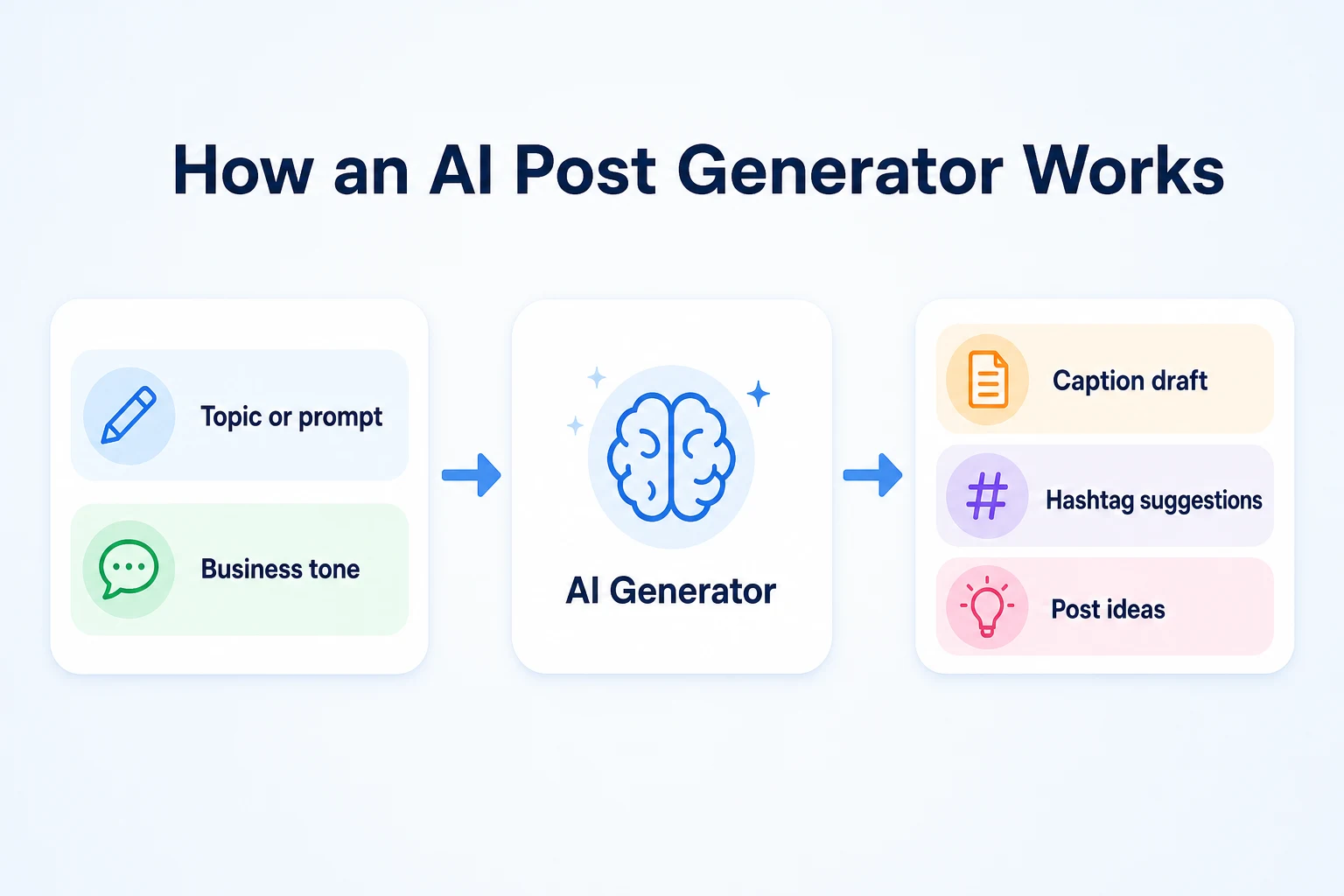
Socialpost AI belongs to a category of tools built around one job: turn a short prompt into finished-looking social media posts. You give it a topic, it gives you captions. That's the whole loop, and it's worth being precise about what sits on each side of it.
What you type in
Most tools in this category ask for the same handful of things. A topic or product ("weekend bakery sale"), a tone (friendly, professional, playful), a platform (Instagram, Facebook, LinkedIn), and sometimes a target length or a call to action you want included. Some let you paste in a product description or a website URL so the output leans on real details rather than a guess. The more specific the input, the less generic the output tends to be, though the tool still has to fill in the gaps you didn't cover.
What the tool generates
In return, you typically get a batch of caption drafts, often several variations of the same idea, a set of suggested hashtags, and sometimes a short list of related post ideas you didn't ask for directly. What you don't get is a sense of whether any of it fits what you posted last week, whether your audience actually responds to that tone, or whether the offer you're promoting is even the right one to lead with this month. The tool answers the prompt in front of it. It doesn't know the rest of your calendar, and it doesn't check your past performance unless you've connected something that lets it. Our piece on AI bots on social media covers a related question worth understanding alongside this one: how much of what shows up in a feed, including generated content, is actually driven by automated activity rather than people.
What a Real Content Plan Actually Includes
A caption generator produces posts. A content plan decides which posts are worth producing in the first place, and in what order. Those are different jobs, and conflating them is where a lot of the confusion starts.
Goals and audience
A real plan starts with what you're actually trying to get out of posting at all. More bookings, more foot traffic on a slow weekday, more people aware a new product exists. It also starts with some sense of who's actually seeing your posts: regulars who already know your business, or people discovering it for the first time. Neither of those things comes from a prompt box. They come from knowing your own customers, which no generator can do on your behalf.
A mix of content types
A plan usually balances a few kinds of posts across a week or a month: a product or service highlight, something behind the scenes, a direct offer, a response to a seasonal moment, maybe a customer question answered publicly. A generator can help write any one of those once you've decided it belongs on the calendar. It won't tell you that your last five posts were all product highlights and you're due for something different. A structured approach like the one in our SEO content calendar guide works the same way for blog content, and the same logic carries over to social posts: variety has to be planned, not generated one prompt at a time.
A way to track what's working
The last piece of a plan is a way to look back. Which posts got saved, shared or commented on. Which ones led to an actual message or booking. A generator has no visibility into any of that unless you feed it back in manually, and most don't ask. Without that feedback loop, every batch of captions starts from the same blank assumption about what works, no matter how many you've already posted.
Where AI Generators Genuinely Save Time
None of this means the tools aren't useful. They're good at a specific, narrow job, and that job is worth naming honestly rather than dismissing.
Getting past the blank page
Staring at an empty caption box is its own kind of time sink, especially at the end of a long day. A generator gives you something to react to, even if you end up rewriting most of it. Editing a draft is almost always faster than starting from nothing, and for a small business owner squeezing social media in between everything else the business actually runs on, that speed matters.
Turning one idea into several posts
A single idea, like a weekend sale or a new menu item, often needs to be said more than once, in slightly different ways, across a week. A generator can produce several angles on the same idea quickly: one leading with urgency, one leading with a price, one framed as a question. Picking through those variations and choosing the one that fits your voice is usually faster than writing each version from scratch.
Where AI Generators Fall Short
The same narrowness that makes these tools fast is also what limits them. They answer the prompt you give, and nothing more.
Generic phrasing anyone could post
A caption generated from "bakery promotion" and nothing else could belong to almost any bakery in the country. It won't mention your actual best-selling item, the name of the street you're on, or the thing regular customers already tease you about. Without specific details fed in, the output tends to sound like it was written for a category of business rather than yours. A reader who follows a small business usually wants to hear from that business, not a version of it that could be anyone's.
No memory of what's already worked
A generator doesn't remember that your last three giveaway posts underperformed, or that a simple photo caption with no hashtags got more comments than anything else you've tried. Each prompt starts fresh. Building on what's actually worked requires a person keeping track of that across weeks and months, something no single prompt can carry forward on its own.
No real audience research
A generator can guess at a tone based on what you tell it, but it hasn't talked to your customers, read their comments, or noticed which questions keep coming up in your inbox. That kind of audience knowledge, the thing that makes a post land rather than just exist, comes from paying attention to real people, not from a prompt. It's worth checking generated drafts the same way you'd check any AI-written text before it goes out under your business's name, which is part of what our guide to the AI content detector question covers for written content generally.
Gap | What it means | What you still need to add |
|---|---|---|
Generic phrasing | The draft could belong to almost any similar business | Specific product names, prices, locations and details only you know |
No memory of past posts | Every prompt starts without knowing what you've already tried | A record of what's worked before, fed in manually if you want it reflected |
No audience research | The tone is a guess, not based on how your actual customers respond | Your own sense of what your customers ask about and respond to |
A Worked Example: One Promotion, Two Ways
This example is illustrative, not a transcript of a real tool's output.
Imagine a small bakery running a weekend sale on sourdough loaves, down from $9 to $7, Saturday and Sunday only.
The owner types "weekend bakery sale" into a generator and gets a caption back in seconds: "This weekend only, treat yourself to something fresh from the oven! Stop by and grab your favorite before it's gone."
It reads fine. It also says nothing about sourdough, nothing about $7, and nothing about Saturday and Sunday specifically. It could run for any bakery, any sale, any weekend.
Now imagine the owner takes that same draft and edits it with the details only she knows: the bread, the price, the dates, and the fact that regulars usually ask if the sourdough sells out by noon. The post becomes something like: "Sourdough loaves are $7 this Saturday and Sunday, down from $9. They usually sell out by early afternoon, so morning is your best bet."
The second version does the same job faster than writing from scratch would have, but it only works because a person added the specifics the generator couldn't know.
Version | What it says | What changed and why |
|---|---|---|
AI draft | General sale language, no product, price or dates named | Nothing yet. It answers the prompt, not the actual promotion |
Edited post | Names the product, the price, the exact dates, and a reason to come early | The owner added the details that make the post specific to her bakery and her customers |
This example is illustrative.
AI Generator Alone vs a Content Plan With AI Help
The comparison isn't really generator versus no generator. It's generator as the whole system versus generator as one step inside a plan a person still directs.
Used alone, a generator tends to produce posts that are consistent in tone but not necessarily consistent in message, since each prompt starts without any memory of what came before it. Used inside a plan, the same tool can speed up the writing step while a person still decides what gets said, when, and why. The difference shows up most clearly over weeks, not in any single post. A similar question comes up with broader SEO automation tools: automating the output of a single task is different from automating the judgment behind a whole plan, and the second one usually still needs a person.
Factor | Generator alone | Content plan with AI assist |
|---|---|---|
Consistency | Tone stays similar, but topics and messaging can drift week to week | A calendar keeps topics balanced and avoids repeating the same angle too often |
Brand voice | Generic unless specific details are added each time | A person edits every draft to sound like the actual business |
Tie-ins to real offers | Only as accurate as the prompt, which can miss current pricing or stock | Posts are checked against what's actually true that week before they go out |
Tracking what works | No visibility into past performance unless manually fed back in | A person reviews engagement and adjusts future topics based on it |
How to Use an AI Post Generator Inside Your Plan
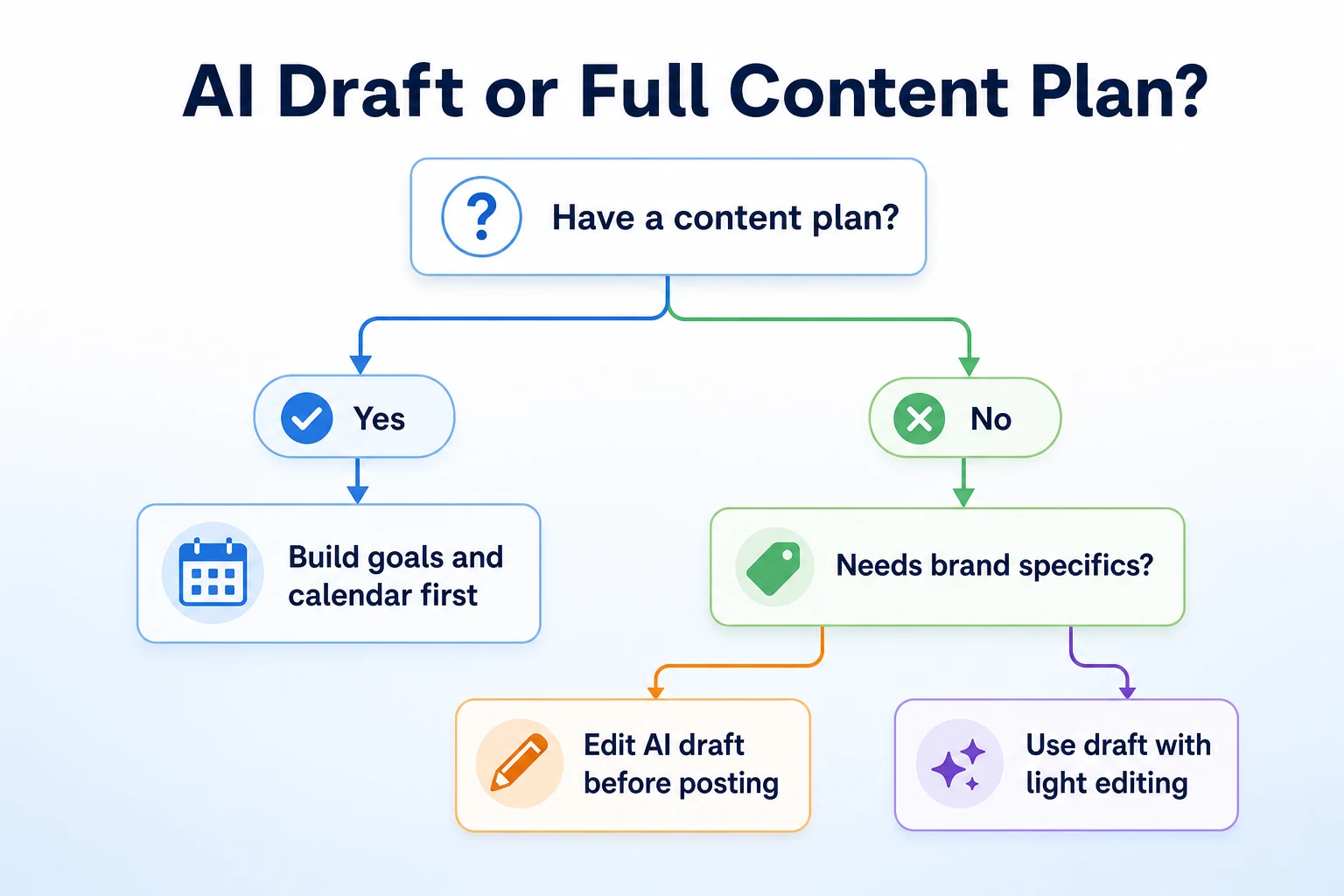
Folding a generator into a real plan doesn't take much extra time. It mostly means doing three things in the right order.
Plan topics before you open the tool
Decide what you're posting about and when before you open the generator at all. A simple list, a week of topics sketched out on a Sunday evening, works. This keeps the generator in its proper role, as a drafting tool for decisions you've already made, rather than the thing deciding what to post about in the first place.
Feed it specifics, not just a topic
Instead of typing "bakery promotion," give it the product name, the price, the dates, and anything your customers usually ask about. The more specific the prompt, the less editing the draft needs afterward. This is the single biggest lever for getting output that doesn't read like it could belong to anyone. An approach similar to deciding what to automate and what to review in AI SEO automation applies here too: the tool does the repetitive part, a person still supplies the facts that make it accurate.
Edit before you post
Read every draft before it goes out, every time, even the ones that look ready. Check for anything that sounds slightly off for your business, any detail that's outdated, and any claim that isn't actually true yet, like a price that changed last week. This step takes a minute or two per post and is the difference between a caption that sounds like your business and one that merely mentions it.
A 30-Day Test to See If It's Actually Working
A month is enough time to see whether a generator is actually saving time or just adding a new step to check and rewrite.
Week | Action | What to check |
|---|---|---|
Week 1: Baseline | Keep writing posts the way you normally do, timing how long each one takes | A rough sense of your current time per post, as a point of comparison |
Week 2: Introduce the tool | Use the generator for drafts, then edit each one with specific details before posting | How much editing each draft actually needs, and how long that takes compared to writing from scratch |
Week 3: Compare engagement | Keep posting the edited drafts and note which ones get saved, shared or commented on | Whether edited AI drafts perform differently from posts you wrote entirely yourself |
Week 4: Decide | Weigh the time saved against any drop in how specific or distinctive the posts feel | Whether the tool earns a permanent place in your weekly routine, or just for certain post types |
Thirty days won't settle the question forever, but it's enough to tell whether a generator is pulling its weight for your specific business, rather than just adding a new habit to keep up with.
Common Mistakes to Avoid
A handful of habits turn a genuinely useful tool into a source of posts nobody actually wanted. They're easy to slide into, especially once the novelty of fast drafts wears off.
Mistake | Why it backfires | Better move |
|---|---|---|
Posting the first draft unedited | The caption sounds generic and misses details your customers actually care about | Treat every draft as a starting point, not a finished post, and edit before publishing |
Using the same prompt every time | Posts start to sound repetitive, even across different topics | Vary the specifics you feed in, and mix generated drafts with posts you write yourself |
Letting the tool decide what to post about | The calendar drifts toward whatever's easy to prompt rather than what the business needs | Plan topics first, then bring the generator in to help write them |
Never checking what actually performed | The same generic angles keep getting used even when they don't land | Review engagement regularly and feed what you learn back into future prompts |
Posting outdated details from an old prompt | A price, date or offer that's no longer true goes out under the business's name | Check every fact in a draft against what's currently true before it posts |
The pattern underneath most of these mistakes is the same one that shows up with any automated tool: treating speed as a reason to stop checking, rather than a reason to check on a shorter, steadier schedule.
Where RepGet Fits
RepGet doesn't generate social media captions, and it isn't a tool like Socialpost AI. That's not the problem it's built to solve.
What RepGet does is help with the website that a social media plan usually points back to. A bakery post about a weekend sale is only as useful as the page someone lands on after clicking a link in your bio or your profile, and a lot of small business sites have gaps there that quietly undercut every post sent out to drive traffic to them. RepGet's website auditing, keyword research, content planning and article writing work on that side of things: the pages, blog posts and technical setup that search engines and visitors actually judge a business by.
If social posts are meant to support a bigger goal, like more people finding the business through Google or showing up in an AI assistant's answer, it helps to know what the site itself needs first. RepGet's free website audit crawls a site and gives it a 0 to 100 SEO score, flagging technical and content issues worth fixing. No account or credit card required. Its free SEO tools cover things like meta descriptions and page titles, which matter for whoever clicks through from a social post just as much as for anyone arriving from a search result.
RepGet doesn't write or schedule social media content, and it doesn't claim a connection between a business's social posting habits and its search rankings beyond what's documented. What it can do is make sure the site behind the posts is in reasonable shape before more traffic gets sent its way.
The bottom line
A tool like Socialpost AI is good at one specific job: turning a prompt into a draft fast enough that you're not starting from a blank box every time you need to post. That's a real time saver, and there's no reason to pretend otherwise.
It isn't a content plan. It doesn't know your goals, your audience, what you've already tried, or what actually worked last month. Those things still need a person behind them, deciding what gets said and checking every draft before it goes out under the business's name. Used that way, inside a plan you still direct, a generator earns its place. Used instead of a plan, it just produces posts faster, without making them more likely to matter.
Find out what your website needs first
Run a free website audit with RepGet to see what your own site needs before sending more social traffic its way. No account or credit card required.
FAQ
What is Socialpost AI used for?
It's a tool that turns a short prompt, like a topic and tone, into draft social media captions, hashtag suggestions and post ideas, meant to save time on the initial writing step.
Can AI social media tools replace a content calendar?
Not on their own. A calendar decides what to post and why based on your goals and audience, while the tool only drafts the wording once that decision's already made.
Are AI-generated captions bad for engagement?
They're not inherently bad, but unedited drafts tend to sound generic since they lack specific details about your business, which can make them less likely to stand out or get a response.
How much editing does an AI-written post usually need?
It depends on the prompt. A vague prompt usually needs more rewriting to add real details, while a specific prompt with product names, prices and dates needs lighter edits.
What information should I give an AI post generator for better results?
Specific details only you know: product names, exact prices, dates, and anything customers commonly ask about. These make the draft sound like your business instead of any similar one.
Is it safe to post AI-generated captions without checking them first?
It's worth checking every draft before posting, since the tool can't confirm current prices, dates or stock, and an outdated or generic detail can go out under your business's name unnoticed.
How do I know if an AI post generator is saving me time?
Compare how long drafting and editing a post takes against writing one from scratch over a few weeks. If editing takes nearly as long as writing, the tool isn't adding much.