

Facebook Forum Admin AI: What the New Moderation Tools Do
Short answer
On October 23, 2026, Meta added Forum tools to Facebook Groups: Admin AI for automated moderation, scheduled posts, shared calendars and a community insights dashboard. Availability is limited to some groups and regions, with no confirmed date for a full rollout. For brands, it's less manual moderation and easier content planning, within real limits.
A community manager logs into her Facebook Group one morning and finds a new tab called Forum tools.
Next to the usual member requests queue sits an option named Admin AI.
She isn't sure yet whether it will flag her regulars' posts by mistake or actually save her a few hours a week.
She also notices a calendar icon she hasn't seen before, and a new insights panel with numbers she doesn't recognize.
That mix of new buttons is what's behind Facebook Forum Admin AI, a set of tools Meta announced on October 23, 2026. Here's what Meta has actually said about Admin AI, scheduled posts, shared calendars and community insights, and what's still unclear about who has access.
What Meta Announced on October 23
On October 23, 2026, Meta announced a bundle of new administration tools for Facebook Groups, grouped under what it's calling Forum tools. The centerpiece is Admin AI, a feature meant to help automate parts of group moderation. Alongside it, Meta introduced scheduled posts, a shared calendar for teams of admins, and a community insights dashboard.
The announcement in brief
Meta described the update as aimed at admins who run larger or more active groups, where keeping up with moderation and posting by hand becomes harder as a community grows. The four pieces, Admin AI, scheduling, shared calendars and insights, were announced together as a connected set rather than as separate, unrelated features. Meta hasn't published a full technical breakdown of how Admin AI makes its decisions, so most of what's known comes from how Meta describes the admin-facing experience rather than the model or system behind it.
Why Meta is adding these tools now
Meta hasn't given a detailed public explanation for the timing beyond presenting this as part of ongoing investment in Facebook Groups. It's worth noticing the pattern, though. Groups that grow past a certain size tend to put more strain on a small number of volunteer or part-time admins, and tools that reduce that load can keep those admins active rather than burning out and stepping back. Automating repetitive moderation work and making scheduling easier fits that goal, even though Meta hasn't stated it in those exact terms.
What Admin AI Actually Does
Admin AI is the moderation piece of the update, and it's the part most likely to change how a group runs day to day.
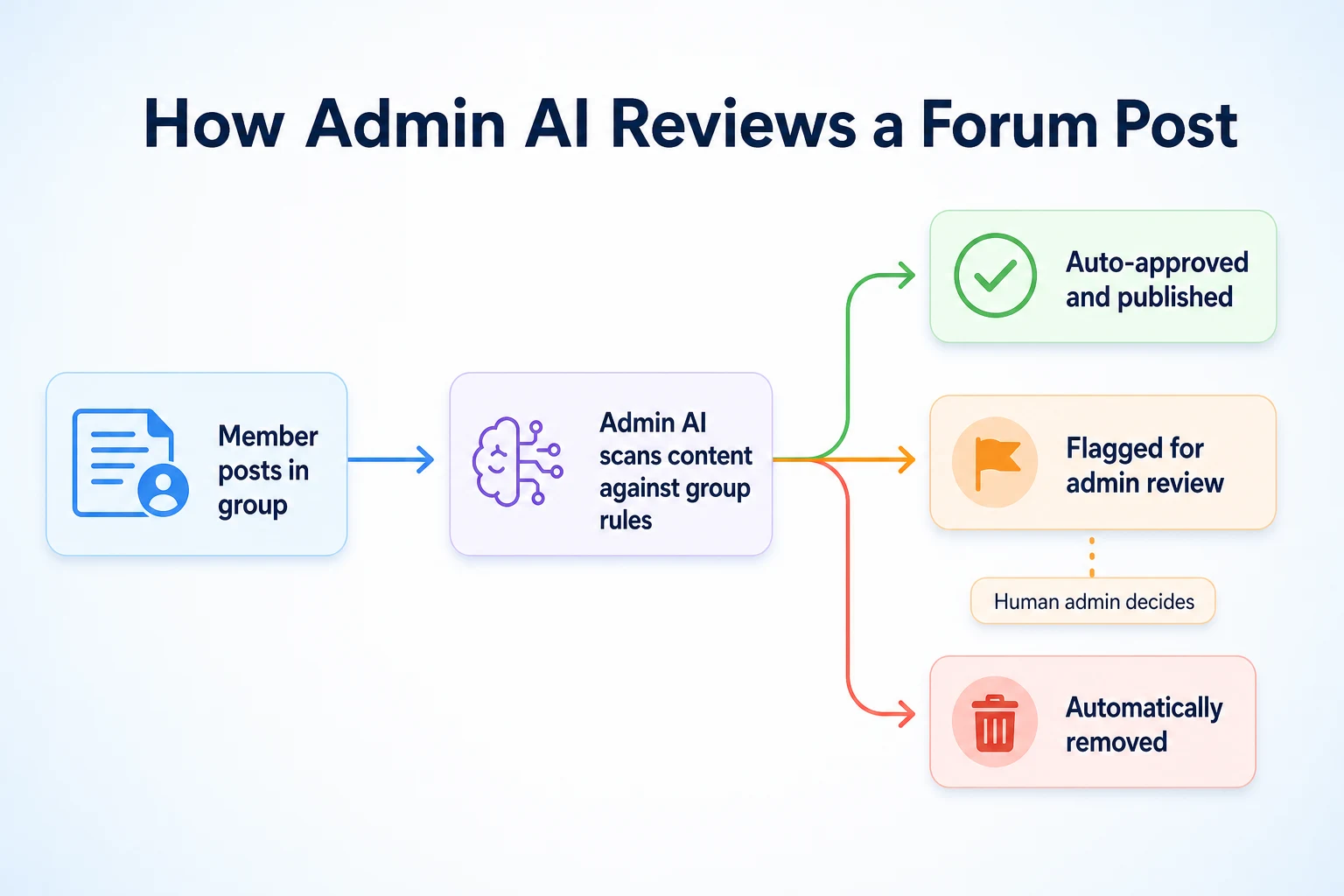
Automated flagging and review queues
Meta has described Admin AI as reviewing new posts and comments against a group's own rules, then sorting them into outcomes: letting a post through automatically, flagging it for a human admin to look at, or removing it outright where it clearly breaks a rule the admin has set. The flagged items land in a review queue, similar in spirit to the existing member requests queue many admins already use, but built around content rather than membership. Meta hasn't published exact detail on how confident the system needs to be before it removes something automatically versus simply flagging it, so admins should expect some judgment calls to still land in their queue rather than being resolved for them.
Setting rules and thresholds
Admin AI works from the rules an admin sets for their own group, rather than applying one fixed standard across every group on Facebook. Meta's description suggests an admin can tell Admin AI what to watch for, such as spam, certain banned topics, or language that violates the group's own posted rules, and the system applies that going forward. Meta hasn't published how granular those settings can get, for example whether an admin can set different thresholds for new members versus established ones, so it's worth treating the rule-setting as a starting point to test rather than a fully customizable system from day one.
What Admin AI doesn't do on its own
Nothing in Meta's announcement suggests Admin AI replaces a human admin's judgment entirely. Flagged content still needs a person to make the final call in most cases, and Meta hasn't described the tool as handling appeals, banning members, or making policy decisions about what a group's rules should be in the first place. It's a tool for sorting and flagging content faster, not a replacement for someone who understands the group's community. For businesses weighing how much moderation and engagement work to hand to automated tools more broadly, our piece on AI bots on social media covers a related question: where automation genuinely saves time, and where it still needs a person checking the output.
Scheduled Posts and Shared Calendars
The second part of the update is less about moderation and more about planning what a group actually posts.
Scheduling a post in advance
Meta has confirmed that Forum tools let an admin schedule a post to go out at a set future time, rather than posting it immediately or relying on someone remembering to post manually. This is the kind of feature that's existed on Facebook Pages for a while, now extended to groups through the Forum tools update. Meta hasn't published full detail on how far in advance a post can be scheduled or whether there's a limit on how many scheduled posts a group can queue at once.
A shared calendar for teams of admins
Alongside scheduling, Meta introduced a shared calendar view, letting a team of admins and moderators see what's planned for the group in one place rather than each person keeping their own notes or relying on a separate spreadsheet. For a group run by more than one person, that's a meaningful change, since it removes some of the guesswork about whether something has already been posted or planned. Meta hasn't described whether the calendar shows who scheduled each post or just what's coming up, which matters for groups where accountability between admins is part of how the team works. A content calendar habit isn't new outside of Facebook either. Our guide to building an SEO content calendar covers the same basic discipline applied to a blog, and the reasoning carries over: planning ahead makes it easier to stay consistent and to see gaps before they become a problem.
Community Insights: What Admins Can See
The last piece of the update is a dashboard meant to give admins a clearer view of how their group is actually doing, beyond the basic member count most groups already show.
Metrics Meta has confirmed
Meta described the community insights dashboard as surfacing trends in group growth and engagement over time, giving admins a way to see whether activity is rising, falling or staying flat without digging through individual posts to guess. Meta hasn't published the complete list of every metric included, so the table below reflects what's been confirmed in general terms rather than an exhaustive breakdown.
Metric | What it shows | Still unclear |
|---|---|---|
Growth trends | How membership has changed over a given period | Whether it breaks down by how members joined |
Engagement trends | General activity levels, such as posts and comments over time | Whether it separates post types or topics |
Active member patterns | A general sense of how many members are actively participating | Whether individual member activity is identifiable |
What's not included yet
Meta hasn't confirmed whether the dashboard includes anything tied to specific posts performing better or worse, or whether it offers any export option for admins who want to track the numbers outside of Facebook itself. It also hasn't said whether insights data goes back further than a fixed recent window or whether admins can compare one period against another directly inside the tool. Until Meta publishes more detail, it's reasonable to treat the dashboard as a general health check for a group rather than a full analytics suite.
Facebook Forum vs Traditional Facebook Group Tools
Facebook Groups already had moderation, scheduling and basic reporting before this update. It's worth being clear about what's actually new here, rather than assuming the whole toolkit just arrived.
What's new compared to existing tools
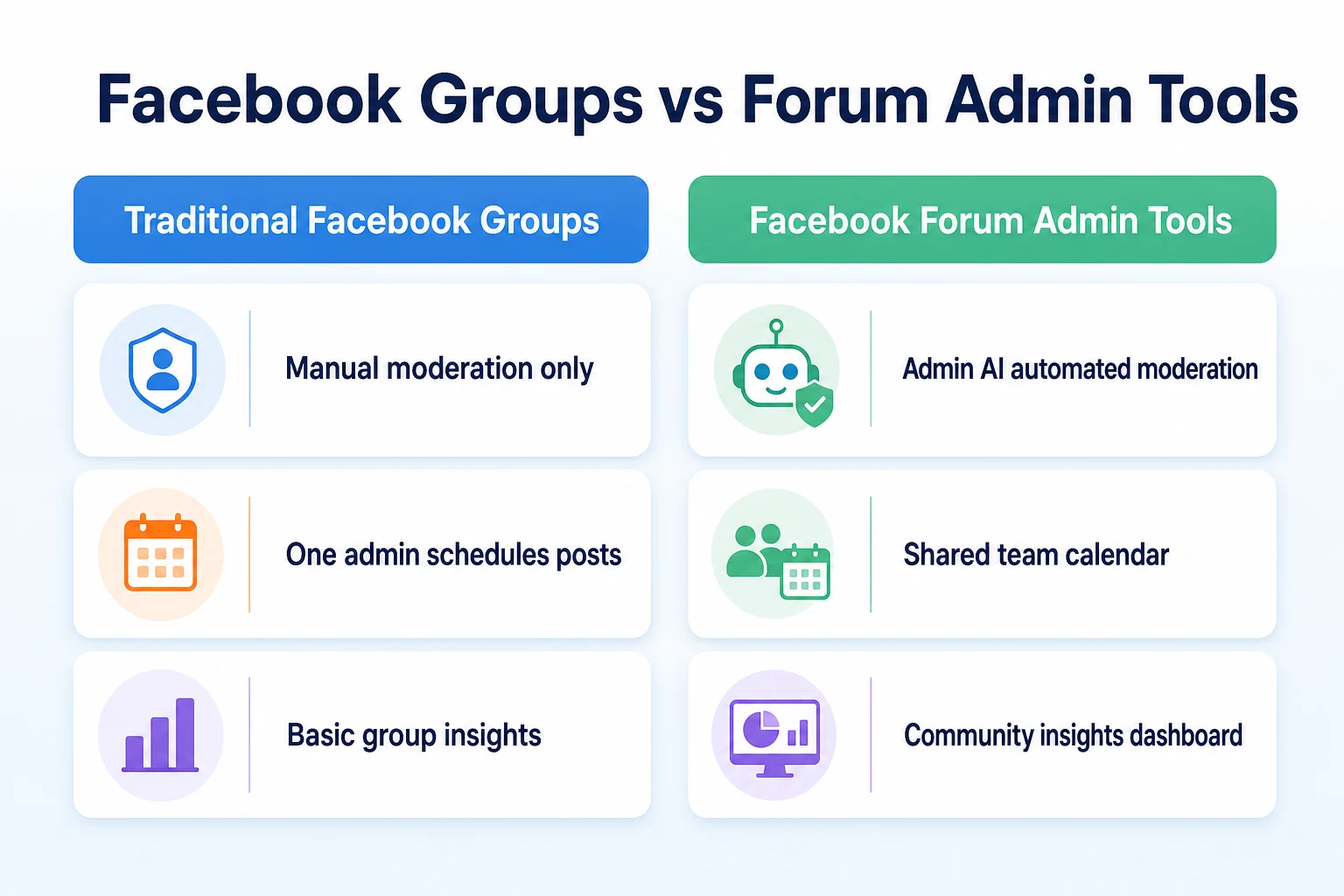
Before this update, moderation in a Facebook Group relied on admins reviewing posts manually, using keyword filters, or approving every post before it went live, which slows a group down as it grows. Scheduling existed on Facebook Pages for a while, but Meta's announcement frames scheduled posts and the shared calendar as new specifically for groups through Forum tools. The community insights dashboard is also new in this form. Groups have had a basic insights tab for some time, but Meta described the updated dashboard as giving a clearer view of growth and engagement trends than what was available before.
What hasn't changed
Meta hasn't removed any of the existing moderation options, like manual post approval or keyword-based filters. Admin AI sits alongside those tools rather than replacing them, so an admin can keep using a membership questionnaire or a manual approval queue for new members while also turning on Admin AI for ongoing moderation. The basic structure of a Facebook Group, membership requests, rules, pinned posts, hasn't changed either. Forum tools is an added layer for admins, not a redesign of how a group works for its members.
Feature | Traditional Facebook Groups | Facebook Forum Admin Tools |
|---|---|---|
Moderation | Manual review, keyword filters, member approval | Admin AI flags or removes content automatically based on group rules |
Scheduling | Not available for group posts | Posts can be scheduled in advance |
Planning across admins | Informal, often tracked outside Facebook | A shared calendar visible to the admin team |
Reporting | Basic member counts and activity | A dashboard with growth and engagement trends |
Regional Availability and Rollout
As with most feature announcements, the gap between what Meta has said and what's actually live in a given group matters here.
Which groups have access now
Meta's October 23 announcement described Forum tools as reaching groups gradually, without publishing a complete list of which groups, account types or regions have access from day one. What's clear is that the rollout isn't instant or universal. An admin who doesn't see the Forum tools tab yet shouldn't assume their group did something wrong or that the feature has been withdrawn. It more likely hasn't reached that group yet.
What Meta hasn't said about a full rollout
Meta hasn't published a firm date for when Forum tools will reach every group, nor has it confirmed whether access depends on group size, activity level or region. It also hasn't said whether all four pieces, Admin AI, scheduling, shared calendars and insights, arrive together for a given group or whether some admins might see one part before the rest. Until Meta clarifies that, it's reasonable to check back periodically rather than expect a specific date.
Question | What's confirmed | What's still unclear |
|---|---|---|
When was this announced? | October 23, 2026 | A full date for reaching every group |
Does every group get access at once? | No, the rollout is gradual | Exact criteria for which groups go first |
Do all four tools arrive together? | Not addressed directly | Whether some groups see partial access first |
Is access tied to region? | Not addressed directly | Whether some markets get Forum tools before others |
Practical Uses for Brands and Community Managers
Once a group actually has access, the question becomes how to use these tools without handing over more control than makes sense.
Running a branded customer community
A business running a customer group, say for product support or a loyalty community, tends to deal with the same repetitive moderation questions over and over: spam links, off-topic posts, the occasional rule-breaking comment. Admin AI's rule-based flagging is built for exactly that kind of repeat pattern, catching the obvious cases so a human admin can spend more time on posts that actually need judgment, like a customer complaint that needs a careful reply rather than a quick removal.
Coordinating a team of moderators
A group run by more than one person, a small business with a few staff members sharing admin duties, or a community manager working with volunteer moderators, often struggles with basic coordination: who's planning to post what, and when. The shared calendar addresses that directly, giving everyone on the team one place to check instead of relying on a side conversation or a shared document outside Facebook. For a business already thinking about planning content across more than one channel, our piece on socialpost AI and similar tools covers a related question worth asking here too: whether a scheduling tool actually replaces the need for a real content plan, or just makes an existing plan easier to execute.
Spotting trends before they become problems
The community insights dashboard gives an admin a general sense of whether engagement is rising or falling, which can work as an early warning sign. A sudden drop in activity might mean nothing, or it might mean something in the group changed, a new rule frustrated members, a competitor opened a similar group, or posting simply slowed down. Meta hasn't described the dashboard as diagnosing the cause of any trend it shows, so an admin still has to do the thinking once a pattern shows up. The value is in noticing the shift early enough to ask the right question.
A Worked Example: Using Admin AI in a Local Business Group
This example is illustrative, not a record of a real group's experience.
Imagine a local fitness studio that runs a Facebook Group for its members, used mostly for class updates, schedule changes and member questions. The studio's two staff admins get access to Forum tools and decide to try Admin AI, scheduling and the shared calendar over two weeks.
Day | Action | What happened |
|---|---|---|
Day 1 | Turned on Admin AI with rules against spam links and off-topic promotions | A handful of spam posts from new accounts were flagged within the first day |
Day 3 | Scheduled a week of class reminders in advance using the new scheduling tool | Posts went out on time without either admin needing to remember each one |
Day 5 | Reviewed the Admin AI flagged queue | Found one legitimate member post wrongly flagged for a banned word used in a different context, approved it manually |
Day 8 | Added a planned schedule change to the shared calendar | Both admins could see it ahead of time, avoiding a duplicate post from the second admin |
Day 14 | Checked the community insights dashboard | Engagement had held steady, with no clear indication of whether Admin AI itself changed that |
These figures are illustrative.
The Day 5 flag is worth noting. Admin AI caught useful spam quickly, but it also needed a human to correct one mistake, which fits what Meta has said about the tool sorting content rather than deciding everything on its own.
A 30-Day Plan to Set Up Forum Admin Tools
A month is enough time to turn on these tools carefully and see what they actually change, without handing over moderation or planning before you trust them.
Week | Task | Why it matters |
|---|---|---|
1 | Turn on Admin AI with a short list of clear rules, like spam links and banned words, rather than every rule the group has | A narrow starting set makes it easier to spot mistakes early, before the system is handling more nuanced judgment calls |
2 | Check the flagged queue daily and note anything flagged or removed that shouldn't have been | Meta hasn't published exact detail on how confident Admin AI needs to be before acting, so early review catches edge cases |
3 | Set up the shared calendar with the admin team and schedule a week of planned posts | Getting everyone used to checking one calendar avoids duplicate or missed posts once scheduling becomes routine |
4 | Review the community insights dashboard against what the group actually experienced that month | Comparing the numbers to what you already know about the group shows whether the dashboard is telling you anything new |
Common Mistakes to Avoid With Admin AI and Scheduling
New automation tools tend to get misused in the same few ways before admins settle into what they're actually good for.
Mistake | Why it backfires | Better move |
|---|---|---|
Turning on every Admin AI rule at once | A broad rule set makes it harder to tell which rule is causing a wrongly flagged post | Start with a small number of clear rules and expand once you trust how they behave |
Ignoring the flagged queue after the first week | Admin AI still needs a human to make the final call on anything it flags rather than removes outright | Keep checking the queue regularly, even once it seems to be working well |
Scheduling a month of posts and walking away | A group still needs real-time replies to comments and questions that scheduling can't handle | Use scheduling for planned updates, not as a substitute for being present in the group |
Assuming every admin can see the same calendar details | Meta hasn't confirmed whether the shared calendar shows who scheduled each post | Confirm what the calendar actually displays before relying on it for accountability |
Treating the insights dashboard as a diagnosis tool | Meta hasn't described the dashboard as explaining why a trend happened, only showing that it did | Use a drop or rise in engagement as a prompt to ask questions, not as an answer on its own |
Where RepGet fits
RepGet has no connection to Facebook Groups, Forum tools or Admin AI. It doesn't moderate posts, schedule content inside a group, or read Facebook's community insights.
What RepGet works on is a step removed from that. A Facebook Group, run well with scheduled posts and a shared calendar, often generates attention that a business wants to turn into something lasting: a blog post answering a question that comes up repeatedly in the group, a service page addressing a concern members raise often, or an update to an existing page once a group discussion reveals it's out of date. RepGet's website auditing, keyword research, content planning, article writing and publishing work on that layer, helping a business turn what it learns from running a community into content that also works for search.
If a business wants to check whether its website is ready to capture attention coming from a Facebook Group, RepGet's free website audit crawls the site and gives it a 0 to 100 SEO score, flagging technical and content issues worth fixing first. No account or credit card required. RepGet's free SEO tools cover related checks, like whether a page's title and description give someone a reason to click through once a group discussion sends them looking for more.
RepGet doesn't manage a Facebook Group, doesn't automate moderation or scheduling inside Facebook, and doesn't guarantee that community engagement will translate into rankings, traffic or sales. What it can do is make sure the website behind that community is technically sound and clearly described, whatever platform brings attention to it.
The bottom line
Meta's October 23 announcement adds four real, documented tools to Facebook Groups: Admin AI for automated moderation, scheduled posts, a shared calendar for admin teams, and a community insights dashboard. For a group that's grown past what one or two volunteer admins can comfortably moderate and plan by hand, these are genuine changes worth testing.
What's still missing matters just as much. Meta hasn't published a full rollout timeline, a complete list of which groups have access first, or exact detail on how confident Admin AI needs to be before it acts on its own. Until that's clearer, the sensible approach is the same one that applies to most new automated tools: start with a narrow set of rules, check the flagged queue often, and keep a human admin in the loop rather than assuming the system has it handled.
Find out what your website needs first
Run a free website audit with RepGet to see what your site needs before a well-run Facebook community starts sending more people your way. No account or credit card required.
FAQ
What is Facebook Forum Admin AI?
Admin AI is a moderation tool Meta announced on October 23, 2026 as part of its Forum tools update for Facebook Groups. It reviews posts and comments against a group's own rules and can approve, flag or remove content automatically.
When did Meta launch the new Facebook Forum tools?
Meta announced Forum tools, including Admin AI, scheduled posts, shared calendars and community insights, on October 23, 2026. The rollout to individual groups is gradual rather than immediate for everyone.
Is Facebook Forum Admin AI available in my region yet?
Meta hasn't published a full list of which regions or groups have access first. If the Forum tools tab hasn't appeared in your group, it likely hasn't reached you yet rather than being withdrawn.
Can Admin AI remove posts from my group automatically?
Yes, Meta has described Admin AI as able to remove content automatically when it clearly breaks a rule an admin has set, alongside flagging less clear cases for a human to review instead.
How is Facebook Forum different from a regular Facebook Group?
Facebook Forum tools add Admin AI, scheduling, shared calendars and a new insights dashboard on top of an existing group. The underlying group structure, like membership requests and rules, hasn't changed.
Can multiple admins share a content calendar on Facebook Forum?
Yes, Meta confirmed a shared calendar that lets a team of admins and moderators see what's planned for the group in one place, instead of tracking posts separately or outside Facebook.
Does Admin AI replace human moderators in a group?
No. Meta hasn't described Admin AI as handling appeals, bans or policy decisions. It sorts and flags content faster, but a human admin still makes the final call on most flagged posts.
What insights can group admins see with the new Forum tools?
Meta has confirmed the dashboard shows general growth and engagement trends over time. It hasn't published whether it breaks results down by post type or offers data export options yet.