

SEO Content Calendar: How to Plan 30 Days of Useful Content
Short answer
An SEO content calendar lists what you'll publish, when, and why, built from real customer questions and keyword research instead of guesswork. Collect topics from customers, support tickets and keyword tools, sort them by search intent, then spread them across 30 days based on how much time you actually have to write and publish. Review performance and adjust the next month's plan using Search Console data.
A business owner opens the blog's dashboard and sees the last post went up four months ago.
Nothing is scheduled. There's no list of topics waiting, no sense of what should come next.
The last few posts went up whenever someone found an hour, usually about whatever felt urgent that week. Some did well. Most didn't do much at all.
An SEO content calendar fixes the part of this that's actually fixable: having a plan built from real questions and real search data, spread across a time frame you can actually keep up with.
Here's how to build one for the next 30 days, starting with what a calendar needs to actually contain.
What an SEO Content Calendar Actually Does
A list of blog titles on a sticky note isn't a content calendar. It's a wish list.
A working calendar tells you what to publish, when, who's writing it, and why that topic earns a slot in the first place.
A content calendar versus a list of blog ideas
A list of ideas answers one question: what could we write about?
A calendar answers several more: which of these ideas is worth the time, what should it target, when does it go live, and how will we know if it worked?
Without those extra details, a list of ideas tends to get worked through in whatever order feels easiest that day, which is usually not the order that helps the site most.
The fields every entry needs
Each row on the calendar should carry enough information that anyone on the team could pick it up and start writing without asking what it's actually for.
Field | Example | Why it matters |
|---|---|---|
Topic | How to unclog a drain without a plumber | Keeps the writer focused on one clear subject |
Target keyword | unclog a drain | Confirms the topic matches something people actually search |
Search intent | Informational | Decides whether the page should inform, compare or sell |
Page type | Blog post | Separates topics that need a service page from ones that need a post |
Publish date | Week 2 | Turns a pile of ideas into an actual schedule |
Owner | Office manager | Makes clear who's actually responsible for it getting done |
Status | Drafting | Shows at a glance what still needs attention |
These figures are illustrative.
This is also where a content calendar differs from a general editorial calendar. An editorial calendar might schedule a product announcement, a holiday message or a company update. An SEO content calendar is narrower: every entry exists because it targets a real search, not just because it's news the business wants to share.
Collect Real Questions and Keyword Opportunities First
A calendar is only as good as the topics that go into it. Before scheduling anything, spend time collecting what people are actually asking.
Mining questions from customers, sales and support
The questions customers ask before they buy are often the exact questions they'd type into a search bar.
Ask whoever answers the phone, replies to support emails or handles sales calls to jot down the questions that come up more than once. A handful of these, collected over even a week or two, usually surfaces topics a business never thought to write about.
Reviews are another source. A negative review that mentions confusion about pricing or process points to a page that could answer that question before it ever becomes a complaint.
Finding keyword opportunities with free tools
Once you have a list of real questions, check whether people are actually searching for them, and how those searches are phrased.
A free keyword tool can show search volume and related phrases for a topic, which helps turn a vague question like
A free keyword tool can show search volume and related phrases for a topic, which helps turn a vague question like "why is my drain clogged" into something more specific, like "what causes a slow kitchen drain," with real search volume behind it. Our guide to using Google Keyword Planner for free walks through how to pull this kind of data without paying for a separate tool.
Keep a simple list as you go: the question, the closest matching search phrase, and roughly how often people search for it. You don't need exact numbers. You need a rough sense of which questions are worth a page and which ones barely get searched at all.
Checking what competitors rank for that you don't
Search for a handful of your core topics and see which pages show up that aren't yours.
If a competitor has a detailed page answering a question you've never addressed, that's a gap worth noting. It doesn't mean copying their page. It means the question is clearly searched enough that someone built a whole page around it.
This step isn't about chasing every competitor's content. It's a quick check to make sure an obvious gap doesn't sit there unaddressed simply because nobody thought to look for it.
Group Topics by Search Intent and Funnel Stage
Once you have a list of real questions and keyword phrases, the next step is sorting them by what the person searching actually wants.
This matters because the same topic can call for a completely different kind of page depending on intent.
The three intents behind most searches
Most searches fall into one of three broad categories.
Informational searches are someone trying to understand something, like "why does my faucet drip" or "how often should gutters be cleaned." They're not ready to buy yet. They want an answer.
Commercial searches are someone comparing options, like "best tankless water heater for a small house" or "plumber vs handyman for a leak." They're closer to a decision but still weighing choices.
Transactional searches are someone ready to act, like "emergency plumber near me" or "book a drain cleaning." They want to find a business and get in touch.
Matching intent to the right page type
A calendar that puts every topic into a blog post misses the point of sorting by intent in the first place. Some of these questions deserve a dedicated page, not a post buried in an archive.
Intent | Example query | Best page type |
|---|---|---|
Informational | Why does my faucet drip | Blog post |
Commercial | Best tankless water heater for a small house | Comparison post or buying guide |
Transactional | Emergency plumber near me | Service page |
These figures are illustrative.
A transactional query like that last one rarely belongs on the content calendar at all. It belongs on a service page built to convert, with the kind of structure covered in our guide to service page SEO. The calendar is mostly for the informational and commercial topics that build toward those service pages, not a replacement for them.
Check Your Site for Gaps and Overlaps Before You Schedule Anything
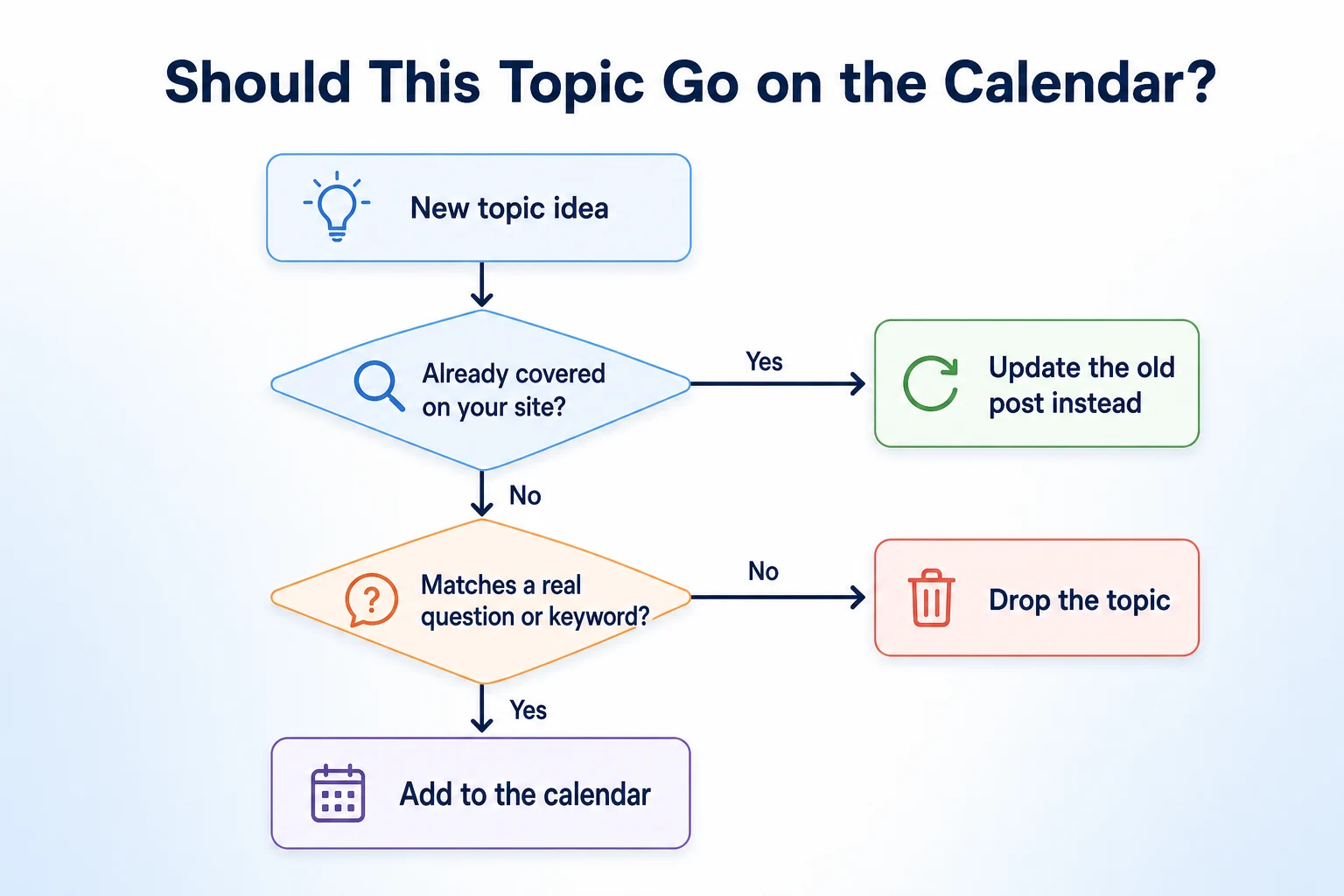
Before a single topic gets a date, check what's already on the site. Scheduling a new post on a topic that's already covered, even loosely, wastes a slot and risks creating two pages that compete with each other.
Finding real gaps with a quick content audit
Pull a list of every page and post currently live, even a rough one from the site's own navigation and archive pages. Compare it against the topic list collected so far.
Some topics will turn out to already have a home. Instead of scheduling a new post, that question becomes a note to update the existing page, which fits the kind of refresh work covered in our guide on updating old blog posts without losing rankings.
RepGet's free website audit can help with this step too. It crawls a site and lists content issues worth investigating, which is a reasonable way to see what's thin or missing before building a calendar around guesswork. No account or credit card required.
Avoiding cannibalization before it starts
Two posts that both loosely target the same keyword don't double a site's visibility. They usually just split it.
Before scheduling a new post, search for the closest existing page covering something similar and ask whether the new topic is genuinely distinct, or just a narrower slice of the same question. If it's the latter, that's a sign to fold it into the existing page instead of creating a second one. Our guide to finding and fixing keyword cannibalization covers how to spot this pattern once posts are already live, but catching it before scheduling saves the cleanup later.
Decide How Much You Can Realistically Publish
With a sorted, gap-checked list of topics in hand, the next decision is how many of them actually fit into the next 30 days.
This is where most calendars quietly fall apart. A plan built around more posts than anyone has time to write doesn't survive past the second week.
Matching frequency to your actual capacity
Be honest about who's actually writing, how long a post takes them, and what else is competing for that time during a normal month.
A solo business owner squeezing in writing between jobs has very different capacity than a team with someone dedicated to content. Neither pace is wrong. The only wrong pace is one the calendar assumes but nobody can actually keep.
Cadence | Posts in 30 days | Who it suits |
|---|---|---|
Weekly | 4 to 5 | A business with one person able to dedicate consistent time to writing |
Twice a month | 2 | A busy owner fitting writing around day-to-day work |
Monthly | 1 | A very small business prioritizing one well-researched piece over quantity |
These figures are illustrative.
Mixing formats and lengths across the month
Not every slot needs to be a full, deeply researched guide. A short how-to post answering one specific question can go up faster than a long comparison piece, and both have a place on the same calendar.
Mixing shorter and longer formats across the month keeps the schedule realistic without lowering the bar on quality for every single entry.
Build the 30-Day Calendar Week by Week
With topics sorted and a realistic pace chosen, the actual scheduling is mostly a matter of ordering what matters most first.
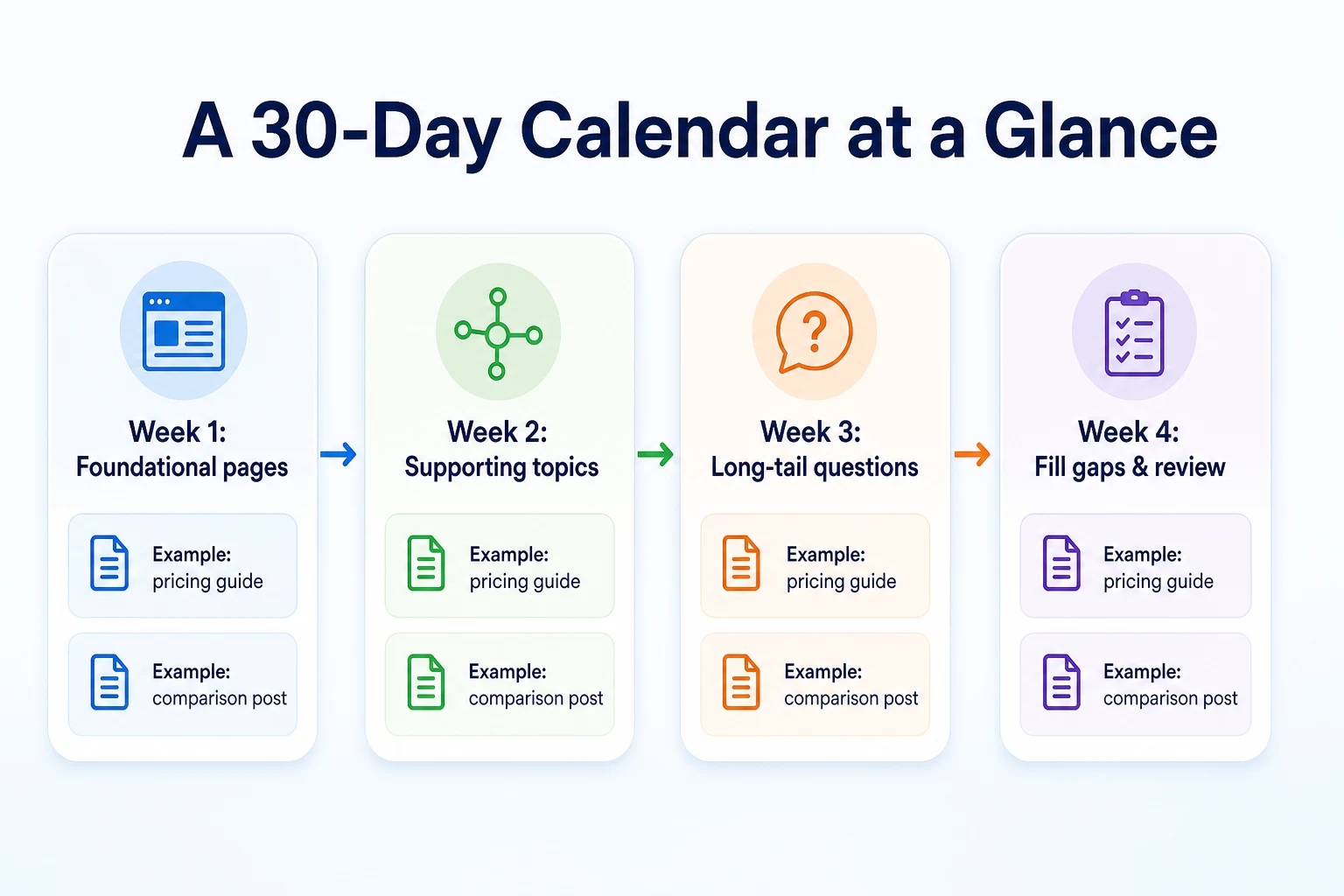
Week 1: foundational, high-intent pages
Start the month with the topics that matter most to the business, usually the commercial and informational queries closest to a buying decision.
These are worth getting right early, since they're the pages most likely to bring in visitors who are close to becoming customers.
Weeks 2 through 4: supporting and long-tail topics
The rest of the month fills in with supporting topics: narrower questions, long-tail phrases, and pieces that back up the foundational pages from week one with internal links.
The final week is a good place to review what's been published so far and fill any slot that's gone unused, rather than leaving it empty.
Week | Focus | Example topics | Goal |
|---|---|---|---|
Week 1 | Foundational, high-intent pages | Pricing guide, comparison post | Capture the searches closest to a decision |
Week 2 | Supporting topics | How-to post, explainer post | Build context around the foundational pages |
Week 3 | Long-tail questions | Specific how-to post, FAQ roundup | Pick up narrower searches with less competition |
Week 4 | Fill gaps and review | Any unused slot, a short update to an older post | Keep the month complete and review what worked |
These figures are illustrative.
A Worked Example: One Month for a Hypothetical Local Service Business
Imagine a small plumbing company with one van, two staff, and no content published in over a year. This example is illustrative.
The owner spent a week collecting real questions: from the phone, from a few online reviews, and from a quick look at what competitors ranked for that the business didn't cover. Ten questions came out of that process, more than enough to fill a month at a realistic pace.
Sorting them by intent showed four informational questions, three commercial comparisons, two narrower long-tail questions, and one that turned out to be transactional and belonged on a service page instead of the calendar. That left nine topics for the blog.
With a twice-a-month pace being the honest limit for a two-person team, only four of the nine would actually get written this month. The owner picked the two closest to a buying decision for week one, then spread two supporting topics across the following weeks, leaving the rest for next month's calendar.
Week | Topic | Target keyword | Page type |
|---|---|---|---|
Week 1 | Tankless vs tank water heater for a small house | tankless vs tank water heater | Comparison post |
Week 2 | Why does my water heater make a popping sound | water heater popping sound | Blog post |
Week 3 | How often should you flush a water heater | how often flush water heater | Blog post |
Week 4 | Signs your water heater is about to fail | signs water heater failing | Blog post |
These figures are illustrative.
Notice the topics all circle the same general subject, water heaters, rather than jumping between unrelated services. That wasn't an accident. Grouping a month's worth of topics around one theme gives the business a cluster of related pages that can link to each other, instead of four scattered posts with nothing in common.
Build Internal Links Into the Plan From the Start
A calendar that only tracks what gets published misses something just as important: where each new post should link, and what should link back to it.
Deciding this while scheduling the topic saves a separate pass later, and it's one of the easiest things to forget once the writing itself gets busy.
Linking new posts to existing service pages
Every informational or commercial post on the calendar should have at least one clear path to a service page, since that's usually where the actual business happens.
In the water heater example, each of the four posts has an obvious link to add: a mention of the business's water heater installation or repair service, placed where it naturally fits the content rather than bolted on at the end.
Note this link in the calendar itself, as part of planning the topic, not as an afterthought once the draft is finished.
Updating older posts to link to what's new
New content works harder when older pages point to it too, not just the other way around.
If the plumbing company already has an older post about water heater maintenance, that's a page worth revisiting once the new posts go live, adding a link to the new comparison piece or the failure-signs post where it's genuinely relevant. Our guide on updating old blog posts without losing rankings covers how to make this kind of small edit without disturbing a page's existing rankings.
A line on the calendar for "older posts to update with a link" keeps this step from getting skipped once a new post is live and attention moves on to the next one.
Track What's Published and Review the Calendar Monthly
A calendar isn't finished once a post goes live. The last piece is tracking what actually happened, so the next month's plan is built on evidence instead of a repeat guess.
What to track for each entry
A few simple columns added to the same calendar, or a separate tracking sheet, are enough to keep a clear record without turning this into its own project.
Column | Purpose |
|---|---|
Publish date | Confirms when the post actually went live, not just when it was planned |
URL | Makes it easy to check performance later without searching for the post |
Clicks and impressions after 30 days | Shows whether the topic is gaining any visibility at all |
Notes | Records anything worth remembering, like a slow start or an unexpected result |
Reviewing performance before planning the next month
Before building next month's calendar, pull up Search Console and check how the previous month's posts are doing. Google's Search Console Performance report help page explains how to filter this data by page and date, which makes it straightforward to isolate just the posts published that month.
A post with early impressions is worth watching rather than judging too quickly, since a new page can take time to settle into the index. A post with nothing at all after a month is worth a second look at whether the keyword behind it was ever searched enough to matter.
Either way, that review becomes the starting point for the next 30 days, closing the loop between what got planned and what actually worked.
Common Mistakes When Planning an SEO Content Calendar
Most calendars don't fail because the idea was wrong. They fail because of a handful of habits that creep in once the first excitement wears off.
Scheduling more posts than anyone can actually write. A calendar built around an ambitious pace looks great on day one and gets quietly abandoned by week three, once real work catches up with the plan.
Filling slots with thin posts just to hit a number. A short post that genuinely answers a question beats a longer one padded out to look substantial. Google's own guidance on creating helpful, reliable content is clear that usefulness to the reader matters more than length or frequency.
Picking topics nobody searches for. A topic that sounds interesting to write about isn't the same as a topic people are actually typing into a search bar. Skipping the keyword check means some slots go to posts that were never going to find an audience.
Never revisiting the plan. A calendar set once and never checked against what actually happened keeps repeating the same guesses, month after month, without learning anything from the last one.
Treating every topic as a blog post. A transactional query dressed up as a blog post usually underperforms a proper service page built to answer that intent directly.
Ignoring what's already on the site. Scheduling a new post without checking for an existing one on the same topic creates competition between two pages instead of one page doing the job well.
Dropping the calendar the moment things get busy. A slower month is normal. Abandoning the whole system because one month didn't go to plan throws away the structure that would have made the next month easier.
Where RepGet Fits
Building a calendar from real questions and keyword data, the way this guide describes, still takes someone who knows the business sitting down with the list and making judgment calls about what matters most.
Where RepGet can help is in the groundwork underneath that decision. Its free website audit crawls a site, gives it a 0 to 100 SEO score, and lists technical and content issues worth investigating, which is a useful way to check for gaps before a single topic gets scheduled. No account or credit card required.
RepGet also brings website auditing, keyword research, content planning, article writing, publishing, and search performance reporting from Google Search Console into one workflow, so once a calendar's topics are chosen, there's a practical place to turn them into drafts rather than juggling a separate tool for each step. Articles RepGet writes can stay as drafts for a business to review before anything goes live, which matters for a calendar since the final call on tone, accuracy and priority still belongs to the people running the business.
RepGet doesn't decide which topics matter most to a specific business, and it doesn't guarantee that a published post will rank, bring traffic, or get mentioned anywhere. The judgment behind a working calendar, and the follow-through to keep it going, still come from whoever runs the site.
The Bottom Line
An SEO content calendar isn't a template or a list of catchy titles. It's a schedule built from real questions, checked against real search demand, and sized to match how much a business can actually write in a month.
Collect topics from customers and keyword tools before scheduling anything. Sort them by intent so a buying question doesn't end up as a blog post. Check the site for gaps and overlaps first, then pick a pace that survives a busy week, not just a good one.
None of this guarantees a specific result. What it does is replace guesswork with a plan that's honest about what the business knows, what people are searching for, and what can realistically get written and published in the next 30 days.
Find out what your website needs first
Before building next month's calendar, check what's already working and what's missing on your site. Run a free website audit with RepGet to see what's worth fixing or covering first. No account or credit card required.
FAQ
How many blog posts should be in a content calendar?
There's no fixed number. A realistic calendar matches how many posts a business can actually research, write and publish well in 30 days, whether that's one post or five, not a target borrowed from somewhere else.
What should an SEO content calendar include?
Each entry needs a topic, a target keyword, its search intent, the right page type, a publish date, an owner and a status, so anyone can pick it up and know exactly what it's meant to do.
How do I find topics for a content calendar?
Start with real questions from customers, sales calls, support tickets and reviews, then check search volume for those phrases with a free keyword tool before scheduling anything.
Is a content calendar the same as an editorial calendar?
Not quite. An editorial calendar can include announcements and updates the business wants to share. An SEO content calendar only includes topics tied to a real search, not just news worth posting.
How often should a small business publish blog content?
It depends on who's writing and how much time they realistically have. A consistent monthly or twice-monthly pace that gets kept up beats a weekly schedule that gets abandoned after three weeks.
How do I know if a blog post topic is worth writing?
Check whether it matches a question customers actually ask, whether people search for it, and whether your site already covers it well. If none of those are true, it probably doesn't deserve a slot yet.
Should I use a spreadsheet for a content calendar?
A spreadsheet works fine for most small businesses. What matters is tracking the right fields, topic, keyword, intent, date, owner and status, not which tool holds them.