

Keyword Cannibalization: How to Find and Fix It in Google Search Console
Short answer
Keyword cannibalization becomes a problem when multiple pages on your website compete for the same search intent and weaken your overall search performance. Use Google Search Console to find queries associated with several URLs, then examine their purpose and results. Some pages should be merged or redirected, while others should remain separate. Sharing a keyword alone does not mean something needs fixing.
You publish an article about ecommerce bookkeeping.
A month later, you publish another about bookkeeping for online stores. Both pages look useful. Both target relevant searches.
Then you notice something strange in Google Search Console.
One page appears for a keyword one week. The other appears the following week. Neither seems to attract the traffic you expected.
Is Google confused about which page to rank?
Possibly. But multiple pages appearing for the same search doesn't automatically mean your website has a problem.
Before merging articles, changing canonical tags, or deleting URLs, you need to find out whether those pages genuinely compete for the same reader.
Here's how to do that without risking content that's already working.
What keyword cannibalization actually means
Keyword cannibalization happens when multiple pages on the same website target substantially the same search need and their overlap creates a problem for organic search performance.
The important part is the effect on performance, not simply the repeated keyword.
A website can legitimately have several pages related to the same subject.
Consider a company offering bookkeeping services.
It might publish:
A service page for ecommerce bookkeeping.
A guide explaining ecommerce bookkeeping costs.
A comparison of bookkeeping software and professional services.
An article about reconciling Shopify transactions.
All four pages could mention "ecommerce bookkeeping."
That doesn't make them duplicates.
Each serves a different purpose.
Someone researching software needs different information from someone ready to hire a bookkeeper.
Google may display more than one of these pages for certain searches. That can be normal.
The problem becomes more meaningful when two pages offer nearly the same answer, neither has a clear role, or the less useful page consistently attracts visibility that the stronger page should receive.
Two pages ranking for one keyword isn't automatically bad
This is where conventional SEO advice often becomes misleading.
Some guides suggest that whenever two URLs appear for the same keyword, one should be removed.
That approach can destroy useful content.
In a study of its own search performance, Ahrefs examined 80 keywords where more than one of its pages ranked. Its analysis identified only one case that required corrective action.
That doesn't mean genuine keyword cannibalization is rare on every website. The study examined a particular sample from one company's site.
But it illustrates an important principle: multiple rankings and harmful competition are not the same thing.
You can review the Ahrefs research on multiple rankings and its methodology.
For a business owner, the first task is deciding whether there is a problem worth fixing.
Find possible keyword cannibalization in Google Search Console
You can start without purchasing an additional SEO platform.
Google Search Console provides query-level and page-level performance data that can help identify possible overlap.
It doesn't have a dedicated report that labels every keyword cannibalization issue.
You'll need to examine the results.
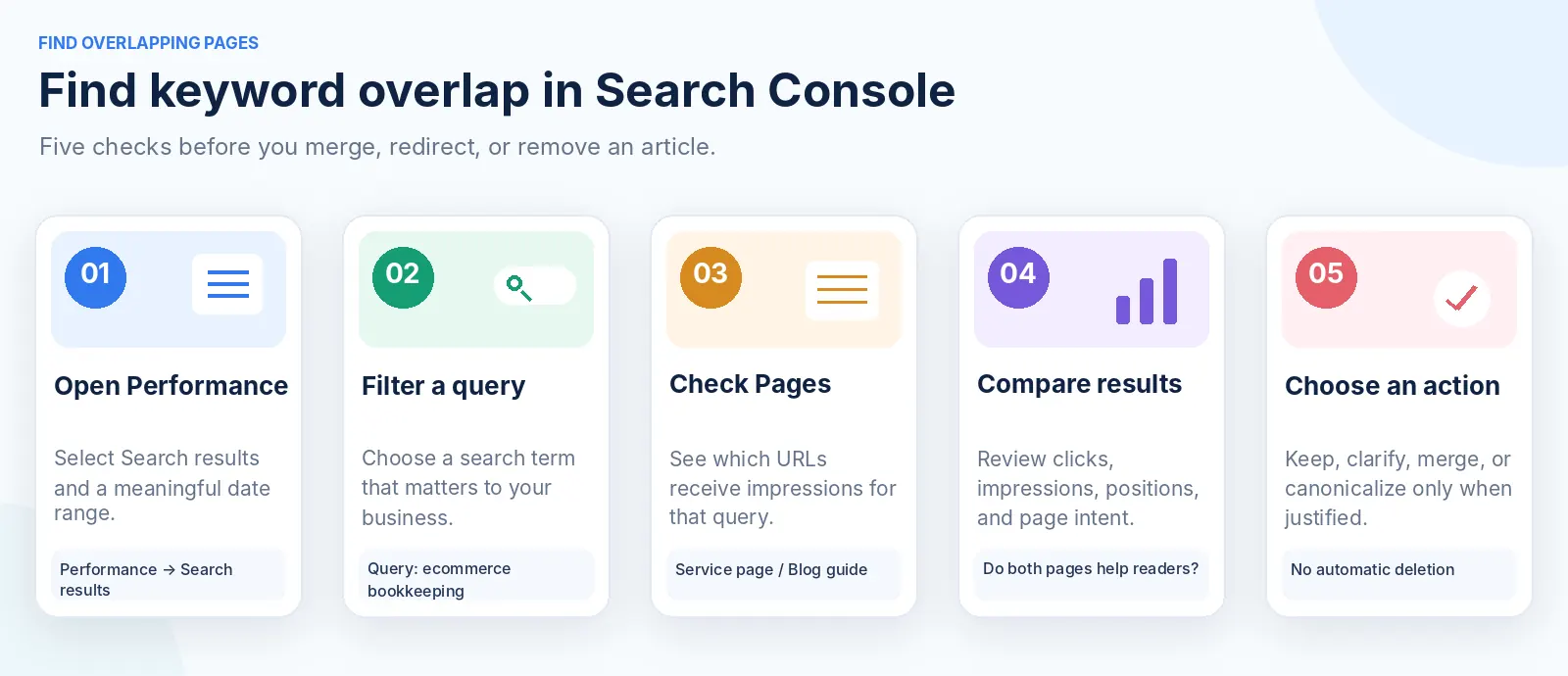
Open the Search results report
Go to Google Search Console and select your website property.
Open Performance → Search results.
Select a meaningful date range.
For an established website, the last three months is a reasonable starting point.
If your site receives very little traffic, use a longer period where appropriate.
Enable the four available metrics:
Total clicks.
Total impressions.
Average CTR.
Average position.
Don't worry about identifying every possible overlap immediately.
Start with the keywords that matter to your business.
Select a keyword and inspect the associated pages
Open the Queries tab.
Choose a search term relevant to one of your services or important articles.
Click the query to apply it as a filter.
Then open the Pages tab.
Search Console will display the URLs associated with that search term.
You might discover that two articles receive impressions for the same query.
For example:
Query | URL appearing in Search Console |
|---|---|
Ecommerce bookkeeping services |
|
Ecommerce bookkeeping services |
|
These URLs are illustrative.
This is a possible overlap worth investigating.
It is not proof that either page is harming the other.
Perhaps Google displays the service page when someone is looking to hire a provider and the guide when someone is looking for information.
Or perhaps both pages contain almost identical service descriptions.
You need to examine the content before deciding.
Compare the performance over time
Keep the query filter active.
Select one of the URLs and review its performance for the selected period.
Repeat the process for the other URL.
If useful, compare two equivalent date ranges.
Look for patterns.
Does one URL consistently attract the relevant clicks?
Does the preferred commercial page receive little visibility while an informational article appears more often?
Has the main ranking URL changed?
Are both pages contributing worthwhile search traffic?
Be careful with the numbers.
Search Console can aggregate impressions differently depending on whether the report is grouped by property or by page.
The page rows don't always add up neatly to the site's overall totals.
Some rare queries are also omitted from reports for privacy reasons.
Google explains these differences in its Search Console Performance documentation.
Treat the data as a way to identify candidates for investigation.
Use a site search to find additional overlaps
Search Google for:
site:yourdomain.com "ecommerce bookkeeping"
Replace the example domain and phrase with your own.
This can surface existing pages that discuss the same subject.
Open the relevant results and compare them.
The site: operator isn't a complete content inventory, and the order of results isn't a reliable measure of cannibalization.
Its value is helping you discover pages you may have forgotten about.
For larger websites, a site crawler or a simple content inventory can be more useful.
Check whether the pages really compete
Finding two URLs associated with the same keyword is the beginning of the investigation.
Now you need to understand what each page is supposed to accomplish.
I recommend a simple three-question test.
Do they serve the same audience?
Consider two pages about bookkeeping.
One is written for people learning to manage their accounts.
The other is written for businesses considering professional bookkeeping services.
They may share vocabulary without serving the same audience.
If both pages answer different customer needs, keeping them separate may be appropriate.
Do they answer the same question?
Compare the main purpose of each page.
A guide titled "How Much Does Ecommerce Bookkeeping Cost?" should explain pricing, service inclusions, and the factors that affect a quote.
A service page titled "Ecommerce Bookkeeping Services" should explain what the provider offers, who it's for, and how to enquire.
Related subjects. Different answers.
Now imagine two articles:
"Complete Guide to Ecommerce Bookkeeping"
"Everything You Need to Know About Ecommerce Bookkeeping"
If both explain the same tasks, software, and general concepts to the same audience, the overlap may be substantial.
You now have a stronger reason to investigate consolidation.
Would a reader benefit from visiting both pages?
This is often the clearest test.
If a reader opens one page, learns something useful, and has a natural reason to visit the second, the pages probably have distinct roles.
If the second page repeats almost everything the first already explained, one stronger resource may serve the reader better.
Here's how to evaluate common situations.
Situation | Is it necessarily cannibalization? | Recommended approach |
|---|---|---|
A service page and a pricing guide cover the same service | No | Keep both if each answers a different need |
Two articles provide nearly identical introductions to the same subject | Potentially | Investigate merging |
A product page and a product comparison mention the same product | No | Usually keep both |
An outdated article repeats a newer, more complete guide | Potentially | Consider consolidating |
A filtered product URL duplicates the main product page | Duplicate URL issue | Review canonicalization |
Two articles rank for the same query but attract different relevant visitors | Not necessarily | Usually leave them alone |
The decision should come from page purpose and performance, not keyword repetition alone.
A real example from RepGet's own blog
RepGet already publishes two related resources:
Why Your Website Isn't Showing Up on Google
and
How to Get Your Website Indexed by Google.
Both discuss Google visibility.
Both mention indexing.
But they address different problems.
The first explains several reasons a business website might be invisible, including poor targeting, technical issues, and a lack of relevant references.
The second is a practical indexing checklist covering Search Console, sitemaps, crawling, and indexing statuses.
Someone trying to understand why their business receives no traffic could benefit from the broader explanation.
Someone specifically trying to get a new page indexed needs the technical checklist.
The pages therefore have distinct editorial purposes.
That doesn't prove they perform well or that Google never associates them with overlapping searches. Establishing that would require access to RepGet's Search Console data.
But their structure illustrates why two related articles should not automatically be combined.
A useful website needs connected resources, not just one enormous page attempting to answer every possible question.
The important thing is that each resource has a clear purpose and the links between them help readers move from one question to the next.
How to fix real keyword cannibalization
Once you've established that a genuine overlap exists, there are several possible solutions.
The right one depends on whether both pages still deserve to exist.
Keep both pages and clarify their purpose
This is often the best solution when both pages contain useful information.
Suppose you have:
/services/shopify-bookkeeping
and
/blog/shopify-bookkeeping-cost
The service page should focus on what the company provides.
The article should explain how pricing works and which factors affect the final cost.
Make those differences clear in the headings, opening paragraphs, and supporting content.
You can also connect the pages using natural internal links.
The pricing guide might link to the service page when explaining how to request a quote.
The service page might link to the guide for customers who want more information about costs.
This creates a useful path without removing either page.
Merge two articles that answer the same question
If two articles serve the same audience and repeat substantially the same information, a single stronger resource may be appropriate.
Imagine a website with:
/blog/shopify-bookkeeping-guide
and
/blog/complete-shopify-bookkeeping
Both cover the same topic with nearly identical explanations.
Instead of maintaining two competing articles, review the strongest material from each.
Choose the URL that makes the most sense to preserve.
That may be the page with more relevant traffic, useful backlinks, better conversion performance, or a clearer long-term purpose.
Don't automatically choose the newest URL.
Prepare one complete article on the preferred page.
Preserve valuable examples and information from the other.
Then, if the old URL has a genuinely equivalent replacement, implement a permanent redirect to the consolidated page.
Google recommends server-side permanent redirects, such as HTTP 301 or 308, when a page has permanently moved.
Its redirect documentation explains how search engines interpret these changes.
Afterward, update internal links to point directly to the preferred URL and remove the redirected page from your XML sitemap.
Don't redirect an unrelated article merely because it contains the same keyword.
The replacement needs to make sense to the person following the link.
Use canonical tags for duplicate URL versions
Sometimes the problem isn't two articles.
It's the same content available through multiple addresses.
For example:
/products/blue-shirt
and
/products/blue-shirt?sort=popular
If both URLs show substantially the same product information, canonicalization may help identify the preferred version.
A canonical tag tells search engines which URL you prefer to represent duplicate or very similar content.
Google treats canonical tags as strong signals, but not absolute commands.
Its canonical URL documentation explains the available methods.
This distinction matters.
Canonical tags are not a general solution for two genuinely different articles that happen to rank for the same keyword.
If both articles serve distinct purposes, pointing one canonical tag at the other may prevent the page you want from being independently represented in search results.
Use canonicalization for genuine duplicate or near-duplicate content.
Use editorial differentiation when the pages answer different questions.
Avoid deleting or noindexing useful content unnecessarily
If an article has independent value, deleting it solely because it shares a keyword with another page may cause more harm than good.
The same caution applies to noindex.
A noindex directive asks search engines not to include that page in search results.
It does not combine the two pages into one useful resource.
Google specifically advises against using noindex simply to influence canonical selection among duplicate pages on the same site.
Before removing or excluding a URL, inspect its other search queries, internal links, relevant backlinks, and business value.
A page may appear weak for one keyword while performing well for several others.
Fix the problem you've actually identified.
Which fix should you choose?
Use this decision framework before making a technical change.
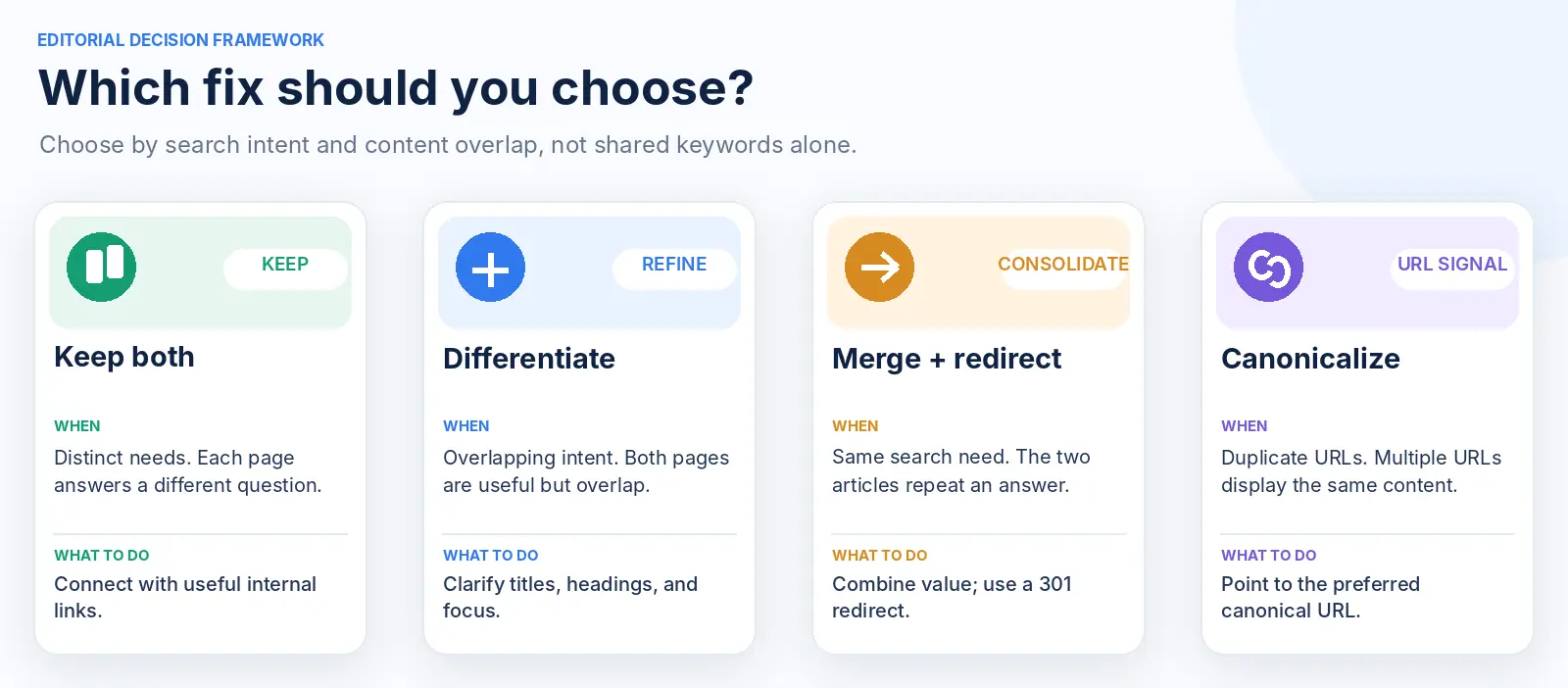
What you discovered | Best next action |
|---|---|
Two pages answer different customer questions | Keep both and clarify their roles |
Two useful pages have partially overlapping content | Differentiate and add relevant internal links |
Two articles substantially repeat the same answer | Consider merging and redirecting the redundant URL |
One article is outdated and another fully replaces it | Consolidate useful information, then consider a permanent redirect |
Multiple URLs show duplicate versions of the same content | Review canonicalization or URL redirects |
More than one page ranks, but both contribute valuable traffic | Usually leave them alone |
There is no need to force every situation into a technical fix.
Sometimes a content edit is enough.
Sometimes the best decision is to make no change.
And sometimes the issue isn't cannibalization at all. A page may simply be outranked by more relevant or stronger competing resources.
Prevent keyword overlap before publishing new articles
As a website grows, prevention becomes easier than repeatedly fixing similar content.
You don't need complicated software to start.
Create a simple content map.
For each important page, record its main subject, intended audience, purpose, and preferred URL.
For example:
Page | Main purpose | Target reader |
|---|---|---|
Ecommerce bookkeeping services | Explain and sell the service | Business owner looking for a provider |
Ecommerce bookkeeping costs | Explain pricing and quotations | Prospect comparing costs |
Shopify reconciliation tutorial | Help solve an accounting task | Store owner needing practical instructions |
Bookkeeper vs accounting software | Compare approaches | Business owner deciding how to manage accounts |
When researching a new article, consult this map.
If a similar page exists, ask whether the new idea deserves its own URL.
Sometimes the best choice is to strengthen what you've already published.
Other times, a new page answers a genuinely different question.
Our low-competition keyword research playbook explains how to assess search intent and commercial relevance before committing to a topic.
Give AI a list of existing content before generating new ideas
AI-assisted content planning can make keyword overlap easier to create if the software doesn't understand what is already published.
A system might suggest:
"How to Choose an Ecommerce Bookkeeper"
"Best Ecommerce Bookkeeping Services"
"Finding the Right Bookkeeper for Your Online Store"
These could become three useful articles.
They could also become three versions of essentially the same buying guide.
Before approving them, compare the intended search intent and page structure.
If they don't have distinct purposes, consolidate the ideas into one stronger resource.
For businesses publishing regularly, this editorial check is worth including before any automatic publication step.
Automation is most useful when it reduces manual work without creating new problems for the website.
Measure whether your changes worked
SEO changes need time to be crawled and processed.
Don't assume a redirected or rewritten page should produce higher rankings the following morning.
Record the baseline before editing.
For each affected URL, note:
Which relevant queries produced impressions and clicks.
The trend in those metrics.
Which URL was appearing for the important queries.
Whether the pages generated useful enquiries or conversions.
The date and nature of the change.
After publication, confirm that the new page works correctly.
If you implemented a redirect, test the old URL and verify that it leads to the intended destination.
If you changed canonical tags, use URL Inspection to investigate Google's selected canonical after the changes have been processed.
Then monitor search performance over a meaningful period.
Measure the topic, not just the surviving URL
Suppose two articles previously received a combined total of 120 organic clicks in a month.
You merge them.
The surviving article later receives 90 clicks.
It may look better individually than before, but you haven't necessarily improved the website's overall performance.
You need to compare the relevant traffic across the topic before and after consolidation.
Also account for changes in search demand, ranking positions, and reporting periods.
The objective is not simply to have fewer URLs.
It is to make the website more useful and improve meaningful search visibility.
If rankings fluctuate temporarily after a redirect or substantial content change, that alone does not prove the decision was wrong.
But sustained losses should prompt another review.
A 20-minute keyword cannibalization audit
If you want to try this today, start with one important subject rather than auditing your entire website.
First five minutes: Find possible overlaps
Open Search Console, choose a valuable query, and check which pages appear for it.
Next five minutes: Compare the pages
Read their titles, introductions, headings, and main answers.
Ask whether they serve the same audience and search intent.
Next five minutes: Review the performance
Check which pages receive relevant clicks, whether one consistently appears instead of the preferred page, and whether both have independent value.
Final five minutes: Make a decision
Choose one of four outcomes:
Keep both.
Differentiate their purpose.
Investigate consolidation.
Review duplicate URL canonicalization.
Record the decision before making changes.
You don't need to remove any pages during this initial audit.
The useful outcome is knowing which potential conflicts deserve further work.
Where RepGet fits into this process
Keyword cannibalization becomes more difficult to manage when a website publishes regularly without a consistent content plan.
RepGet brings together keyword research, topic planning, article preparation, CMS publishing, and website reporting.
That connected workflow can help businesses organize content around relevant search opportunities rather than generating articles from isolated keyword suggestions.
Its publishing controls also allow articles to remain as drafts for review.
However, an automated content system should not be trusted to merge or redirect existing pages without checking their independent value.
Search Console remains an important source of evidence when diagnosing URL-level performance.
If you're unsure whether your site has technical or content issues worth investigating, start with RepGet's free website audit.
It can help identify broader site problems before you invest in producing more articles.
The bottom line
Keyword cannibalization isn't a reason to panic whenever two pages appear for the same search.
Related content is normal.
Different pages can help different readers understand the same broader subject.
The problem is unnecessary duplication or overlap that makes your website less useful or weakens its performance.
Start with Search Console.
Compare the pages.
Identify the reader's actual intent.
Then decide whether to keep, improve, combine, or redirect.
The objective isn't to have one page for every keyword. It's to give every important page a clear reason to exist.
Check your website before publishing more content
If your articles are overlapping, your site has technical problems, or you're unsure what to improve next, begin with a free SEO audit from RepGet.
Find out what deserves attention before building another content schedule.
No account or credit card required.
FAQ
What is keyword cannibalization in SEO?
Keyword cannibalization occurs when multiple pages on the same website target substantially the same search intent and their overlap harms organic search performance. Two pages ranking for the same keyword do not automatically indicate a problem.
How do I find keyword cannibalization for free?
Use Google Search Console. Open Performance → Search results, select a relevant query, and check the Pages tab to see which URLs appear. Then compare the content, search intent, and performance of those pages.
Does Google penalize websites for keyword cannibalization?
Google does not have a general penalty simply because two pages cover similar topics. Duplicate content is not inherently a spam-policy violation. However, unnecessary duplication can create a poor user experience and make maintaining a clear site structure more difficult.
Should I delete pages that target the same keyword?
Not automatically. Review whether the pages answer different questions and attract useful traffic. Delete or redirect content only when there is a sound reason, such as consolidating genuinely redundant articles.
Can canonical tags fix keyword cannibalization?
Canonical tags are appropriate for duplicate or very similar URL versions. They are not a universal fix for separate articles that share keywords but serve different search intents.
How long does it take to recover after fixing keyword cannibalization?
There is no guaranteed timeframe. Google needs to recrawl and process changes, and rankings can fluctuate. Monitor the affected queries and pages over a meaningful period rather than expecting immediate improvement.
Does AI-generated content increase the risk of keyword cannibalization?
It can when content is produced at scale without checking existing pages and search intent. The risk comes from overlapping content plans and weak editorial controls, not simply from using AI to write articles.