

Local SEO for Small Businesses: How to Get Found by Nearby Customers
Short answer
To improve local SEO, start with an accurate Google Business Profile, clear service and location information on your website, and genuine customer reviews. Make sure customers can contact you, understand where you operate, and find the services they need. Google local results depend mainly on relevance, distance, and prominence, so no business can guarantee the top position in every area.
Someone searches for an electrician on their phone. Google shows a map, several nearby businesses, and a few websites.
The person probably isn't planning to read ten articles about electrical systems. They want to know who serves their area, whether the company handles their problem, and how quickly they can get in touch.
That is the practical purpose of local SEO.
A small business doesn't need to compete for every search in its industry. It needs to become a credible option when someone nearby is looking for a service or place it genuinely offers.
A complete Google Business Profile helps. So does a clear website, accurate business information, real customer feedback, and a straightforward way to enquire.
But these activities solve different problems, and doing them in the wrong order can waste time.
Here's how to decide what matters first.
How local SEO works on Google
Local SEO helps a business become discoverable when a search has a geographic component.
That doesn't always mean the person types a city name.
Searches such as "coffee shop near me", "emergency plumber", and "wedding photographer Lake Como" may trigger location-sensitive results.
Google can display different kinds of results for those queries.
Local results may show businesses in a map or local business listing, with contact information, reviews, opening hours, and directions.
Organic website results may show service pages, local guides, company websites, or other relevant resources.
Both matter, but they aren't the same system.
A business can have a good website and an incomplete Business Profile. It can also have a visible Maps listing while its website performs poorly for important service-related searches.
Improving one doesn't automatically fix the other.
What determines local rankings?
Google identifies three main factors behind local rankings:
Factor | What it means | What a business can influence |
|---|---|---|
Relevance | How closely a business matches the search | Accurate categories, services, descriptions, and business information |
Distance | How far the business is from the searcher's relevant location | Accurate location or service-area information, but not the customer's actual distance |
Prominence | How well-known and established a business appears | Genuine reviews, credible references, and its broader public presence |
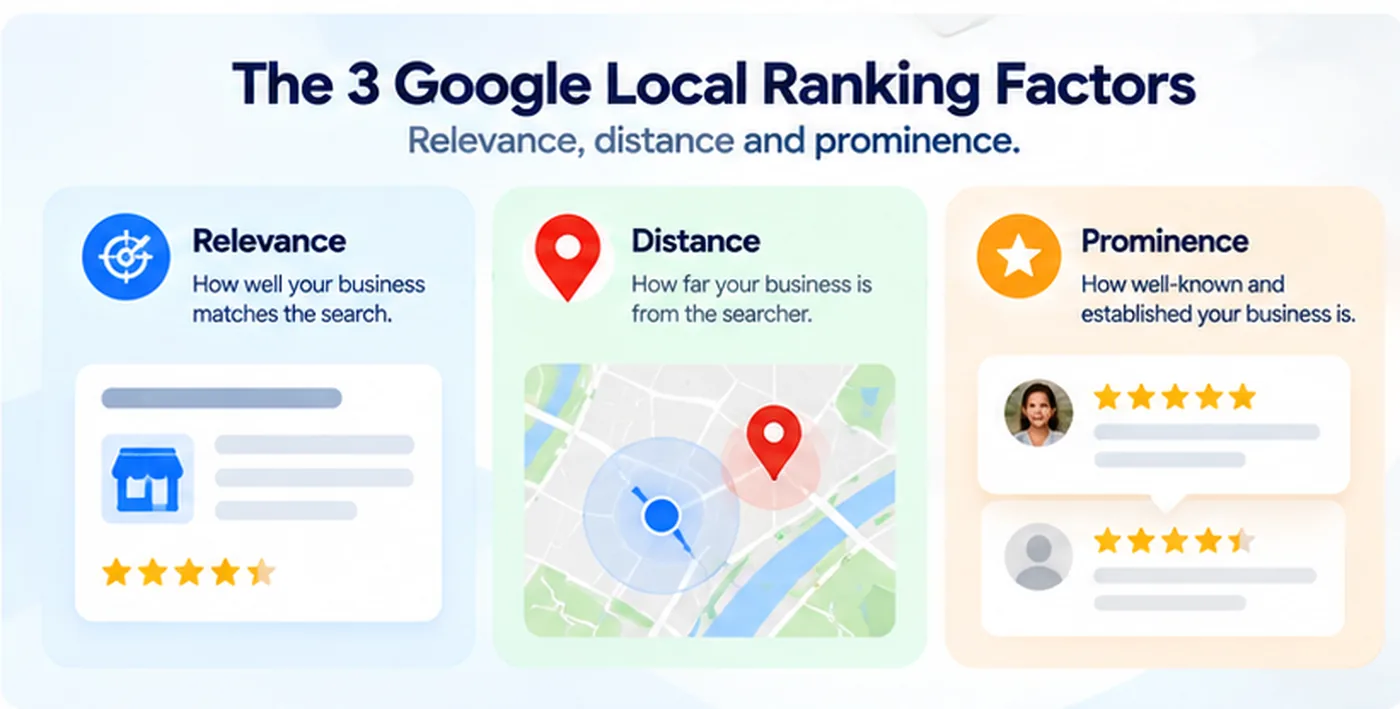
Google doesn't disclose the exact weighting of these factors.
It also states that businesses cannot request or purchase better organic placement in local results.
You can review the official Google guidance on local ranking.
This explains why two people searching for the same service in different neighborhoods can receive different business recommendations.
A business closer to one person may be less convenient for another.
No SEO tool can remove that geographical reality.
Check whether your business is eligible for Google Business Profile
Before optimizing a profile, make sure your business qualifies for one.
Google Business Profile is generally intended for eligible businesses that have in-person contact with customers, either at a physical business location or by traveling to customers.
An online-only business without qualifying in-person customer contact generally isn't eligible just because it has a website.
For example, a bakery with a physical shop may qualify.
A plumbing company that visits customers may qualify as a service-area business.
A purely online software platform doesn't automatically qualify.
Google's Business Profile eligibility and representation guidelines explain the requirements.
Storefront, service-area, or hybrid?
These business types should be represented differently.
Business type | Example | Profile considerations |
|---|---|---|
Storefront | Cafe, salon, retail shop | Show the actual eligible customer-facing location |
Service-area | Plumber, mobile cleaner | Define the genuine area served; hide the address if customers aren't served there |
Hybrid | Business serving customers at its location and at theirs | Provide accurate location and service-area information |
Online-only | Remote SaaS company without in-person services | Generally not eligible for a standard Business Profile |
The distinction matters because some businesses try to create listings using rented mailboxes or virtual office addresses.
Google's guidelines prohibit using an address where the business doesn't genuinely operate.
A virtual address is not a shortcut to ranking in another city.
For a qualifying service-area business, represent the actual business location appropriately and follow Google's rules for hiding an address that customers cannot visit.
Claim or verify your profile
If your business is eligible, use Google Business Profile to manage its information.
Search for your business first. An existing listing may already be present.
Claim the appropriate listing instead of creating an unnecessary duplicate.
Complete the verification process Google requests.
The available verification methods can vary by business, and Google may require additional checks.
Verification helps you manage your profile. It doesn't guarantee a particular search position.
Make your Google Business Profile genuinely useful
Many businesses complete their profile once and never revisit it.
Then their hours change, their services evolve, or their website moves.
Outdated details can create problems for customers even when the listing still appears in search results.
Start with the information someone needs to make a decision.
Use your actual business name
Enter the name customers know and that your business uses in the real world.
Do not add extra services, cities, or marketing claims simply to target keywords.
For example, a company officially named "Oakfield Plumbing" shouldn't rename its Google profile to "Oakfield Plumbing Best Emergency Plumber London 24/7" unless that genuinely reflects its business name.
Google's guidelines explicitly restrict unnecessary information in business names.
Keyword stuffing can put your listing at risk.
Select the most accurate primary category
Categories help Google understand what type of business you operate.
Choose the most specific primary category that accurately describes your main business.
Add other categories only when they represent genuine additional areas of your business.
A wedding photographer doesn't need unrelated categories simply to appear in more searches.
A plumbing company should not add electrician services unless it genuinely provides them.
You can describe detailed services in the appropriate service fields rather than using categories as a keyword list.
Check business hours and contact details
Review your telephone number, website link, opening hours, and any available contact options.
Include special hours for holidays or temporary schedule changes where relevant.
Make sure the contact route works.
A prominent listing is not very useful if the phone number is disconnected or the website leads to an error page.
For appointment-only businesses, explain the process honestly rather than publishing invented walk-in hours.
Describe your services clearly
A useful business description explains what you do and who you serve.
Consider a hypothetical cleaning company.
Unhelpful description:
"We provide outstanding, innovative, and professional solutions with exceptional attention to quality."
More useful description:
"Oakfield Cleaning provides routine office cleaning and scheduled deep cleaning for small businesses across Greater Manchester. Services are arranged around each workplace's requirements and operating schedule."
The second version is more specific.
It identifies the service, audience, and geographic market.
The example is fictional, and the wording should only be used if it accurately describes the business.
Avoid exaggerated claims, unrelated promotions, or repeating the same location dozens of times.
Add authentic photographs
For businesses where the physical environment or completed work matters, photos can help prospective customers understand what to expect.
A restaurant might show its dining area and real dishes.
A salon might show its premises and examples of permitted client work.
A contractor could show genuine completed projects, with necessary permissions.
An attractive stock photograph doesn't demonstrate what the actual business provides.
Use authentic material and keep it current.
Google Business Profile should represent the business as customers would experience it.
Improve the website pages that support local searches
A Business Profile is useful, but it isn't a substitute for a clear website.
A prospective customer may want details that don't fit comfortably in a local listing.
They may need to compare services, understand pricing, review previous work, or request a detailed quote.
This is where the website becomes important.
Start with your main service page
Imagine a plumbing company in Bristol.
Its homepage explains that it offers dependable plumbing solutions, but its service pages contain little practical information.
A customer searches for "boiler repair Bristol".
Before changing every page on the website, the company should check whether it has a suitable page explaining the relevant service.
A useful page might describe:
The types of boiler problems it can handle.
The locations genuinely served.
Any relevant professional qualifications.
How appointments or emergency enquiries work.
What information a customer should provide.
How quotation or pricing arrangements are determined.
The page should reflect the company's real services and capabilities.
It shouldn't pretend that the business offers emergency repairs or certain certifications if it doesn't.
Our service page SEO guide explains how to build commercial pages around actual customer decisions rather than broad marketing copy.
Use location information where it helps the customer
A real local business should make it clear where it operates.
For a storefront, include an accurate address and information about visiting.
For a service-area company, explain the genuine areas served and how customers can check availability.
Don't invent multiple branches to give the impression of a larger geographical presence.
And don't assume that inserting a city name into every heading makes a page more relevant.
Google needs useful business information, not a list of places copied across dozens of near-identical pages.
When should you create separate location pages?
Separate location pages can be appropriate when they provide genuinely distinct information.
For example, a company with two staffed locations may need separate pages explaining each location's address, hours, facilities, staff, or services.
A business serving several areas may also have useful location-specific information, provided the page adds real value.
But creating fifty pages that differ only by a city name is a poor long-term strategy.
Google's spam policies address doorway abuse, including pages built mainly to capture similar searches and funnel visitors toward the same destination.
Ask whether the new page would still be valuable if search engines didn't exist.
If it wouldn't, reconsider whether it needs to be published.
Build trust with real customer reviews
Customer reviews can help people decide whether to contact a local business.
They also contribute to the broader picture Google uses to evaluate local prominence.
But the objective shouldn't be collecting the largest possible number of stars.
It should be developing an accurate, useful record of customer experiences.
Ask at the right time
A reasonable moment to request a review is after a genuine service has been completed or a customer has had an opportunity to experience the business.
Keep the invitation neutral.
For example:
"If you have a moment, we'd appreciate an honest Google review about your experience. Your feedback helps other customers understand what to expect."
Avoid implying that only positive feedback is welcome.
Don't request five stars specifically.
And don't offer discounts or rewards in exchange for reviews where doing so violates platform policy.
Google prohibits fake engagement and certain incentivized review practices.
Respond usefully
When a customer leaves a review, respond where appropriate.
For a positive review, a brief, genuine acknowledgment is enough.
For a complaint, address the issue professionally without exposing private customer information.
Avoid turning every reply into a paragraph packed with service keywords.
The purpose is to communicate with a real customer.
Don't confuse review volume with a guaranteed ranking
Google says reviews and positive ratings can contribute to local ranking.
That does not mean collecting ten more reviews will move every business into the first three results.
Distance and relevance still matter.
Competitors, user location, and changes in search behavior can also affect visibility.
Track genuine customer feedback as part of business quality, not just an SEO tactic.
Make your business information consistent across the web
People may encounter your business outside Google.
Industry directories, local organizations, relevant publications, suppliers, business partners, and review websites can all provide information about a company.
Consistency makes it easier for customers to confirm they've found the right business.
Start with the sources that genuinely matter to your industry.
Check the business name, website, contact information, and location details where appropriate.
Correct outdated entries.
If the business has moved, ensure important profiles don't continue directing customers to the old address.
But avoid treating directory submissions as a competition to create hundreds of backlinks.
An irrelevant directory listing provides little practical value.
A legitimate industry association or relevant local organization may be more useful because it gives real customers an additional way to discover and verify your business.
What about citations and backlinks?
In local SEO, a citation often means an online reference to a business and its identifying information.
A backlink is a clickable link from another website to yours.
The two can overlap, but they aren't identical.
A local chamber of commerce listing might include both your business information and a link to your website.
A newspaper article might mention your company and link to a specific project.
Those references can support legitimate discovery and credibility.
Don't manufacture placements or participate in excessive link exchanges primarily to manipulate rankings.
Google's link spam policies still apply to local businesses.
A smaller set of relevant, genuine references is a stronger foundation than hundreds of artificial listings.
Add structured data where it genuinely applies
Structured data can provide search engines with machine-readable information about a business.
Google supports LocalBusiness structured data for appropriate business websites.
Relevant details can include the business name, address, telephone number, and opening hours, depending on the business and its circumstances.
For a business with a real physical location, accurate markup on its relevant website pages may help Google interpret that information.
But structured data isn't a substitute for an eligible Business Profile.
Nor does adding schema guarantee that Google will display a particular search feature or ranking.
Google documents the supported properties and validation process in its LocalBusiness structured data guidance.
Use the most appropriate subtype when supported and keep the information consistent with the visible website.
Don't invent a physical address for a service-area business merely to fill schema fields.
And don't add self-serving review markup hoping to manufacture star ratings in organic results.
Accurate structured data supports clarity. It doesn't compensate for misleading business information.
Find local keywords that are actually worth targeting
A small business doesn't need to rank for every variation of its industry name.
It needs to understand the searches that could bring relevant customers.
Start with the business's actual services and market.
For a hypothetical cleaning company, the research list might include:
Search idea | Likely intent | Suitable destination |
|---|---|---|
Office cleaning Manchester | Find a provider | Main service page |
Evening office cleaning Manchester | Find a service with a specific requirement | Relevant service page or detailed section |
How much does office cleaning cost? | Understand pricing | Pricing explanation or buying guide |
End of tenancy cleaning Manchester | Find a separate service | Dedicated page, if offered |
How often should an office be professionally cleaned? | Research a practical question | Educational guide |
These are illustrative search ideas. They aren't verified search-volume or keyword-difficulty findings.
The distinction is important.
A phrase containing a city isn't automatically a valuable local keyword.
You need to check whether people actually search for it, whether the intent matches your services, and what types of pages Google currently displays.
Look at the live search results.
Do they show local businesses, comparison directories, tutorials, or service pages?
Does your business offer the kind of result the searcher appears to want?
For a structured method, use our low-competition keyword research playbook.
Don't publish an article for every keyword variation
Suppose you discover:
"Office cleaners Manchester"
"Office cleaning Manchester"
"Professional office cleaning in Manchester"
Those queries may describe essentially the same customer need.
Creating three nearly identical pages can add complexity without helping anyone.
A strong service page may satisfy all three.
Create separate resources when the intent is genuinely different, such as a pricing guide or an explanation of a specialist service.
The aim is a useful website structure, not the maximum number of indexed URLs.
Measure local visibility without chasing a universal ranking
One of the frustrating things about local SEO is that the same business can appear in different positions depending on where the search is made.
A customer standing near your shop may see different results from someone several miles away.
There isn't one permanent local ranking position that accurately describes every customer experience.
This makes measurement important.
Use Business Profile performance data
Google Business Profile provides performance information for supported interactions.
Depending on the business and available reporting, this may include calls, website clicks, direction requests, and other customer actions.
Use the metrics that correspond to how customers actually contact or visit your business.
For a restaurant, direction requests may be meaningful.
For a service-area company, calls and enquiry requests may matter more.
Remember that interactions aren't the same as completed sales.
A customer may request directions and never arrive.
A telephone call may be unrelated to a purchase.
Use Search Console for website performance
Open Google Search Console and review the Search results report.
Look at the queries and pages associated with your local services.
A company based in Manchester might examine whether its office cleaning service page receives impressions for relevant searches.
Compare meaningful periods.
Check whether the traffic comes from the regions your business serves.
If the page receives impressions but few clicks, investigate ranking position, search intent, and the way the page appears in search results.
Our guide to Search Console impressions without clicks explains how to make that distinction.
Measure actual business outcomes
Website visitors aren't automatically customers.
Where possible, measure qualified enquiries, bookings, confirmed appointments, or purchases.
A service business might use form-completion tracking and its customer records to distinguish genuine enquiries from spam.
A retail business might look at store visits or orders where it has a reliable way to attribute them.
Not every offline sale can be connected to one search interaction.
That's fine.
Use several meaningful indicators rather than pretending a single SEO score captures business performance.
A practical 30-day local SEO plan
Local SEO can involve many individual tasks.
For a small business, the better approach is to fix the fundamentals first and then improve the information customers use to make decisions.
Period | Priority | Expected output |
|---|---|---|
Week 1 | Verify eligibility, claim or review the Business Profile, correct important business details | Accurate, properly managed profile |
Week 2 | Improve homepage and priority service pages, including genuine locations and enquiry routes | Clearer information for local customers |
Week 3 | Request honest feedback from real customers and review relevant existing listings | Better maintained public business information |
Week 4 | Review Business Profile performance, Search Console, and enquiries | Baseline data and the next set of priorities |
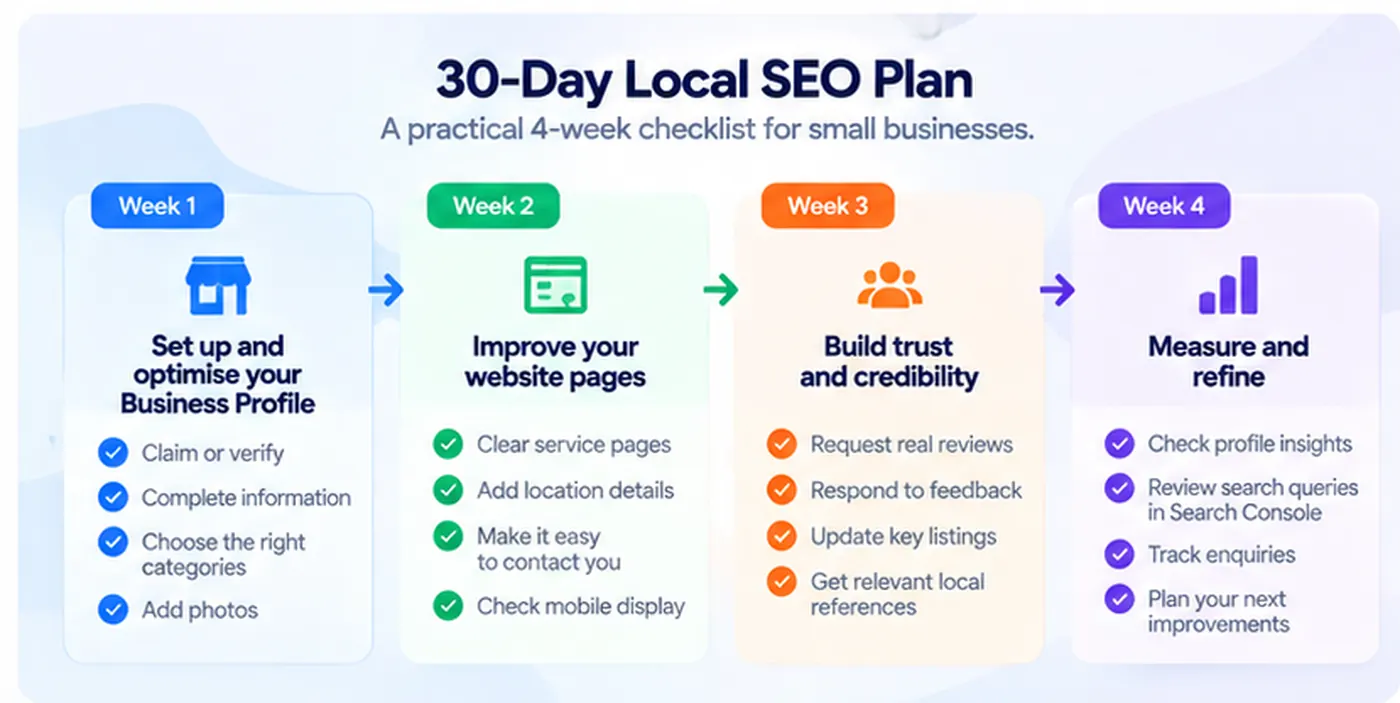
This is a work schedule, not a prediction that your rankings will rise in thirty days.
Some changes may be processed quickly.
Others take longer.
And not every change produces a measurable ranking improvement.
The purpose is to establish a repeatable process that you can maintain.
What I would prioritize for a brand-new business
If you have a new local business and limited time, focus first on the information customers need to verify that you are real and contact you.
That means an eligible and accurately configured Business Profile, a working website, clear services, and a reliable enquiry route.
If those aren't in place, publishing another ten blog articles is unlikely to be the best first investment.
What I would prioritize for an established business
If your website and Business Profile are already in good condition, investigate the queries and locations that matter most.
You may discover that a service page needs improvement, an important business listing is outdated, or potential customers can't understand pricing or availability.
Those are more concrete opportunities than changing every title or adding unrelated directory links.
Common local SEO mistakes
Some local SEO advice promises quick results from tricks that create more risk than value.
Adding keywords to your business name
Google requires businesses to use their real-world names.
Stuffing a Business Profile name with services and locations can violate its guidelines.
Using virtual addresses to appear in more cities
A rented mailbox or virtual office doesn't automatically qualify as a real business location.
Represent your actual business location and service areas according to Google's eligibility rules.
Creating dozens of near-identical city pages
A separate page can be useful when it provides distinct local information.
A collection of nearly identical pages created primarily to capture city-name searches may fall under Google's doorway abuse policy.
Buying positive reviews
Fake or incentivized positive reviews violate platform policies and can damage customer trust.
Ask for authentic feedback without telling people what rating to provide.
Assuming a perfect website audit guarantees Maps rankings
Technical accessibility is important.
But local rankings also depend on relevance, distance, and prominence.
A website audit cannot control where a customer is searching from or how Google evaluates every competing business.
Ignoring the actual customer experience
A prominent listing with incorrect hours, outdated contact information, or a confusing website still creates problems.
Better visibility is only useful when the business can deliver what the customer expects.
Where RepGet fits into local SEO
Local businesses often need to manage technical website issues, commercial pages, content planning, and search performance without a dedicated SEO team.
RepGet brings website auditing, keyword research, content preparation, publishing, and search visibility reporting into one workflow.
Its free website audit can help identify technical and content issues worth investigating.
For example, a cleaning company might discover that its main service page doesn't clearly explain the areas it serves, or that important pages are difficult to find through internal links.
RepGet can support website analysis and ongoing content work.
It doesn't replace Google Business Profile, determine physical-distance ranking factors, or guarantee local Maps positions.
That distinction matters.
The goal is to make your website more useful alongside an accurate, eligible business listing.
The bottom line
Local SEO isn't about putting your city name everywhere.
It's about helping nearby customers understand who you are, what you offer, where you operate, and why they should consider your business.
Start with accurate Business Profile information.
Make your main website pages genuinely useful.
Build credibility through real work, customer feedback, and relevant public references.
Then measure enquiries and customer actions, not just rankings.
The strongest local SEO strategy is one that connects accurate search visibility with a business people can actually trust and contact.
Find out what your website needs first
Before investing in more local SEO content, check whether technical or content issues are limiting your website's visibility.
Run a free website audit with RepGet to identify problems worth investigating and decide what deserves attention first.
FAQ
What is local SEO for a small business?
Local SEO is the process of improving a business's visibility for geographically relevant searches. It typically involves an accurate Google Business Profile, clear website information, useful service pages, authentic customer reviews, and relevant local references.
How can I improve my ranking on Google Maps?
Start by checking your Business Profile's accuracy, category, address or service area, opening hours, services, and customer information. Build credibility through genuine reviews and relevant references. Google says local results depend mainly on relevance, distance, and prominence.
Is Google Business Profile free?
Yes. Eligible businesses can create and manage a Google Business Profile without paying Google for the listing. Verification may be required, and eligibility depends on how the business operates.
Can I use a virtual office address for Google Maps?
A virtual office or rented mailing address generally isn't eligible unless the business genuinely operates there and meets Google's customer-facing location requirements. Service-area businesses should follow the appropriate rules, including hiding addresses where customers aren't served.
How long does local SEO take to work?
There is no guaranteed timeframe. Some profile corrections may become visible relatively quickly, while meaningful changes in organic search visibility can take longer. Results also depend on competition, location, and the quality of the business's public information.
Do customer reviews help local SEO?
Google identifies reviews and positive ratings among the signals that can contribute to local prominence. However, more reviews don't guarantee a particular ranking. Reviews must be authentic and comply with Google's policies.
Do I need separate pages for every city I serve?
No. Create separate location pages when they provide genuine, distinct value. Avoid producing near-identical pages that only swap city names. A single clear service page can describe multiple real service areas where appropriate.
Can RepGet improve Google Maps rankings automatically?
RepGet can help identify website SEO issues and support content planning and search visibility reporting. It doesn't control Google's local ranking algorithms, physical distance, or Business Profile placement, and cannot guarantee Maps rankings.