

Google Search Console Impressions but No Clicks? Here's What to Fix
Short answer
Google Search Console impressions without clicks usually mean your page appears too low in the results, doesn't match what people want, or isn't compelling enough to click. Check the exact queries, ranking position, and page Google displays before changing anything. Some searches simply don't generate many clicks, so prioritize relevant visitors rather than chasing a higher click-through rate everywhere.
You open Google Search Console and see that your website appeared in Google results thousands of times last month.
That sounds promising.
Then you look at the clicks.
Almost nothing.
It's tempting to change every page title, publish another batch of articles, or assume Google is showing your website to the wrong people.
But impressions without clicks can mean several very different things. Some are worth fixing immediately. Others aren't problems at all.
The useful question is not simply why people aren't clicking. It's whether your website is appearing for the right searches, in a position where someone might reasonably choose it.
Here's how to find out.
What impressions and clicks actually tell you
Google Search Console measures several aspects of your website's search performance.
Four are especially useful when investigating pages that receive visibility but little traffic.
Metric | What it tells you |
|---|---|
Impressions | How often a result linking to your website appeared in Google Search, according to the applicable visibility rules |
Clicks | How often someone clicked through from a Google Search result to your website |
CTR | The percentage of impressions that resulted in clicks |
Average position | The average search-result position recorded for your website or the selected page or query |
Click-through rate is calculated as:
CTR = Clicks ÷ Impressions × 100
If a page receives 2,000 impressions and 20 clicks, its CTR is 1%.
That number alone doesn't tell you whether the page is performing well.
A result appearing near the bottom of the second page of Google has very different click opportunities from one appearing near the top.
The type of search matters too.
Someone looking for a specific service may want to visit a provider's website.
Someone checking a basic definition might get everything they need directly in the search results.
Both searches can generate impressions. They don't create the same likelihood of a click.
Google explains these measurements in its official Search Console Performance documentation.
Before making changes, you need to look beneath the totals.
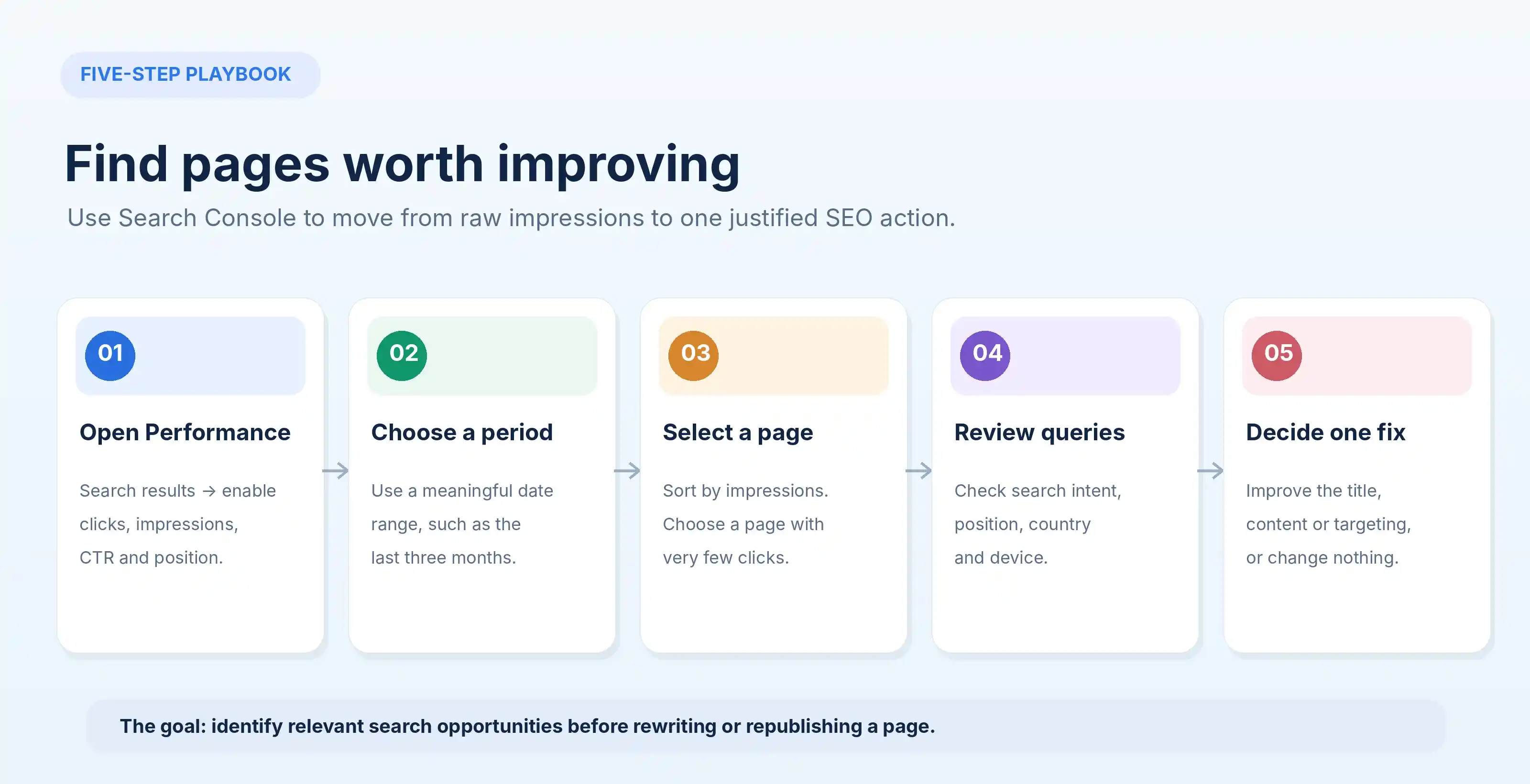
Find the pages getting impressions but few clicks
Start with the data you already have.
Open Google Search Console and select the correct website property.
Go to Performance → Search results.
Then follow this process.
Select a meaningful date range
Choose the last three months as a starting point.
For a new website with limited data, you may need to examine a longer period.
For an established site, compare the most recent 28 days with the previous 28 days when investigating a recent change.
Avoid relying on the last day or two. Some recent Search Console data may still be preliminary.
Also avoid drawing conclusions from very small samples.
A page with twelve impressions and zero clicks doesn't give you enough information to diagnose an important CTR problem.
Enable all four metrics
At the top of the report, select:
Total clicks.
Total impressions.
Average CTR.
Average position.
This gives you the information needed to distinguish visibility problems from potential click-through problems.
Open the Pages tab
Sort the pages by impressions, starting with the highest.
You're looking for pages Google displays frequently but that receive relatively few clicks.
Don't make a decision yet.
An apparently weak page may simply rank too low to attract traffic.
If you have many URLs, export the table and filter for pages with substantial impressions and low CTR.
Search Console allows you to export report data, but the exported data can still be subject to reporting limits.
Select a specific page
Click one of the URLs worth investigating.
Search Console will filter the report to that page.
Now open the Queries tab.
This is where the analysis becomes useful.
You can see which searches generated impressions for the selected page.
A service page might receive impressions for several distinct queries:
"Office cleaning Manchester"
"Commercial cleaning company Manchester"
"How much does office cleaning cost?"
"Office cleaning jobs Manchester"
Those searches do not represent the same customer.
The first two may indicate someone looking for a provider.
The third suggests price research.
The fourth may come from someone looking for employment.
A low CTR driven partly by irrelevant employment searches doesn't automatically mean the service page needs a stronger title.
Check country and device
Open the Countries and Devices tabs.
If your business serves the UK but most impressions come from another market, investigate whether those visitors are relevant.
Compare mobile and desktop performance as well.
Search-result layouts differ by device. Ads, maps, AI-generated summaries, shopping features, and other elements can change which results receive attention.
These differences matter when interpreting CTR.
By the end of this process, you should have a short list of pages, the queries associated with them, and enough context to decide what to investigate next.
The five reasons people see your website but don't click
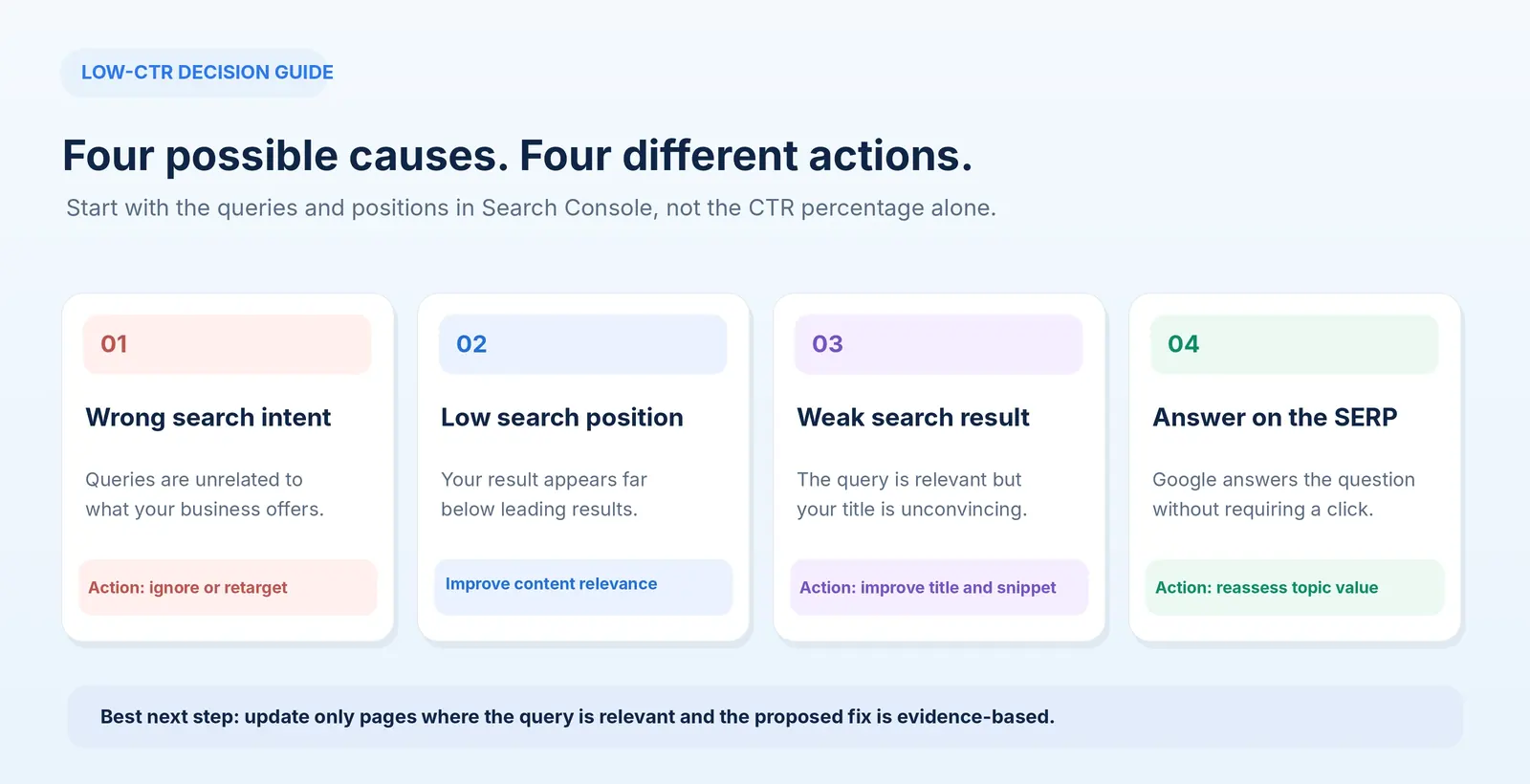
Most cases fit into one or more of five situations.
What you find | Likely issue | What to do |
|---|---|---|
Many impressions, average position far below leading results | Low ranking visibility | Improve the page's relevance and usefulness |
The page appears for unrelated queries | Search intent mismatch | Prioritize relevant queries; ignore misleading totals |
A relevant page ranks reasonably well but receives few clicks | Search presentation may be weak | Review title, snippet, and competing results |
Google answers the question directly | Low-click search behavior | Evaluate whether the topic is commercially worthwhile |
Performance differs by country or device | Audience or result-layout differences | Investigate the affected segment |
These are diagnostic starting points, not guaranteed explanations.
Let's look at each.
Your page ranks too low to attract attention
Imagine a page receives 4,000 impressions during a month.
Its average position is 34.
The page is appearing in Google's results, but often far below the results people are most likely to inspect.
Changing the meta description may have little effect.
The larger problem is that the page isn't competitive for the searches generating those impressions.
Start by examining the queries that matter to your business.
Compare your page with the current leading results.
Does it answer the same question?
Does it provide the kind of information those searchers need?
Is a service page appearing where Google mostly shows product comparisons?
Does the content lack important details that competing pages explain well?
Sometimes the best fix is improving the existing page.
Other times you may discover that the subject doesn't match your business closely enough to justify further work.
A low ranking position is not automatically a reason to publish another article.
It is a reason to investigate why the existing page is not a strong match.
Google shows your page for the wrong searches
This problem is less obvious.
A website might appear for thousands of searches that have only a loose connection to its actual services.
Consider a bookkeeping company.
Its article explains bookkeeping for ecommerce businesses.
Google might also display it for searches about free invoice templates, accounting software downloads, and general bookkeeping definitions.
Those impressions can make the overall numbers look encouraging.
But many of those visitors may have no intention of hiring a bookkeeper.
Even if they click, they might never become customers.
This is why the Queries tab matters more than a headline impression total.
Separate searches into three groups:
Commercially relevant: People may need a product or service you actually provide.
Informational but useful: People are researching a problem connected to your expertise.
Unrelated: The search doesn't match the business or the page's purpose.
Focus your analysis on the first two groups.
If your website is attracting visibility for irrelevant queries, that isn't necessarily something to repair.
It may simply mean those impressions aren't a useful measure of business progress.
For help choosing more relevant subjects, see our low-competition keyword research playbook.
Your title doesn't give people a reason to click
This is a problem worth examining when the page appears for relevant queries in reasonably prominent positions.
Consider a commercial cleaning business.
Its service page has this title:
Services | Acme Clean
That tells searchers almost nothing.
A more descriptive title might be:
Office Cleaning in Manchester | Acme Clean
If the company genuinely provides evening cleaning and that is an important customer requirement, a related page could use a more specific title such as:
Evening Office Cleaning in Manchester | Acme Clean
The improved titles identify the service and location.
They make the page easier to distinguish from unrelated results.
But don't promise features, prices, or availability the business cannot provide.
And don't assume a title needs to include every possible keyword.
Google's title link guidance recommends concise, descriptive titles and discourages keyword stuffing.
Google may also generate a different title link from page headings and other signals.
You can influence what appears in search results. You cannot dictate it completely.
The search result already provides the answer
Some searches naturally produce fewer clicks.
A user checking a simple conversion, definition, date, or other short factual answer might not need to visit a website.
Google can show that information directly.
AI Overviews may also provide a detailed response with supporting sources.
That changes the opportunities available to traditional results.
However, don't assume every decline in clicks is caused by AI.
Search demand, rankings, competing pages, ads, local packs, and other search features may also affect traffic.
Inspect the actual results for a representative query in your target market.
If the entire question can be answered directly on Google, ask whether the topic provides enough value to justify further investment.
An article explaining a simple definition might have limited commercial potential.
A more detailed comparison or buying guide may serve a customer who genuinely needs to visit a website.
The answer isn't to make useful content unnecessarily difficult to understand just to force a click.
It's to publish information that remains valuable after the basic question has been answered.
Your page attracts the wrong country or device audience
A local service business can receive impressions from searches outside its operating area.
For example, a wedding photographer based in Italy might appear for general photography searches from countries where the company isn't actively targeting customers.
That doesn't automatically mean the website is performing badly.
But it can make overall CTR misleading.
Use Search Console's Countries filter to compare the markets that matter.
Then inspect Devices.
If your mobile performance differs substantially from desktop, examine the search results on both devices and check how the page displays after visitors arrive.
A mobile usability problem won't necessarily explain why someone didn't click a search result, but it can affect the business outcome once they do.
Always distinguish the factors that influence the click from those that influence what happens afterward.
How to improve a page without rewriting everything
Once you identify a relevant page with a plausible click-through opportunity, make a focused improvement.
You don't need to rewrite the entire article every time.
Start with the information people see before they click.
Improve the title tag
A useful title describes the page and reflects the searcher's actual need.
Compare these examples.
Weak title | More useful alternative |
|---|---|
Our Services | Commercial Office Cleaning in Manchester |
Wedding Photography | Lake Como Wedding Photography: Coverage & Approach |
Accounting Solutions | Ecommerce Bookkeeping Services for Shopify Sellers |
SEO Information | How to Check Whether Google Has Indexed Your Website |
These are illustrative examples, not results from an SEO experiment.
The better versions are more specific.
They clarify the subject, audience, or location.
That can make a page more understandable to the people already seeing it.
You can review your current title using RepGet's free SEO Title Checker.
Treat any score or preview as editorial assistance, not a prediction of click-through rate or rankings.
Write a meta description that matches the page
A meta description should explain what the reader will find.
For example, a bookkeeping service page might use:
Bookkeeping support for Shopify and ecommerce businesses. Explore monthly services, reporting, and how to request a tailored quote.
That is more useful than:
We are passionate about providing innovative, high-quality accounting solutions for clients.
The first description identifies the customer, service, and next step.
Google may choose a different snippet from the page's visible content when it better matches a particular query.
Its snippet documentation explains that meta descriptions are suggestions, not guaranteed search-result text.
RepGet's Meta Description Generator can help prepare alternative descriptions, but every version should accurately reflect the page.
Make the answer easier to find
Sometimes the search result is not the only problem.
Imagine an article that appears for:
"How much does office cleaning cost in Manchester?"
The article has several paragraphs about the importance of professional cleaning before it addresses pricing.
If the page has reliable cost information, moving the relevant explanation closer to the top could make it more useful.
If the business cannot responsibly provide a price range, it can explain how quotes are calculated and what affects the final cost.
That is more helpful than promising a specific figure without evidence.
Better content and clearer titles should support each other.
A title promises an answer.
The page needs to deliver it.
Avoid making several changes at once
If you simultaneously rewrite the article, change the title, redesign the page, and add new internal links, it becomes harder to understand which change may have mattered.
When practical, begin with the smallest justified improvement.
Record the date.
Then monitor a comparable period after Google has processed the update.
SEO performance is influenced by many factors, so even a focused change doesn't prove causation.
But careful records make your decisions more informed.
Three examples: Same symptom, different solutions
Consider three hypothetical pages.
Each receives impressions but very few clicks.
The correct response differs.
Page | Impressions | Clicks | Average position | Recommended action |
|---|---|---|---|---|
General accounting guide | 4,000 | 0 | 35 | Investigate relevance and ranking competitiveness |
Ecommerce bookkeeping service | 2,000 | 15 | 7 | Review query intent and search-result presentation |
Simple accounting definition | 800 | 2 | 3 | Investigate whether the search needs a website visit |
The figures are illustrative examples, not actual Search Console results.
The accounting guide
At position 35, the page's primary problem is unlikely to be its meta description.
Inspect the queries.
If they're relevant, compare the content with competing pages and determine whether the topic deserves improvement.
If they're irrelevant, stop treating those impressions as a meaningful growth opportunity.
The service page
The service page appears closer to positions where a click may be plausible.
Its queries are commercially relevant.
This is a better candidate for examining the title, competing results, and whether the page clearly communicates the service.
A focused change may be worthwhile.
The definition page
The definition page ranks prominently but receives almost no clicks.
That may reflect the type of question.
If Google provides a clear answer directly, many users won't need another page.
You could improve the article if it contains genuinely useful material beyond the definition.
But producing a longer article solely to raise CTR may be a poor investment.
These examples illustrate why a single minimum CTR target is rarely a useful editorial rule.
Different searches create different opportunities.
What Google's AI search reporting changes in 2026
Google introduced dedicated Generative AI performance reports in Search Console in June 2026 and announced worldwide rollout by August 31.
The Search report covers impressions from AI Overviews and AI Mode.
That gives website owners additional insight into whether links to their pages have appeared in Google's AI-generated search experiences.
You can inspect the official Generative AI performance report documentation.
What the new report shows
The report provides impressions and breakdowns including:
Pages.
Countries.
Devices.
Dates.
It can help identify which URLs appeared in Google's supported AI search features and how that visibility changed.
However, the dedicated report does not provide a separate set of clicks, CTR, or search queries for those AI impressions.
It is a visibility report, not a complete conversion report.
Don't count the same impressions twice
Google includes generative AI search impressions within its overall Search performance data.
The separate report helps you understand that portion of visibility.
You should not add its impressions to the normal Web search totals as if they were entirely new exposure.
Likewise, you cannot reliably calculate an AI-only click-through rate by dividing all Search clicks by generative AI impressions.
Those numbers represent different scopes of measurement.
What should you do with the information?
Suppose a practical guide on your website begins receiving impressions in Google's generative AI features.
You now know the page is appearing in those experiences.
You don't yet know which exact question triggered every appearance or how many visits came specifically from those impressions.
The next useful actions are to keep the page accurate, review conventional search performance, and understand whether the subject connects to relevant customer needs.
Don't start creating dozens of near-identical articles trying to reproduce one AI appearance.
Google's guidance for generative AI search emphasizes useful, original material and established SEO fundamentals rather than special AI-ranking shortcuts.
For businesses, it is worth monitoring both traditional clicks and AI visibility, while remembering that they represent different signals.
How to decide which pages deserve attention first
A small business rarely has time to improve every page that receives impressions.
Prioritize the pages most likely to benefit from a sensible change.
Use this practical framework.
Priority | Situation | Action |
|---|---|---|
High | Commercially relevant query, meaningful impressions, plausible ranking position, weak or mismatched title | Review search presentation and page fit |
High | Relevant page suddenly loses clicks or position | Investigate the change before editing |
Medium | Relevant topic with lower positions and a clear content gap | Improve the existing resource |
Low | Broad informational search with little buying relevance | Maintain if useful, but don't prioritize CTR |
Low | Unrelated queries generating impressions | Usually ignore for commercial optimization |
This is an editorial prioritization model, not a Google ranking formula.
It forces you to consider business relevance alongside search metrics.
The order matters.
A page receiving fifty commercially relevant visitors may be more important than one receiving hundreds of people searching for something unrelated.
If you aren't sure which subjects are worth targeting, our keyword research playbook explains how to evaluate competition and customer intent.
Measure whether your changes helped
After editing a page, don't rely on checking Google the next morning.
Search results can vary by location, device, query, and time.
Google also needs to process changes before they can affect the displayed title or content.
Record the page's original data before editing.
Then compare an appropriate period after the change has been processed.
For a page with regular search activity, comparing consecutive 28-day periods may be useful.
For pages with limited data, a longer period can reduce the effect of small fluctuations.
Keep the filters consistent:
The same URL.
The same relevant queries where practical.
The same country.
The same device category.
Comparable date ranges.
Review clicks, impressions, CTR, and average position together.
What counts as improvement?
Suppose relevant clicks increase but CTR falls slightly.
That isn't automatically a bad result.
The page may now be appearing for many additional searches, including some where its position is lower.
More impressions can lower overall CTR even while the page attracts more useful visitors.
Conversely, CTR could improve because the page stopped appearing for broad searches, while the total number of clicks declined.
That's why the final assessment shouldn't depend on one percentage.
Ask whether more relevant people are visiting.
And, if your analytics is configured to measure conversions, whether those visitors are making enquiries, booking services, or purchasing products.
Search Console measures search visibility and clicks.
You need other business data to understand what happened afterward.
A 30-minute checklist for your next Search Console review
You can complete a useful first investigation without spending the entire day analyzing SEO.
First 5 minutes: Find the candidates
Open Search results, select a meaningful date range, enable the four metrics, and sort Pages by impressions.
Next 10 minutes: Examine the queries
Open a promising page.
Read its Queries tab.
Separate commercially relevant searches from unrelated ones.
Check the positions for the useful queries rather than relying only on the page-wide average.
Next 5 minutes: Inspect the results
Search a representative query in your target market.
Look at competing results, title wording, page types, and whether Google provides the answer directly.
Next 5 minutes: Choose one action
Decide whether the page needs:
A clearer title or description.
Better alignment with search intent.
A meaningful content improvement.
Additional internal links.
No change at all.
Final 5 minutes: Record your decision
Write down the page, query, reason for the change, and baseline numbers.
Return after enough new data has accumulated to make a useful comparison.
The purpose is to leave Search Console with one justified action, not twenty vague recommendations.
Where RepGet fits
Search Console provides the underlying data.
The harder part for a small business is keeping track of which pages need attention while continuing to run the business.
RepGet connects website auditing, content planning, publishing, and search performance reporting in one workflow.
Its Search Console reporting can help surface pages losing clicks, while its free SEO tools can assist with titles and metadata.
That doesn't mean every performance decline should trigger an automated rewrite.
Sometimes the right decision is to update a page.
Sometimes it's to investigate the queries.
And sometimes there is no worthwhile problem to fix.
If you haven't reviewed your website recently, RepGet's free website audit can help identify technical and visibility issues worth investigating before you commit to another publishing plan.
The bottom line
Impressions without clicks are not automatically a sign of failure.
They mean Google has shown a result from your website, but those appearances haven't consistently turned into visits.
Find out which queries are responsible.
Check whether your page appears in a realistic position.
Look at what the searcher actually needs.
Then decide whether the content, search-result presentation, or overall keyword strategy deserves attention.
The pages worth improving are the ones where better visibility can attract people who genuinely need what your business offers.
Find the opportunities your website may be missing
Before rewriting more articles, check your site's technical health and existing SEO opportunities.
Run a free website audit with RepGet to understand what deserves attention first.
No account or credit card is required.
FAQ
Why do I have impressions but zero clicks in Google Search Console?
Your pages may rank too low, appear for irrelevant searches, or answer questions that users can resolve without visiting a website. Weak titles and mismatched search intent can also contribute. Check the queries and average position before deciding what to change.
What is a good CTR in Google Search Console?
There is no universal good CTR. It varies with ranking position, branded versus non-branded searches, search intent, device, and the features displayed in Google's results. Compare similar queries and relevant periods rather than using one fixed percentage for your entire site.
Can changing my SEO title increase clicks?
A clearer, more relevant title may encourage more people to choose your result. However, Google can display a different title link, and improvements are not guaranteed. Make sure the title accurately represents the page and the searcher's question.
Why are my impressions increasing while clicks remain unchanged?
Google may be showing your website for additional queries or in positions that rarely receive clicks. Search-result features and changes in search behavior may also contribute. Review the Queries, Pages, Countries, and Devices dimensions to understand what changed.
Do AI Overviews affect organic clicks?
They can affect how people interact with search results, but their presence doesn't establish the cause of every traffic change. Google's dedicated generative AI report provides impression data for supported AI features, while clicks remain part of the broader Search performance reporting.
Should I update an article with impressions but no clicks?
Only when the data identifies a worthwhile improvement. Check whether the article ranks for relevant queries, satisfies search intent, and provides useful information. A page appearing for unrelated searches or basic factual questions may not justify an extensive rewrite.
Can RepGet help improve low CTR?
RepGet provides website auditing, search performance reporting, and tools for improving titles and metadata. These can support diagnosis and content improvements. The platform cannot guarantee click-through rates or rankings, and changes should be evaluated against actual Search Console results.