

Service Page SEO: How to Build Pages That Bring Enquiries
Short answer
A strong SEO service page explains what you offer, who it is for, what is included, and how a customer can enquire. Start with the search intent, write a clear service description, add verifiable proof, and make the next step obvious. Then check your titles, internal links, indexing, and lead tracking. More blog posts won't fix a service page that leaves buyers confused.
A business can publish helpful articles every week and still struggle to receive enquiries.
Sometimes the problem is on a page nobody thought to improve.
The website has a section called "Services". It contains a polished headline, a few paragraphs about quality and professionalism, and a contact button.
But a potential customer searching for a specific service can't work out what is included, whether the company handles their type of project, or what happens after they make contact.
That is a problem for search visibility and for sales.
A good service page has two jobs: help the right people discover your business and give them enough reliable information to decide whether to enquire.
Here's how to build one without turning it into a wall of keywords or generic marketing promises.
Start with the searcher's decision
Before writing a service page, decide what someone is trying to accomplish when they search for that service.
Consider an independent photography studio in Milan.
Someone searching for "product photography Milan" may be looking for a business they can hire.
Someone searching for "how to photograph products at home" probably wants instructions.
And someone searching for "product photography prices" may be comparing options before requesting a quote.
The subjects are related, but the needs are different.
A service page should primarily serve people evaluating a provider.
That changes what belongs on the page.
Instead of opening with a long explanation of why product photography matters, the page should explain the service, its intended customers, the work involved, and how to request it.
Check what Google currently shows
Search your target phrase in the country or city that matters to your business.
Look at the types of results.
Are they service pages from studios? Local business listings? Guides explaining the process? Platforms offering instant online photo editing?
The results help you understand the kind of page people appear to want.
If Google mainly shows businesses offering a service, an educational blog post may not be the best page to target that query.
If the results are primarily tutorials, a service page might struggle to satisfy the same intent.
Don't rely only on a keyword difficulty score.
The first decision is whether the search belongs on a commercial page at all.
Our low-competition keyword research playbook explains how to evaluate search demand, competition, and customer relevance before creating a page.
Choose the right page type
What someone searches | Likely need | Appropriate page |
|---|---|---|
Product photography studio Milan | Find a provider | Service page |
Ecommerce product photography prices | Understand costs | Pricing page or buying guide |
Product photography vs lifestyle photography | Compare approaches | Comparison guide |
How to photograph products on white backgrounds | Learn a technique | Tutorial |
Book product photography for an online store | Arrange a service | Service or booking page |
These are illustrative search queries, not verified keyword-volume findings.
The objective is to assign each important search need to a page that serves it properly.
You don't need a separate URL for every keyword variation.
If two proposed pages answer effectively the same question for the same audience, you may be creating unnecessary overlap.
That is one reason to check your existing content before publishing. Our keyword cannibalization guide explains when similar pages become a genuine problem.
What a strong service page needs to answer
A potential customer rarely needs a longer introduction.
They need answers.
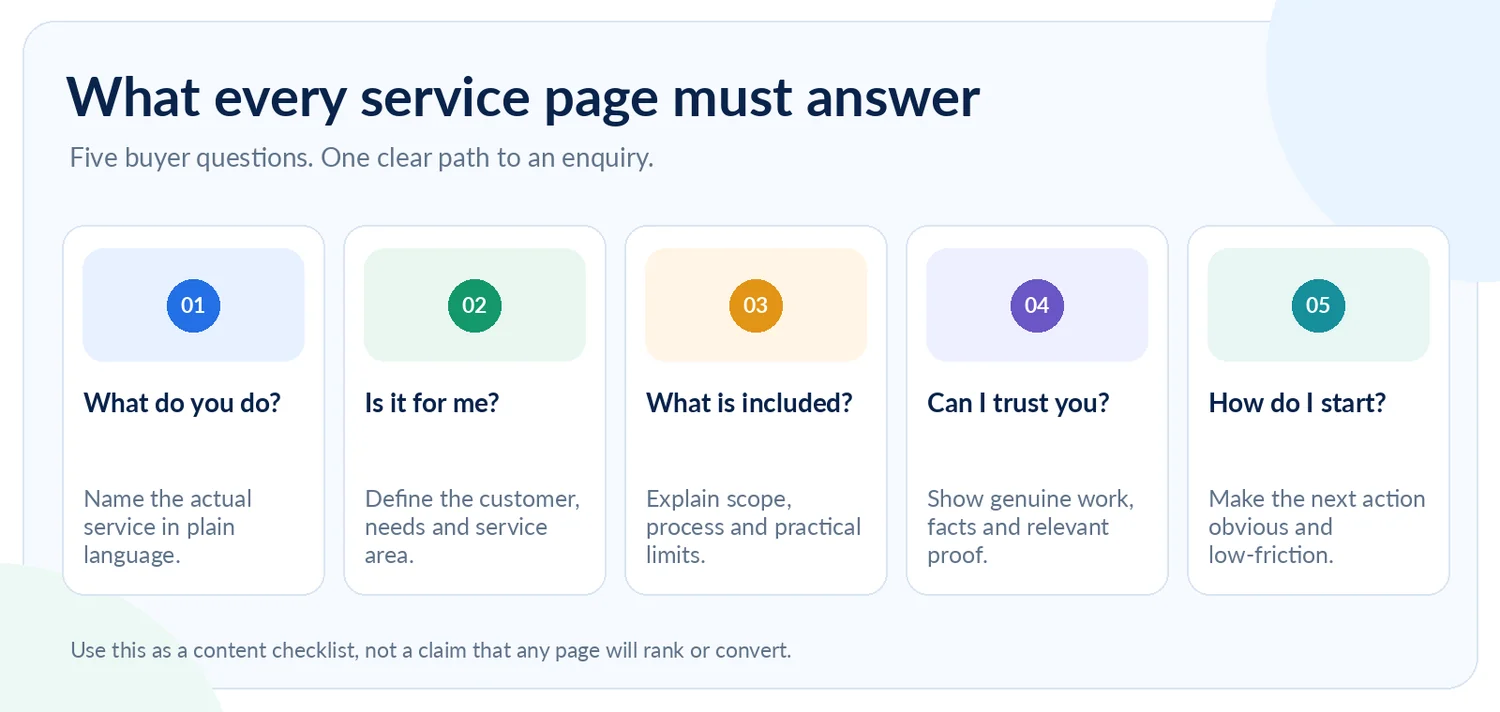
Before writing the page, ask whether it addresses these five questions:
What exactly does this business provide?
Is the service appropriate for me?
What is included, and how does the process work?
What evidence suggests the business can deliver?
What should I do next?
These questions can guide the structure without making every page look identical.
Make the first screen useful
The top of the page should tell a visitor what the service is, who it's for, and how to proceed.
For a hypothetical photography studio, compare:
Vague headline
"Elevating Brands Through Exceptional Visual Experiences"
More useful headline
"Product Photography in Milan for Ecommerce Brands"
The second version is less decorative, but considerably clearer.
A supporting introduction might explain:
"We create product photographs for online stores, catalogues, and brand materials. Tell us what you're selling, how many items need photographing, and where the images will be used. We'll explain the production options and what we need to prepare a quote."
This is illustrative copy for a hypothetical business. It should only be used by a real studio if those services accurately describe its work.
Notice what the opening accomplishes.
It names the service, identifies relevant customers, provides useful context, and tells the reader what to do next.
There is no need to repeat "best product photography Milan" throughout the text.
Explain what is included
After the introduction, describe the actual service.
What does the customer receive?
What choices are available?
Which parts are included in the quoted work, and which may require an additional agreement?
For a product photography service, relevant subjects might include:
Photography style and background options.
Product preparation and handling.
Selection and retouching of images.
Final file formats and delivery.
Commercial usage terms.
Turnaround and scheduling.
Only describe options the business genuinely provides.
If an element varies by project, explain that rather than promising a fixed package that doesn't exist.
For other industries, the same principle applies.
A cleaning company should describe its cleaning scope.
A website developer should clarify what design, development, hosting, and maintenance actually include.
A bookkeeper should explain which accounting tasks are covered and which require separate professional support.
A useful service page reduces uncertainty.
Explain the process without unnecessary detail
A customer should understand what happens after making an enquiry.
A photography studio might describe an initial brief, a quotation, project preparation, production, and delivery.
The details should reflect the studio's real workflow.
You don't need ten steps if the process is simple.
But a short explanation helps customers understand what they're committing to and what information they should prepare.
It can also reduce unsuitable enquiries.
Someone looking for same-day delivery may discover that the service requires advance planning.
A customer with a highly specialized requirement may learn that they should explain it before receiving a quote.
That is useful information for both parties.
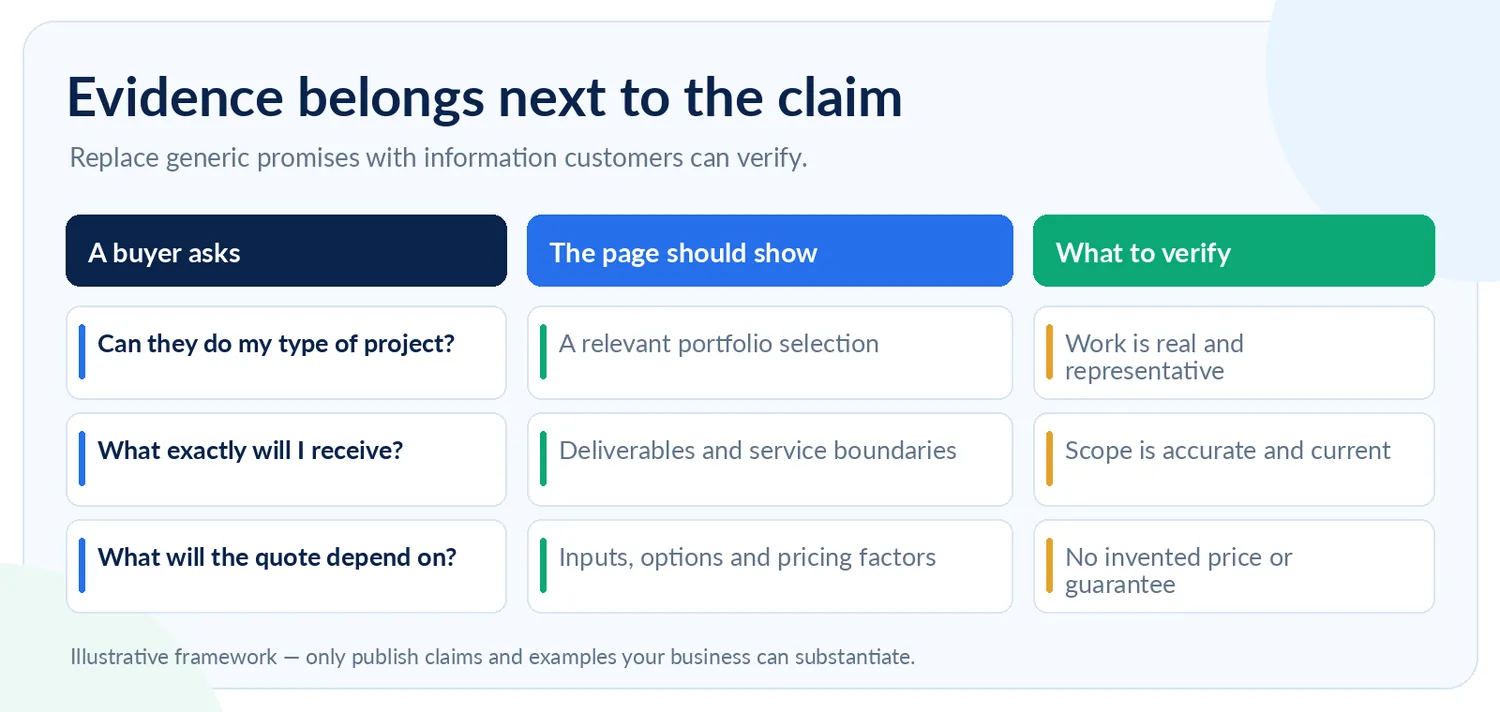
Put proof beside the claim it supports
Most businesses describe themselves as experienced, creative, reliable, or committed to quality.
Those words mean very little without supporting evidence.
Consider the statement:
"We deliver exceptional product photography."
A potential customer may reasonably ask, "Have you photographed anything similar to my products?"
An actual portfolio showing relevant work answers that question more effectively than another paragraph of praise.
The same principle applies to other claims.
Claim or customer concern | Useful supporting information |
|---|---|
Experience with similar projects | Real, relevant examples of completed work |
Understanding of a particular industry | Specific project details or demonstrated expertise |
Reliable delivery process | Clear stages, responsibilities, and deliverables |
Professional qualifications | Genuine, current credentials where relevant |
Customer satisfaction | Authentic reviews or testimonials used with permission |
Pricing transparency | An explanation of inclusions and cost factors |
The evidence should appear close to the concern it addresses.
If you're explaining what kinds of products a studio photographs, show relevant examples there.
If you're discussing turnaround times, explain how scheduling and delivery are managed.
Don't place every testimonial at the bottom and expect readers to connect it to the appropriate claim.
Never invent customer reviews, awards, qualifications, statistics, or project outcomes to make a service page look more established.
If you are a new business without many case studies, use accurate information about your process, experience, and actual work.
A modest, verifiable statement is more persuasive than an impressive claim you cannot substantiate.
Google's guidance on helpful content emphasizes original information, relevant expertise, and trustworthy content.
Give pricing enough context to be useful
Many service businesses avoid mentioning pricing because every project is different.
That is understandable.
But "Contact us for pricing" without any further explanation can leave prospective customers unsure whether the service is suitable for their budget.
If you can publish accurate starting prices or defined packages, consider doing so.
If you cannot, explain the factors that determine the quote.
For product photography, those might include the number and type of products, styling complexity, shooting location, retouching requirements, and usage arrangements.
A website design company might explain how the number of pages, integrations, content preparation, and maintenance affect the project scope.
This helps potential customers prepare a useful enquiry.
It also allows the business to communicate limitations before investing time in a quotation.
Don't invent a convenient "from" price just to make the page seem more competitive.
And don't publish fixed prices that are no longer valid.
A worked example: rewriting a weak service page
Let's build a better page for a hypothetical product photography studio.
The example is a writing framework, not a real customer case study or a claim about any existing company.
Before: a page that could describe almost any business
Title: Our Creative Services
Headline: We Bring Your Vision to Life
Opening copy:
"We are a passionate creative team providing innovative solutions to help brands stand out. Our experienced professionals deliver high-quality results tailored to every client's needs."
Button: Contact Us
There isn't necessarily anything false in that copy.
The problem is how little it explains.
A visitor cannot tell whether the studio photographs products, makes videos, offers branding, or provides social media management.
The headline could belong to hundreds of unrelated companies.
After: a page built around an actual service
SEO title: Product Photography in Milan | [Studio Name]
Page H1: Product Photography for Ecommerce Brands in Milan
Opening description:
"Product photography for online stores, catalogs, and brand campaigns. Share your product list, image requirements, and preferred delivery date, and we'll help define the production brief and quotation."
Primary action: Request a Photography Quote
The page could then follow this structure:
Section | What it should contain |
|---|---|
The service | A clear description of the photography offered |
Who it's for | Relevant businesses, product types, and project requirements |
Selected work | Genuine photographs demonstrating appropriate experience |
What's included | Accurate deliverables, options, and boundaries |
How a project works | Briefing, quotation, production, and delivery stages |
Pricing considerations | What determines the final quote |
Common questions | Issues customers raise before committing |
Enquiry | A simple form or clear contact route |
This doesn't require an enormous page.
Some businesses can explain their service properly in a relatively concise format. More complicated services may require additional detail.
The useful test is whether a prospective customer has enough information to decide what to do next.
What the enquiry form should ask
For the hypothetical photography studio, a useful form could request:
Name and contact details.
Business or brand name, if relevant.
Type and approximate number of products.
Intended use of the images.
Preferred timeframe.
Additional requirements or references.
Don't ask for information you don't need.
An overly complicated form can create unnecessary friction.
The aim is to gather enough context to respond helpfully, while keeping it easy for a serious customer to get in touch.
What makes this page better?
It has a defined service, a relevant audience, a clearer proposition, and practical information.
It also has a logical place for actual portfolio evidence.
None of those improvements guarantees a Google ranking or a new enquiry.
But the page now serves a real buyer's decision instead of relying on vague promotional language.
That is a much stronger foundation for both SEO and conversion measurement.
Write titles and metadata that describe the real service
Good service page content needs a clear search-result presentation.
Start with the HTML title.
Google recommends descriptive, concise titles that help people understand what a page offers.
For a service page, that will often include the service and, where genuinely relevant, a location or specific audience.
Examples:
Generic title | More descriptive version |
|---|---|
Our Services | Product Photography in Milan |
Accounting Solutions | Ecommerce Bookkeeping Services |
Professional Cleaning | Office Cleaning Services in Manchester |
Creative Production | Commercial Film Production for Brands |
These examples assume the business really provides the named service and serves the relevant market.
Don't insert cities or specialties that the company cannot legitimately support.
Google can also generate a different title link from page headings or other information. Your HTML title influences the result but doesn't dictate exactly what Google displays.
See Google's title link recommendations.
Make the meta description useful
A meta description should accurately summarize the page.
For example:
"Product photography for ecommerce brands in Milan. Explore our studio work, production process, and what to prepare when requesting a quote."
That's more helpful than:
"Discover our innovative, high-quality, professional creative services and exceptional customer solutions."
Google may generate its own snippet from visible page content when that better matches a search.
Its snippet guidance explains how descriptions are selected.
Choose a clear URL
A concise service-specific URL is easier to understand than a generic or unnecessarily complicated one.
For example:
/services/product-photography
is clearer than:
/services/service-01-final-new
Avoid changing an established URL merely to make it shorter.
If an important URL genuinely needs to move, implement an appropriate permanent redirect and update the internal links pointing to it.
Changing URLs unnecessarily introduces work and potential risk without guaranteeing better rankings.
Connect the service page to the rest of your website
A service page shouldn't exist in isolation.
Visitors should be able to find it through the site's main navigation or an appropriate services section.
Relevant blog articles can also point to it.
For example, a product photography studio might publish:
"How to Prepare Products for a Professional Photoshoot"
That educational article could naturally link to the product photography service page when discussing professional production.
The service page could link back to the guide if it helps customers prepare their brief.
Those links connect two different needs.
One page teaches the visitor something.
The other explains how to hire the business.
This is a useful relationship between editorial content and commercial pages.
Don't make every blog post compete with the service page
A common mistake is publishing multiple articles that effectively repeat the main service pitch.
Imagine a studio with these pages:
"Best Product Photography in Milan"
"Professional Product Photography Milan"
"Top Product Photography Services in Milan"
If all three describe the same service and target the same buying intent, the website may be creating unnecessary overlap.
One strong commercial page, supported by distinct educational resources, is generally easier to maintain and understand.
Our keyword cannibalization guide explains how to diagnose harmful overlap rather than automatically merging every related page.
Don't manufacture location pages
If your business serves multiple cities, it can be appropriate to explain those service areas.
But creating near-identical pages for dozens of locations doesn't establish genuine local relevance.
Google's spam policies address doorway abuse, including substantially similar location-targeted pages designed to funnel visitors toward the same destination.
Create a distinct local page when it genuinely helps someone understand your services in that location.
Otherwise, explain the areas you serve clearly on the appropriate existing page.
Check the technical foundations
A well-written page still needs to function properly.
Before publishing, check the basics.
Indexing: The page should be publicly accessible, return the appropriate HTTP response, and not contain an unintended noindex directive.
Canonical URL: The canonical should identify the preferred page, without unnecessarily pointing a distinct service page toward another URL.
Mobile presentation: Headings, images, descriptions, and enquiry controls should work on smaller screens.
Images: Use real service imagery where possible. Include descriptive alternative text that reflects what the image shows.
Internal links: Make the page reachable through crawlable links, not just a button dependent on complicated JavaScript.
Structured data: Where appropriate, accurate Organization or LocalBusiness structured data can help describe the business. Markup should reflect visible, real-world information.
Google documents LocalBusiness structured data, but adding markup doesn't guarantee a rich result or higher ranking.
Don't assume that adding generic Service schema automatically creates a special Google search appearance.
And avoid self-serving star-rating markup intended to manufacture review snippets.
These checks matter, but none replaces useful service information.
A perfect technical audit score won't make a vague sales page persuasive.
Measure enquiries, not just search positions
Once the page is published, you need to know whether people discover it and whether it helps the business.
Start with Google Search Console.
Open Performance → Search results, then select the service page in the Pages tab.
Review the queries associated with that URL.
Are they relevant to the service?
Are people searching for a provider or for something unrelated?
Is the page earning clicks?
Does its visibility change over time?
These measurements help you understand organic discovery.
They don't tell you whether visitors became customers.
Track the next action
In your analytics setup, measure meaningful events.
Depending on the business, these could include a completed enquiry form, a booking request, or another clearly defined contact action.
Google Analytics 4 refers to important website interactions as key events. Its documentation explains how key events differ from advertising conversions.
Don't count every button click as a successful lead.
A form that fails to submit is not an enquiry.
A spam message is not a qualified prospect.
And some real customers may call or contact the company through a different channel.
For the most useful assessment, combine website data with actual business outcomes.
What should you investigate?
What you observe | What to review |
|---|---|
Few relevant impressions | Search intent, competition, content relevance, and indexing |
Relevant impressions but few clicks | Ranking position, title, and search-result presentation |
Relevant clicks but few enquiries | Page clarity, proof, offer fit, and contact experience |
Many enquiries but poor fit | Qualification, service boundaries, and messaging |
Enquiries increase after an improvement | Check source, quality, and comparable reporting periods |
A page can receive modest traffic and still generate valuable business.
Another page can attract thousands of visitors who never need the service.
Don't evaluate commercial pages by traffic alone.
If you're investigating high impressions with few clicks, our Search Console guide covers that diagnosis in more detail.
A 30-minute review of your most important service page
Choose one page associated with a service your business genuinely wants to sell.
Don't begin by rewriting the entire website.
First five minutes: Check the search intent
Search the target phrase in your market and examine the types of pages appearing.
Make sure a service page is appropriate.
Next five minutes: Review the first screen
Can a visitor identify the service, intended customer, location where relevant, and next action?
If not, rewrite the opening for clarity.
Next five minutes: Check the service scope
Can someone understand what is included, what varies by project, and how the process works?
Look for unanswered customer questions.
Next five minutes: Review the proof
Find claims about expertise, quality, experience, and outcomes.
Identify which ones have genuine supporting evidence and which should be removed or rewritten.
Next five minutes: Test the enquiry route
Open the page on mobile.
Follow the enquiry process yourself.
Make sure forms, contact details, and important instructions work as intended.
Final five minutes: Record the next action
Note the current relevant Search Console data, decide on the most useful improvement, and record when the change is made.
You may discover that the page needs a complete rewrite.
Or you may find that the main issue is a vague introduction, an unclear service boundary, or a broken contact form.
Fix what the evidence supports.
Where RepGet fits
For small businesses, identifying useful SEO improvements and carrying out the work consistently can take significant time.
RepGet connects website auditing, keyword research, article preparation, publishing, and search performance reporting in one workflow.
Its free website audit can help identify technical issues and visibility gaps worth investigating.
The keyword and content tools can also support related educational articles that answer questions around your services.
However, any service description, project claim, price, or customer evidence still needs to be accurate and approved by the business.
Automating content production is most useful when the underlying service information is correct.
The bottom line
A strong service page doesn't need to be the longest page on your website.
It needs to be the one that answers the right questions.
Explain the service clearly.
Show who it's suitable for.
Describe the actual work involved.
Support important claims with genuine evidence.
Make it easy for a serious customer to take the next step.
Then measure whether relevant search visibility is turning into useful enquiries.
Before publishing another ten blog posts, make sure the pages closest to your customers' buying decisions are worth visiting.
See where your website could improve
If you're unsure whether technical issues or weak on-page SEO are limiting your site's visibility, start with a free website audit from RepGet.
It can help you identify issues worth addressing before expanding your content plan.
No account or credit card required.
FAQ
What is service page SEO?
Service page SEO is the process of making a page about a specific business service easier for search engines to understand and more useful to potential customers. It includes search intent, accurate service information, descriptive titles, internal links, technical accessibility, and a clear enquiry route.
How long should an SEO service page be?
There is no required word count. A straightforward service may need a concise page, while a complex service may require more explanation. Include enough information to answer important buying questions without adding text simply to make the page longer.
Should each service have its own SEO page?
Distinct services may deserve separate pages when they meet different customer needs. Avoid creating multiple near-identical pages for minor keyword variations. Each important page should have a clear purpose.
Should I put prices on my service page?
Accurate pricing can help customers evaluate a service. If projects require individual quotes, explain what affects the cost and what information customers should provide. Don't publish fictional starting prices or outdated packages.
Can a service page rank without a blog?
Yes. Google can index and rank a relevant, accessible service page without requiring a supporting blog. Educational articles can be useful for answering related questions and building internal links, but they aren't a prerequisite for ranking.
Do service pages need schema markup?
Not every service page requires structured data. Accurate Organization or LocalBusiness markup may help Google understand relevant business information. Adding generic Service schema does not guarantee a rich result or higher rankings.
How can I tell whether my service page is working?
Review its relevant search queries, impressions, and clicks in Google Search Console. Then use analytics and business records to assess qualified enquiries, bookings, or other meaningful customer actions. Traffic and conversions should be evaluated separately.