

How to Find Low-Competition Keywords That Bring Customers
Short answer
To find low-competition keywords, start with the problems your customers need solved, then use Google Search Console and keyword research tools to discover relevant searches. Check the actual Google results before trusting difficulty scores, and prioritize topics that match your services and lead to a useful next action. Low search volume can still be valuable, but low competition alone does not guarantee rankings or customers.
A keyword with 200 monthly searches can be more valuable to a small business than one with 20,000.
Imagine you run a bookkeeping firm. Ranking for "accounting" would bring a wide range of visitors, many of whom aren't looking to hire anyone.
Ranking for "bookkeeper for Shopify sellers UK" could attract someone searching for exactly the service you provide.
The second term may have fewer searches, but its commercial relevance is much clearer.
That's the opportunity behind low-competition keyword research. You look for searches where your website has a realistic chance of competing and where the person searching might genuinely need your business.
Finding those opportunities requires more than setting a keyword difficulty filter to zero.
Here's a practical way to do it.
What makes a keyword low competition?
A low-competition keyword is a search term where ranking may be more achievable because the existing results are less difficult to compete with.
That doesn't necessarily mean the keyword is unpopular.
And it doesn't mean every website has the same chance of ranking for it.
Consider these hypothetical searches:
Accounting software.
Accounting software for freelancers.
Accounting software for freelance photographers.
How to manage invoices as a freelance photographer.
The broader terms may attract larger audiences. The more specific searches describe narrower problems.
For a business serving freelance photographers, some of those specific questions could be more relevant than the broad term.
But specificity alone doesn't establish low competition.
Google might already show excellent pages from established companies for the exact question.
Or the search results might favor software products when your website only provides accounting services.
You need to understand both the competition and the reason someone is searching.
Low competition and low search volume are different
Keyword tools commonly provide two separate estimates.
Search volume estimates how often people search for a term during a given period.
Keyword difficulty estimates how challenging it may be to rank in organic search results.
A keyword can have low search volume and still be difficult to rank for.
It can also have considerable search demand while showing opportunities for a relevant specialist website.
Ahrefs and Semrush use their own difficulty models. These are useful research indicators, not scores provided by Google.
Start with the services people can buy from you
Before opening a keyword tool, write down what your business sells.
Not broad industry categories.
Actual services, products, and customer problems.
Let's use an independent bookkeeping company serving UK ecommerce businesses as an example.
Its services might include monthly bookkeeping, transaction reconciliation, financial reporting, and support with ecommerce accounting systems.
A basic research list could look like this:
Service or customer need | Initial keyword idea |
|---|---|
Bookkeeping for online retailers | Ecommerce bookkeeping services |
Specialist support for Shopify stores | Shopify bookkeeper UK |
Understanding costs | Monthly ecommerce bookkeeping cost |
Comparing solutions | Ecommerce bookkeeping software vs bookkeeper |
Solving marketplace accounting problems | Bookkeeping for Amazon sellers |
Choosing a provider | How to choose an ecommerce bookkeeper |
These are illustrative keyword ideas, not verified search-volume or difficulty findings.
That's fine at this stage.
The purpose is to identify the questions and needs closely connected to the business.
You can then investigate whether people actually search for them.
Ask customers, not just keyword software
Your own customer conversations are useful research material.
What do customers ask before requesting a quote?
Which services do they misunderstand?
What makes someone choose your business instead of a competitor?
What do new customers wish they had understood earlier?
A bookkeeping firm might repeatedly hear:
"Can my Shopify sales be reconciled automatically?"
"Do I still need a bookkeeper if I use accounting software?"
"What information do I need to provide every month?"
Those questions are potential content topics.
They still need search-demand and intent validation, but they start from genuine customer needs.
This is an advantage smaller businesses sometimes overlook. Large keyword databases can show patterns across thousands of websites. Your customer conversations can reveal the problems your own audience cares about.
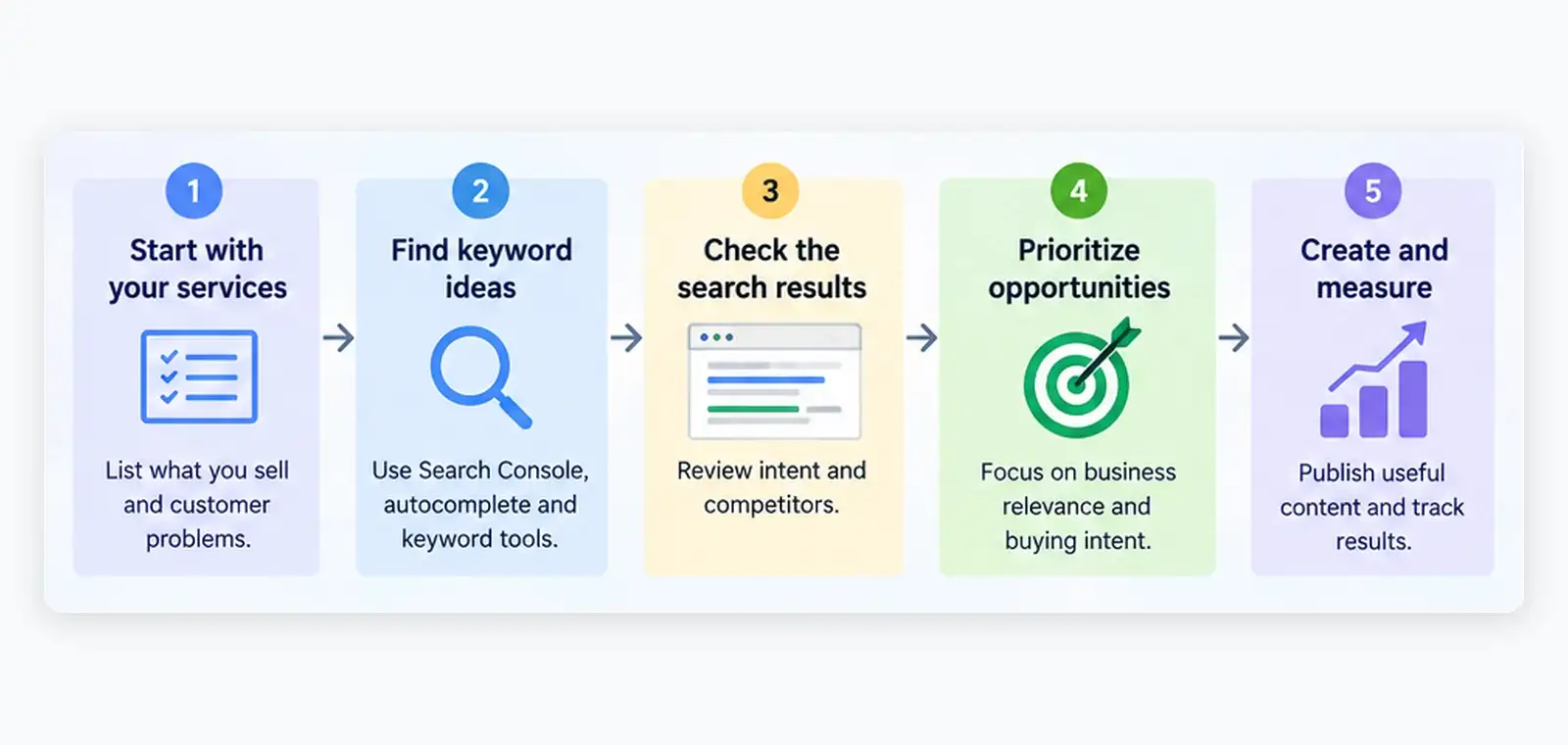
Find opportunities in Google Search Console
If your website already appears in Google results, Search Console is one of the best places to begin.
It shows queries for which Google has displayed your pages.
That means you can discover subjects where your website already has some visibility, even when visitors haven't clicked.
Open Google Search Console and select your property.
Go to Performance → Search results.
Choose the last three months, or a longer period if your website has limited traffic.
Then follow this process.
Look for relevant queries with impressions
Open the Queries tab.
Review searches that relate to your actual services.
Don't immediately sort everything by highest impressions.
Instead, look for questions your website could answer more thoroughly.
For example, suppose your bookkeeping website appears for a query about the cost of ecommerce bookkeeping but doesn't have a dedicated explanation of its pricing.
That could indicate a content opportunity.
It does not automatically require a new article. The answer might belong on an existing service or pricing page.
Check which page Google already associates with the query
Click a relevant query in Search Console, then open the Pages tab.
This helps you see which URL received visibility for that search.
Now inspect that page.
Does it answer the question?
Is the information easy to find?
Is the page intended for someone seeking that service?
If Google is already displaying a relevant page, improving it may be a better investment than creating another URL.
Investigate pages that receive impressions but few clicks
Open the Pages tab and select a relevant page. Then return to Queries to review the searches associated with it.
A page with impressions but limited clicks may deserve further investigation.
Possible reasons include a weak title, a mismatch between the page and search intent, competition from other results, or a search that users can complete without clicking.
Don't assume a low click-through rate always means the title is wrong.
Search position, result features, branded queries, and the nature of the question can all affect clicks.
Google's Search Console Performance documentation explains how to interpret these metrics.
One limitation is important: Search Console hides some rare queries for privacy and does not expose every possible search.
If your website is new and has almost no impressions, move to external keyword research rather than expecting Search Console to produce a complete list.
Expand your list without paying for expensive tools
You can find useful keyword ideas with several accessible sources.
You don't need all of them.
Start with the ones that answer different questions.
Google autocomplete and related searches
Type a service-related phrase into Google and look at the suggested completions.
Try variations involving your audience, location, problem, and buying stage.
For example:
"Bookkeeping for..."
"Shopify bookkeeper..."
"Cost of ecommerce bookkeeping..."
"Bookkeeper vs..."
Suggestions can reveal common ways people express a need.
However, autocomplete suggestions are not reliable search-volume measurements. Don't assume a phrase receives substantial traffic simply because Google suggests it.
Use the suggestions as research leads.
Google Keyword Planner
Google Keyword Planner can help expand a list and provide historical search-volume estimates.
Be careful with one particular metric.
The Competition column in Keyword Planner refers to competition among advertisers for Google Ads.
It is not an organic SEO difficulty score.
A term marked as having low advertising competition is not necessarily easy to rank for in unpaid search results.
Google explains the distinction in its Keyword Planner documentation.
Also remember that its search estimates depend on the selected location, period, and other settings.
A UK bookkeeping business should not evaluate local opportunities using worldwide search estimates without understanding the difference.
Dedicated SEO research tools
Ahrefs and Semrush provide organic keyword difficulty estimates, related keyword ideas, and information about competing pages.
These can help narrow a large list.
For example, you might start by reviewing terms with lower difficulty scores in your chosen tool.
But don't treat an arbitrary threshold, such as a difficulty score below 20, as a promise that a new website can rank.
The score is an estimate.
Your next step is to inspect the actual results.
AI-assisted keyword research
AI can also help organize research.
For example, you could ask:
"Group these bookkeeping questions by customer intent. Identify which topics might belong on service pages, which need educational guides, and which appear to overlap."
That is a useful organizational task.
Asking AI to invent search volumes or declare keywords easy to rank for without actual search data is not.
Use AI to structure evidence, not manufacture it.
Check the search results before trusting a difficulty score
This is the most important part of the process.
A keyword tool might report a low difficulty score, but the current Google results could tell a different story.
Search the exact phrase in the country or market you want to reach.
Inspect the first page carefully.
You aren't simply checking how famous the competing websites are.
You're checking what Google appears to consider a good answer.
Look at the type of pages ranking
Does Google show service pages?
Product listings?
Tutorials?
Comparison articles?
Local business listings?
Video results?
If someone searches for "Shopify bookkeeper UK" and the results primarily show service providers, an informational blog post may not be the right page to create.
Your business may need a dedicated service page instead.
If the results mostly explain how to reconcile Shopify transactions, a practical tutorial may be more appropriate.
Match the purpose of the search before choosing the content format.
Look for weaknesses in existing answers
Open several relevant results.
Ask whether the pages genuinely answer the question.
Sometimes a broad industry website ranks with a short explanation that barely addresses a specific customer need.
A specialist business may be able to provide a more useful answer with practical detail, original examples, and clear information.
But don't mistake an unattractive design or a short article for weak competition.
A concise page can be excellent.
And an established website may rank because it offers relevant information, strong credibility, and an effective user experience that isn't obvious from the word count.
Look for a real information gap.
Consider the strength of competing websites
A results page dominated by relevant, well-developed pages from established providers may be difficult for a new website.
A page showing a mixture of relevant specialist businesses, general guides, and less complete resources may be worth investigating.
Neither pattern guarantees success.
Domain authority estimates can help provide context, but they do not replace reviewing the individual pages and the search intent.
Also pay attention to location.
A query that looks achievable in one country may have very different results in another.
For local businesses, map results and nearby providers can be central to the search experience.
Record your conclusion
For every promising keyword, make one of three decisions:
Pursue: The intent matches your business, and you have a credible way to create a useful page.
Investigate further: The topic is relevant, but competition or search intent is unclear.
Skip: The query is not closely related to your services, or your website cannot provide the kind of result people appear to want.
Don't publish simply because a keyword tool displays a reassuring number.
Prioritize buying intent over impressive search volume
A keyword can bring visitors who never become customers.
That doesn't make informational content worthless. Useful guides can build awareness, earn relevant references, and help people make decisions.
But a small business with limited time needs to understand which topics connect most directly to revenue.
Consider these illustrative searches for a bookkeeping company.
Search query | Likely intent | Best content direction |
|---|---|---|
What is bookkeeping? | Learn a basic concept | Educational guide, lower immediate buying intent |
Best bookkeeping software for ecommerce | Compare software | Comparison guide, if the company can offer credible expertise |
Bookkeeper for Shopify sellers UK | Find a specialist provider | Service page |
How much does ecommerce bookkeeping cost? | Evaluate a potential purchase | Pricing explanation or buying guide |
Shopify sales reconciliation problems | Solve a specific issue | Practical tutorial with relevant service context |
Ecommerce bookkeeping services | Find a provider | Main commercial service page |
These classifications are starting hypotheses. Confirm them against current results before creating pages.
The table illustrates an important distinction.
A question about bookkeeping software can attract plenty of researchers who intend to do the work themselves.
A search for a specialist bookkeeper expresses a more direct service need.
That does not mean you should ignore educational content.
It means you should understand what each page is supposed to achieve.
Use a simple commercial relevance test
Ask yourself:
If someone arrived on this page, would my business offer a useful next step?
For a service-related search, that might be an enquiry.
For a software comparison, it might be a relevant product trial.
For an introductory explanation, it might be another guide that helps the reader move closer to a decision.
If there is no relevant next step, the topic may not deserve priority.
Traffic without a meaningful connection to your business can consume a great deal of content-production effort.
Use a four-part test to choose your first keywords
You now have a list of possible search terms.
Some have estimated volume. Some have difficulty scores. Some already appear in Search Console.
You still need a way to decide what to work on first.
Use the following editorial framework.
This is a prioritization method, not a proprietary search-engine score.
Criterion | Question to ask |
|---|---|
Business fit | Does the topic directly relate to something we sell or provide? |
Search intent | Are people looking for information or services we can genuinely deliver? |
Competitive opportunity | Do the current results leave room for a useful, credible page from our website? |
Evidence and expertise | Can we provide accurate, specific information beyond generic explanations? |
Rate each criterion from 0 to 2.
0: Weak or missing.
1: Partially meets the requirement.
2: Strong match.
A keyword can therefore receive a maximum of eight points.
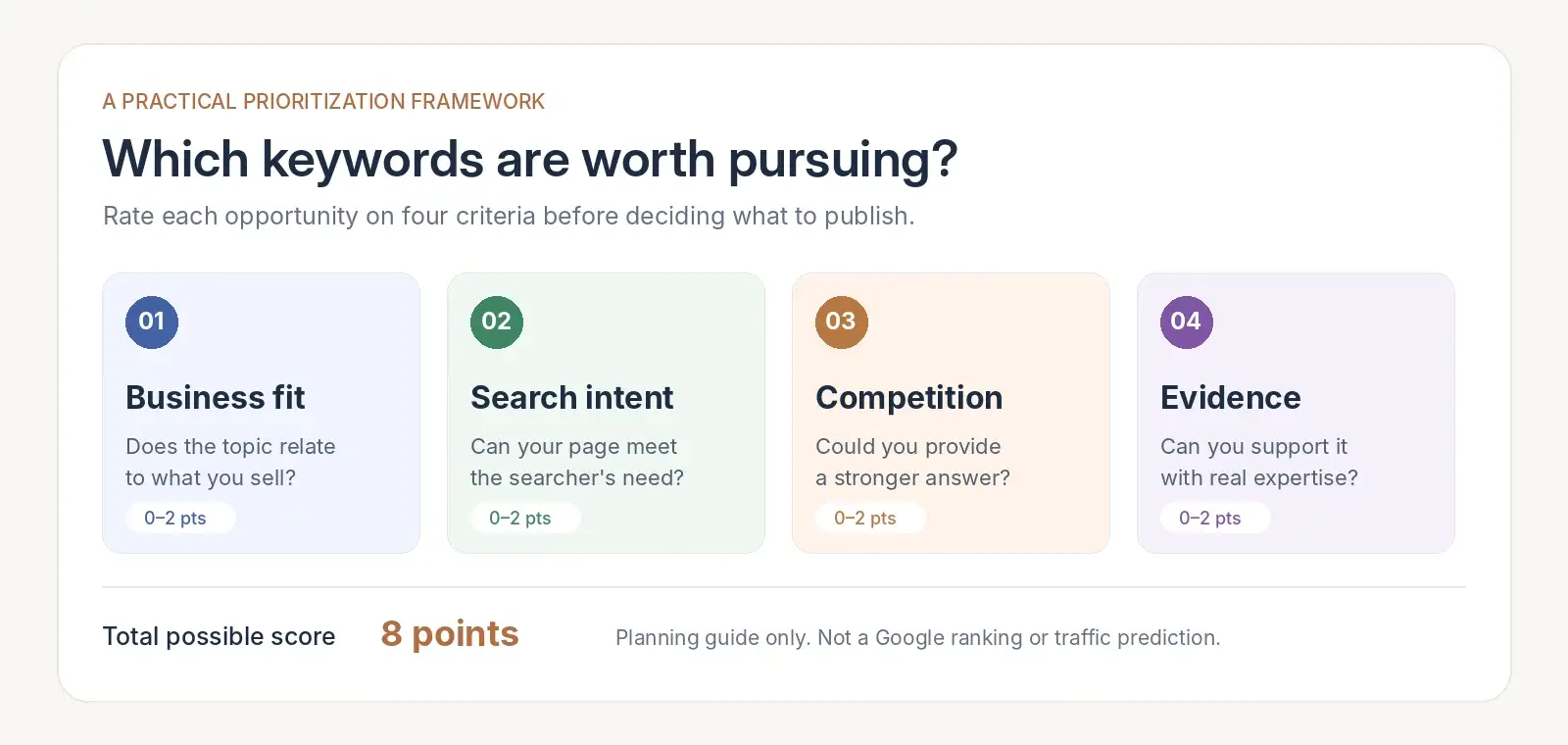
This isn't a prediction of rankings.
It simply prevents your team from prioritizing keywords based on search volume or difficulty alone.
For example, "bookkeeping software" may have limited business fit for a company that only provides bookkeeping services.
"Bookkeeper for Shopify sellers UK" may have much stronger business fit, but it still requires an honest competition check.
If the current search results are too strong or the company lacks relevant experience, the keyword may be a poor immediate target despite its commercial relevance.
The framework forces you to consider those limitations.
What should you prioritize?
Start with the terms that combine:
A clear connection to your products or services.
Search intent you can satisfy.
A realistic opportunity based on current results.
Enough knowledge or evidence to create a strong page.
Search volume is useful after those conditions are considered.
It is rarely the best first filter for a small business.
Build a keyword plan without creating duplicate pages
One of the easiest SEO mistakes is treating every keyword as a separate article.
Suppose you discover these searches:
"Shopify bookkeeping services"
"Bookkeeper for Shopify sellers"
"Shopify bookkeeping accountant"
"Bookkeeping help for Shopify stores"
They may represent closely related needs.
Publishing four near-identical service pages could create unnecessary duplication and confusion.
Instead, investigate whether one well-developed page can satisfy the overlapping searches.
A sensible content plan might look like this:
Page | Main purpose | Supporting questions |
|---|---|---|
Shopify bookkeeping services | Explain the specialist service | Who it's for, scope, workflow, enquiries |
Ecommerce bookkeeping costs | Help prospects understand pricing | Monthly fees, complexity, included services |
Shopify reconciliation guide | Solve a practical problem | Common discrepancies, information needed |
Bookkeeping software vs bookkeeper | Help readers choose an approach | DIY limitations, professional support, tradeoffs |
Amazon seller bookkeeping | Address a distinct seller category | Marketplace-specific requirements |
These are potential page concepts, not confirmed keyword opportunities.
Notice that each page has a different job.
The service page helps someone evaluate a provider.
The pricing page answers a commercial question.
The reconciliation article helps solve a technical problem.
The comparison helps someone choose between approaches.
That's a better structure than publishing multiple articles that repeat slightly different versions of the same advice.
When should you improve an existing page?
If the topic is already covered on your website, inspect the existing content before creating another URL.
Look at its Search Console queries.
Compare it with the current competing results.
Check whether it answers the relevant customer questions.
You may find that the best opportunity is to strengthen the page you already have.
If your website is struggling to attract any search traffic, our guide to what to fix first explains why technical accessibility and existing content often deserve attention before expanding the blog.
Turn a promising keyword into a useful page
Once you've selected a topic, don't immediately ask AI to write 2,000 words.
Decide what the reader needs to accomplish.
Let's return to the hypothetical keyword "bookkeeper for Shopify sellers UK."
A useful service page should make several things clear.
Who is the service for?
What work does the company actually handle?
Does it have relevant experience with Shopify businesses?
How does onboarding work?
What information will a prospective customer need?
How can someone request a quote?
The page doesn't need an elaborate introduction explaining why bookkeeping is important.
People searching for a specialist provider already understand that they have a problem to solve.
They need help evaluating a solution.
Add information competitors cannot invent
Your actual services, processes, limitations, and experience are valuable.
An AI-generated article can explain what bookkeeping is.
It cannot truthfully claim that your business has worked with hundreds of ecommerce clients unless that is verified.
It cannot invent your monthly prices or fabricate customer outcomes.
The strongest content comes from useful source material.
This may include original examples, clear service descriptions, verified customer questions, and first-hand knowledge.
Google's helpful content guidance emphasizes original information, useful analysis, and satisfying the reader's actual purpose.
That principle matters far more than reaching a particular word count.
Give readers a relevant next action
A commercial service page should make it easy to enquire.
An educational guide can link to a related service when that would genuinely help.
A product comparison can explain which solution fits different customers.
The next action should follow naturally from the subject.
Don't insert unrelated product promotions into every paragraph.
The goal is to help the reader complete the decision that brought them to your website.
Measure whether the keywords bring customers
Keyword research doesn't end when an article is published.
You need to understand whether the page is reaching the intended audience.
Start with Search Console.
Record the page's initial performance and review it over time.
Look at:
Relevant impressions. Is Google showing the page for the searches you intended to address?
Organic clicks. Are people choosing to visit?
Unexpected queries. Is the page attracting questions that suggest an information gap or a different search intent?
Search position. Is visibility changing, while accounting for fluctuations and differences between queries?
Then examine what visitors do after arriving.
If you have analytics and conversion tracking configured, look for meaningful actions such as:
Enquiry form submissions.
Qualified contact requests.
Product trial signups.
Purchases or bookings.
A page with modest traffic that regularly supports genuine enquiries may be more commercially valuable than an article attracting large numbers of visitors who never become customers.
Don't declare success too early
Search performance can change gradually and is affected by many factors.
A new page may take time to be discovered, indexed, and evaluated.
Some queries also have seasonal demand.
And a page can receive impressions without producing clicks, especially when search results answer parts of the question directly.
Review meaningful periods rather than reacting to every daily movement.
If the page receives relevant impressions but consistently fails to attract visitors, examine its title, positioning, and search intent.
If it attracts visitors but no useful actions, inspect whether the content matches what the business actually offers.
If it attracts almost no relevant impressions, revisit the topic selection, competing pages, and technical accessibility.
Keyword research should become a recurring process of choosing, publishing, measuring, and improving.
Where RepGet fits into keyword research
For small businesses, the difficulty isn't necessarily finding a keyword.
It's turning research into a consistent publishing plan without spending hours moving between different tools.
RepGet combines website auditing, keyword research and clustering, article preparation, CMS publishing, and reporting.
The platform can help organize related searches, prepare content around selected subjects, and publish approved articles to your website.
It also connects with Google Search Console for ongoing performance reporting.
That makes it useful for businesses that want keyword research connected to the work that follows.
However, no keyword research tool can guarantee that a chosen term will rank.
You still need to evaluate relevance, verify important claims, and review what gets published.
If you're unsure whether your website is ready for more content, start with a free website audit from RepGet. It can help identify technical and visibility issues worth investigating before you expand your publishing schedule.
The bottom line
The best keyword is not always the one with the most searches.
And the easiest keyword to rank for is not automatically the one worth targeting.
Start with your customers.
Find the questions and services that matter to them.
Use search data to discover opportunities, inspect the current results, and decide whether your website can provide a genuinely useful answer.
Then choose the right page: a service page, a guide, a comparison, or an improvement to content you already have.
A small group of relevant keywords can be a better business investment than a long list of popular searches with no clear connection to your customers.
Find out what your website needs first
Before investing in more articles, understand where your existing website stands.
Run a free SEO audit with RepGet to identify technical issues and visibility gaps worth addressing.
No account or credit card is required.
FAQ
What is a good keyword difficulty score for a new website?
There is no universal score that guarantees a new website can rank. Different SEO tools calculate difficulty differently. Use lower difficulty scores to identify candidates, then inspect the search results, search intent, and competing pages before choosing a keyword.
Can low-volume keywords bring customers?
Yes. A specific search with clear commercial intent may attract visitors who are closer to purchasing than a broad informational query. However, low search volume does not guarantee high conversion rates. Relevance and the quality of the page matter.
How can I find low-competition keywords for free?
Start with your customer questions, Google Search Console if your site has existing visibility, Google's autocomplete suggestions, and Keyword Planner. Then manually review the search results to judge relevance and competition. Keyword Planner's advertiser competition metric should not be confused with organic SEO difficulty.
Should I create a separate page for every keyword?
No. Closely related keywords often share search intent and can be served by one strong page. Create separate pages when people are looking for meaningfully different information, services, or decisions.
Are long-tail keywords always easier to rank for?
No. Longer, more specific phrases can be less competitive, but some are simply alternative ways of expressing highly competitive searches. Always evaluate the actual results rather than relying on the number of words.
How many keywords should a small business target first?
A focused shortlist of five to ten worthwhile topics is a manageable starting point for planning. That is an organizational recommendation, not a Google ranking requirement. Prioritize quality, relevance, and the ability to maintain the pages rather than reaching a fixed number.
Can AI find profitable SEO keywords automatically?
AI can help generate and organize keyword ideas, group related searches, and prepare content plans. Profitability depends on search demand, competition, commercial relevance, and actual conversions. Those outcomes need reliable data and validation rather than AI predictions alone.