

How to Update Old Blog Posts Without Losing SEO Rankings
Short answer
To update an old blog post without losing rankings, keep its URL and its existing internal and external links, then rewrite only what's outdated: stale facts, old examples, thin sections, and the title and meta description if they no longer match the content. Update the sitemap and request reindexing once the changes are live. Only change the published date if the content genuinely changed.
A post that used to bring in a steady trickle of visitors has quietly slipped to page two.
The screenshots inside it show software that looks nothing like the current version. The prices mentioned are a few years out of date.
You could rewrite the whole thing. You could leave it alone and hope it recovers on its own. You could delete it and start over with a fresh URL.
Any of those choices can go wrong if you don't know what's actually holding the rankings a post already has.
Here's a practical workflow for how to update old blog posts: what to keep, what to change, and when it's actually worth republishing.
Why Old Blog Posts Lose Rankings Over Time
A blog post doesn't usually lose its ranking because Google suddenly decided it was bad.
It loses ranking because the world around it kept moving while the page stayed still.
What actually causes a post to slip
A few things tend to happen gradually, and each one chips away at a post's usefulness.
Facts go out of date. A price, a statistic, or a tool mentioned in the post no longer reflects reality, and a reader notices within the first few sentences.
Links break. A post that once pointed to a helpful resource now sends readers to a dead page or a site that's changed completely.
Competing pages catch up. Other sites publish newer, more complete articles on the same topic, and Google has more options to choose from.
Search intent shifts. The phrase that used to bring informational searches might now bring people looking to buy, or the other way around, and the page no longer matches what people want.
None of this means the post was written badly. It means time passed, and nothing on the page reflected that.
Google's own guidance on creating helpful, reliable content describes this directly: content that stays accurate and useful over time tends to hold up better than content that was only ever accurate on the day it was published.
Why deleting isn't usually the first answer
It's tempting to delete an old, underperforming post and start fresh with a new URL.
That throws away something valuable: whatever signals the page has already earned. Backlinks pointing to it, internal links from other pages on your site, and any history Google has built up about how that URL performs.
A brand new URL starts from zero. An existing URL that gets refreshed keeps what it's already built, provided you don't disturb it unnecessarily.
Deleting and starting over is sometimes the right call, but it should be a deliberate decision, not the default one.
Find the Posts That Actually Need Updating
Before touching anything, figure out which posts are actually worth the effort. Not every old post needs a refresh, and guessing from how old a post looks is a poor way to decide.
Google Search Console gives you the clearest picture of how a post is actually performing, not how it feels like it's performing.
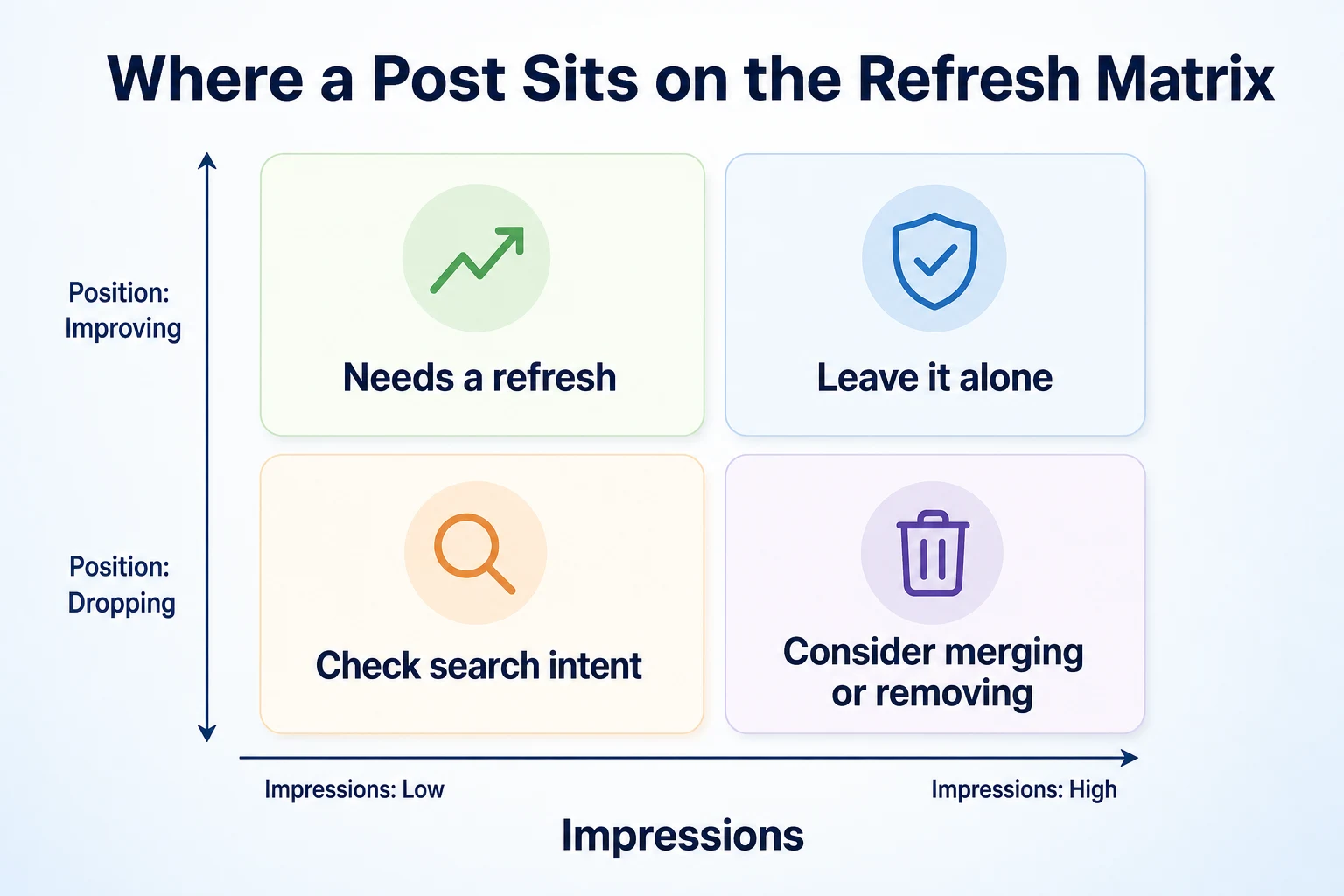
Signals that a post needs attention
Open the Search results report, filter to the page in question, and look at a few specific signals rather than a single overall number.
A page that gets a reasonable number of impressions but very few clicks often has a mismatch between what it promises and what it delivers, or a title and description that no longer feel current. Our guide to impressions without clicks walks through how to diagnose that specific pattern.
A page with a falling average position over several months, especially one that used to rank higher, is a reasonable candidate for a refresh.
Signals that a post is fine as it is
Not every quiet post is a problem. Some topics simply don't get much search volume, and that's not something a refresh will fix.
A page holding a steady position with steady clicks doesn't need attention just because it's a few years old. Updating it anyway risks introducing errors into something that currently works.
Signal | What it usually means | Where to look |
|---|---|---|
High impressions, low clicks | Title or description no longer matches what people expect | Search results report, filtered by page |
Falling average position over months | Competing pages may have overtaken it, or the content feels dated | Performance report, compared over a longer date range |
Steady position and steady clicks | The page is doing its job; leave it alone | Performance report, compared month to month |
Very low impressions regardless of position | The topic may no longer have meaningful search demand | Performance report, filtered by query |
If you're not sure where to start across a whole blog, RepGet's free website audit can flag pages with content issues worth investigating alongside your Search Console data. No account or credit card required.
What to Keep When You Refresh a Post
Once you've picked a post to update, the instinct is often to rewrite everything. Resist that. Some parts of the page are carrying weight you don't want to lose.
The URL
The URL is usually the single most valuable thing a page has. It's what backlinks point to, what Google has indexed and evaluated over time, and what any bookmark or saved link still relies on.
Keep it the same unless there's a genuine, specific reason to change it.
Internal and External Links
Check which pages on your own site link to this post, and which outside pages link to it. Both represent effort other people, or you, put in over time.
A refresh shouldn't break those links or make them point somewhere that no longer makes sense.
Anything Still Accurate
Not every sentence in an old post is wrong. Go through it section by section and keep what still holds up.
Rewriting a post from scratch when only a third of it is actually outdated wastes time and risks introducing new mistakes into parts that were fine.
Element | Usually keep | Usually change |
|---|---|---|
URL | Yes, almost always | Only with a genuine reason and a redirect |
Core structure and headings | Yes, if they still match how the topic is searched | Only the sections that are actually outdated |
Statistics, prices, screenshots | No | Yes, whenever they're out of date |
Internal links from other pages | Yes | Only if the destination truly needs to change |
Title and meta description | Only if they still match the content | Yes, if the page's focus has shifted |
Decide Whether to Update, Merge, or Remove
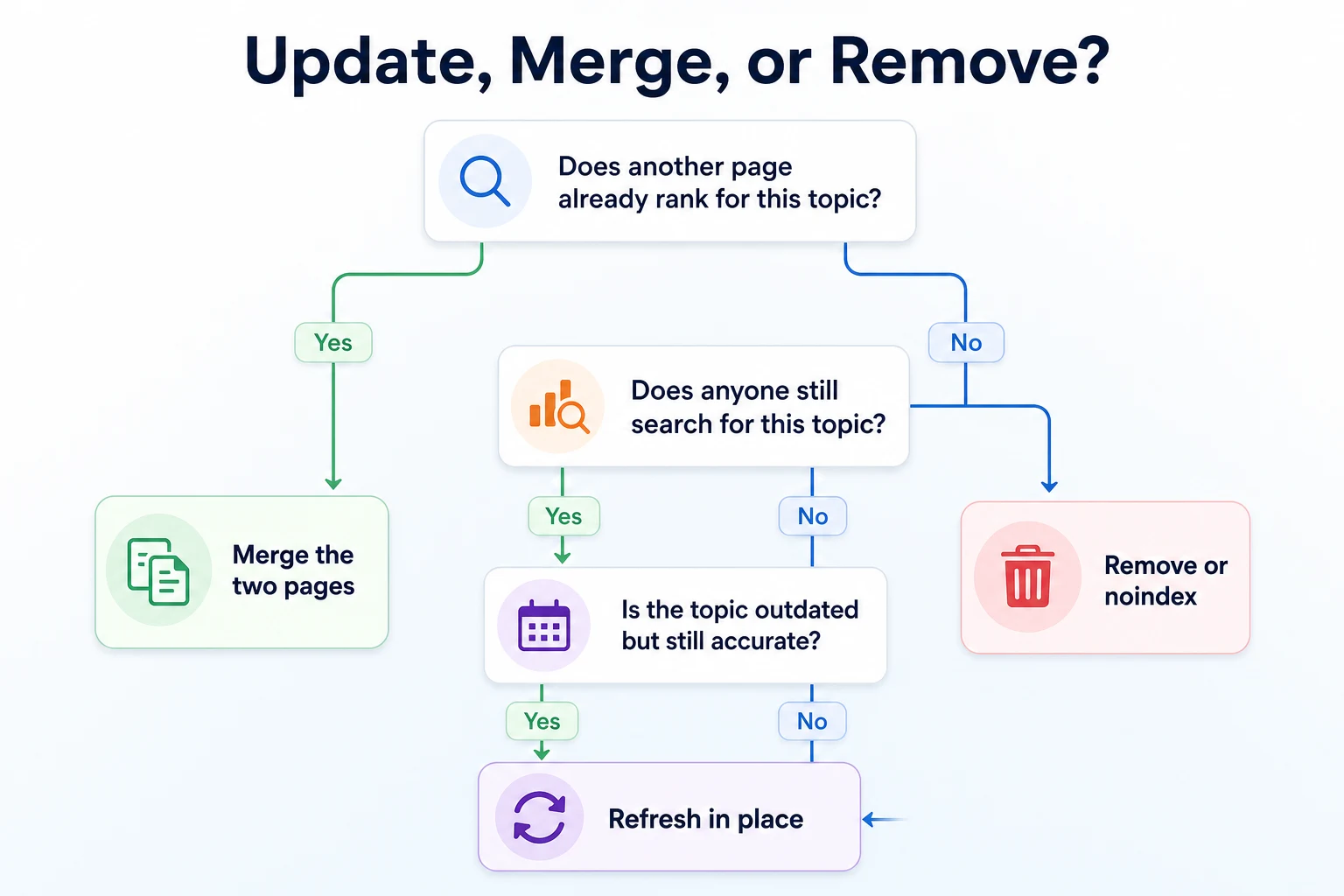
A refresh isn't always the right move. Sometimes a post should be merged into a stronger page, or removed entirely, and updating it in place just delays that decision.
When Two Posts Compete for the Same Search
If you have two posts covering close to the same topic, refreshing both separately can make the problem worse, not better. They end up competing with each other instead of with other sites.
Check whether this is happening on your own site before you invest time in a rewrite. Our guide to keyword cannibalization explains how to spot this in Search Console and decide which page should stay.
When a Topic No Longer Deserves Its Own Page
Some posts were written for a search that doesn't really happen anymore, or for a product or service you no longer offer. No amount of rewriting fixes a topic nobody is searching for.
In that case, the honest options are folding the useful parts into another page, or removing the post and setting up an appropriate redirect if other pages still link to it.
Keep the Same URL Whenever You Can
This point is worth its own section because it's the one mistake that's hardest to undo once it's made.
Why the URL matters more than the words on the page
A URL is more than an address. It's the thing every backlink points to, the thing Google has crawled and indexed repeatedly over time, and the thing any internal link on your own site already relies on.
Change the URL, and all of that has to be rebuilt from somewhere close to zero, even if the content on the page is better than before.
A new title, a better structure, updated examples: none of that requires a new address. If the topic of the page hasn't fundamentally changed, the URL shouldn't either.
Setting up a redirect if you must change it
Sometimes a URL genuinely has to change. Maybe it contains a year that's now wrong, or it was set up badly the first time and includes a typo or an awkward structure you don't want to live with permanently.
If that's the case, set up a 301 redirect from the old URL to the new one. Google's own documentation on 301 redirects explains how this tells search engines that the page has permanently moved, so that signals built up at the old address carry over to the new one rather than starting fresh.
Don't redirect a page to something unrelated just to preserve its ranking signals. A redirect should point to a genuinely equivalent page, or Google may not treat the two as connected at all.
And don't change a URL casually. If the current one works and there's no specific, real problem with it, leave it exactly where it is.
Rewrite the Content Itself
With the URL and links left alone, the actual rewriting is where most of the real work happens.
A Worked Example: Refreshing a Hypothetical Post
Imagine a post called "How to Choose a Point of Sale System for a Small Shop," published a few years ago. This example is illustrative.
The post opens with a general explanation of what point of sale software does, which still reads fine. It then lists five specific products by name, two of which have since been discontinued, and compares prices that are now wrong by a wide margin.
Further down, it recommends checking whether a system supports a certain kind of card reader, advice that was relevant at the time but has since become standard across almost every option on the market.
The sensible approach here isn't a full rewrite. It's going section by section: keep the opening explanation, remove the two discontinued products, update the pricing, and either cut the card reader advice or replace it with something that's still a genuine point of difference between systems today.
The post ends up shorter in places and longer in others, but every sentence in it reflects something true right now, not something that was true when it was first written.
Filling Genuine Gaps Without Padding the Word Count
It's tempting to treat a refresh as an opportunity to make a post longer, on the assumption that longer automatically means better.
It doesn't. A section added purely to pad out the word count usually reads like exactly that, and it dilutes the parts of the page that were actually useful.
Add a section only if there's a real gap: a question readers are clearly asking that the post doesn't answer, or a part of the topic that's become more relevant since the post was first written.
If there's nothing genuinely missing, a shorter, more accurate post is a better outcome than a longer one padded with restated points.
Refresh the Metadata and On-Page Details
Once the body of the post reflects reality, the details around it need the same check.
Title Tag and Meta Description
A post's title tag and meta description were written to match what the page covered at the time. If the content has shifted since then, even slightly, the title and description should shift with it.
A title that promises something the post no longer delivers will cost it clicks even if the ranking position stays the same. Our free SEO Title Checker can show how a revised title is likely to appear in search results before you publish it.
Headings and Internal Links
Read through the post's headings on their own, without the paragraphs underneath. Do they still accurately describe what each section says?
A heading left over from the old version of the post can mislead both readers and search engines about what's actually there now.
Finally, check the internal links pointing to this post from elsewhere on your site. If the anchor text promises something the refreshed post no longer covers, update the link text on the page that points here, not just the destination.
Decide Whether to Change the Published Date
Once the content is actually updated, there's a visible question left: should the date on the post change too?
Readers use that date to judge whether a post is still trustworthy. Search engines use it as one more piece of context about the page. Get it wrong in either direction and you create a different problem.
Published Date vs Last Modified Date
Most blog platforms track two separate dates behind the scenes, even if only one shows on the page.
The published date is when the post first went live. The last modified date is when it was last meaningfully changed.
Google's documentation on dates in search results explains that it looks for signals about when a page was published and when it was last updated, and that showing an inaccurate or misleading date can cause problems with how the page is understood.
That means quietly changing the published date to today, without actually updating the content, isn't a shortcut. It misrepresents what the date is supposed to tell a reader.
Field | What it shows | When to update it |
|---|---|---|
Published date | When the post first went live | Rarely, if ever, once a post is live |
Last modified date | When the post was last meaningfully changed | Whenever you make a genuine update to the content |
Visible date on the page | Whatever your template chooses to display | Should reflect whichever field it's actually drawing from |
When Changing the Date Is Justified
If you've genuinely rewritten a meaningful portion of a post, updating the visible date to reflect that is reasonable. It tells a reader the content in front of them has been checked recently, and that's true.
If you've only fixed a typo, swapped a broken link, or made a small cosmetic change, updating the date to today overstates what actually happened. A reader who sees a recent date and then finds a post that reads almost exactly as it did two years ago has reason to be less trusting of your dates going forward.
A fair rule: change the visible date when the change would matter to someone deciding whether to trust the post. Leave it alone when it wouldn't.
Tell Search Engines the Post Has Changed
Once the page itself is updated, Google still has to notice. That usually doesn't happen instantly on its own.
Updating Your Sitemap
Your XML sitemap typically includes a lastmod value for each URL, which tells search engines roughly when a page last changed. If your site generates this automatically, a content update should update the value on its own.
It's worth checking that this is actually happening rather than assuming it. Our free Sitemap Checker can confirm your sitemap is valid and that the page in question is listed with a current date.
A sitemap with stale lastmod values across every page isn't a useful signal to anyone. It's worth fixing at the platform level, not just for the one post you're refreshing today.
Requesting Reindexing
Once the update is live and the sitemap reflects it, you can ask Google to take another look sooner rather than waiting for its next scheduled crawl.
Google Search Console's URL Inspection tool lets you check a page's current indexed version and request that it be crawled again. Google's own help documentation on asking Google to recrawl your URLs explains how this works and what to expect from it.
Requesting reindexing doesn't guarantee a faster ranking change, and it isn't meant for every small edit on your site. Use it for pages you've genuinely updated in a way worth Google noticing again.
A 30-Day Content Refresh Workflow
Refreshing old posts works best as a recurring habit rather than a one-off scramble. A month is enough time to go through the process properly on a first batch of posts.
Week | Priority | Expected output |
|---|---|---|
Week 1 | Pull Search Console data for older posts and sort by falling position and high impressions with low clicks | A shortlist of posts worth investigating further |
Week 2 | For each shortlisted post, decide whether to refresh, merge, or remove, and note what's actually outdated | A clear plan for each post, not a blanket rewrite |
Week 3 | Rewrite the outdated sections, update the title and description where needed, and check internal links | Updated posts ready to publish, with URLs unchanged |
Week 4 | Update the sitemap, request reindexing for each post, and note which ones to check again in a few months | A record of what changed and when to revisit it |
This pace is a suggestion, not a fixed rule. A small blog might get through its whole backlog in one pass. A larger one might treat this as the first of several monthly cycles.
Common Mistakes When Updating Old Posts
Most refresh work goes wrong in a handful of predictable ways. Here are the ones worth watching for.
Changing the URL for no real reason. A new slug that reads slightly better isn't worth resetting the signals an existing URL has built up. Only change it when there's a genuine problem with the current one, and redirect properly when you do.
Padding the post to make it look more updated. Adding sections that restate existing points, or stretching a short answer into three paragraphs, doesn't make a page more useful. It usually makes the genuinely new information harder to find.
Refreshing a post that should have been merged or removed. If the post is competing with a stronger page on your own site, or covers a topic nobody searches for anymore, a careful rewrite still leaves you with the wrong fix.
Bumping the published date without changing the content. This misrepresents what the date is meant to tell a reader, and it's the kind of thing that erodes trust once someone notices the mismatch.
Rewriting everything when only part of the post was wrong. A full rewrite takes longer and introduces more chances for a new mistake, when a targeted edit to the outdated sections would have done the job.
Forgetting the internal links that point to the post. If a refresh changes what a page covers, the anchor text linking to it from elsewhere on your site should still accurately describe what a reader will find there.
Treating one refresh as the end of the process. A post that's been rewritten can still go stale again in another year or two. Worth a note in a calendar to check it once more down the line.
Where RepGet Fits
Deciding which posts to refresh, and judging whether a section is genuinely outdated, is work only someone who knows the business can really do well.
Where RepGet can help is in the parts around that judgment. Its free website audit crawls a site, gives it a 0 to 100 SEO score, and lists technical and content issues worth investigating, which can be a useful starting point alongside the Search Console data covered earlier in this guide. No account or credit card required.
RepGet also brings website auditing, keyword research, content planning, article writing, and search performance reporting from Google Search Console into one workflow, so a refresh plan built from this article has somewhere practical to go. Articles RepGet writes can stay as drafts for a business to review before anything goes live, which matters for a refresh since the final judgment about what's accurate still belongs to the business.
RepGet doesn't decide for you which posts deserve a rewrite, and it doesn't guarantee that a refreshed post will recover its rankings. That decision, and that outcome, still depend on the work itself and on factors no tool controls.
The Bottom Line
Updating an old blog post isn't really about making it longer or newer looking. It's about making sure everything on the page is still true.
Keep the URL. Keep the links. Keep the sections that still hold up. Change the parts that don't, and change the title, description, and visible date only when the content underneath them has genuinely moved.
Once the update is live, tell search engines about it through your sitemap and the URL Inspection tool, then leave it alone until the data says it's worth another look.
None of this guarantees a post will climb back to where it used to be. But it gives a post that's still worth keeping the best chance of being judged on what it says today, not what it said when it was first written.
Find out which pages need a refresh first
Before rewriting posts by instinct, check which ones actually have issues worth fixing. Run a free website audit with RepGet to see what's worth investigating. No account or credit card required.
FAQ
Will updating a blog post hurt its existing rankings?
Not if you keep the URL, keep its existing internal and external links, and only change what's actually outdated. Rankings are more at risk from unnecessary URL changes than from improving the content itself.
Should I change the URL when I update a blog post?
Usually no. The URL carries backlinks and indexing history built up over time. Only change it for a genuine reason, and set up a 301 redirect from the old address if you do.
Does changing the published date help SEO?
Only if the content genuinely changed. Google's documentation says misleading dates can cause problems with how a page is understood, so update the visible date when it reflects a real, meaningful edit, not a cosmetic one.
How often should you update old blog posts?
There's no fixed schedule. Check Search Console periodically for falling positions or high impressions with low clicks, and treat those signals as the trigger rather than how old a post looks on the calendar.
What's the difference between updating and republishing a post?
Updating usually means editing the existing page in place while keeping its URL and history. Republishing can imply a fresh published date or even a new URL, which risks losing signals the original page already earned.
How do I get Google to recrawl an updated post?
Update your sitemap's lastmod value for that URL, then use the URL Inspection tool in Google Search Console to request reindexing. This doesn't guarantee a faster ranking change, but it does prompt another look.
Should I merge two old blog posts instead of updating both?
If two posts cover close to the same topic and compete for the same searches, merging them into one stronger page is usually better than refreshing both separately and letting them keep competing with each other.
How do I know which blog posts need updating?
Check Google Search Console for posts with falling average position, or high impressions paired with low clicks. Those signals point to real problems, rather than guessing based on how old a post looks.