

Organic Traffic Drop: How to Diagnose What's Wrong
Short answer
A drop in organic traffic usually comes from one of four causes: a ranking loss on specific pages, a seasonal or genuine change in search demand, a tracking or measurement problem that only looks like a drop, or a technical issue blocking crawling or indexing. Check Search Console's Performance report first to see whether clicks, impressions, or both fell, then work through each cause in turn.
A site owner opens Google Analytics on a Monday morning and sees organic sessions down almost half compared to last month.
There's no obvious reason. No warning email, no site change anyone remembers making, no note in a calendar about a big promotion ending.
Just a chart that used to trend up and now trends down.
An organic traffic drop like this can come from four very different places: a ranking loss on specific pages, a genuine change in how many people are searching for your topic, a tracking problem that makes a steady site look like it's falling, or a technical fault blocking Google from crawling or indexing your pages.
Guessing which one it is wastes time and often leads to the wrong fix. Here's how to work through the possibilities in order, starting with making sure the drop is even real.
Confirm the Drop Is Real Before You Chase a Cause
Before you investigate anything, check that you're comparing the right numbers in the first place.
A lot of panic over an organic traffic drop turns out to be a comparison problem, not a traffic problem.
Compare the right time periods
Weekday and weekend traffic can look completely different, especially for a B2B site. Comparing this Monday to last Saturday will always look like a drop, even on a perfectly healthy site.
Use a like-for-like comparison: the same day of the week, the same length of period, and ideally a period without a holiday or an unusual event skewing one side of the comparison.
Week over week is useful for catching something sudden. Month over month smooths out day-to-day noise but can hide a short dip inside a longer average. Year over year is the only way to see past normal seasonal patterns.
Comparison | Good for catching | Watch out for |
|---|---|---|
Week over week | Sudden, recent changes | Normal weekday and weekend swings |
Month over month | Gradual declines over several weeks | Can hide a short, sharp dip inside the average |
Year over year | Seasonal patterns and genuine long-term change | Needs at least a year of history to be meaningful |
Rule out a small sample size
A small site with a few hundred monthly organic sessions can see what looks like a dramatic percentage drop from ordinary day-to-day variation.
Going from 40 sessions to 22 sessions in a day sounds alarming as a percentage, but it's a small enough number that random variation explains a lot of it.
Look at the drop across a full week or month, not a single day, before deciding it's worth investigating further.
Start in Google Search Console: Clicks vs Impressions
Once you're confident the drop is real, Search Console's Performance report is the best place to narrow down what kind of problem you're dealing with.
The report shows two separate numbers: impressions, which count how often your pages appeared in search results, and clicks, which count how often someone actually clicked through.
Reading the Performance report by date, page and query
Open the Performance report and set the date range to cover the period before and after the drop.
Look at the overall trend line first, then filter by page to see whether the drop is spread across the whole site or concentrated on a handful of pages.
Filter by query too. A drop limited to a few queries points somewhere different than a drop spread across hundreds of them.
What each clicks-and-impressions pattern usually points to
The relationship between clicks and impressions is the single most useful signal in this whole process. Google's own guide on debugging search traffic drops walks through this same logic in more detail.
Pattern | Likely cause |
|---|---|
Impressions and clicks both down | A ranking loss, or pages dropping out of the index |
Impressions down, clicks down proportionally | A genuine fall in search demand for the topic |
Impressions flat, clicks down | A click-through problem, such as a worse title or description, or a tracking issue |
Impressions and clicks both at zero for key pages | A technical block: noindex, robots.txt, or a removed URL |
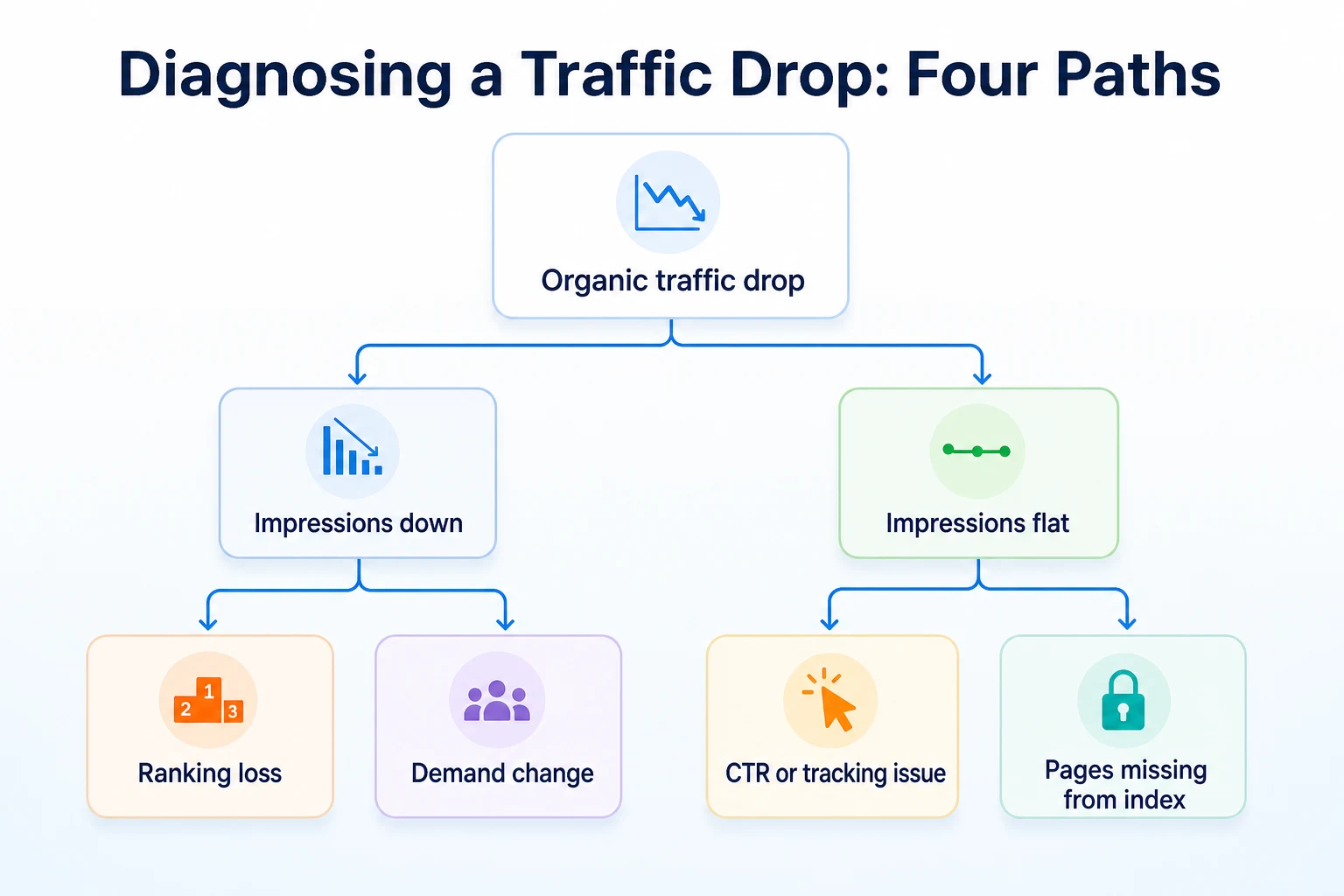
If impressions stayed flat but clicks fell, the problem probably isn't ranking at all. Our guide on Search Console impressions but no clicks walks through that specific pattern in more depth.
Rule Out a Tracking or Measurement Problem
If Search Console shows clicks and impressions holding steady, but Google Analytics shows a sharp drop, the problem is probably in how traffic is being measured, not in how your site is performing.
This is worth checking early, because it's one of the few causes that has nothing to do with search at all.
Signs the problem is tracking, not traffic
A few patterns point toward a measurement issue rather than a real decline.
The drop started the same day a site update, a new cookie consent banner, or a GA4 property change went live. Traffic fell to zero or close to it on specific pages rather than gradually declining. Other channels, like direct or referral traffic, dropped at the same time in a way that doesn't make sense if only organic search changed.
A broken analytics tag after a redesign, a consent mode setting that's now blocking measurement for visitors who decline cookies, or a filter accidentally excluding real traffic can all produce a chart that looks like a traffic collapse when the site itself hasn't changed.
Cross-checking Analytics against Search Console
Search Console counts clicks independently of whatever tracking code is installed on your site, since it measures what happens on Google's side, not what a script on your page reports back.
If Search Console clicks are steady but Analytics sessions fell sharply over the same period, that mismatch is itself the answer. The traffic is probably still arriving. Your tracking just stopped counting it properly.
Check your tag installation, your consent settings, and any recent changes to your GA4 property configuration before assuming anything is wrong with the site's visibility in search.
Rule Out a Genuine Change in Search Demand
Sometimes nothing is broken and nothing has lost rank. Fewer people are simply searching for the topic right now.
This is easy to overlook because it feels less likely than a technical fault, but it's a genuine and common cause of a drop.
Checking whether search volume itself has changed
Some topics are seasonal in an obvious way: holiday gift guides, tax preparation, event planning for a specific time of year. Others fade for less obvious reasons, like a product category falling out of fashion or a news event that temporarily spiked interest and then passed.
A general search trends tool can show whether interest in your core topic has changed over time, independent of anything happening on your own site.
Comparing this year to the same period last year
If your business has existed for more than a year, check whether this same dip happened at the same point last year.
A seasonal business that sees a predictable quiet period every year isn't dealing with a problem. It's dealing with a pattern that repeats, and the traffic should recover on its own schedule.
If last year's numbers for the same period were steady or growing, and this year's are falling, that rules out a simple seasonal explanation and points back toward ranking, tracking, or a technical cause instead.
Check for Ranking Losses on Specific Pages
If impressions and clicks both fell together, the next step is finding out exactly which pages and queries lost position, rather than treating the whole site as one problem.
A drop concentrated on a handful of pages has a very different fix than a drop spread evenly across the entire site.
Finding the pages and queries that slipped
Go back into the Performance report and add the average position column alongside clicks and impressions.
Sort by the pages or queries that lost the most position over the period you're investigating. A query that moved from position 4 to position 15 lost real visibility, even if its impressions didn't fall to zero.
Once you've found a page that dropped, search for its target query yourself in an incognito browser window. Confirm what's actually ranking there now: a competitor's page, a different page on your own site, or a type of result that didn't used to appear, like a featured snippet or an AI-generated answer sitting above the normal listings.
Checking whether your own pages are competing with each other
Sometimes a page doesn't lose to a competitor. It loses to another page on the same site.
A newer blog post or service page can start ranking for a query an older page used to own, splitting clicks and impressions between the two instead of adding to the total.
If two of your own pages show up in the Performance report for overlapping queries, that's worth checking carefully. Our guide to keyword cannibalization explains how to spot this pattern in Search Console and decide which page should stay as the main target.
Check Whether a Google Algorithm Update Is Involved
If the drop happened across many pages at once, with no single page or query standing out, a broader change in how Google ranks results is worth considering.
This isn't something to jump to first. It's worth checking only after ruling out tracking issues, demand changes, and page-specific ranking losses.
Checking the timing against known updates
Google maintains a Search Status Dashboard that lists confirmed ranking updates and their rollout dates.
Compare the date your traffic started falling against the dates listed there. A drop that started a day or two before a listed update probably isn't related to it. A drop that started during or right after a rollout window is worth investigating further, even though timing alone doesn't prove cause.
What Google says about recovering from a ranking change
Google's own guidance on creating helpful, reliable content describes the kind of page it aims to rank well: content that's genuinely useful to the person reading it, not written primarily to perform well in search.
There's no fixed timeline Google publishes for recovering after a ranking change, and no guarantee that any specific fix restores a page's previous position. The documentation focuses on the quality of the content itself rather than a checklist of technical tweaks.
If a broad update looks like the likely cause, the honest next step is reviewing whether your content genuinely serves the reader well, not searching for a quick technical fix that reverses it.
Check for Technical Problems Blocking Crawling or Indexing
A drop that hits specific pages hard, sometimes down to zero impressions, often has a technical cause rather than a ranking or demand one.
These faults are usually quiet. Nothing looks broken when you open the page in a browser, because the problem sits in a tag or a file most visitors never see.
Checking for accidental noindex tags and robots.txt blocks
A noindex tag left on a page after a staging site goes live, or a robots.txt rule that accidentally blocks a whole folder, can remove pages from search results without changing how the page looks to a visitor.
Google's documentation on blocking search indexing explains how these controls work and how easily a leftover tag can cause this.
Our free Robots.txt Checker can confirm whether a rule is quietly blocking pages that should be crawlable.
Checking the Page Indexing report for drops
Search Console's Page Indexing report shows how many of your pages are indexed and lists the reasons any aren't, which is often the fastest way to spot a sudden technical fault.
Check | What it catches | Tool to use |
|---|---|---|
Noindex tags | Pages accidentally excluded from search results | Page Indexing report, page source |
Robots.txt rules | Whole folders blocked from crawling | |
Sitemap errors | Pages missing or outdated in your sitemap | |
Server errors | Pages returning errors instead of loading | Page Indexing report, server logs |
If your checklist for getting pages indexed in the first place feels unfamiliar, our guide to getting a website indexed by Google covers the same checks from the other direction, for pages that never made it in at all.
Check Recent Site Changes, Redirects and Lost Backlinks
Not every drop traces back to Google's side at all. Sometimes the cause is something that happened on your own site, weeks before the numbers caught up.
Auditing a recent migration or redesign
A redesign, a new content management system, or a URL structure change can all quietly break things that used to work.
Check whether any URLs changed without a proper redirect in place. Google's documentation on 301 redirects explains how a permanent redirect carries a page's existing signals to its new address. Without one, a changed URL can effectively start from zero, even though the content on it didn't get worse.
Also check whether the new version of a page actually matches the old one in substance. A redesign sometimes shortens a page, removes a section a customer relied on, or changes a heading structure in a way that makes the page harder to read, even if nobody intended any of that.
Checking whether backlinks disappeared
If another site used to link to you and that link disappeared, whether because the other site redesigned, removed a resources page, or shut down entirely, it can take some of your visibility with it.
This is harder to catch in Search Console alone, since it reports your own site's performance rather than who links to you. If you track your backlinks elsewhere, check whether a handful of your more valuable links vanished around the time the drop started.
A single lost link rarely explains a big drop on its own. A pattern of several disappearing around the same time, especially from a site that shut down or was penalized, is worth noting as a contributing factor rather than dismissing outright.
A Worked Example: Finding the Real Cause of a Drop
Imagine a home services company that redesigned its website to modernize the look and speed up page load times. This example is illustrative.
A week after the new site went live, organic sessions in Google Analytics had fallen by about 40 percent compared to the week before the launch. The team's first instinct was to assume a Google algorithm update had hit them, since the timing felt sudden.
Checking the Search Status Dashboard showed no update listed around that date, so that theory was set aside.
Next, they opened Search Console's Performance report and compared the weeks before and after launch. Impressions for several key service pages had fallen close to zero, while a handful of blog posts that hadn't been touched in the redesign kept their normal numbers.
That pattern, a sharp drop concentrated on specific pages rather than spread across the whole site, pointed toward a technical cause rather than a ranking or demand problem. They opened the page source for one of the affected service pages and found a noindex meta tag left over from the staging environment, carried into the live site by mistake during the launch.
Removing the tag from the affected templates and requesting reindexing through the URL Inspection tool was the fix. Traffic didn't recover instantly, since Google still had to recrawl and reindex the pages, but impressions and clicks on those pages climbed back over the following weeks as the index updated.
Day | What was checked | What it ruled in or out |
|---|---|---|
Day 1 | Compared timing against the Search Status Dashboard | Ruled out a known algorithm update |
Day 2 | Reviewed Search Console Performance report by page | Found the drop was concentrated on redesigned service pages |
Day 3 | Checked page source on an affected page | Found a leftover noindex tag from staging |
Day 4 | Removed the tag and requested reindexing | Fix applied; waiting on recrawl |
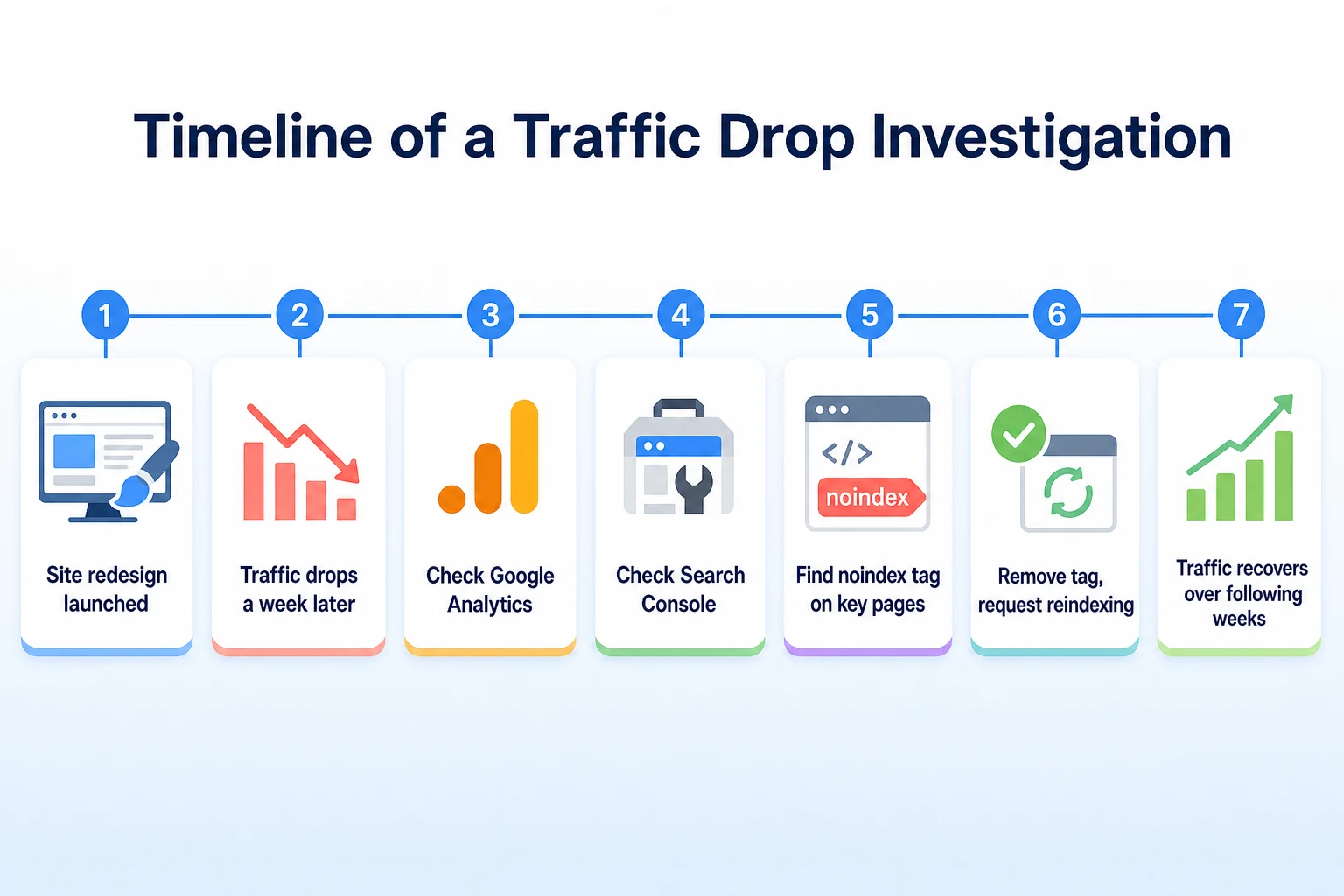
This timeline is illustrative.
A 7-Day Traffic Drop Diagnostic Checklist
Working through every cause covered in this article can feel like a lot at once, especially when traffic is actually falling and there's pressure to fix it quickly. Spreading the checks over a week keeps the process methodical instead of reactive.
Day | Task | What it rules in or out |
|---|---|---|
Day 1 | Confirm the drop with a like-for-like date comparison | Rules out a reporting artifact or small sample noise |
Day 2 | Check Search Console clicks and impressions by date, page and query | Narrows the cause toward ranking, demand, or a click issue |
Day 3 | Cross-check Analytics against Search Console clicks | Rules in or out a tracking or measurement problem |
Day 4 | Check search demand trends and last year's same period | Rules in or out a seasonal or genuine demand change |
Day 5 | Review pages and queries with the biggest position drops | Identifies specific ranking losses and cannibalization |
Day 6 | Check the Page Indexing report, robots.txt and noindex tags | Rules in or out a technical crawling or indexing fault |
Day 7 | Review recent site changes, redirects and backlinks | Catches causes tied to a migration, redesign or lost links |
This pace is a suggestion, not a fixed rule. A site with a visible technical fault might find the answer on day one. A quieter, gradual decline can take the full week to properly rule everything else out first.
Common Mistakes When Diagnosing a Traffic Drop
A traffic drop tends to arrive with some pressure attached, and pressure is exactly when the shortcuts in this list start to look tempting.
Blaming an algorithm update before checking anything else. It's the easiest explanation to reach for because it requires no further work, but most drops have a specific, findable cause that an update doesn't explain.
Rewriting content before ruling out a technical fault. A page with a leftover noindex tag won't improve no matter how well it's rewritten, and the time spent rewriting it delays finding the actual problem.
Assuming Analytics and Search Console always agree. They measure different things in different ways, and a mismatch between the two is itself useful information, not a sign that one of them is simply wrong.
Reacting to a single bad day or week. Short-term noise, a holiday, a reporting delay, or a small sample size can all produce a scary-looking chart that settles back down on its own within a few days.
Checking only the homepage. A drop concentrated on a handful of service pages or blog posts can get missed entirely if the investigation never goes past the site's overall trend line.
Changing several things at once. Fixing a redirect, rewriting a title, and adjusting a robots.txt rule in the same afternoon makes it hard to know which change, if any, actually mattered.
Giving up on a fix too soon. A technical fix often needs a recrawl and reindex before it shows up in the numbers, and judging it a failure after two days doesn't give Google enough time to notice the change.
Where RepGet Fits
Working through four possible causes takes real attention, and most of the checks in this article depend on judgment only someone who knows the business can make properly, like whether a dip matches a known seasonal pattern or whether a rewritten page still serves the reader as well as the old one did.
Where RepGet can help is in surfacing some of the technical and content issues worth investigating in the first place. Its free website audit crawls a site, gives it a 0 to 100 SEO score, and lists issues worth looking into, which is a reasonable starting point alongside the Search Console checks covered earlier in this guide. No account or credit card required.
RepGet also brings website auditing, keyword research, content planning, article writing, and search performance reporting from Google Search Console into one workflow, so once a cause is identified, there's a practical place to act on it rather than a separate set of tools to juggle.
RepGet doesn't replace Search Console or Google Analytics, and it doesn't diagnose a traffic drop on its own or guarantee that fixing an issue will bring traffic back. The investigation covered in this article, and the judgment calls inside it, still belong to whoever runs the site.
The Bottom Line
An organic traffic drop feels like one problem, but it's usually one of four: a ranking loss on specific pages, a real change in search demand, a tracking issue that only looks like a decline, or a technical fault blocking crawling or indexing.
Confirm the drop is real first, then let Search Console's clicks and impressions data point you toward the right category before you start making changes.
Most drops have a specific, findable reason, even when it takes a few days of methodical checking to find it. Working through the causes in order beats guessing, and it keeps you from fixing something that was never actually broken.
Find out what your website needs first
Before assuming the cause of a drop, check whether your site has technical or content issues worth investigating. Run a free website audit with RepGet to see what's worth fixing first. No account or credit card required.
FAQ
Why did my organic traffic suddenly drop?
A sudden drop usually comes from a ranking loss, a change in search demand, a tracking problem, or a technical fault like a noindex tag. Check Search Console's clicks and impressions first to narrow down which one applies.
How do I know if a traffic drop is a Google algorithm update?
Compare when your drop started against Google's Search Status Dashboard, which lists confirmed update rollout dates. Matching timing doesn't prove cause, so it's worth checking this only after ruling out page-specific and technical issues first.
Why does Google Analytics show a drop but Search Console doesn't?
This usually points to a tracking problem rather than a real decline, such as a broken analytics tag, a consent mode change, or a GA4 configuration issue introduced after a site update.
Can a website redesign cause a traffic drop?
Yes. A redesign can leave a leftover noindex tag, change URLs without redirects, or remove content a page used to rank for, any of which can cut traffic without anything looking visibly broken.
How long does it take to recover from a traffic drop?
It depends on the cause. A technical fix needs time for Google to recrawl and reindex affected pages, while a ranking or content issue has no fixed recovery timeline that Google publishes.
Is a seasonal traffic drop normal?
It can be. Compare the current dip to the same period last year. If the pattern repeats annually, it's likely seasonal demand rather than a ranking or technical problem.
How do I check if my pages got deindexed?
Open the Page Indexing report in Google Search Console, which lists indexed pages and the reasons any are excluded, such as a noindex tag, a robots.txt block, or a crawl error.
What's the difference between a ranking drop and a demand drop?
A ranking drop shows falling position for queries that still have steady search volume. A demand drop shows falling impressions because fewer people are searching for the topic at all, regardless of your ranking.