

AI SEO Automation: What to Automate and What to Review
Short answer
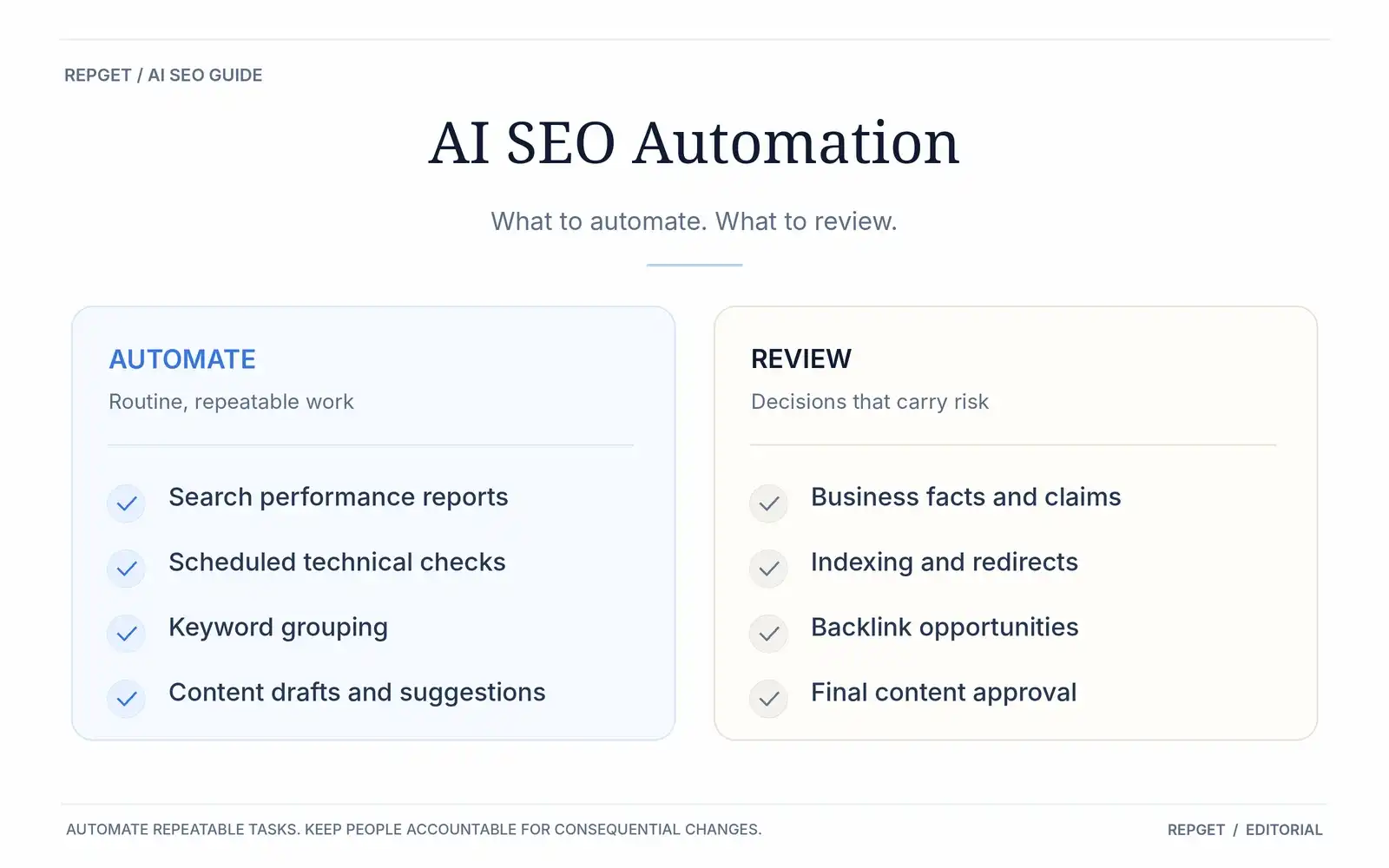
AI SEO automation works best for repetitive tasks such as website monitoring, keyword research, content preparation, internal linking, and reporting. More consequential decisions, including publishing unverified claims, changing indexing settings, and acquiring backlinks, still need human oversight. Start by automating tasks you can easily check and reverse.
An SEO tool can scan a website in minutes, suggest fifty keywords, and produce a month's worth of articles before lunch.
That sounds productive. But none of those actions guarantees that a single additional customer will find your business.
AI SEO automation can spot problems you might otherwise miss, prepare work that would take hours, and keep routine tasks moving. The difficult part is knowing where to stop.
A broken-link report and an automatic rewrite of your most important service page are two very different decisions. They shouldn't have the same level of permission.
Here's how to build an SEO workflow that saves time without giving up control of your website.
First, decide what deserves automation
Before connecting an AI tool to your website, ask three questions.
Can the result be checked? A list of broken URLs is easy to verify. A claim that one article will outrank its competitors is not.
What happens if the tool gets it wrong? A poorly written draft can be corrected before anyone sees it. An incorrect redirect or indexing rule can affect an entire section of your website.
Does the task require information only your business knows? Software can suggest an article about service pricing. It cannot reliably invent your actual prices, availability, or experience.
These questions give you a practical way to divide SEO work.
Task | Recommended approach |
|---|---|
Collecting search performance data | Automate |
Scheduled website checks | Automate |
Grouping related keywords | Automate suggestions, review decisions |
Preparing article outlines | AI-assisted |
Drafting content | AI-assisted, with fact-checking |
Suggesting internal links | AI-assisted |
Publishing approved content | Automate |
Changing redirects or indexing rules | Require technical approval |
Publishing prices or professional claims | Require factual approval |
Building backlinks | Keep editorial control and review compliance |
The safest starting point is a task where the input is reliable, the output is easy to inspect, and mistakes can be reversed.
That usually means monitoring and preparation before automatic changes to live pages.
Automate your SEO reporting before your publishing
Many small businesses only check their search performance when enquiries slow down.
By then, a page may have been losing visibility for weeks.
You don't need an expensive platform to start watching the right numbers. Google Search Console already provides information about the searches where your website appears.
Open Search Console → Performance → Search results.
Choose a meaningful date range, such as the last three months. If the site has sufficient historical data, compare it with the previous period.
Then examine the Pages and Queries tabs.
Look for three things:
Pages that have lost clicks or impressions.
Pages appearing for relevant searches but receiving few clicks.
Search queries that suggest an unanswered customer question.
Suppose an article about office cleaning starts appearing for searches about office cleaning costs.
That doesn't automatically mean you should publish a second article.
First, inspect the existing page. Does it explain how pricing works? Does it answer what businesses typically pay for? Is the answer buried halfway down the page?
A useful improvement might be adding a clear pricing explanation to the existing article.
Or the search intent might justify a separate page.
The decision depends on what the reader needs.
What to automate: Collect the data each week and flag meaningful changes.
What to keep human: Investigate what caused those changes and decide whether the content needs updating.
Average position, click-through rate, and impressions can change for reasons unrelated to your latest edit. Small samples are particularly easy to misread.
Google explains these metrics in its Search Console Performance report documentation.
A good automated report should tell you where to investigate. It shouldn't pretend to know why every number moved.
Let software find technical problems, not fix everything automatically
Technical SEO is well suited to automation because many checks follow clear rules.
A crawler can look for broken internal links, server errors, missing titles, inaccessible pages, and inconsistent canonical URLs.
Running those checks regularly is more useful than discovering an important problem several months after it appeared.
But automated audits also produce warnings that are not necessarily urgent.
A page marked noindex might be intentionally excluded from search results.
Two similar title tags might describe pages with genuinely different purposes.
A missing meta description is worth reviewing, but it doesn't automatically mean the page cannot rank.
Treat audit findings as evidence, not instructions.
For pages that matter to your business, Google's URL Inspection tool can help you check indexing status and the canonical URL Google selected.
Before publishing new content, make sure the important pages you already have are accessible and eligible for indexing.
If you're unsure where the problem begins, read our guide to why your website isn't showing up on Google.
You can also use RepGet's free SEO tools to inspect metadata, robots.txt, and sitemaps without starting a paid subscription.
What to automate: Regular scans, comparisons with earlier results, and technical alerts.
What to review: Any recommendation that changes redirects, canonical URLs, indexing instructions, or important live content.
One incorrect sitewide change can create considerably more work than the automation saves.
Use AI to organize keyword research, then decide what to publish
Keyword research is often treated as a numbers exercise.
Find a phrase with search volume. Check the competition. Generate an article.
That process misses an important question: why would someone searching for this subject become interested in your business?
Consider a company that installs windows.
An automated keyword tool might suggest:
Double glazing vs triple glazing.
How to reduce traffic noise through windows.
How much do replacement windows cost?
Can you replace windows without changing the frames?
These topics have different purposes.
Someone comparing double and triple glazing is researching a decision. Someone asking about installation costs may be closer to contacting a supplier.
AI can group the queries, identify overlapping subjects, and prepare a content plan.
The business must decide which topics it can answer well and which are commercially relevant.
It also needs to check whether the website already covers them.
Publishing separate articles for every slightly different keyword can create unnecessary duplication.
For example, "double glazing or triple glazing" and "is triple glazing better than double glazing" might belong on the same page, depending on what current search results and readers need.
A useful research workflow should therefore produce three possible actions:
Create a new page for an important unanswered subject.
Improve an existing page that only partly answers the question.
Skip a topic because it is irrelevant, redundant, or unsupported by your expertise.
That third option is important.
Good SEO software should help you decide what not to publish.
Automate content preparation, but make the source material better
AI can prepare a reasonable article outline in seconds.
It can also produce a polished draft that says almost nothing.
The difference often comes down to what information the system receives before it starts writing.
Consider an article about replacement window costs.
A generic draft might explain that prices vary depending on materials, dimensions, and installation requirements.
That is accurate in broad terms. It is also information readers can find almost anywhere.
A more useful article could explain which options the company offers, what is included in its quotations, which installation problems increase complexity, and what customers should check before comparing offers.
Those details cannot be responsibly invented.
A useful example is Image Studio's approach to creative production. Its editorial explains how research, planning, and creative decisions shape the final work. This is the kind of first-hand expertise AI can help turn into useful content, but cannot independently create.
Before generating the draft, prepare a small collection of verified material:
The exact question the article should answer.
The products or services the business actually provides.
Relevant customer questions.
Original examples, specifications, or photographs.
Reliable sources for technical or factual statements.
Then let AI organize the material into a readable explanation.
This approach works especially well for recurring content types such as buying guides, product comparisons, practical tutorials, and answers to common customer questions.
It also creates a useful approval process.
If the article includes a statistic, where did it come from?
If it describes a product feature, does the official specification support it?
If it refers to a customer's experience, did that experience actually happen?
Google's guidance on generative AI content emphasizes accuracy, quality, relevance, and manual fact-checking.
The problem with large-scale content automation is not that software helped write the article.
The problem is publishing material that hasn't earned the reader's attention.
Automate internal linking and publishing after editorial approval
Publishing is full of small, repetitive tasks.
Someone has to format the headings, add metadata, upload images, choose a URL, insert relevant links, and check the final page.
Much of that work can be automated.
Internal linking is a particularly useful example.
When you publish a new guide, the system can examine your existing articles and suggest pages that should link to it.
Suppose you publish an article about window replacement costs.
An existing guide comparing window materials may be a natural place to introduce it.
But an automated suggestion is only useful if the link makes sense to a reader.
Good internal links connect related questions. They don't need to be inserted into every paragraph.
A content system can prepare link suggestions, write draft metadata, and send approved articles to your CMS.
You can then review how the page looks before it goes live.
That last check matters.
A well-written article can still lose credibility through broken links, irrelevant imagery, unsupported claims, or poor formatting.
For routine work, automation removes unnecessary steps.
For editorial decisions, retaining an approval option is the safer choice.
A practical example: improve one page before creating five more
Here's a workflow you can use on your own website. The window installation example is illustrative, not a claimed customer case study.
Imagine you have an existing page explaining double glazing.
You want to attract more potential customers, and an AI tool has suggested several new articles.
Before accepting the suggestions, work through the following process.
Step 1. Find the page's real search queries
Open Google Search Console and go to Performance → Search results.
Select the Pages tab and choose your existing double-glazing page.
Then open Queries to see which searches are associated with that URL.
Suppose you find impressions for a question about reducing outside noise.
That gives you a subject worth investigating.
Step 2. Check whether the current page answers the question
Read the page as a customer would.
Does it explain the difference between glazing options for noise reduction?
Does it acknowledge that the overall window construction, installation, and other factors can influence the result?
Does it provide information based on actual products or technical specifications?
If the answer is incomplete, you have found a possible content improvement.
Step 3. Decide whether to update or create
If the missing explanation is central to the page, improve the existing content.
If the question needs a detailed, standalone explanation, consider a separate article and link the two pages together.
Avoid creating another page that simply repeats the original.
Step 4. Give AI a specific assignment
Instead of asking, "Write an SEO article about soundproof windows," give the system a narrower job:
"Prepare an explanation of how glazing options affect noise reduction. Use the supplied product specifications. Identify claims that require verification. Do not invent performance figures, installation costs, or product certifications."
Now the software has a defined task.
You also know what to check when the draft arrives.
Step 5. Review the content and publish
Verify technical claims against the manufacturer's documentation or another qualified source.
Remove anything the business cannot support.
Add a relevant internal link if it helps the reader continue researching the subject.
Then publish the approved version.
Step 6. Measure what happens
Record the page's baseline search performance and review the same page and relevant queries over the following weeks.
Look for changes in impressions, clicks, query relevance, and enquiries.
Avoid attributing every improvement or decline to your edit. Competition, seasonality, demand, and search-result changes can all affect performance.
This workflow is modest. It improves one useful page based on actual search evidence.
That is often a better starting point than automatically adding five more articles to an already underdeveloped website.
The editorial checks every automated article should pass
Before a generated article is approved, a useful quality review can be surprisingly short.
Ask:
Does it answer a specific question?
A reader should understand why the page exists within the first few sentences.
Does it contain information we can verify?
Dates, prices, statistics, product capabilities, and technical explanations need trustworthy sources.
Does it add something useful?
An example, a practical instruction, a comparison, or an original explanation should justify the page's existence.
Is it substantially different from our existing content?
If another page already answers the same question, consider improving that page rather than publishing a near-duplicate.
Would we publish this without the possibility of Google traffic?
This is a useful final test. If the article would still help customers make a decision, understand a product, or solve a problem, it has a reason to exist beyond ranking.
Automated systems can assist with each check.
Editorial responsibility should remain identifiable.
Backlinks are not another task to put on autopilot
Link building needs a separate discussion because the consequences of getting it wrong can extend beyond one page.
Software is useful for finding relevant publications, tracking existing backlinks, identifying broken references, and organizing outreach.
It cannot make an artificial linking arrangement editorially legitimate.
Google's link spam policies identify practices such as excessive link exchanges and automated link creation intended to manipulate rankings.
A link placed inside a genuine-looking article is not automatically compliant.
And arranging a different website to return the link does not remove the need to evaluate the overall arrangement.
For businesses, a more defensible approach is to focus on mentions and links that exist for a genuine reason.
That could include original research, useful resources, legitimate industry coverage, relevant partnerships, or editorial references to work worth discussing.
Automation can help find opportunities and monitor them.
It should not be trusted to manufacture authority.
How to tell whether your SEO automation is working
The number of published articles is easy to measure.
It is also a poor measure of business success on its own.
A more useful review connects automated work to outcomes.
Measure | What it tells you |
|---|---|
Time spent on recurring SEO work | Whether the workflow is saving effort |
Articles requiring major corrections | Whether content quality is consistent |
Important pages with technical issues | Whether maintenance is improving |
Relevant search queries and organic clicks | Whether the website is reaching its intended audience |
Enquiries or sales from organic visitors | Whether the traffic contributes to the business |
Not every improvement will appear immediately in search traffic.
A technical fix might prevent a future problem. A revised article may take time to be crawled and reevaluated. Some pages may remain less competitive than expected.
This is why automation needs both activity tracking and outcome measurement.
A system that publishes more content but creates additional editing work may be moving the workload rather than reducing it.
One that consistently identifies useful opportunities, prepares accurate drafts, and reduces maintenance deserves a closer look.
Where RepGet fits into this workflow
For small businesses, the difficulty is often coordinating several separate SEO tasks rather than understanding one tool.
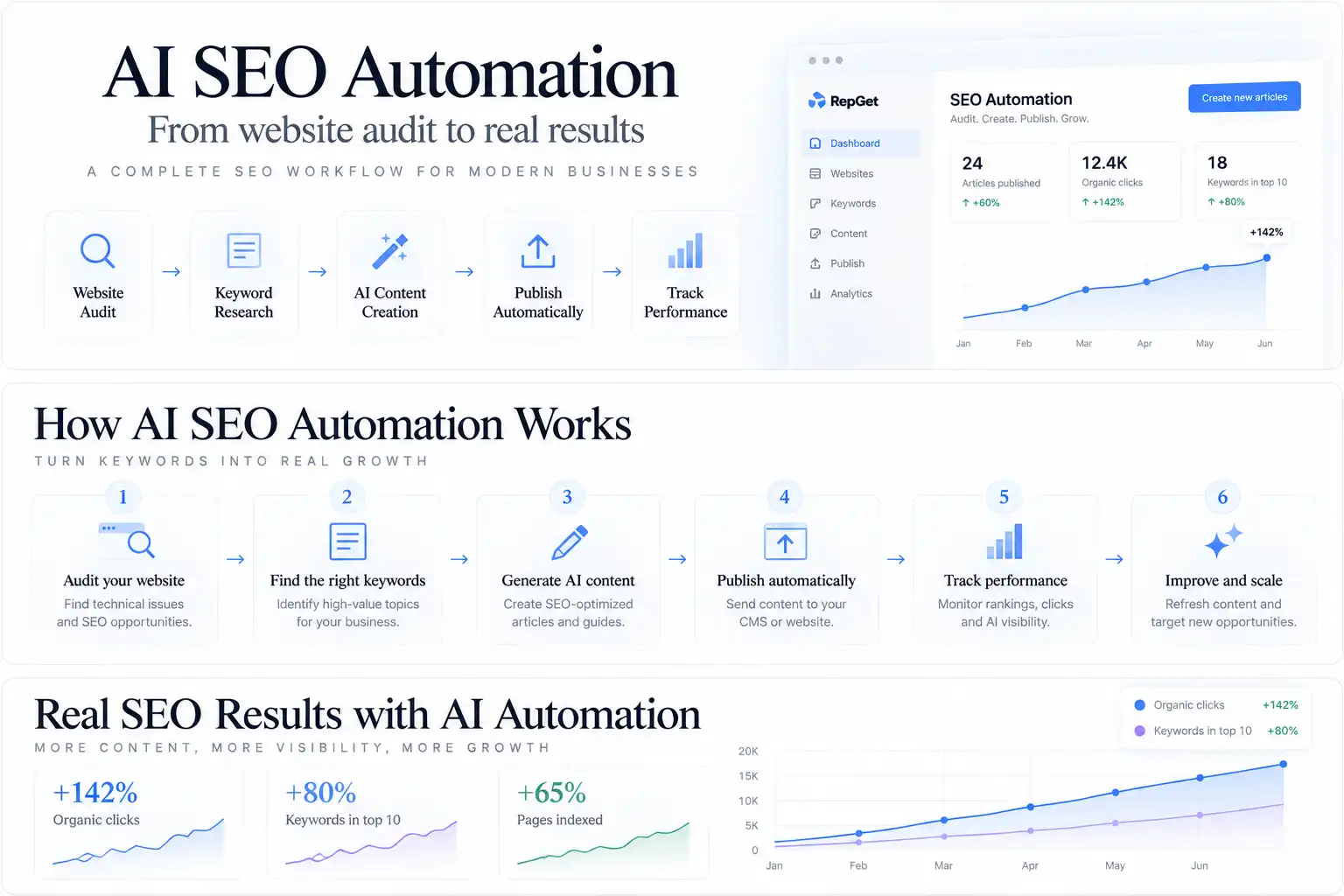
RepGet brings website checks, keyword research, content preparation, CMS publishing, and performance reporting into a connected workflow.
Articles can be prepared for review or published automatically when the website is connected and that option is enabled.
The useful starting point is still understanding the website's current position.
If you haven't checked its technical health, begin with RepGet's free website audit. It can help identify issues worth investigating before you commit to producing more content.
If the audit reveals several problems, our guide to what to fix first on a website that gets no traffic explains how to prioritize the work.
What should you automate first?
For a small business, a sensible starting order is:
Monitor search performance and important technical problems.
Collect keyword opportunities connected to real customer needs.
Prepare content briefs and drafts using verified business information.
Review metadata and relevant internal links.
Automate publication once the review process is reliable.
Revisit the results and improve the pages that deserve attention.
You don't need a complicated collection of AI agents to benefit from this approach.
Start with one task that takes time every week. Make the output easy to inspect. Run it consistently.
When it becomes reliable, move to the next.
The strongest SEO workflow is one where automation handles the recurring work and someone remains accountable for the decisions that matter.
Not sure where to begin? Run a free website audit with RepGet to identify technical issues and see what deserves your attention first.
FAQ
Can SEO be fully automated?
Many recurring tasks can be, including scheduled audits, reporting, draft preparation, and publishing approved content. Strategy, factual verification, technical changes, and editorial decisions still require appropriate oversight.
Does Google penalize AI-generated SEO articles?
Google does not prohibit content simply because generative AI was used. Producing large amounts of low-value content primarily to manipulate search rankings can violate its spam policies. Accuracy, relevance, and usefulness remain important.
Should a new website publish AI-generated content every day?
There is no universal publishing frequency that guarantees better rankings. A newer site may benefit more from a smaller collection of useful, well-connected pages that answer distinct customer questions.
Can AI SEO automation guarantee traffic?
No. Search visibility depends on multiple factors, including competition, search demand, website accessibility, content quality, and changes to search systems. Automation improves the process of doing SEO, but it cannot guarantee the outcome.
What is the difference between automated SEO and AI SEO?
Automated SEO uses software to carry out repeatable tasks. AI SEO uses artificial intelligence for work such as research, analysis, content preparation, and recommendations. Some workflows use both, but not all SEO automation requires AI.