

Search Engines: How They Actually Work, Explained Simply
Short answer
Search engines work in three stages. Crawling finds your pages by following links, indexing stores and organizes what those pages are about, and ranking decides which indexed pages best answer a specific search. Google and Bing both document this process publicly, and AI assistants like ChatGPT draw on much of the same crawled content. That's why a crawlable, well-written site still matters.
A business owner searches their own company name.
They scroll past two competitors, then find their own site on page two.
They have no idea why Google put it there, or what they'd even need to change to move up.
Most advice about this jumps straight to tactics: add keywords, get backlinks, write more blog posts. None of it explains what's actually happening behind the scenes, so it's hard to tell which tactic matters and which one is noise.
Search engines aren't one single process. They're three separate jobs, done in order, and most of the confusing advice out there is really just advice aimed at one of those three jobs without saying so. Here's how crawling, indexing and ranking actually work, in plain terms, and why understanding the order explains most of the "why isn't this working" questions a small business runs into.
What a Search Engine Actually Does
A search engine is software built to do three separate jobs, one after another. Skip any one of them and nothing after it happens, no matter how good your website is.
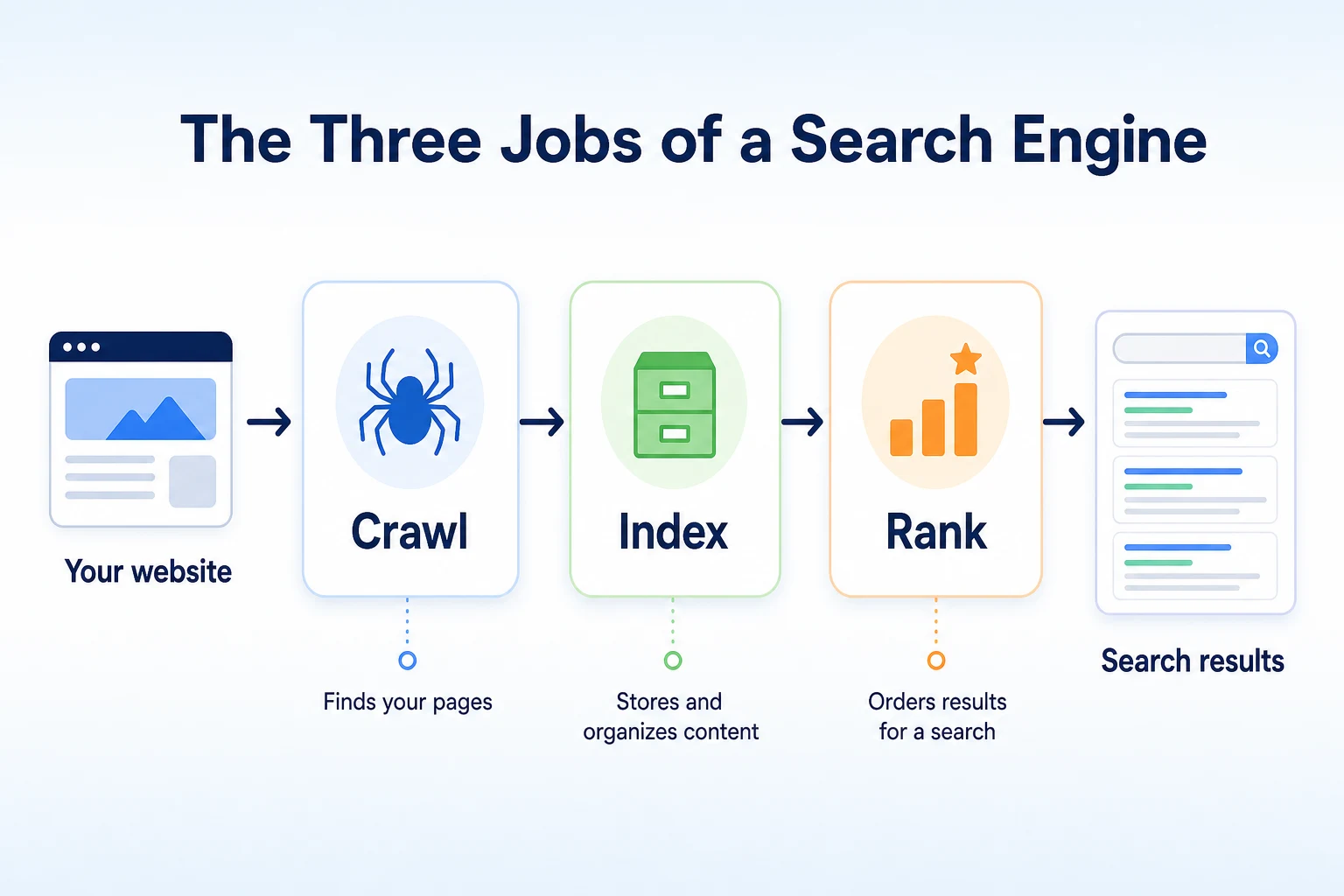
The three jobs: crawl, index, rank
The first job is crawling: finding pages that exist on the web. The second is indexing: reading those pages and storing an organized record of what's on them. The third is ranking: when someone actually searches for something, deciding which stored pages to show, and in what order.
A simple way to picture it: crawling is a librarian walking through a city collecting every book they can find. Indexing is that librarian reading each book and filing it by subject. Ranking is what happens the moment a visitor asks for a book on a specific topic, and the librarian picks the best matches off the shelf.
Why the order matters more than any single trick
These three jobs happen in sequence, and each one depends on the one before it. A page that was never crawled can't be indexed. A page that was never indexed can't rank for anything, no matter how well written it is. This is why a lot of SEO advice that sounds like it's about writing better content is actually only useful once crawling and indexing are already working.
It also explains why two businesses can follow the same advice with different results. One might have a crawling problem hiding underneath everything else, so better writing never gets a chance to matter. The other might have crawling and indexing working fine, so the writing is genuinely the next thing to improve. Same advice, different starting point.
Crawling: How Search Engines Find Your New or Changed Pages
Crawling is the discovery stage. Before a search engine can do anything with your site, something has to find it first.
How a crawler finds a page it's never seen
A search engine uses automated programs, often called crawlers or spiders, that move from page to page by following links. Google's own crawler is called Googlebot. It starts from pages it already knows about, follows the links on those pages to new ones, and repeats that process constantly. A new page usually gets found one of two ways: a link from somewhere Googlebot already visits, or a sitemap that lists the page directly and points the crawler to it.
This means a page with no links pointing to it and no mention in a sitemap can sit on your site indefinitely without a crawler ever stumbling onto it. It isn't being rejected. It's simply never been found.
What can stop a crawler before it even starts
A handful of common setup problems block a crawler outright. A robots.txt file can explicitly tell a crawler to stay away from a page or a whole section of a site. A page can carry a noindex instruction that tells a search engine not to keep it even if it's crawled. A broken internal link structure, where a page exists but nothing else on the site links to it, leaves a crawler with no path to follow in. Google's own documentation on how Googlebot crawls a site covers exactly what it looks for and what can get in its way.
Checking whether a crawler can reach your site
You don't need to guess at this. Our free Robots.txt Checker reads your site's robots.txt file and gives a plain verdict on whether search and AI crawlers are actually allowed in, rather than leaving you to interpret the file's rules yourself. It takes a couple of minutes and answers the most basic question in this entire process: can anything even get in the door.
Indexing: How Search Engines Decide What a Page Is About
Once a page is found, it still has to earn a place in the index. Being crawled and being indexed are two different outcomes, and mixing them up causes a lot of unnecessary worry.
Why 'crawled' doesn't mean 'indexed'
A search engine can visit a page, read it, and still decide not to keep it in its index. This happens for all sorts of reasons: the content is too thin to be worth storing, it's a near-duplicate of another page on the same site, or it was blocked from indexing even though the crawler could technically reach it. A page sitting in this state shows up in server logs as crawled, but it won't appear in search results at all. Our guide to getting a website indexed by Google walks through this gap in more detail, including how to check which of your pages have actually made it in.
What search engines actually read on a page
When a page does get indexed, a search engine stores more than just the words on it. It reads the page title, the headings, the main body text, and structured data markup that describes what the page is, a product, a local business, a recipe, an article. A sitemap helps here too, by giving a search engine a direct list of the pages on a site worth checking, rather than relying entirely on links to find them. Google's documentation on sitemaps explains what one actually does and when it helps.
This is also where thin or vague content causes a real problem. A page that says almost nothing specific gives a search engine very little to file it under, which makes it harder for that page to surface for anything beyond the most generic search.
Ranking: How Search Engines Order Results for a Single Search
Ranking is the last stage, and it's the one most people think about first. It only happens among pages that already cleared the first two stages.
What 'relevance' means to a ranking system
When someone types a search, a ranking system compares that search against everything in the index and tries to surface the pages that best answer it. Google's Search Essentials documentation describes this as weighing a mix of factors: how relevant a page's content is to the search, how reliable and helpful the page appears to be, and page experience signals like loading speed and mobile usability. There isn't one single factor that decides a result's position. It's a combination, applied fresh for every individual search.
Our guide to how Google decides which sites to rank goes through the documented factors in full, which is worth reading once crawling and indexing are confirmed to be working, since that's the point where ranking advice actually starts to apply.
Why your position can change without you touching your site
A page's position in results can shift even if nothing on that page changes at all. A competitor might publish a stronger page on the same topic. A search engine might update how it weighs a particular signal. The exact wording of a search can shift what counts as the best answer, since "plumber near me" and "emergency plumber" can surface a different order of results even for the same business. None of this means something broke on your end. Ranking is relative to everything else competing for the same search at that moment, and that competition keeps moving on its own, as covered in Google's Search Essentials documentation.
A Worked Example: What Happens When Someone Searches 'Plumber Near Me'
The three stages are easier to see when you walk through one actual search from start to finish. This example is illustrative, but it reflects the order described above.
Matching the search to what's already indexed
Imagine a plumber in Austin has a website with a homepage, a services page, and a handful of city-specific pages, one of which targets emergency plumbing. Weeks before anyone searches anything, Googlebot has already crawled those pages by following internal links and the site's sitemap. Each page then went into the index, filed under what it's about based on its title, headings, and body text, plus any local business structured data on the site.
Now someone nearby searches "plumber near me" on their phone. None of the crawling or indexing happens at this moment. All of that already happened earlier. What happens now is the ranking step: Google compares the searcher's location and the words of the search against everything already sitting in its index, and decides which pages, out of every plumbing site it has stored for that area, best match this specific search right now.
Stage | What happens in this example | What a business could check |
|---|---|---|
Crawl | Googlebot follows a link or sitemap entry to find the plumber's emergency services page | Whether the page is linked from elsewhere on the site and listed in the sitemap |
Index | The page is stored and filed under "emergency plumbing, Austin" based on its title and content | Whether the page's title and text actually say what service and area it covers |
Rank | Google compares the searcher's location and wording against every indexed plumbing page nearby, then orders the results | How complete and specific the page is compared with other local plumbers' pages |
These figures are illustrative.
Our guide to local SEO for small businesses goes further into what a page like this needs to compete for a search tied to a specific area, once the crawling and indexing pieces are confirmed to be in place.
Do Google, Bing and Other Search Engines Work the Same Way?
The three-stage model isn't specific to Google. It's a description of what a search engine has to do structurally, which is why Bing and other engines follow the same basic shape even though they're separate systems built by different companies.
What's documented as similar
Both Google and Bing publish guidance describing a crawl, index, rank sequence. Both use automated crawlers that follow links and read sitemaps. Both store what they find in an index before anything is shown to a searcher. Both apply a ranking step at the moment of a search, weighing relevance and quality signals rather than showing results in some fixed order. The structure is consistent enough that advice aimed at one of the three stages, like fixing a crawl block or writing a clearer page title, tends to help across more than one search engine at once.
What each engine keeps private
Where they differ is in the detail neither one publishes in full. The exact weighting of a particular signal, how much one factor matters relative to another for a given search, isn't public for Google or Bing. Each company documents the categories of things it considers, not a formula. That's a deliberate choice on their part, not a gap in this article.
Stage | Bing | |
|---|---|---|
Crawling | Uses Googlebot, following links and sitemaps, documented in its crawling guidance | Uses Bingbot, following links and sitemaps, documented in its webmaster guidelines |
Indexing | Stores content it finds worth keeping, factoring in page quality and duplication | Stores content similarly, also filtering out thin or duplicate pages |
Ranking | Weighs documented categories: relevance, page experience, reliability | Weighs its own documented categories, including relevance and page quality |
In practice, a small business doesn't usually need a separate strategy for each search engine. Fixing a crawl block or a thin page tends to help with both at once, since the underlying problem is the same regardless of which engine is trying to read the page.
Where AI Assistants Like ChatGPT Fit Into This Picture
AI assistants add a fourth name to this conversation, but they don't replace the three-stage model. In most cases, they depend on it.
What an AI crawler needs to read your site
Some AI systems run their own crawlers, separate from Googlebot or Bingbot, to gather content directly from the web. Others rely more on an existing search index to find and summarize information when answering a question. Either way, the basic requirement doesn't change: the crawler involved, whichever one it is, still needs to be able to reach your page and read its actual text. If a page is blocked in robots.txt, or its content only appears after a script runs in the browser, an AI crawler can run into the same wall a search engine crawler would. Our guide to how an AI web crawler reads and indexes a website covers what that access actually requires in more detail.
Why indexing and an AI mention aren't the same thing
Being indexed by Google doesn't guarantee a mention in an AI assistant's answer, and the reverse is also true. These are separate systems, built and operated independently, and no official documentation ties a page's presence in Google's index to whether a specific AI assistant will reference it. What's true across both is that a page has to be readable and specific before either one can do anything useful with it. A vague, thin page gives a search engine little to rank and gives an AI assistant little to summarize accurately, for the same underlying reason.
Why Your Site Might Not Be Showing Up: Matching the Symptom to the Stage
Once you know there are three separate stages, most "why isn't this working" situations become easier to sort. The trick is matching what you're actually seeing to the stage that's most likely responsible, rather than guessing at a fix before you know which problem you have.
Reading your own symptoms correctly before you start fixing anything
A site search like site:yourdomain.com typed into Google is a quick first read: if a page doesn't show up there at all, it's worth checking crawling and indexing before worrying about ranking at all. A page that does show up in a site search but never appears for a relevant search term points somewhere else entirely, usually toward content or ranking rather than access.
What you're seeing | Likely stage | What to check first |
|---|---|---|
Page doesn't appear even with a | Crawl | Robots.txt, internal links, whether the page is in the sitemap |
Page was recently published and still isn't showing up weeks later | Crawl or index | Search Console's coverage report, sitemap submission |
Page appears with a | Rank | Page content, title, and how well it matches what searchers are actually typing |
Page used to rank well and recently dropped | Rank | New competing pages, a content update elsewhere on the site, a broader algorithm change |
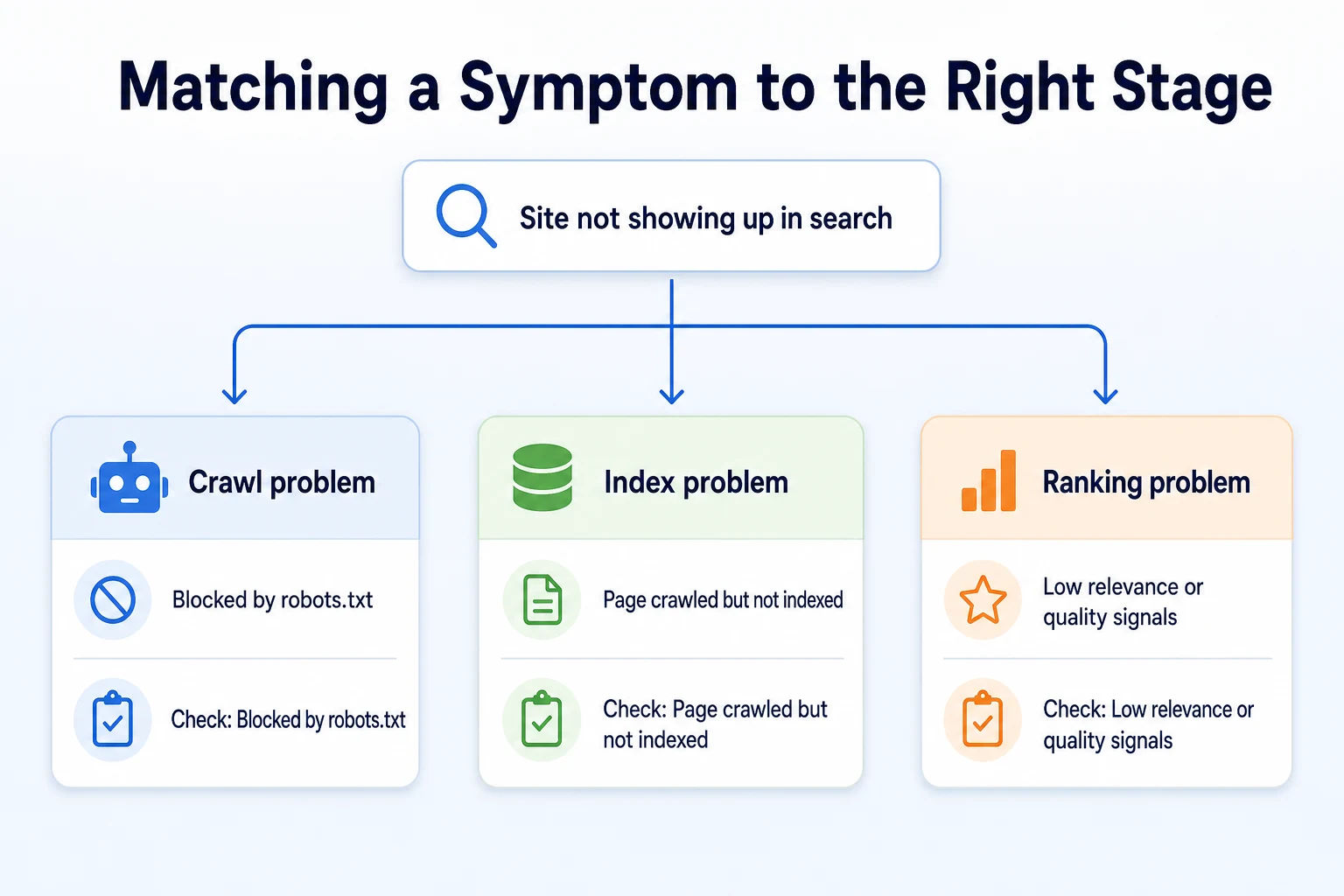
A few minutes with our free Robots.txt Checker rules out the most basic crawl problem in under a minute, which is worth doing before assuming the issue is something more complicated further down the chain.
A 20-Minute Check to See How Search Engines Currently See Your Site
You don't need any technical background to get a first real read on where your site stands. Twenty minutes and a browser is enough to check all three stages, one at a time.
What you'll need before you start
Just your site's homepage address and, if you already have one set up, access to Google Search Console. If you don't have Search Console connected, you can still run most of this check, you'll just skip the one step that needs it.
Step | Time | What it tells you |
|---|---|---|
Search | 3 minutes | Whether your key pages have made it into the index at all |
Run your site through the Robots.txt Checker | 5 minutes | Whether a crawl block is stopping search or AI crawlers before they even start |
Check the Pages or Coverage report in Search Console | 7 minutes | Which pages Google has crawled, indexed, or excluded, and why |
Search the exact phrase you want to be found for | 5 minutes | Whether a page that is indexed is actually ranking for the term that matters to you |
Running through these four in order mirrors the three-stage model itself. If the first two steps turn up a problem, there's little point spending time on the fourth yet, since a ranking fix can't do anything for a page that was never indexed in the first place.
Common Misunderstandings About How Search Engines Work
A few ideas about search engines keep circulating long after they stopped being accurate, if they ever were. Clearing a handful of them up saves a lot of wasted effort.
Running Google Ads improves your organic ranking. It doesn't. Paid ads and organic results come from separate systems inside Google, and spending on one has no documented effect on the other.
Repeating a keyword many times on a page helps it rank. Search engines read for topic and relevance, not word count. A page stuffed with the same phrase over and over tends to read worse to an actual visitor, and it gives a search engine no extra credit for the repetition.
Submitting a sitemap guarantees a page gets indexed. A sitemap only helps a search engine find a page faster. Whether that page actually makes it into the index still depends on whether it clears the bar for quality and uniqueness described earlier in this article.
More pages always means more search visibility. A large number of thin, near-duplicate pages can do the opposite, since none of them gives a search engine much reason to index or rank it over the others. A smaller number of specific, well-written pages usually performs better than a large number of vague ones.
Sharing a page on social media directly boosts its ranking. Social shares can bring visitors and, indirectly, more links over time, but no documented ranking factor treats a share count itself as an input into where a page lands in results.
Where RepGet fits
RepGet doesn't change how crawling, indexing or ranking work, and nothing about using it skips any of the three stages described in this article. What it does is help you see where your own site actually stands against them, and work through the issues that are getting in the way.
RepGet's free website audit crawls your site and gives it a 0 to 100 SEO score, flagging the crawlability and content issues that decide whether a page clears the first two stages at all: things like pages a crawler can't reach, thin content a search engine has little to index, and missing technical basics. No account or credit card required.
Beyond the audit, RepGet brings keyword research, content planning, article writing, publishing and search performance reporting from Google Search Console into one workflow, which is useful once crawling and indexing are confirmed and the work shifts toward the content and relevance signals that affect ranking. RepGet doesn't control any search engine's algorithm, and it doesn't guarantee a ranking, a Google Maps position, or a mention in an AI assistant's answer.
The bottom line
A search engine's job breaks down into three stages done in order: crawling finds your pages, indexing stores and organizes what's on them, and ranking decides which indexed pages answer a specific search best. A problem at any one stage can keep a site invisible, no matter how much effort goes into the stages after it.
Google and Bing both document this same basic sequence, even though neither publishes the exact weighting behind its ranking decisions. AI assistants draw on much of the same crawled content, which is why being readable and specific still matters even as more of that content reaches people through a chat answer instead of a results page.
Once you know which stage a problem sits in, the next step usually becomes obvious, and a lot of advice that used to sound contradictory starts to make sense in its proper place.
Find out what your website needs first
Before chasing ranking advice, find out whether your site is even being crawled and indexed properly. Run a free website audit with RepGet to see the technical and content issues worth fixing first. No account or credit card required.
FAQ
How do search engines work in simple terms?
A search engine finds pages by crawling links, stores and organizes what it finds through indexing, and then ranks the indexed pages that best match a specific search when someone types one in.
What is the difference between crawling and indexing?
Crawling is a search engine finding and visiting a page. Indexing is a separate step where it decides to store and file that page, which doesn't always happen even if the page was successfully crawled.
Why isn't my website showing up on Google?
It usually comes down to one of three things: a crawler can't reach the page, the page was crawled but not indexed, or it's indexed but not ranking well for the terms you're checking.
Do all search engines use the same ranking system?
No. Google, Bing and others each run their own separate ranking systems with their own undisclosed weighting, though they all document the same basic crawl, index, rank structure underneath.
How does ChatGPT find information about a business?
It depends on the system. Some AI assistants run their own crawlers to gather web content directly, while others draw more on existing search indexes, but both need to be able to read a page's actual text.
How long does it take Google to crawl a new website?
There's no fixed timeline, and Google hasn't documented a guaranteed speed. A sitemap and internal links from pages Google already visits can help a new page get found sooner.
Can you pay a search engine to crawl or index a page faster?
No. Paid ads run through a separate system from organic crawling, indexing and ranking, and there's no documented way to pay for faster or guaranteed inclusion in the organic index.