

Google SEO: How Google Decides Which Sites to Rank
Short answer
Google ranks small business sites using documented systems that weigh relevance, content quality, experience and expertise signals, links, page experience, and location for local searches. No single factor decides a ranking on its own. A competitor usually outranks you because their site combines several of these better, not because of one secret trick, and nobody outside Google can guarantee a specific position.
A small business owner types their own service and city into Google.
Their own site sits third, maybe fourth. A competitor they know personally, one they don't think writes better content or works harder, sits at the top.
They open both sites side by side and can't find anything obviously different. Same services, similar prices, similar photos.
So they start asking the only question that matters: what is Google actually looking at, and how does google seo decide who wins that spot?
Here's how Google's own documentation describes the process, translated out of jargon and into what a small business can actually check and change.
What Google SEO Actually Means for a Small Business
Google SEO is the work of helping Google's automated systems find a page, understand what it's about, and judge it worth showing for a given search. It's separate from paid search ads, which buy a position rather than earn one through these signals.
That's a broad definition on purpose, because the real answer is broad. There isn't one setting, one plugin, or one phrase to add that moves a page from page two to page one.
SEO is not a single setting you switch on
A page ranks based on a combination of signals working together: whether Google can reach and store the page, how well it matches what someone searched for, how it reads in terms of quality and trust, whether other sites point to it, how it performs for a visitor, and for local searches, where the business sits relative to the searcher.
Strengthening one of these while ignoring the rest rarely moves the needle much. A fast, well-built page about the wrong topic still won't rank for a search it doesn't answer, and a page that answers the right question perfectly but takes ten seconds to load competes at a disadvantage against one that doesn't.
Why Google doesn't publish one master checklist
Google has never published a complete list of ranking factors with exact weights attached. What it has published, across its Search Central documentation, is a set of principles and specific signals it has confirmed using, like page experience and the ideas behind helpful content.
That's a deliberate gap, not an oversight. A full published formula would be gamed within weeks, which would make search results worse for everyone searching, not better. What follows in this article sticks to what Google documents, rather than guessing at anything it hasn't said.
Before Ranking Can Happen: Crawling, Indexing, and Rendering
Before any ranking factor applies, a page has to clear three technical steps. Skip any one of them and the rest of this article doesn't matter, because the page was never in the running.
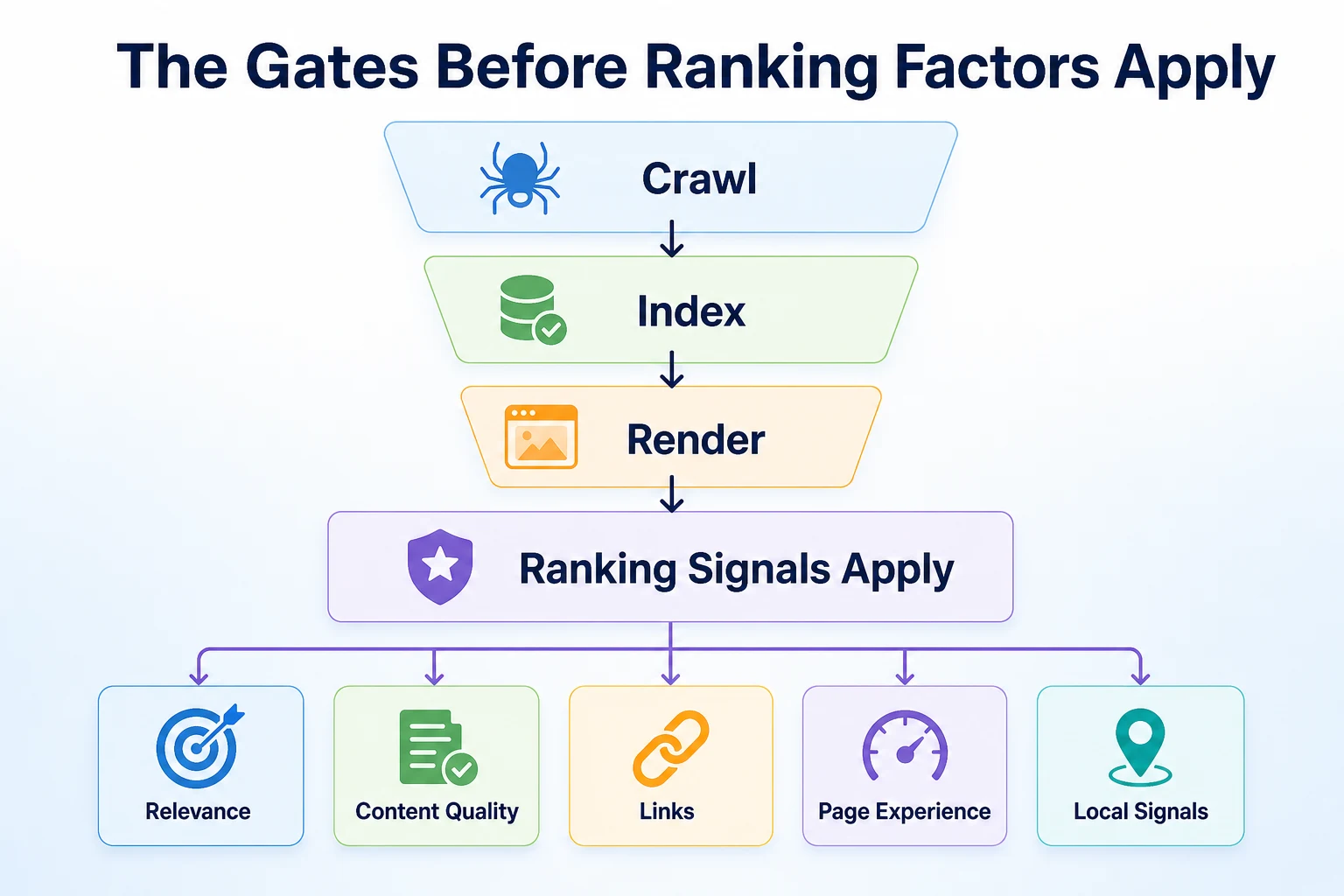
Crawling: can Googlebot reach the page at all
Google's crawler, Googlebot, has to actually find and fetch a page before anything else can happen. It follows links from pages it already knows about, and it reads sitemaps a site submits to help it find new ones faster.
A page blocked by a robots.txt rule, locked behind a login, or simply not linked from anywhere else on the site may never get crawled in the first place. This is usually the first thing worth ruling out when a page that should rank doesn't show up at all.
Indexing: does the page qualify to be stored
Once Googlebot fetches a page, Google decides whether to store it in its index, the enormous collection of pages it can draw search results from. A page can be crawled and still not indexed, often because Google judged it too similar to another page, too thin to be useful, or marked with a noindex tag somewhere in its code.
Checking whether a specific page is indexed is a quick first step whenever a page seems to be missing from search results entirely. Our guide to how to get your website indexed by Google walks through the checks in order, including how to read the result in Search Console.
Rendering: seeing the page the way a visitor does
Rendering is the step where Google loads a page's scripts and styling to see it roughly the way a visitor's browser would, rather than just reading the raw HTML. A page that depends heavily on JavaScript to show its main content can render differently than expected, sometimes leaving key text invisible to Google even though a visitor sees it fine.
This step rarely causes problems on a simple small business site built with a standard theme or page builder. It's worth knowing about mainly because it explains why two technically similar pages can be treated differently if one relies more heavily on scripts to display its actual content.
Relevance: Matching a Page to What Someone Searched
Once a page clears those three gates, Google's systems start judging how well it matches the search itself. Relevance is the first and most basic layer of that judgment.
Why using the keyword once isn't enough
Older advice treated relevance as a word-matching exercise: put the keyword in the title, the first paragraph, and a few headings, and the job was done. Google's systems have moved well past simple keyword matching, and a page that repeats a phrase without actually covering the topic doesn't read as more relevant, just more repetitive.
What tends to matter more is whether a page genuinely covers the subject a searcher cares about. A page about
A page about emergency drain cleaning that only mentions drains once, then spends three paragraphs on the company's history, isn't covering the topic a searcher typing that phrase actually wants answered. A page that walks through what causes a blocked drain, what a same-day callout usually involves, and what it costs tends to match the search more completely, without needing to repeat the exact phrase more than a handful of times.
This is also why stuffing a page with every variation of a keyword rarely helps anymore. Google's systems are built to understand a page's subject from the whole of its content, not from counting how many times one phrase appears.
Matching the intent behind a search, not just the words
Different searches carry different intent, even when the words look similar. Someone searching "how to fix a leaking tap" usually wants instructions, while someone searching "leaking tap repair" is more often looking for someone to call. A page built for the wrong intent can use all the right words and still struggle, because it isn't answering the question the searcher actually had.
Checking what a service page is really built to answer, a how-to guide or a hire-us page, is worth doing before assuming a relevance problem is really a content quality problem instead.
Content Quality and E-E-A-T: What Google Documents Looking For
Once relevance is in place, Google's systems weigh how trustworthy and genuinely useful a page is. Google's own guidance on creating helpful content describes this using four ideas, often shortened to E-E-A-T: experience, expertise, authoritativeness, and trust.
Experience and expertise in plain language
Experience means whether the content reflects someone who has actually done the thing they're writing about. Expertise is closer to formal knowledge or training in the subject. For a small business, both usually show up the same way: specific details that only come from doing the work, rather than general statements that could apply to any similar business anywhere.
A roofer writing about storm damage from firsthand jobs reads differently than a page that lists generic facts about roofing anyone could find in five minutes elsewhere. Google's documentation describes this kind of specificity as part of what separates genuinely helpful content from content written mainly to attract search traffic.
Why an accurate but generic page can still struggle
A page can be factually correct and still read as low value if it tells a searcher nothing they couldn't already guess. This is the trap a lot of small business sites fall into without realizing it, because the content isn't wrong, it's just thin.
Naming the actual town, the actual service, and a specific detail about how the job gets done usually does more for a page than adding another paragraph of general information already covered elsewhere on the page or the web.
Information that helps Google see who stands behind a page
Trust, the last part of E-E-A-T, is partly built from signals outside the page itself, like reviews, and partly from information on the site: a real author or business name, a working contact page, and clear details about who runs the business and where. Google's documentation notes this kind of transparency as something it looks for when judging whether a page can be trusted.
Links: What a Documented Signal Actually Tells Google
Links are one of the oldest documented ranking signals, and one of the most misunderstood. A link from one page to another still functions as a kind of vote, but not every vote counts the same way, and not every attempt to collect votes is safe.
Why a link acts like a vote of confidence
When one site links to another, it's effectively saying this page is worth pointing someone toward. Google's systems weigh these links as part of how they judge a page's standing, though a link's actual value depends heavily on where it comes from and why it exists, not just that it exists at all.
Internal links you control versus backlinks you don't
A business has full control over internal links, the links from one page on its own site to another. It has far less control over backlinks, links from other websites, and Google's spam policies specifically warn against artificially creating, buying, or exchanging links purely to manipulate rankings, rather than earning them naturally.
Type | Who controls it | Risk of manufacturing it | What it tends to signal |
|---|---|---|---|
Internal links | The business, directly | Low, since these connect your own pages | How your site's pages relate to each other |
Backlinks | Other sites, not the business | High, if bought or exchanged purely to manipulate rankings | Whether other sites consider a page worth pointing to |
For most small businesses, the realistic path to backlinks is being genuinely worth mentioning, a local supplier, a trade association, a news story, rather than chasing links directly. Internal linking, by contrast, is work a business can simply do this week, connecting a blog post to the service page it supports.
Page Experience: Speed, Mobile, and Security Signals
Beyond what a page says, Google's documentation also describes signals around how a page performs once someone actually opens it.
Core Web Vitals in plain terms
Core Web Vitals are a set of measurements Google uses to judge loading speed, responsiveness, and visual stability, the kind of thing a visitor notices as a page jumping around while it loads or taking too long to respond to a tap. Google's web.dev documentation on Core Web Vitals explains each metric and the thresholds it considers good.
Mobile-friendliness and a secure connection
A page also needs to work properly on a phone screen, since most searches happen on mobile devices, and it needs to load over a secure HTTPS connection rather than plain HTTP. Neither is complicated to check on an existing site, but both are easy to overlook if a site was built years ago and never revisited.
Signal | What it measures | Simple way to check it |
|---|---|---|
Loading speed | How quickly the main content appears | Open the page on a phone over mobile data and time it yourself |
Visual stability | Whether elements shift position while loading | Watch the page load and note any buttons or text that jump around |
Mobile-friendliness | Whether the layout and text work on a small screen | View the page on an actual phone, not just a resized browser window |
HTTPS | Whether the connection is encrypted | Check for a padlock icon next to the address in the browser bar |
These checks are a starting point, not a full technical audit.
Local Signals: Why Results Differ by Searcher Location
For searches with any local intent, like a service plus a town, Google layers a different set of signals on top of everything covered so far. Two people searching the same phrase in different cities can see entirely different results, because location itself is part of the judgment.
Proximity, relevance and prominence explained
Google Business Profile Help describes local results as being shaped by three main factors: relevance, how well a business matches what's being searched for, distance, how far each business is from the location used in the search, and prominence, how well known a business is based on information Google has about it, including reviews. None of these overrides the others. A business a few minutes closer doesn't automatically win if a nearby competitor is clearly more relevant or better reviewed.
This is also why a business can rank well in one neighborhood and barely show up in another just a few miles away, with nothing on the website itself having changed in between.
Why a Google Business Profile matters alongside the website
A Google Business Profile is a separate listing Google maintains directly, and it's what actually appears in Google Maps and the local pack of results. It isn't a replacement for a website, and a website isn't a replacement for it either. The two feed different parts of how a business shows up locally, and a business with a strong website but a thin, unclaimed profile is leaving an obvious gap open. Our guide to local SEO for small businesses covers how a profile and a website work together, including reviews and citations that sit outside anything the site itself controls.
A Worked Example: Why One Plumber Outranks Another
Imagine two plumbing businesses serving the same town, both family run, both with similar pricing. One consistently outranks the other for the same searches. This example is illustrative.
Factor | Plumber A | Plumber B |
|---|---|---|
Relevance | Strong: separate pages for each service with specific details | Weak: one general page mentioning every service briefly |
Content quality | Strong: pages mention real job types and local streets served | Weak: generic descriptions that could fit any plumber anywhere |
Links | Strong: internal links connect blog posts to service pages | Weak: blog posts sit isolated with no links to services |
Page experience | Weak: slow to load on mobile, no HTTPS padlock showing | Strong: fast, mobile-friendly, secure connection |
Local signals | Strong: active Google Business Profile with recent reviews | Weak: profile claimed years ago and never updated |
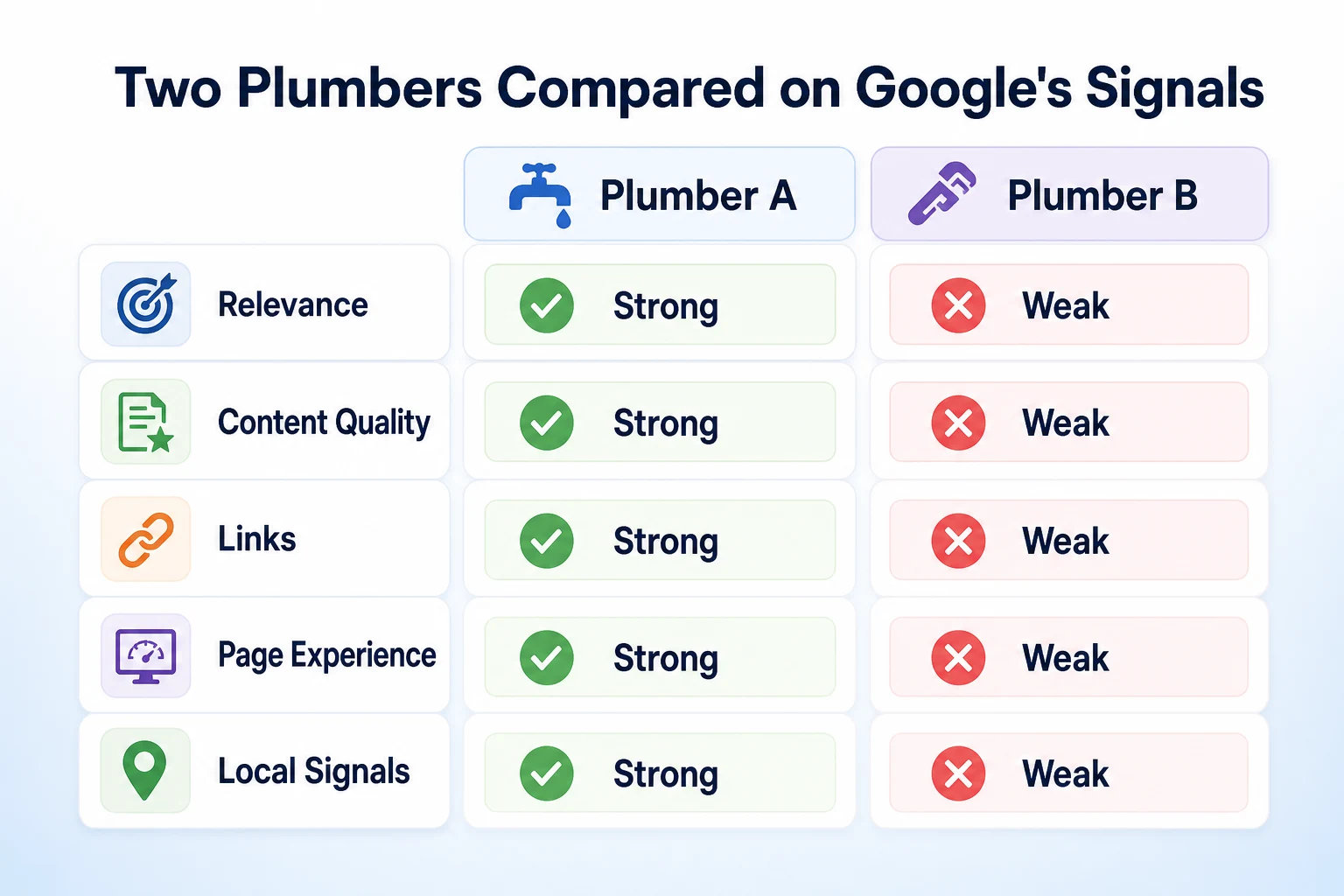
These figures are illustrative.
Neither plumber is strong everywhere, and neither is weak everywhere either. Plumber A's site reads better once someone lands on it, and its profile is active, which likely explains why it tends to edge ahead for searches with local intent, even while its page experience lags behind. Plumber B's faster, more secure site isn't enough to overcome thin content and a neglected profile on its own. This is the pattern worth looking for on a real site: not one broken thing, but a handful of average ones stacking up against a competitor that's only slightly better across more of them.
A 30-Day Plan to Strengthen Your Google SEO Signals
Trying to fix every factor at once usually means fixing none of them well. Spreading the work across a month, in the order the gates and signals actually apply, keeps it manageable.
Week | Focus | Tasks |
|---|---|---|
1 | Crawlability and indexing | Confirm key pages aren't blocked by robots.txt, check whether they're indexed, and submit or update the sitemap |
2 | Content and relevance | Pick two or three service pages, check what they actually cover against what a searcher would want, and rewrite thin sections |
3 | Content quality and E-E-A-T | Add specific details only your business would know, a real author or business name, and a working contact page |
4 | Page experience and local signals | Check mobile loading speed, confirm HTTPS, and update your Google Business Profile's hours, photos and recent reviews |
A single month won't finish every item this article has covered, but it moves each of the main signal groups forward at least once, rather than leaving three of them untouched while one gets all the attention. Our SEO audit checklist breaks this kind of work into a longer worksheet if a month isn't enough to cover everything worth checking.
Common Mistakes That Keep Competitors Ahead
A few habits show up again and again on small business sites that struggle to move up, and most of them come from treating one signal as the whole story.
Chasing a single factor in isolation is the most common one. A business notices its site feels slow, spends weeks optimizing images and scripts, then wonders why rankings barely move, because the real gap was thin content or a neglected Google Business Profile the whole time.
Copying a competitor's content closely enough that it reads as a rewrite rather than original work is another. Google's own guidance on helpful content points toward material that reflects real experience and specific detail, and a page built mainly by rephrasing someone else's rarely has either.
Treating the website and the Google Business Profile as separate projects, handled by different people or at different times, leaves an obvious gap open for local searches. A strong site with an outdated profile, or a well-kept profile linking to a thin site, both undercut the other.
Buying or exchanging links to speed up the process is a mistake with real downside, not just wasted effort. Google's spam policies describe this kind of link manipulation directly, and it's safer to earn mentions slowly than to risk a site being treated as spam for trying to shortcut the process.
Giving up after a few weeks is the quieter mistake. Content and trust signals build gradually, and a page published last month hasn't had time to show what it can do yet, regardless of how well it was written.
Mistake | Why it hurts | What to do instead |
|---|---|---|
Fixing one signal while ignoring the rest | A faster site with thin content still won't outrank a slower one that answers the search better | Check crawlability, content, links, page experience and local signals together before picking one to fix |
Rewriting a competitor's content closely | Reads as generic rather than reflecting real experience, which Google's guidance points toward | Write from what your own business actually knows and does |
Treating the website and Google Business Profile separately | Leaves an obvious gap open for any search with local intent | Update both on the same schedule, not just one of them |
Buying or exchanging links | Google's spam policies warn against manipulated links directly | Earn mentions through real relationships and genuine newsworthy activity |
Giving up after a few weeks | Trust and content signals build gradually, not overnight | Give changes a few months before judging whether they worked |
Our guide to what to fix first on a website that gets no traffic walks through how to prioritize when several of these problems show up on the same site at once.
Where RepGet fits
Everything in this article comes from what Google documents about how it finds, judges and ranks a page. None of it is a setting a tool can flip on by itself, and nothing here changes when a human still has to decide what a page should actually say.
RepGet's free website audit crawls a site and gives it a 0 to 100 SEO score, flagging technical and content issues worth investigating, including some of the gates and signals covered in this article: whether pages are reachable and indexed, whether content looks thin against what a search intends, and basic page experience issues. It's a reasonable way to see where a site stands across several of these signals at once, rather than guessing from the outside the way a business owner comparing two sites in a browser tab has to. No account or credit card required.
RepGet also brings keyword research, content planning and article writing into one workflow, and articles it writes can stay as drafts for a business to review before anything goes live. That still leaves the judgment calls in this article, like whether a page genuinely reflects real experience, to the person running the business.
RepGet doesn't replace a Google Business Profile, Search Console, or a person's judgment, and it can't guarantee a ranking, a Maps position, or a traffic result. No honest tool can promise that, and Google's own documentation doesn't promise it either.
The bottom line
Google ranks a small business site using a combination of documented signals: whether the page can be crawled, indexed and rendered at all, how well it matches what someone searched for, how it reads for quality and trust, whether other sites point to it, how it performs once opened, and for local searches, where the business sits relative to the searcher.
A competitor usually outranks you because their site combines several of these a little better, not because of one secret setting or a trick you missed. The plumber in the worked example above wasn't winning on every factor, just enough of them.
There's no shortcut that replaces working through these signals one at a time, and nobody outside Google, including RepGet, can promise a specific position once you do.
Find out what your website needs first
Before guessing which signal is holding your site back, see what it actually needs. Run a free website audit with RepGet to check your site's technical setup alongside its content. No account or credit card required.
FAQ
What are Google's main ranking factors?
Google weighs whether a page can be crawled, indexed and rendered, how relevant it is to the search, content quality and trust signals, links, page experience, and for local searches, proximity and prominence. No single factor decides a ranking alone.
Why does my competitor rank higher than me on Google?
Usually because their site combines several documented signals a little better, like more specific content, a stronger Google Business Profile, or faster mobile loading, rather than one secret trick you're missing.
How long does Google SEO take to show results?
Google doesn't publish a fixed timeline, and content and trust signals tend to build gradually. Most changes need a few months before you can fairly judge whether they made a difference.
Does Google publish exactly how it ranks websites?
No. Google publishes principles and specific documented signals, like page experience and helpful content guidance, but not a full formula with exact weights, partly to prevent the system from being easily gamed.
Is Google SEO different from local SEO?
Local SEO adds signals like proximity and a Google Business Profile on top of the same relevance, quality and link factors that apply to any search, so it's a layer on general SEO rather than a separate system.
Do backlinks still matter for Google rankings?
Yes, links remain a documented signal, but Google's spam policies warn against manufactured or bought links. Earning mentions naturally matters more than chasing links directly.
What is E-E-A-T and does it affect small business sites?
E-E-A-T stands for experience, expertise, authoritativeness and trust, ideas Google's helpful content guidance describes. It affects any site, including small businesses, mainly through specific, genuine detail rather than generic claims.
Can a small business rank on Google without paying for ads?
Yes, organic rankings are separate from paid ads and are based on the signals covered in this article. It takes consistent work on content, technical health and local signals rather than any ad spend.