

User-Agent Examples: Which Bots to Allow and Which to Block
Short answer
A user agent is the name a visitor's browser or bot sends to identify itself, like Googlebot or GPTBot. Checking your server logs or robots.txt file shows which user agents are visiting your site. Search engine bots like Googlebot and Bingbot should generally be allowed, AI crawlers depend on whether you want your content used, and unidentified scrapers are usually worth blocking.
A business owner checks their server logs after a hosting bill spikes.
The list is full of names they don't recognize: Googlebot, GPTBot, SemrushBot, AhrefsBot, and a handful of visits with barely a name at all.
Some of these are helping the site get found in search. Some are feeding an AI model somewhere. Some are just costing bandwidth with nothing in return.
The real question isn't whether to block bots in general. It's which ones.
Here are plain user-agent examples for the visitors a small business site actually sees, and a practical way to decide which ones to allow and which to block in robots.txt.
What a User Agent Actually Is
Every time a browser or a bot asks your server for a page, it sends along a short line of text identifying itself. That line is called a user agent, and it's how a server, or a file like robots.txt, tells one visitor from another.
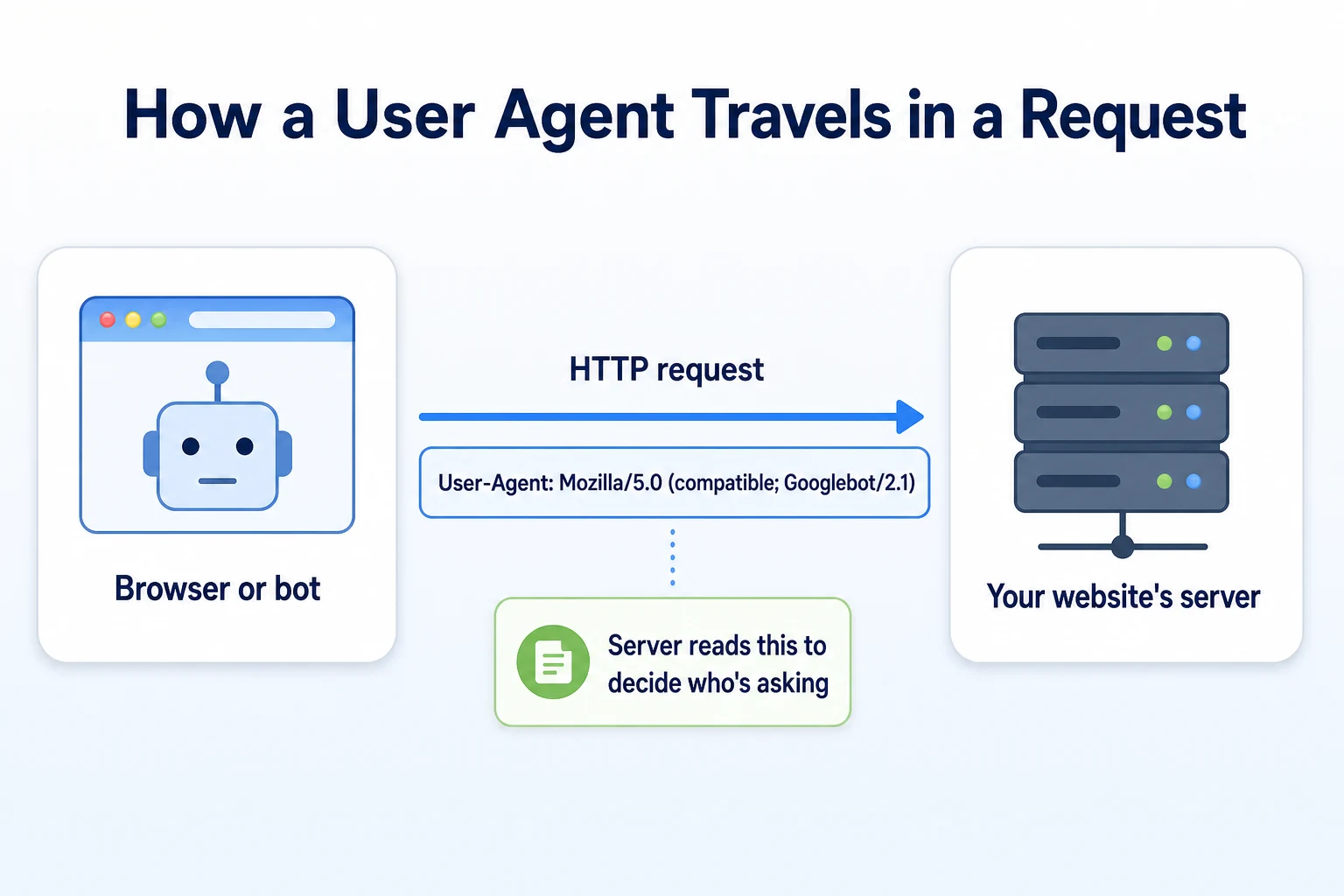
The user-agent string in an HTTP request
A user agent travels as a header on every request. A person browsing in Chrome sends something like Mozilla/5.0 (Windows NT 10.0; Win64; x64) AppleWebKit/537.36 (KHTML, like Gecko) Chrome/120.0.0.0 Safari/537.36. A crawler sends its own version, usually shorter and with a name meant to be recognizable, like Mozilla/5.0 (compatible; Googlebot/2.1; +http://www.google.com/bot.html). MDN's documentation on the User-Agent header covers the format in full, including why the string looks the way it does for historical reasons that go back decades.
Why robots.txt relies on the user-agent name
A robots.txt file works by targeting rules at a named user agent. A line that reads User-agent: Googlebot applies only to requests that identify themselves with that name. This is the entire mechanism behind allowing one bot and blocking another: the file doesn't see an IP address or a company, it sees whatever name the visitor chose to send.
Where to Find the User Agents Visiting Your Site
Before deciding what to block, it helps to know what's actually showing up. Guessing from a hosting bill or a vague sense that
Checking your server's access logs
Most hosting control panels keep raw access logs, or a summary of them, under a name like "Raw Access Logs" or "Visitors." Each line lists the date, the page requested, and the user-agent string that made the request. A few minutes scrolling through a week's worth of these logs usually surfaces the same handful of names over and over, which is a more reliable starting point than guessing from a bandwidth graph alone.
Testing a specific bot with a free checker
Reading raw logs tells you who showed up. It doesn't tell you whether your site is actually set up to let a given bot in or keep it out. RepGet's free Robots.txt Checker reads your robots.txt file and gives a verdict for named bots, search and AI crawlers together, so you can see in one place whether a rule is doing what you think it's doing. The AI Crawler Checker does the same for a narrower list, GPTBot, ClaudeBot, PerplexityBot and a few others, which is useful once you get into the AI crawler examples below.
Search Engine User-Agent Examples
Search engine crawlers are the easiest category to recognize once you know what to look for, since the major ones publish their own names and document them openly.
Googlebot and its variants
Google crawls under Googlebot's name using several different strings depending on what it's fetching. The main one, used for most pages, reads Mozilla/5.0 (compatible; Googlebot/2.1; +http://www.google.com/bot.html). A version built to render pages the way a phone would appears as Googlebot Smartphone, with "Mobile" added into the string. Google's own documentation on its crawlers and fetchers lists each variant along with the exact token to look for, including separate crawlers used for images, video and ads.
Other major search engine bots
Bing crawls under Bingbot, with a string like Mozilla/5.0 (compatible; bingbot/2.0; +http://www.bing.com/bingbot.htm). Other search engines run their own named crawlers too: DuckDuckBot for DuckDuckGo, Baiduspider for Baidu, YandexBot for Yandex. For a small business site aimed at a US audience, Googlebot and Bingbot account for most of the crawling worth caring about, with the rest showing up in smaller numbers depending on where visitors are coming from.
User agent name | Example user-agent string | What it crawls for |
|---|---|---|
Googlebot | Mozilla/5.0 (compatible; Googlebot/2.1; +http://www.google.com/bot.html) | Google Search indexing |
Bingbot | Mozilla/5.0 (compatible; bingbot/2.0; +http://www.bing.com/bingbot.htm) | Bing Search indexing |
DuckDuckBot | DuckDuckBot/1.1; (+http://duckduckgo.com/duckduckbot.html) | DuckDuckGo Search indexing |
YandexBot | Mozilla/5.0 (compatible; YandexBot/3.0; +http://yandex.com/bots) | Yandex Search indexing |
These strings are illustrative and can change as search engines update their crawlers.
AI Crawler User-Agent Examples
AI assistants and chatbots run their own named crawlers, and it's worth knowing these serve two different purposes that look the same in a log file but matter differently to a business.
Crawlers that power AI answers
Some AI crawlers fetch a page at the moment someone asks an assistant a question, pulling in current information to help build an answer. OAI-SearchBot, used by ChatGPT's search feature, and PerplexityBot, used by Perplexity, both fall into this group. A visit from one of these can be part of the reason a business gets mentioned when someone asks an assistant a relevant question. Our guide to getting mentioned in ChatGPT covers what that actually involves.
Crawlers used to train AI models
Other crawlers collect pages to train a model's underlying knowledge, with no connection to a specific question asked later. GPTBot, documented by OpenAI as the crawler used to improve its models, falls into this group, as does Google-Extended, a token that controls whether a page can be used to train Google's AI models, separate from whether it's indexed for Search. ClaudeBot, used by Anthropic, works the same way. Our guide to how an AI web crawler reads and indexes a site covers the difference between these two categories in more depth.
User agent name | Example user-agent string | What it's used for |
|---|---|---|
GPTBot | Mozilla/5.0 (compatible; GPTBot/1.1; +https://openai.com/gptbot) | Training OpenAI's models |
OAI-SearchBot | Mozilla/5.0 (compatible; OAI-SearchBot/1.0; +https://openai.com/searchbot) | Fetching pages for ChatGPT's search feature |
ClaudeBot | Mozilla/5.0 (compatible; ClaudeBot/1.0; +claudebot@anthropic.com) | Training Anthropic's models |
PerplexityBot | Mozilla/5.0 (compatible; PerplexityBot/1.0; +https://perplexity.ai/perplexitybot) | Fetching pages to help answer Perplexity queries |
Google-Extended | Controlled as a token in robots.txt, not a crawling bot with its own string | Permission signal for Google's AI training use |
These strings are illustrative and may change as providers update their crawlers.
Scraper and SEO Tool User-Agent Examples
Not everything in a log file is a search engine or an AI assistant. A fair share of the names you'll see belong to SEO tools or scrapers with no documentation at all.
SEO tool bots crawling your site
SemrushBot and AhrefsBot both crawl the open web the way a search engine does, building the backlink and keyword data their platforms sell access to. If your business or an agency you work with uses one of these tools, its bot visiting your own site is expected and usually harmless. If nobody at your business uses either platform, a competitor or a stranger running a report on your site is often behind the visit, and that's still not something robots.txt fully stops, since a lot of the data these tools build comes from crawling other sites that link to yours, not from crawling yours directly.
Scrapers with no clear purpose
A good share of what shows up in a log carries a generic name like "python-requests," a blank user-agent field, or a string copy-pasted from a real browser to disguise an automated script as a person. These are usually scrapers, scripts pulling content, prices, or contact details, with no public documentation and no way to ask what they're doing with it. Our guide to the website traffic bot problem covers what this kind of traffic actually costs a site, beyond the obvious bandwidth hit.
How to Tell a Real Bot From One Faking Its Name
Every example above assumes the name in the log is accurate. That assumption doesn't always hold, and it's worth knowing why before you build a robots.txt rule around a name alone.
Why a user agent alone isn't proof
Anything that sends an HTTP request can put any text it likes in the user-agent header. A scraper with no connection to Google at all can send Mozilla/5.0 (compatible; Googlebot/2.1; +http://www.google.com/bot.html) word for word, and your server has no built-in way to tell the difference from that line alone. This matters because a block based purely on the name can be spoofed just as easily as a legitimate crawler can be allowed through by it.
Verifying Googlebot with reverse DNS
Google documents a specific method for confirming a request actually came from its crawler, based on the connecting IP address rather than the name it claims. The process, covered in Google's guide to verifying Googlebot, involves a reverse DNS lookup on the IP address to confirm it resolves to a googlebot.com or google.com domain, then a forward lookup to confirm that domain resolves back to the same IP. Most small business owners won't do this by hand for every visit, but it's worth knowing the method exists for the times a visit looks suspicious enough to check, such as an unusually high volume of requests claiming to be Googlebot from a single narrow window of time.
Deciding Which User Agents to Allow and Which to Block
Once you can tell a real search crawler from a disguised scraper, the actual decision comes down to a simple trade. What does letting this bot in get you, and what does it cost you to let it keep visiting.
What allowing a bot gets you
A search engine crawler needs to reach your pages before Google or Bing can show them to anyone, so blocking Googlebot or Bingbot removes your site from search entirely, not just from one ranking position. An AI crawler that powers live answers, like OAI-SearchBot or PerplexityBot, can only pull current information from your site if it's allowed to fetch it. A crawler used only for model training, like GPTBot, offers a different kind of trade: no immediate visibility benefit, just a question of whether you want your content used that way at all.
What blocking a bot protects you from
An unidentified scraper or a disguised script offers nothing back for the bandwidth and server load it uses. A heavy SEO tool bot from a platform nobody at your business uses can add up to real traffic over a month with no benefit to you. Blocking these doesn't cost you anything in search visibility, since they were never going to show your pages to anyone.
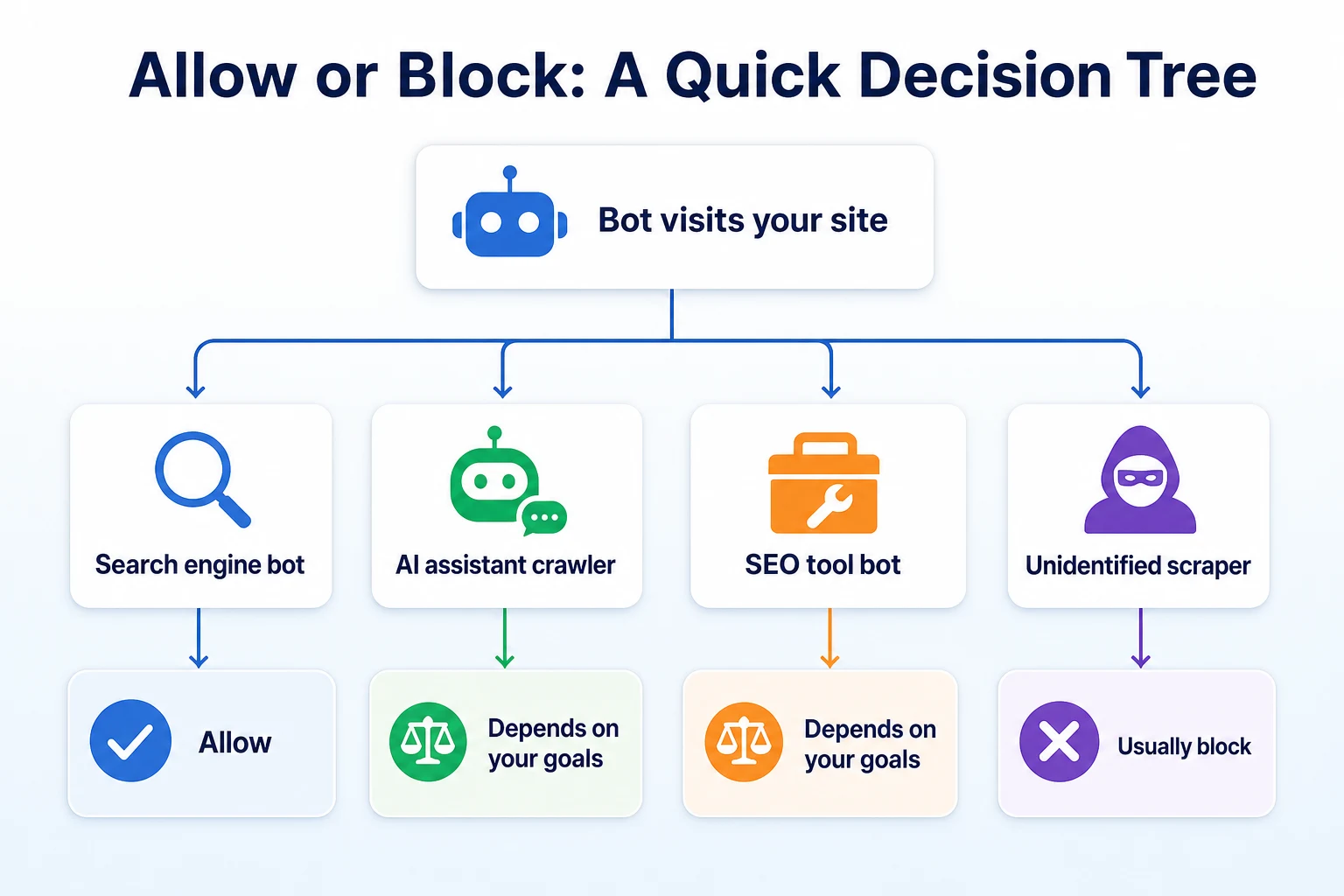
Bot category | Typical recommendation | Reason |
|---|---|---|
Search engine bot (Googlebot, Bingbot) | Allow | Blocking removes your site from that search engine entirely |
AI crawler powering live answers (OAI-SearchBot, PerplexityBot) | Depends | Allowing it can support a mention in an assistant's answer; blocking it removes that chance |
AI crawler used for training (GPTBot, ClaudeBot) | Depends | No immediate visibility trade either way, so it comes down to whether you want your content used for training |
SEO tool bot (SemrushBot, AhrefsBot) | Depends | Harmless if your business uses the tool, otherwise just added load with no benefit |
Unidentified scraper | Usually block | No documented purpose and no benefit to your site |
Writing User-Agent Rules in robots.txt
Once you've decided which names to allow and which to turn away, the syntax for saying so is short.
Targeting one named user agent
A robots.txt file applies rules to whatever name follows User-agent:. To block one specific bot while leaving everything else untouched, a rule might read User-agent: GPTBot followed by Disallow: / on the next line. A separate block with User-agent: * and no disallow line underneath leaves every other bot, including Googlebot, free to crawl as normal. Each named bot needs its own block if you want different rules for different visitors, since a single disallow line doesn't apply across multiple names at once unless you list them separately. Our robots.txt generator guide walks through building a file like this from scratch, including the order rules need to appear in for a crawler to read them correctly.
Why robots.txt is a request, not a lock
It's worth being honest about what robots.txt actually does. Google's own documentation on how robots.txt works describes it as a set of rules well-behaved crawlers choose to follow, not a technical barrier that forces compliance. Googlebot, Bingbot and the major documented AI crawlers follow it. A scraper with no public documentation has no obligation to read the file at all, let alone respect what it says. That doesn't make robots.txt pointless, it's still the correct first step and the one every legitimate crawler checks, but it's not a substitute for server-level blocking if a persistent scraper is ignoring it outright.
A Worked Example: Auditing One Site's Bot Traffic
Imagine a local plumbing company pulls a week of access logs after noticing their hosting plan is close to its bandwidth limit. This example is illustrative.
User agent found in the logs | Visits that week | Decision |
|---|---|---|
Googlebot | 340 | Allow |
Bingbot | 95 | Allow |
GPTBot | 60 | Allow, business wants content eligible for AI training |
AhrefsBot | 410 | Block, nobody at the business uses Ahrefs |
Unnamed script, blank user agent | 1,200 | Block |
These figures are illustrative.
The two biggest sources of traffic in that week weren't search engines at all. AhrefsBot and the unnamed script together accounted for more requests than Googlebot and Bingbot combined, with no benefit to the business behind either one. Blocking those two in robots.txt, and keeping an eye on the unnamed script's IP range in case it ignores the file, addressed the bandwidth spike without touching anything that mattered for search visibility.
A Checklist for Reviewing Your Own User Agents This Month
A review like the one above doesn't need to happen every week. Once a quarter, or any time a hosting bill looks off, is usually enough for a small site.
Pull a week of raw access logs from your hosting control panel and list every distinct user-agent name that shows up.
Sort that list into search engines, AI crawlers, SEO tool bots, and anything unnamed or unfamiliar.
Run your current robots.txt through RepGet's free Robots.txt Checker to see what it currently allows and blocks for the bots you recognize.
Decide on each category using the allow-or-block framework above, rather than blocking anything unfamiliar by default.
Update robots.txt with any new rules, then check it again a few days later to confirm the change took effect.
A pass like this takes less than an hour for most small sites, and it's the kind of thing that only needs repeating when something changes, not every week on a calendar.
Common Mistakes With User Agents and robots.txt
A handful of errors show up often enough in small business robots.txt files that they're worth checking for directly.
Blocking everything with a careless wildcard is the most common. A line that reads User-agent: * followed by Disallow: / turns away every bot that respects the file, Googlebot and Bingbot included, often added in a hurry during a site rebuild and never removed. This is usually an accident rather than a decision, and it's worth checking your robots.txt after any redesign to confirm a leftover rule like this isn't still sitting at the top of the file.
Trusting a name in a log without verifying it is another. A spike in requests all claiming to be Googlebot is worth a reverse DNS check before you assume it's really Google, especially if the volume looks unusual for your site's size.
Blocking every AI crawler on principle, without weighing what each one actually does, is a third. Lumping GPTBot, OAI-SearchBot and ClaudeBot together and blocking all three removes any chance of a mention in a live AI answer along with any training use, when the two might deserve different answers.
Assuming robots.txt alone stops a persistent scraper is the fourth. As covered earlier, a scraper with no public documentation has no obligation to read the file at all, so a server-level block or rate limit is sometimes the only thing that actually works against one.
Blocking every bot by accident with a leftover wildcard rule after a redesign.
Trusting a user-agent name in a log without checking it against a reverse DNS lookup.
Blocking every AI crawler the same way, without weighing training use against live answer visibility separately.
Assuming robots.txt alone stops a scraper that was never going to read the file in the first place.
Where RepGet fits
Working out which user agents are visiting your site, and whether your robots.txt file actually reflects the decisions you've made about them, is exactly the kind of check that's easy to put off because it feels technical. RepGet's free Robots.txt Checker reads your current file and gives a plain verdict for named search and AI bots together, so you can see at a glance whether a rule is doing what you think it's doing, without needing to read the raw syntax yourself. The free AI Crawler Checker does the same for GPTBot, ClaudeBot, PerplexityBot and a few others, which is useful once you've decided which of those you want to allow.
Neither tool reads your server's raw access logs or tells you whether a specific visit was really Googlebot rather than something spoofing its name. That part still comes down to pulling your own logs and, in a doubtful case, checking the IP against Google's documented verification method. RepGet doesn't replace that judgment, and it doesn't guarantee a ranking, a Maps position, or a mention in an AI assistant's answer based on anything a robots.txt file allows or blocks.
If you haven't looked at your site's technical setup in a while, RepGet's free website audit crawls the site and gives it a 0 to 100 SEO score, flagging robots.txt and crawlability issues alongside everything else worth investigating. No account or credit card required.
The bottom line
A user agent is just a name a visitor chooses to send, and that name alone isn't proof of who or what is actually asking for your page. Search engine bots like Googlebot and Bingbot are usually worth allowing without a second thought, since blocking them removes your site from search entirely. AI crawlers split into two different jobs, training a model or fetching a page to help answer a live question, and the right call depends on what you want your content used for, not on the bot's name sounding unfamiliar.
Everything else, the SEO tool bots nobody at your business uses and the scrapers with no stated purpose at all, is usually safe to turn away without losing anything. The work isn't complicated once you know what to look for in a log file and what a robots.txt rule actually does. It just takes sitting down with the real names, not the assumptions, before deciding who gets in.
Find out what your site needs first
Before changing a single rule in robots.txt, see what your site's current setup actually allows and blocks. Run a free website audit with RepGet to check robots.txt and crawlability alongside everything else worth fixing. No account or credit card required.
FAQ
What is a user agent in simple terms?
A user agent is a short line of text a browser or bot sends with every request to identify itself, like Googlebot or a version of Chrome. Servers and robots.txt files read this line to tell visitors apart.
How do I find out what user agent is visiting my website?
Check your hosting control panel for raw access logs, which list each request along with its user-agent string. A week's worth usually surfaces the same handful of names repeating.
Can I block GPTBot without blocking Googlebot?
Yes. Give GPTBot its own block in robots.txt with a disallow rule, and leave a separate block for other user agents without a disallow line. Each named bot follows only the rules under its own name.
Is it safe to trust a user agent string?
Not fully. Any bot can send any name it likes, including "Googlebot," so the string alone isn't proof. Checking the connecting IP against Google's documented verification method confirms a doubtful case.
What happens if I block all bots in robots.txt?
A wildcard disallow rule turns away every bot that respects the file, including Googlebot and Bingbot, which removes your site from those search engines entirely until the rule is fixed.
Does blocking AI crawlers hurt my SEO?
Blocking a training crawler like GPTBot has no documented effect on search rankings. Blocking a crawler that powers live AI answers, like OAI-SearchBot, removes the chance of being pulled into that assistant's response.
How do I check if a bot is really Googlebot?
Google documents a reverse DNS lookup on the connecting IP address, followed by a forward lookup to confirm it resolves back to the same IP, as the way to verify a request actually came from its crawler.
What's the difference between a bot and a user agent?
A bot is the actual program making requests to your site. A user agent is just the name that bot chooses to send identifying itself, which may or may not be accurate.