

AI Web Crawler: How It Reads and Indexes Your Website
Short answer
An AI web crawler is automated software, like GPTBot or ClaudeBot, that requests your pages, checks robots.txt first, then reads the raw HTML to gather text for an AI assistant. It usually can't run JavaScript the way a browser does, so scripts that load text after the page opens, logins, and accidental robots.txt blocks are the most common reasons a site goes unread by these bots.
A business owner asks ChatGPT to recommend a company like theirs.
Their own business never comes up.
The website loads fine in a browser. It still ranks fine on Google. Nothing about it looks broken.
So the real question becomes whether an AI web crawler is even reaching the site in the first place, or whether something on it is quietly keeping that crawler out without anyone deciding that on purpose.
Here's how an AI web crawler actually reads a website, what blocks it by accident, and how to check that your pages are readable to both search engine bots and AI assistants.
What Counts as an AI Web Crawler
An AI web crawler is automated software that visits web pages on behalf of an AI company, the same way a search engine's crawler does.
It requests a page, reads what comes back, and moves on to the next one. Nobody is sitting at a keyboard clicking through your site. A program is doing it, on a schedule, across millions of pages at once.
What differs is the purpose behind the visit. A search engine crawler is usually gathering pages to build a ranked index of results. An AI crawler is usually gathering pages to train a model, to ground an assistant's answers in current information, or to let that assistant cite a source when it responds to a question.
AI crawlers vs. traditional search engine crawlers
Googlebot and Bingbot are search engine crawlers. Their job is to find pages, understand them well enough to rank them, and show the most relevant ones for a given search.
GPTBot, ClaudeBot and PerplexityBot are AI crawlers. They're operated by OpenAI, Anthropic and Perplexity respectively, and each company documents its own crawler's purpose rather than leaving it to guesswork.
The mechanics of a single visit look similar either way: request a page, read the HTML, decide whether to follow a link. The difference is what happens to the content afterward, and that's set by each company's own stated policy, not by anything visible from the outside.
Why this matters even if you've never heard the name GPTBot
A business doesn't need to know every crawler by name to care about this.
What matters is simpler: if your customers are starting to ask AI assistants for recommendations instead of typing a search into Google, then whether these crawlers can read your site becomes part of whether your business can be found at all.
That's a different question from whether your site ranks well in Google. A page can rank perfectly well in search and still be invisible to an AI crawler, because the two systems don't necessarily see the same thing.
How an AI Crawler Actually Reads a Page
Stripped down to the mechanics, a single crawler visit follows a short, fairly mechanical sequence. Understanding that sequence makes it much easier to spot where it can go wrong.
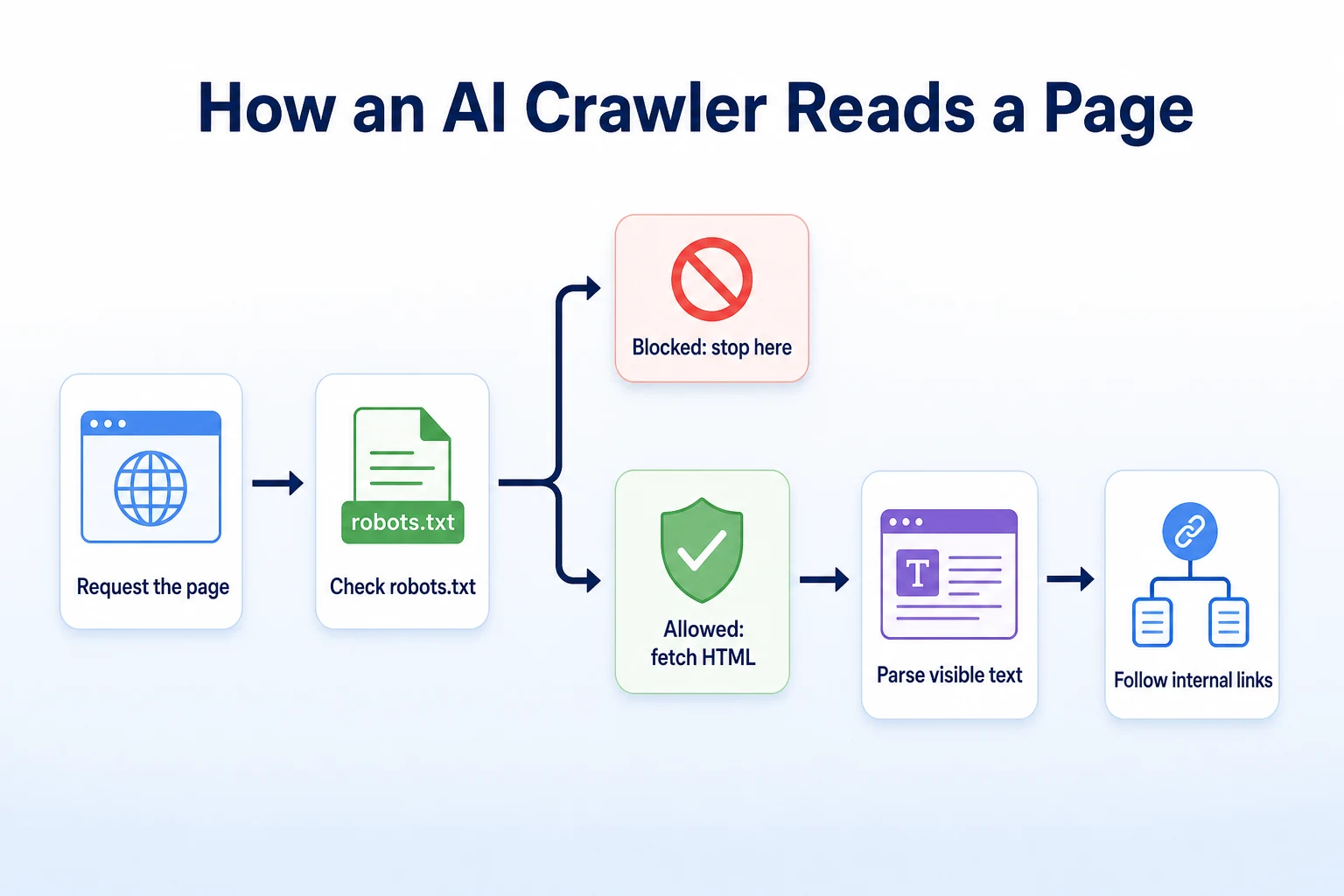
Checking the rules in robots.txt first
Before requesting a page, a well-behaved crawler checks your site's robots.txt file for a rule that names it specifically, or a general rule that applies to everything.
Google's own documentation on how robots.txt works describes it as the standard way crawlers learn which parts of a site they're welcome to request. An AI crawler that respects the standard will skip any path disallowed for its user-agent, and it will skip the entire site if a blanket rule disallows everything.
This is the first and most common point of failure. If a rule meant for one crawler accidentally applies to all of them, the crawler never gets past this step.
Requesting and parsing the HTML
If robots.txt allows the request, the crawler fetches the page the same way a browser would, by requesting the URL and receiving HTML back.
From there, it parses that HTML looking for text, headings and other readable content. Many AI crawlers do this without rendering the page the way a browser does, which means they're generally working from the raw HTML response rather than anything added to the page afterward.
That distinction matters more than it sounds, and it's the subject of its own section later in this article.
Whether it follows links deeper into the site
Once a page is read, a crawler typically looks at the links on it and decides whether to follow any of them to other pages on the same site.
This is how a crawler discovers pages it wasn't told about directly, by following a trail of internal links from pages it already knows about. A page with no links pointing to it from anywhere else on the site can be much harder for a crawler to find on its own.
The AI Crawlers You're Likely to See
A handful of named crawlers account for most of what a small business site will see in its server logs or its crawler access reports. These are illustrative of what each company documents, and it's worth checking each company's own pages directly since names and policies do change.
Crawler name | Operated by | Documented purpose |
|---|---|---|
GPTBot | OpenAI | Crawls pages that may be used for OpenAI's documented purposes, including model training |
ClaudeBot | Anthropic | Crawls pages on Anthropic's behalf, as described in its published crawler information |
PerplexityBot | Perplexity | Crawls pages that Perplexity's answers may draw from or cite |
Google-Extended | Controls whether a site's content can be used for Gemini apps and related generative features, separate from regular Google Search crawling |
These descriptions summarize what each company states publicly; check their own documentation for the current, authoritative wording.
Blocking or allowing any one of these doesn't change whether Googlebot can still crawl and rank your site for ordinary search. Each crawler follows its own rule in robots.txt, and they're independent of each other.
Before deciding anything about any of them, it helps to know what your site currently allows. RepGet's free AI Crawler Checker tests whether GPTBot, ClaudeBot and PerplexityBot can currently reach a given site.
What Tells a Crawler Which Pages to Read
A crawler doesn't know your site's structure in advance. It relies on a small set of signals to figure out what's allowed and where everything is.
Your robots.txt file
This is the permission layer. It tells a crawler which paths it's welcome to request and which ones to leave alone, on a crawler-by-crawler basis if needed.
Our guide to building a robots.txt file that's safe for Google and AI covers the syntax in more depth, including how to allow or block a named AI crawler without touching the rules that apply to search engines.
Your XML sitemap
A sitemap is a list of your pages, usually at an address like yoursite.com/sitemap.xml, that gives a crawler a direct index of what exists rather than relying only on following links to find it.
It doesn't force anything to be crawled, and it isn't a ranking signal. It just makes discovery faster and more complete. RepGet's free Sitemap Checker & Finder can confirm a sitemap exists and is valid.
Internal links between your pages
A page with no internal links pointing to it is harder for any crawler to find, AI or otherwise. If your newest service page is only reachable through a search box on your own site, a crawler following links has no way to stumble onto it.
Linking to important pages from your homepage, navigation menu or related articles gives crawlers an obvious path to follow.
llms.txt: a newer, optional signal
llms.txt is a newer, proposed file format, documented at llmstxt, intended to give AI systems a short, structured summary of a site's most important pages in plain language.
It isn't a standard that every AI crawler is documented to read, and it doesn't replace robots.txt or a sitemap. It's an additional signal some businesses choose to add. RepGet's free llms.txt Generator can build one from a site's existing pages for businesses that want to try it.
The Accidental Blocks That Keep AI Crawlers Out
Most sites that block an AI crawler didn't mean to. The block was written for a different reason, or added by default, and nobody noticed what else it caught.
A leftover or overly broad robots.txt rule
A rule written to block one crawler can end up blocking several, especially if it sits under a general User-agent: * block rather than one written for a specific crawler by name.
This also happens when a staging site's blanket Disallow: / rule gets copied to the live domain during launch and nobody removes it. Every crawler reads that rule the same way, AI or otherwise.
The fix is to give each crawler you want to treat differently its own named block, so a rule meant for one doesn't quietly apply to all of them. Our guide to building a safe robots.txt file walks through the syntax for doing this correctly.
A firewall or security plugin blocking by default
Security plugins and hosting-level firewalls often ship with a setting that blocks unfamiliar user-agents automatically, on the reasonable assumption that most unknown bots are scrapers or worse.
An AI crawler can look exactly like that kind of traffic from the firewall's point of view. It's a program making repeated requests from an address the firewall doesn't recognize, which is precisely the pattern many of these tools are built to stop.
The result is a crawler that's fully allowed in robots.txt but still never gets through, because something further down the stack is rejecting the request before robots.txt is ever consulted. This kind of block won't show up by reading robots.txt at all, which is why it's worth testing access directly rather than only reading the rules.
Content behind a login or paywall
Pages that require a login, a membership, or even just an email address before the content loads are invisible to a crawler the same way they're invisible to a visitor who hasn't signed in.
This is sometimes intentional, and that's a reasonable choice for genuinely gated content. It becomes a problem when a business doesn't realize that a page it wants found, like a pricing page or a resource guide, sits behind a gate that was added for an unrelated reason.
Mistake | What it does to crawling | How to check it |
|---|---|---|
Overly broad robots.txt rule | Blocks an AI crawler along with others under a shared rule | Read the live robots.txt file and check which crawlers each block applies to |
Firewall or plugin blocking unfamiliar bots | Rejects the crawler's request before robots.txt is even read | Test actual access with a checker rather than reading rules alone |
Content behind a login or paywall | Prevents any crawler from reading the gated page at all | Confirm whether pages you want found actually require a login first |
Aggressive rate limiting | Treats repeated crawler requests as an attack and blocks the source | Check server or firewall logs for blocked requests from known crawler names |
RepGet's free Robots.txt Checker and AI Crawler Checker both test actual access rather than just reading the rules, which catches the firewall-level blocks that a plain text file won't reveal.
Why JavaScript-Heavy Pages Are a Common Blind Spot
A page can look complete in a browser and still be mostly empty to a crawler that never ran the scripts that filled it in.
What a crawler sees versus what a visitor sees
Many AI crawlers read the raw HTML a server sends back, without executing the JavaScript that a browser runs afterward to build out the rest of the page.
A visitor opens a product page and sees a full description, a price table and a set of reviews. If some of that content only appears after a script runs, loading data from elsewhere and inserting it into the page, a crawler that doesn't run that script may see none of it. It sees whatever was already in the HTML before the script fired.
This is easy to miss because nothing looks wrong when you check the page yourself. You're using a browser, and a browser runs the scripts. The crawler isn't, and that's the whole gap.
A quick way to check what's actually in the HTML
The simplest check is to view the page's source HTML directly, rather than what's rendered on screen, and look for the actual text you expect a crawler to read.
If a description, a price or a key fact only shows up in the rendered page and not in the raw source, that's the content a JavaScript-dependent crawler is likely to miss entirely. RepGet's free LLM HTML Visibility Checker does this check for you, showing how much of a page's text is actually present in the HTML a crawler receives.
Making Your Content Readable, Not Just Crawlable
Getting a crawler past robots.txt and onto the page is only half the job. What's actually on the page still has to be something it can read and use.
Put key facts in text, not only in images
A photo of a menu, a scanned price list, or a graphic listing service areas looks fine to a visitor but carries no readable text to a crawler, which can't read words baked into an image.
The fix isn't to remove the image. It's to also write the same information out as plain text somewhere on the page, so the fact exists in a form a crawler can actually parse.
Use clear headings that describe the content
Headings that say what a section actually contains, rather than something vague or clever, make it easier for any system reading the page to understand what each part is about.
A heading like "Our Pricing" tells a crawler exactly what follows. A heading like "What It Costs You" might read better to a person but gives a parsing system less to work with.
Avoid hiding essential information behind clicks
Content that only appears after a visitor clicks a tab, expands an accordion, or clicks through a multi-step form can be invisible to a crawler that doesn't interact with the page the way a person does.
If a fact matters enough that you'd want it found, it generally needs to sit in text that's present on the page from the start, not behind an extra click. RepGet's free Meta Tag Checker can confirm what's in a page's title, description and other tags that both search engines and AI systems commonly read first.
Crawling, Indexing and Appearing in an Answer Are Three Different Things
It's easy to assume that once a crawler can reach a page, the rest follows automatically. It doesn't. These are three separate steps, and clearing one doesn't guarantee the next.
Stage | What it means | What it does not guarantee |
|---|---|---|
Page is crawled | A crawler successfully requested and read the page's HTML | That the content was stored, indexed or used for anything afterward |
Content is indexed or referenced | The system retained or can draw on information from the page | That the page will be cited or mentioned in any particular response |
Business is named in an answer | A specific prompt produced a response naming the business | That the same or a similar prompt will produce the same result again |
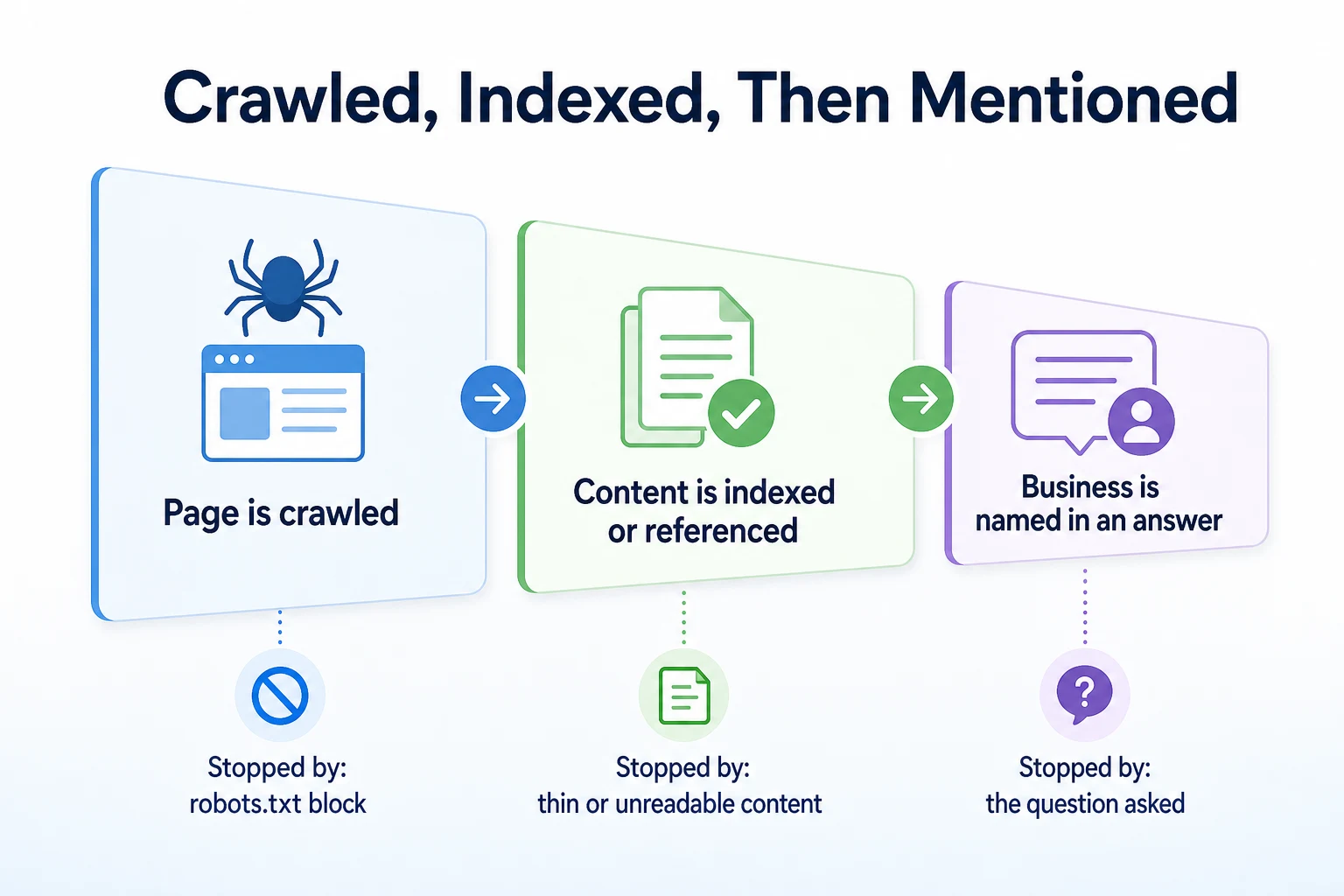
A page can be crawled without ever being referenced again, the same way Googlebot can crawl a page that never ranks for anything useful. Whether a business gets named in a particular AI answer depends heavily on the question asked, the assistant used, and information the business has no control over.
Our guide to getting mentioned in ChatGPT and our explanation of how AI assistants decide which businesses to recommend both go further into what happens after a page is readable, and what's outside anyone's control once it is.
A Worked Example: Tracing One Page Through an AI Crawler's Eyes
Imagine a landscaping company with a lawn care service page at an address like example.com/services/lawn-care. This example is illustrative.
GPTBot requests the page. It checks robots.txt first, finds no rule naming it or blocking the path, and the request goes through.
The crawler didn't find this page by following a link from the homepage. There isn't one. It found the URL listed in the site's sitemap, which is the only reason it knew the page existed at all.
Once the page loads, the crawler reads the HTML it receives. The service description sits in plain paragraphs, right there in the source. So do the headings: "Lawn Care Services," "Service Areas We Cover," "What's Included." All of that gets read without any trouble.
Further down the page is a pricing table. On the live site, a visitor clicks a tab labeled "Pricing" and a script loads the table's contents a moment later.
The crawler never clicks anything. It reads whatever was already present in the HTML when the page first loaded, and the pricing table wasn't there yet. As far as this crawler can tell, the page has no pricing information, even though every visitor who clicks the tab sees it clearly.
Nobody built that tab to hide anything from a crawler. It was built to keep the page tidy. The effect on an AI crawler was simply never part of the decision.
A 20-Minute Checklist to Confirm Your Site Is Crawlable
This is worth running after any site change, a new plugin, a theme update or a move to a new host, since any of these can quietly rewrite the rules a crawler depends on.
Step | What to check | Time |
|---|---|---|
1. Read the live robots.txt file | Confirm there's no blanket block and no rule that accidentally covers more crawlers than intended | 3 minutes |
2. Test named AI crawler access | Confirm GPTBot, ClaudeBot and PerplexityBot are allowed or blocked on purpose, not by accident | 3 minutes |
3. Confirm the sitemap is valid | Check it lists your current pages and loads without errors | 3 minutes |
4. View the page source on key pages | Confirm descriptions, prices and other key facts actually appear in the raw HTML, not just the rendered page | 5 minutes |
5. Check firewall or security plugin settings | Confirm unfamiliar crawler user-agents aren't blocked by default | 3 minutes |
6. Confirm public pages don't sit behind a login | Check that pages meant to be found load without signing in or entering an email | 3 minutes |
Twenty minutes is enough to catch most of the accidental blocks this article has covered. RepGet's free AI Crawler Checker, Robots.txt Checker, Sitemap Checker & Finder and LLM HTML Visibility Checker can speed up most of these steps instead of checking each one by hand.
Where RepGet fits
Figuring out which crawler can reach which page, and which facts actually sit in the raw HTML, is detailed, slightly technical work that's easy to put off.
RepGet's free website audit crawls a site, gives it a 0 to 100 SEO score, and lists technical and content issues worth investigating, which can surface a robots.txt problem or a thin page alongside other things worth fixing on the same visit. Its free AI Crawler Checker tests whether GPTBot, ClaudeBot and PerplexityBot can currently reach a given site, and its free LLM HTML Visibility Checker shows how much of a page's text is actually present in the HTML a crawler receives. No account or credit card required for any of them.
None of these tools can tell you whether a specific AI assistant will name your business in a specific answer, and RepGet doesn't guarantee that. What they can do is show you, in a few minutes, whether the access and the content are there in the first place, which is the part a business actually controls.
The bottom line
An AI web crawler isn't mysterious once you break it down. It checks robots.txt, requests the page, reads the HTML it gets back, and sometimes follows a link to the next one.
Most of what keeps these crawlers out isn't deliberate. A leftover robots.txt rule, a firewall blocking unfamiliar bots by default, a login wall added for an unrelated reason, or a fact that only loads after a click or a script, all of these can quietly keep a crawler from ever seeing content a visitor sees easily.
Fixing that is a matter of access and plain, readable content, not a guarantee of anything beyond it. Being crawled doesn't guarantee being indexed, and being indexed doesn't guarantee being named in any particular AI answer. Those last steps depend on far more than one website can control.
Find out what your website needs first
Before chasing a specific crawler setting, see what your site currently allows and where its content might be falling short. Run a free website audit with RepGet to check your site's technical setup alongside its content. No account or credit card required.
FAQ
What is an AI web crawler?
It's automated software, like GPTBot or ClaudeBot, that requests pages on a website to gather text for an AI company's documented purposes, such as training a model or grounding an assistant's answers in current information.
How do I know if ChatGPT's crawler has visited my site?
Check your server logs for requests from GPTBot, or use a checker tool that tests whether GPTBot can currently access your site. Logs show actual past visits; a checker shows whether access is allowed right now.
Can I block AI crawlers without blocking Google?
Yes. Give each crawler its own named
User-agentblock in robots.txt, so a rule written for one AI crawler doesn't apply to Googlebot or any other crawler by accident.Does JavaScript stop AI crawlers from reading my site?
Many AI crawlers read the raw HTML a server sends back without running JavaScript the way a browser does. Content that only appears after a script runs can be invisible to them even though visitors see it fine.
Why isn't my business showing up in ChatGPT even though Google can crawl my site?
Googlebot and AI crawlers follow separate rules and can be allowed or blocked independently of each other. Also, a page being crawled doesn't guarantee it gets referenced or named in any specific AI answer.
Do I need an llms.txt file for AI crawlers?
No. It's an optional, newer file, and not every AI crawler is documented to read it. It doesn't replace robots.txt or a sitemap, both of which remain the primary signals crawlers rely on.
How often do AI crawlers visit a website?
It varies by crawler and by site, and companies don't publish a fixed schedule. Checking your server logs over time is the only reliable way to see how often a particular crawler actually visits your site.
Is GPTBot the same as Googlebot?
No. They're operated by different companies for different purposes. GPTBot is OpenAI's crawler, Googlebot crawls for Google Search, and each follows its own separate rules in robots.txt.