

GPT Zero Plagiarism Checker: Does Your Blog Need One?
Short answer
GPTZero is built to flag AI-generated text, not to check for plagiarism, so it isn't a true plagiarism checker on its own. A dedicated plagiarism checker compares your draft against indexed web pages and flags word-for-word or near-identical matches. Running one matters most for templated pages, freelancer-written content, or anything assembled from multiple sources, not for every blog post you publish.
A business owner hires a freelance writer to produce a batch of blog posts for the month.
Before publishing, they want some reassurance the content is original. Someone on the team suggests running each post through GPTZero.
The results come back with a score, but it's not a percentage match to other websites. It's a probability that the text was written by AI.
That's not the same question. A GPT Zero plagiarism checker search usually starts from a reasonable worry (did this writer actually write this?) but GPTZero itself answers a different question than the one most people have in mind. Here's what it actually checks, what duplicate content really does to a site's rankings, and when the extra step of checking is worth your time.
What GPTZero Actually Checks (and What It Doesn't)
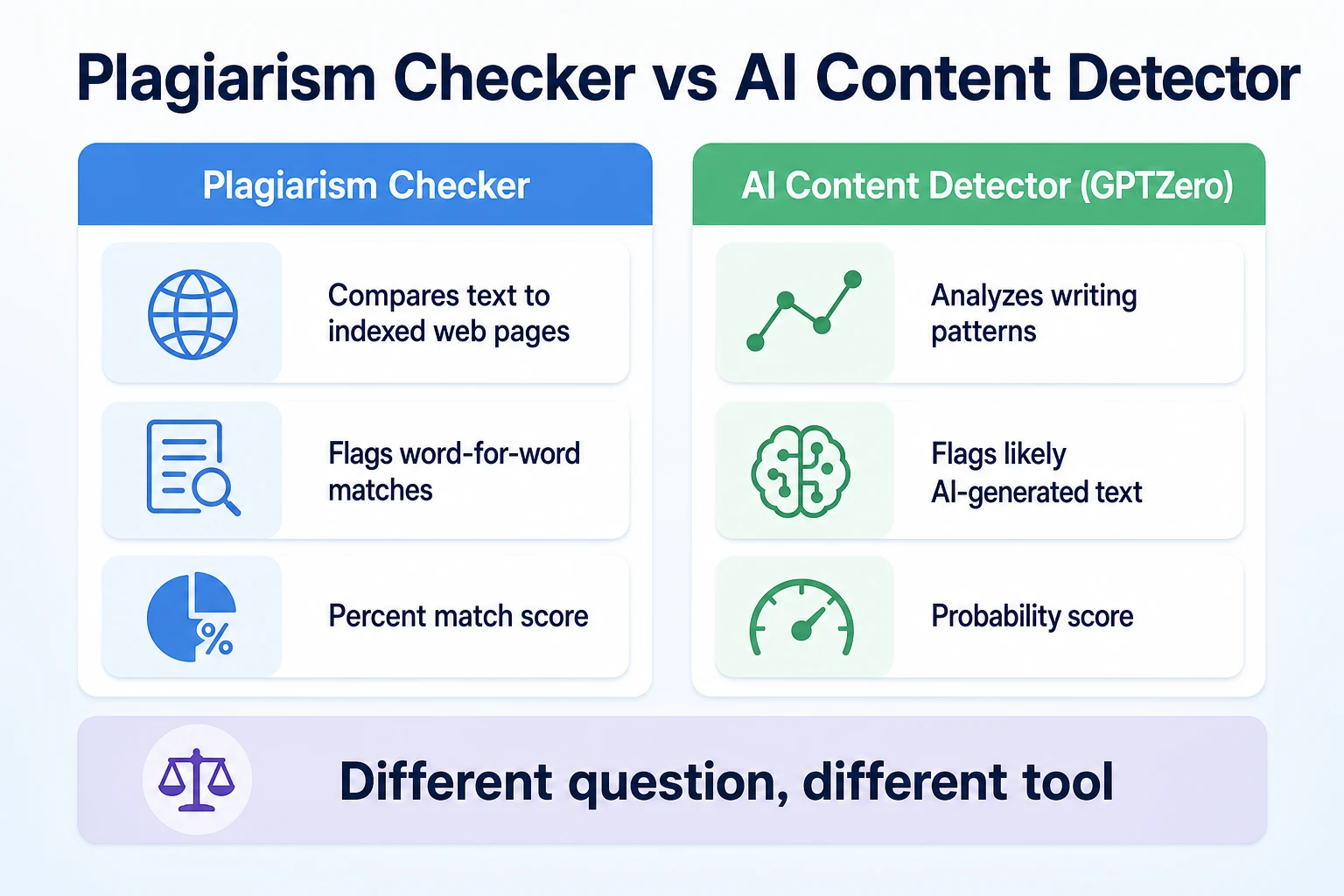
GPTZero is built as an AI content detector. It looks at patterns in how text is written and estimates how likely it is that an AI model produced it. It doesn't compare your draft against other pages on the internet, and it was never designed to.
What an AI content detector like GPTZero looks for
Tools in this category analyze things like sentence length variation, word choice predictability, and other patterns that tend to differ between human writing and AI-generated text. The output is usually a score or a percentage likelihood, not a list of matching sources. Our guide to AI content detectors covers how these tools work in more detail, including why the score is a probability estimate rather than a verdict.
What a dedicated plagiarism checker looks for instead
A plagiarism checker does something different. It breaks your text into short phrases, searches a large index of published web pages for matches, and returns a percentage showing how much of your text overlaps with existing content elsewhere. That's the tool you actually want if the question is whether a post is too close to something already published, whether that's a freelancer's draft or a page on your own site.
Tool type | What it checks | What the result tells you | What it can't tell you |
|---|---|---|---|
AI content detector (GPTZero) | Writing patterns in the text itself | A probability the text was AI-generated | Whether the text matches anything already published |
Plagiarism checker | Your text against an index of web pages | A percentage match to existing content | Whether the text was written by a person or an AI |
Why Duplicate or Similar Content Worries Site Owners
The underlying worry behind running a plagiarism check is usually about rankings, not just originality for its own sake. It's worth separating what's documented from what's assumed.
What Google says about duplicate content
Google's own documentation on consolidating duplicate URLs describes duplicate content as pages with identical or very similar content, and explains that Google tries to index the version it considers canonical rather than penalizing every duplicate outright. There's no separate, named
There's no separate, named "duplicate content penalty" in Google's documentation. What can happen is that Google picks one version to show in search results and treats the rest as duplicates it doesn't need to index on their own, which can mean a page you wanted to rank for never shows up as a distinct result at all.
Why near-duplicate content is different from an outright copy
Two pages covering the same topic will naturally use some of the same words. A page about tree trimming and a page about tree removal from the same company might both mention "certified arborist" and "free estimate" without either one being a problem. The concern isn't overlap in general. It's large blocks of text that are identical or nearly identical across pages that are supposed to be separate, which is a different and more specific thing than two pages simply covering related ground.
Where Accidental Duplication Comes From on a Small Business Site
Most duplicate content on a small business site isn't the result of anyone copying a competitor. It's the result of shortcuts that made sense at the time.
Duplication across your own pages
Location pages and service pages are the most common source. A business with five locations often builds five pages that are identical except for a city name swapped in and out, with the actual description, process, and benefits paragraphs copied word for word across all of them. Our guide to local SEO for small businesses and our guide to service page SEO both cover why each page needs something genuinely specific to stand on its own, rather than relying on a swapped place name to do the work of differentiating it.
Duplication from outside sources
Product descriptions copied straight from a manufacturer's spec sheet are another common case, especially on a site selling items that dozens of other retailers also carry. A press release or an article syndicated from another source and posted on a blog with no changes is a third. None of these come from an attempt to deceive anyone. They're usually just the fastest way to fill a page, and the cost of that shortcut is a page that has nothing distinct to offer in search results.
Source of duplication | Example | Why it matters |
|---|---|---|
Templated location pages | Five city pages with identical body text except the city name | Google may only show one version, leaving the others invisible in search |
Copied product descriptions | Manufacturer spec text pasted onto a product page unchanged | The same text often appears on dozens of other retailer sites already |
Syndicated articles | A press release or guest article posted with no changes | The original publisher's version is usually the one treated as canonical |
Reused boilerplate | A long "about our process" paragraph pasted into every service page | Dilutes what makes each individual page worth ranking on its own |
How a Plagiarism Check Actually Works
Underneath the simple percentage score, a plagiarism checker is doing something fairly mechanical. It splits your text into short overlapping phrases, usually a handful of words at a time, and checks each one against a large index of previously crawled web pages. Phrases that come back as exact or near-exact matches get flagged, and the tool tallies up how much of the total document those flagged phrases make up.
What a match percentage tells you
A high match percentage is a useful signal that a meaningful chunk of your draft already exists somewhere else, word for word or close to it. That's worth investigating whether the source is a freelancer who reused old work, a template pulled from another site, or content copied by mistake during research. The percentage itself is a starting point for that investigation, not the end of it.
What a match percentage can't tell you
A checker can't tell you who copied from whom. If your own older page and a new draft share a large block of text, the tool will flag it the same way it would flag a copy from a stranger's site, even though the two are related pages from the same business. It also can't account for common phrases, quoted material, or standard industry language that legitimately repeats across many unrelated sites, which is why a very low match score isn't proof of total originality and a moderate one isn't automatically a problem. Reading the actual flagged sections matters more than reacting to the number alone.
A 15-Minute Plagiarism Check Before You Hit Publish
A check doesn't need to be elaborate to catch the problems that actually matter. Fifteen minutes before hitting publish covers the ground that counts.
Pull three or four distinctive sentences from the middle of the draft, not the opening line, and search each one in quotation marks to see if it turns up elsewhere word for word.
Run the full draft through a dedicated plagiarism checker and read the flagged sections rather than just noting the percentage.
Paste the draft's key paragraphs against your own site's existing pages on a similar topic, since a checker built for the open web won't always catch overlap with pages you already own.
If the draft came from a freelancer, check whether the flagged matches point back to the same freelancer's other published work, which can be a sign of reused material across clients rather than a one-off coincidence.
Before moving on, run the page's title and meta description through RepGet's free SEO tools, since a templated title repeated across several pages is a related duplication problem that a plagiarism checker won't flag at all.
None of these steps require a paid subscription to a heavyweight checker. A handful of exact-phrase searches and one pass through a free tool catches most of what's worth catching before a post goes live.
A Worked Example: Catching a Copied Paragraph Before It Went Live
Imagine a small residential cleaning company expanding into five nearby towns. This example is illustrative.
The owner builds a page for each town using the same template: a headline with the town name swapped in, a short intro, a list of services, and a closing paragraph about booking a quote. To save time, the services list and the closing paragraph are copied directly from the original page into all five new ones, with only the headline and a single sentence near the top changed for each town.
Before publishing, the owner runs each new page through a plagiarism checker as a habit left over from checking freelancer work. Four of the five pages come back with a high match percentage, not against a stranger's site, but against the company's own original page and against each other.
The flagged sections are exactly what you'd expect: the services list and the closing paragraph, word for word, repeated five times with only a town name different. Nothing about the match is a sign of theft. It's a sign the pages don't actually say anything distinct from one another.
The fix takes an afternoon, not a rewrite from scratch. The owner keeps the same basic structure across all five pages but writes a genuinely different paragraph for each town describing specific neighborhoods served, a local landmark near the office, or a detail about that town's housing stock that affects the kind of cleaning jobs that come up there. The services list stays similar, since the services genuinely are the same, but the surrounding text that made each page a near-copy of the others is gone.
Nobody would have caught this by reading one page on its own. It only showed up because the pages were compared to each other, which is the exact gap a plagiarism check filled here, even though the original worry when the owner started checking was about a freelancer, not about the company's own templated pages.
When Running a Plagiarism Check Is Actually Worth It
A plagiarism check isn't something every blog post needs before it goes live. It earns its fifteen minutes in a specific set of situations, and recognizing those situations is more useful than running the check out of habit on everything.
Scenario | Worth a check? | Why |
|---|---|---|
Content from a freelancer or agency you haven't worked with before | Yes | No track record yet to judge whether drafts are written fresh each time |
Templated pages across locations, services, or products | Yes | The template itself is the most common source of accidental near-duplication, as in the example above |
Content assembled from several source documents or research notes | Yes | Easy to paste a sentence from a source document without rewriting it during a busy editing pass |
A post drafted quickly with AI assistance and light editing | Yes | AI drafting tools can sometimes echo phrasing close to training sources, worth a quick check before publishing |
A long-term writer with an established pattern of original work | Depends | Lower risk, but an occasional spot check still catches a rare slip |
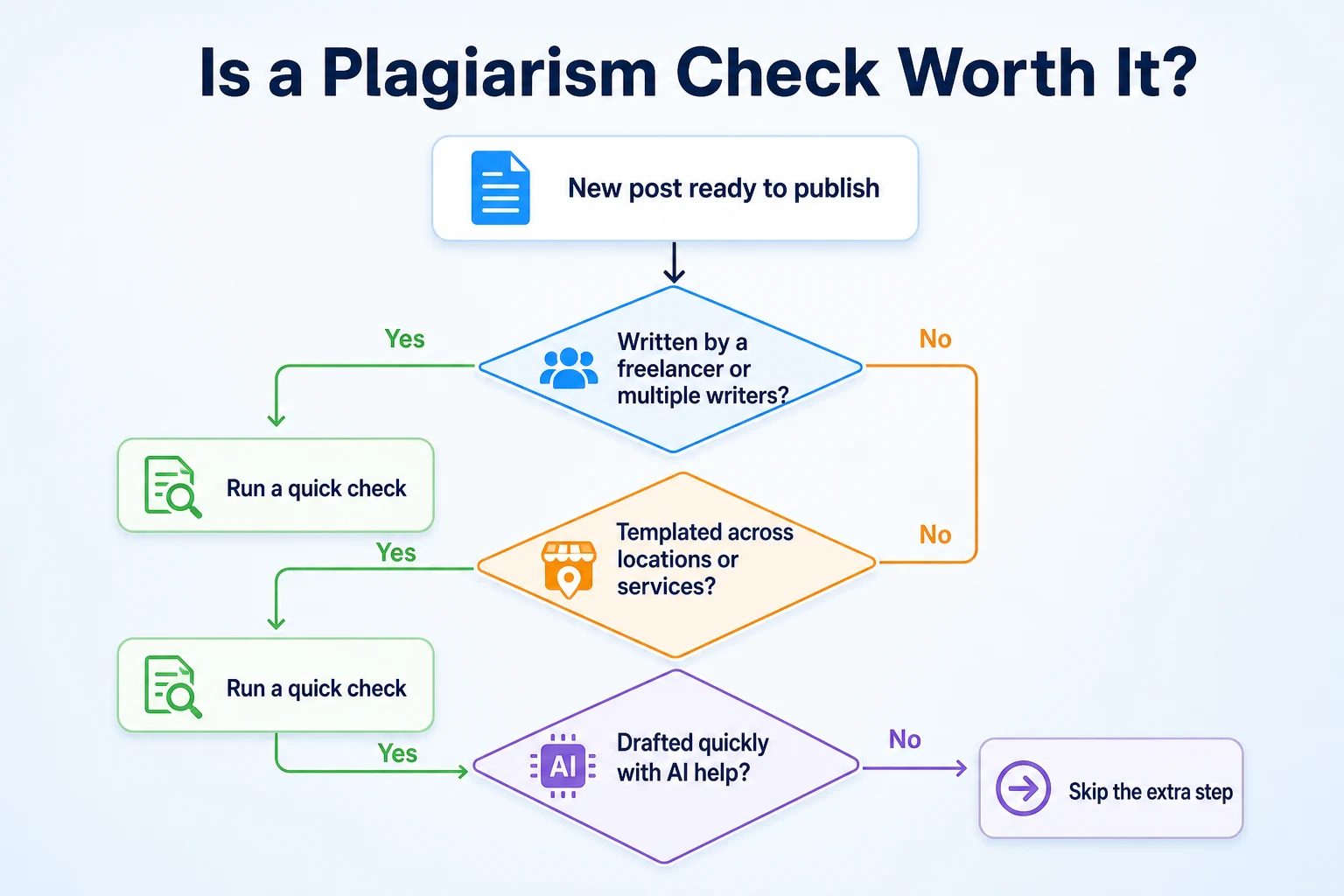
The common thread across the scenarios worth checking is distance between the writer and the final draft. A freelancer you've never worked with, a template filled in by whoever had time that week, or an AI tool generating a first pass all introduce a step where text can end up closer to something else than anyone intended. The check exists to catch that gap, not to question anyone's honesty by default.
When You Can Skip the Extra Step
Running a plagiarism check on every single post, regardless of how it was written, turns a useful habit into busywork that doesn't add much. A few situations are reasonable to skip.
A short post written start to finish by one person on your own team, drawing on their own knowledge of the business rather than outside research, rarely needs a formal check. The risk of accidental overlap is low because there's no template being copied and no source document being paraphrased in a hurry.
Content that's already been through an internal editorial review, where someone read the draft against the brief and confirmed it says something specific to your business, has effectively already had its originality checked, just not with a percentage attached to it.
Boilerplate legal or policy text, like a privacy policy or a standard shipping disclaimer, is worth leaving out of a plagiarism check entirely. This kind of text is expected to closely resemble what thousands of other sites publish, since it's often adapted from the same legal templates for good reason, and a checker will flag it every time without telling you anything useful.
Skipping the check in these cases isn't cutting a corner. It's recognizing that the check is a tool for a specific risk, and running it where that risk isn't present just adds a step with no real payoff.
Common Mistakes When Checking for Duplicate Content
A plagiarism check is only as useful as how you read the result. A few habits turn a genuinely helpful step into either a false alarm or a missed problem.
Treating a match percentage as proof of plagiarism is the most common one. A score on its own doesn't tell you who copied from whom, or whether the match is a quoted statistic, a common industry phrase, or an actual lift from another writer's work. Reading what's flagged, not just the number, is the part that actually tells you something.
Checking only against the open web and skipping your own site is another. As the cleaning company example showed, a checker built to scan the internet won't automatically compare a new draft against pages you already own, which means the most common source of accidental duplication on a small business site can slip past a check that looks thorough.
Panicking over matched boilerplate or quoted material is a third. A pulled quote, a cited statistic with its original phrasing kept intact, or standard legal language will often trigger a match, and none of that is a problem worth rewriting around. The fix is recognizing which flags are expected before deciding one is worth acting on.
Skipping titles and meta tags is a fourth, and it's easy to miss because a plagiarism checker is built to scan body text, not the shorter fields around it. A templated title tag repeated with only a city or product name changed is a form of duplication that behaves differently in search results, closer to the kind of overlap covered in our guide to keyword cannibalization, where two pages on your own site end up competing against each other instead of one clearly winning.
Mistake | What it leads to | Fix |
|---|---|---|
Treating the percentage as a verdict | Rewriting sections that were never actually a problem | Read the flagged text itself before deciding it needs changing |
Only checking against the open web | Missing duplication between your own pages | Compare new drafts against your own existing pages directly |
Reacting to flagged quotes or boilerplate | Wasted time rewriting text that's supposed to match | Expect matches on quoted material and standard legal text |
Ignoring titles and meta tags | Pages competing against each other in search results | Check titles separately, since a body-text checker won't catch this |
Where RepGet fits
RepGet doesn't run a plagiarism check or an AI-detection scan, and it isn't built to compare a draft against GPTZero's output or any other dedicated checker's database. If that's the specific check you need before publishing, the steps covered earlier in this guide, the exact-phrase searches and a dedicated checker, are still the way to do it.
What RepGet does cover is the wider pattern that duplicate content often points to. Its free website audit crawls a site and gives it a 0 to 100 SEO score, flagging content issues worth investigating, including signs that pages are thin, repetitive, or too similar to each other to stand on their own in search results. No account or credit card required. It's a reasonable way to spot a templated set of location or service pages before a plagiarism check ever becomes necessary, since the audit looks at the whole site rather than one draft at a time.
RepGet doesn't guarantee a ranking or tell you whether a specific paragraph was copied from a specific source. It's a way to see where a site's content might need a closer look, not a replacement for the judgment calls covered throughout this guide.
The bottom line
A GPT Zero plagiarism checker search usually comes from a fair question: is this content actually original? GPTZero itself doesn't answer that question, since it's built to estimate whether text was AI-generated, not to compare it against other published pages. A dedicated plagiarism checker does that second job, and it's worth running when content comes from a new freelancer, a templated set of pages, a document assembled from research notes, or a quick AI-assisted draft.
Duplicate content isn't punished the way a lot of site owners imagine. Google's own documentation describes picking one version to show rather than applying a blanket penalty, but that still means a page you wanted to rank for can end up invisible if it's too close to another one, on your site or someone else's. A fifteen-minute check before publishing catches most of what matters, and skipping it for a short, original post from your own team isn't cutting a corner. It's matching the effort to the actual risk.
Find out what your website needs first
Before worrying about one draft, it's worth seeing whether duplicate or thin content is already a pattern across your site. Run a free website audit with RepGet to check content and technical issues worth fixing. No account or credit card required.
FAQ
Is GPTZero a plagiarism checker?
Not really. GPTZero is built as an AI content detector that estimates the likelihood text was written by an AI model, not a tool that compares your draft against other published web pages for matches.
What's the difference between a plagiarism checker and an AI content detector?
A plagiarism checker compares your text against an index of web pages and flags word-for-word matches. An AI content detector analyzes writing patterns and estimates whether the text was AI-generated, answering a different question entirely.
Does Google penalize duplicate content?
There's no separate duplicate content penalty in Google's documentation. Instead, Google tends to pick one version of near-identical pages to show in search results, which can leave the others effectively invisible.
How do I check if my blog post is plagiarized?
Search a few distinctive sentences from the middle of the post in quotation marks, run the draft through a dedicated plagiarism checker, and compare it against your own site's existing pages on similar topics.
Are there free plagiarism checkers for blog posts?
Yes, several free plagiarism checkers exist online that scan a draft against an index of web pages and return a match percentage, though most limit how much text you can check at once without a paid plan.
Can two pages on my own site count as duplicate content?
Yes. Templated location or service pages with identical body text are a common source of this, and a plagiarism checker will flag the overlap the same way it flags a match to a stranger's site.
Should I check AI-written content for plagiarism?
It's a reasonable habit, since AI drafting tools can sometimes echo phrasing close to their training sources. A quick check before publishing catches this without adding much time to your editing process.
What percentage match is too high for plagiarism?
There's no fixed cutoff. A moderate score made up of quoted material or common phrases isn't a problem, while even a lower score worth investigating if it points to large, uncredited blocks of copied text.