

Google Business Home: What the New AI Dashboard Actually Does
Short answer
In October 2026, reports described a closed beta called Google Business Home: a single dashboard that brings Google Business Profile, Merchant Center, Google Ads and YouTube together, with Gemini-powered assistance. Access is limited to invited businesses, and Google hasn't published full eligibility details or a launch date. The better use of your time now is keeping your existing profile, ads and website in good shape.
A local business owner checks her inbox and finds an invitation to something called Google Business Home.
The email promises one dashboard for her Google Business Profile, her product listings, her ad campaigns and her YouTube channel, all in one place, with some kind of AI assistant built in.
She's curious, but she's also managed four separate Google logins for years and isn't sure what actually changes if they get merged into one screen.
That's the question behind Google Business Home: what's actually been reported about this closed beta, what it's meant to replace, and what's worth doing on your own listings and website whether or not you ever get an invite. Here's what's known so far, and what still isn't.
What Google Business Home Is, and Why It's Still in Beta
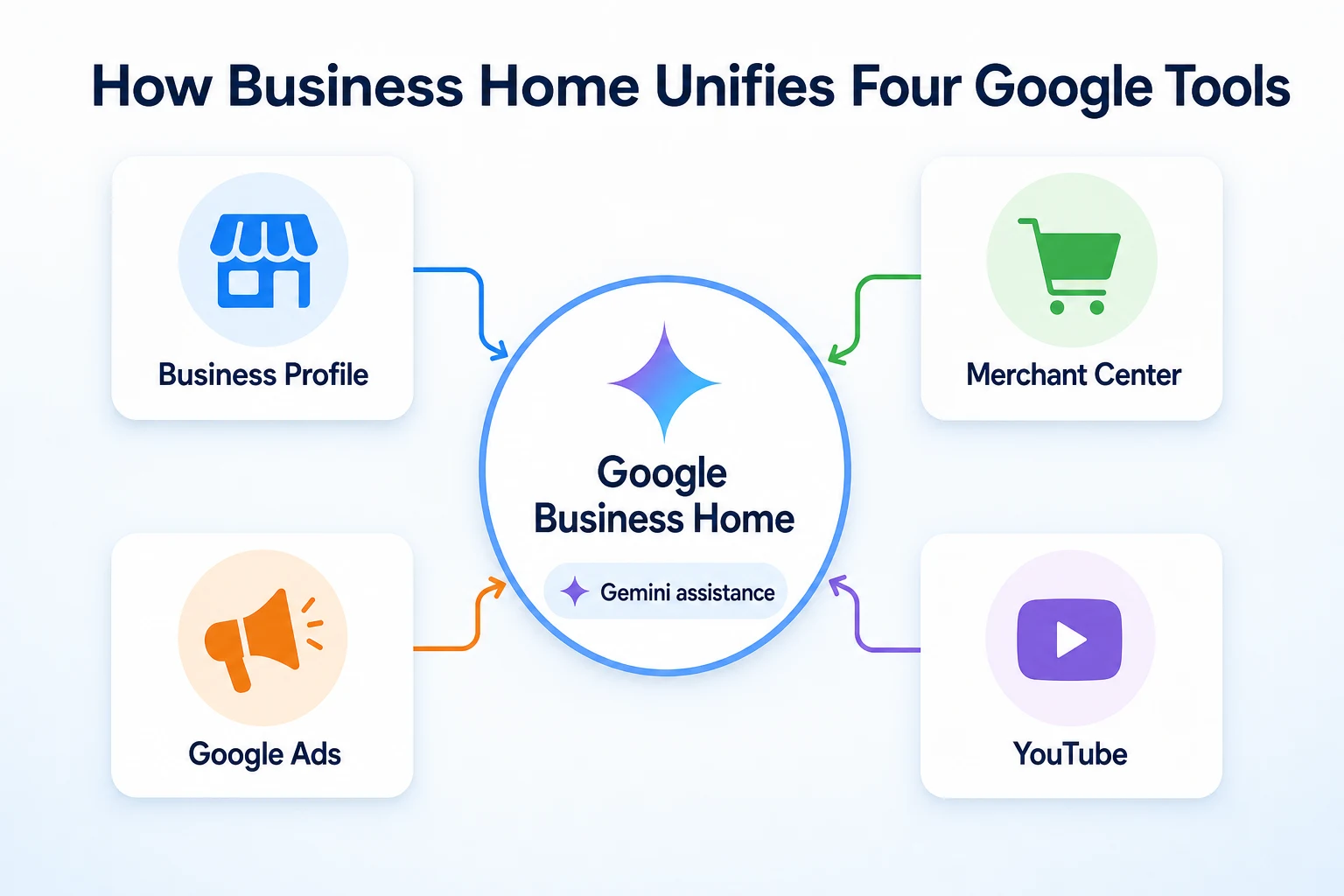
Reports from October 2026 described Google Business Home as a new, unified dashboard that brings together four tools a local or ecommerce business normally manages separately: Google Business Profile, Merchant Center, Google Ads and YouTube. The idea, as reported, is that a business owner could check and update all four from a single screen, instead of signing into each tool on its own.
What's been reported so far
The reporting describes Business Home as being tested through a closed beta, meaning it's only reaching a limited set of invited businesses rather than being rolled out broadly. Google hasn't published its own public documentation describing Business Home in detail at the time of writing, so most of what's known comes from early reports rather than an official product page or help center article. That distinction matters. A closed beta can change shape, get renamed, or never reach a public release at all, and none of that would be unusual for a product still being tested.
Why Google is testing a unified dashboard now
Google hasn't stated a specific reason for building Business Home, but the pattern is a familiar one. A small business that runs ads, maintains a product feed, posts to its Business Profile and uploads videos to YouTube is juggling four separate interfaces, each with its own login, its own notifications and its own way of showing performance. Combining them into one dashboard, with some kind of AI layer to help interpret what's happening across all four, fits the broader direction Google has taken with Gemini across its products generally. Whether that's the actual reasoning behind Business Home specifically, Google hasn't confirmed.
The Four Tools Business Home Brings Together
Before judging whether a combined dashboard is useful, it helps to be clear on what each of the four tools already does on its own, since that's what a business would currently be switching between.
Google Business Profile
Google Business Profile is the free listing that shows a business's name, address, hours, reviews and posts in Google Search and Google Maps. It's the tool most local businesses already know, usually managed directly through Google's own interface or app. Our guide to local SEO for small businesses covers how a well-maintained profile fits into the bigger picture of getting found nearby.
Merchant Center
Merchant Center is where a business uploads and manages its product data, the feed that powers things like Shopping ads and free product listings in Google Search. It's mostly used by businesses that sell physical products online, and it tends to involve more technical setup than a Business Profile, since product data has to follow a specific format to work correctly.
Google Ads
Google Ads is the platform for running paid campaigns, whether that's search ads, display ads, or Shopping campaigns pulled from a connected Merchant Center feed. It already connects to Merchant Center for many businesses, but it's historically been managed as its own account with its own dashboard and reporting.
YouTube
YouTube, for a business, usually means a channel used to post videos, from product demonstrations to customer testimonials to behind-the-scenes content. It's been treated as a separate platform with its own analytics, upload process and audience, generally with little direct connection to a Business Profile or an Ads account.
What Gemini-Powered Assistance Reportedly Does Inside It
The part of Business Home that's drawn the most attention is the AI layer. Reports describe Gemini playing an assistant role inside the dashboard, though the detail on exactly what that looks like day to day is still thin.
What Gemini reportedly helps with
According to the reporting, Gemini inside Business Home is meant to help with tasks like drafting responses, suggesting content ideas, and surfacing changes a business might want to make across its profile, ads or product listings based on recent performance. That general shape, an assistant that drafts suggestions rather than making changes on its own, lines up with how Gemini has been described in other Google products. Whether Business Home's version works the same way, with the same limits, hasn't been confirmed by Google directly.
What Google hasn't confirmed yet
Google hasn't published documentation on how much a business owner has to review before a Gemini suggestion goes live, whether suggestions apply automatically after a set time, or how the assistant decides what to flag in the first place. It also hasn't said whether Gemini's suggestions inside Business Home draw on the same underlying model used elsewhere in Google's products, or a version built specifically for this dashboard. Until that's documented, it's reasonable to treat the AI assistance as a drafting tool to review, not a fully autonomous system making decisions on a business's behalf.
Google Business Home vs Managing the Tools Separately
It helps to see the two approaches side by side, based on what's currently available versus what's been reported about the beta.
Feature | Managing the tools separately today | Google Business Home (closed beta) |
|---|---|---|
Logins required | Separate sign-in for Business Profile, Merchant Center, Ads and YouTube | Reported as a single dashboard covering all four |
Performance view | Checked tool by tool, with separate reporting | Reported as combined in one view |
AI assistance | Varies by tool, not unified across them | Reported Gemini assistance across all four |
Availability | Open to any business with the relevant accounts | Limited to invited participants in a closed beta |
Official documentation | Published in each tool's own help center | Not yet published by Google in detail |
These comparisons reflect what's been reported about the beta, not confirmed Google documentation.
Who Can Access the Closed Beta, and the Requirements
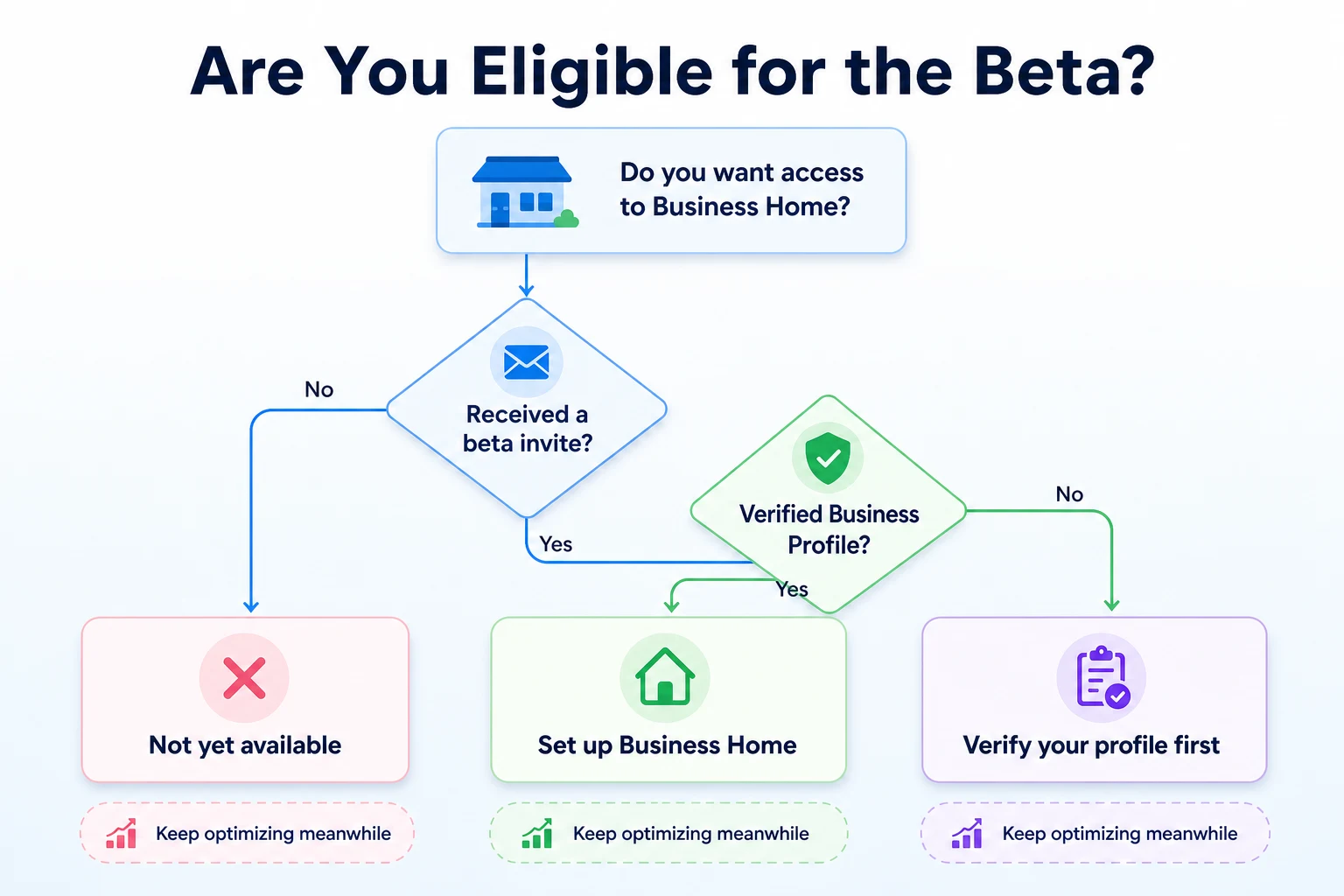
A closed beta means exactly what it sounds like: Google decides who gets in, and most businesses currently can't request access on their own.
What's confirmed about eligibility
Reports describe Business Home as reaching a limited set of businesses by invitation, generally ones that already have an active presence across at least some of the four tools it combines. A business with no Merchant Center account and no YouTube channel, for instance, would have less reason to be invited than one already running all four. Beyond that general pattern, Google hasn't published a formal eligibility list, an application process, or a waitlist that a business owner can sign up for directly.
What Google hasn't said
Google hasn't confirmed whether access depends on business size, industry, country, ad spend, or how long an account has existed. It also hasn't said whether a verified Google Business Profile is a strict requirement, though it would be a reasonable assumption given that the Profile sits at the center of the other three tools. Until Google publishes its own documentation, the honest answer to most access questions is that nobody outside Google has confirmed the specifics.
Question | What's confirmed | What's still unclear |
|---|---|---|
Is Business Home open to the public? | No, it's a closed beta as of the October 2026 reports | Whether or when it opens more broadly |
Can a business apply for access? | No public application process has been reported | Whether Google plans to add one |
Does a business need all four tools set up already? | Not directly confirmed | Whether partial setup, like a Profile without Merchant Center, still qualifies |
Is a verified Business Profile required? | Not directly confirmed | Whether verification is a strict prerequisite |
Is access tied to region? | Not addressed in the reporting | Whether some countries see it before others |
What Business Home Doesn't Do Yet
It's worth being just as clear about the limits here as about what's new, since a dashboard described in early reporting tends to sound more finished than it probably is.
Limits on the automation
Nothing in the reporting suggests Gemini's suggestions inside Business Home publish or apply themselves without a business owner reviewing them first. That matters for the same reason it matters with any AI-assisted tool that touches customer-facing content: a drafted reply to a review, a suggested ad change, or a recommended product listing edit still needs a person checking it makes sense for that specific business before it goes live. Our piece on the customer service AI chatbot covers a related pattern worth keeping in mind here, where automation speeds up a task without removing the need for someone to check the output.
Limits on availability
Business Home isn't something most businesses can turn on today, and Google hasn't given a date for when that changes. It also hasn't confirmed whether every feature reported so far, the unified dashboard, the cross-tool reporting, the Gemini assistance, arrives together for a given business or gets added in stages. Treating Business Home as a feature you can plan around right now would be premature. Treating it as something worth knowing about, so you're not caught off guard if an invite shows up, makes more sense.
Practical Uses for Local Business Marketing
Assuming the reported features hold up once Business Home reaches more businesses, there are a few ways a combined dashboard could genuinely save time for a local business juggling several Google tools at once.
Coordinating a seasonal promotion
A seasonal promotion, say a holiday discount or a limited-time menu item, usually touches several tools at once: a Business Profile post announcing it, a Merchant Center feed update if a product is involved, an Ads campaign pushing it, and maybe a YouTube video showing it off. Doing that today means updating each tool separately and hoping nothing gets missed. A single dashboard that shows all four in one place, as reported, would make it easier to confirm everything launched together and stayed consistent, rather than discovering a week later that the Ads campaign never went live while the Business Profile post did.
Watching performance in one place
Checking how a promotion performed currently means pulling numbers from Business Profile insights, Merchant Center reporting, Ads performance data and YouTube analytics separately, then piecing together a picture by hand. A combined view, if it works the way it's been reported, would remove some of that manual stitching together. It's worth remembering, though, that a combined view only helps if the underlying numbers are accurate and the business owner still takes time to interpret them. A dashboard that's easier to read doesn't replace the judgment needed to decide what to do with what it shows. Planning that promotion in the first place still benefits from a real plan behind it, which is where something like an SEO content calendar comes in, mapping out what gets posted and when across a business's various channels, regardless of which dashboard eventually tracks the results.
A Worked Example: A Bakery Testing Business Home
This example is illustrative, not a record of a real beta participant's experience.
Imagine a neighborhood bakery that gets invited into the Business Home beta in October 2026. The owner already runs a Google Business Profile, a small Merchant Center feed for her seasonal gift boxes, an Ads campaign around the holidays, and a YouTube channel with a handful of recipe videos. She decides to try using Business Home for two weeks to launch a new pumpkin spice gift box.
Day | Action taken | What happened |
|---|---|---|
Day 1 | Logged into Business Home and reviewed the combined view of her four tools | Found it easier to see at a glance that her Merchant Center feed hadn't updated with the new product yet |
Day 2 | Used a Gemini-suggested draft for a Business Profile post announcing the gift box | Edited the draft before publishing, since it referenced a price she'd already changed |
Day 4 | Set up a small Ads campaign for the gift box from inside Business Home | The setup felt familiar, similar to using Google Ads directly, just accessed from a different screen |
Day 7 | Uploaded a short YouTube video showing the gift box being packed | Noticed the video's early view count in the same dashboard as her ad spend, without switching tabs |
Day 14 | Reviewed combined performance across all four tools | Could see the general pattern of interest, but still had to use her own judgment to decide whether to extend the promotion |
These figures are illustrative.
The Day 2 edit is worth noticing. Even with Gemini drafting a post for her, the owner still needed to catch a detail the assistant got wrong. That fits what's been reported about Business Home generally: a tool meant to speed up the busywork of managing several Google products at once, not one that removes the need for someone who actually knows the business to check the details.
A 30-Day Plan to Get Ready, Beta or Not
Most businesses reading about Business Home right now don't have access and won't get an invite this month. That doesn't mean there's nothing to do. The things that make a business a good candidate for a combined dashboard later are the same things worth fixing on their own today.
Why it's worth starting before you have access
A messy Business Profile, an outdated Merchant Center feed, or a YouTube channel nobody has touched in a year won't suddenly improve because Google puts them behind one login instead of four. If anything, a combined view would just make the gaps easier to see all at once. Using the next month to tidy up each piece on its own means that whenever wider access does arrive, there's something solid underneath it rather than four half-finished accounts pulled together into a single screen.
Week | Task | Why it matters |
|---|---|---|
1 | Check your Google Business Profile for accurate hours, categories, photos and a verified status | This is the tool at the center of the other three, and it's one every business can access and improve today |
2 | Review your Merchant Center feed, if you have one, for products that are missing, outdated or rejected | A feed with errors won't look better inside a combined dashboard, it'll just be easier to notice the errors sooner |
3 | Look at your Google Ads account for campaigns that are still running but no longer relevant | Cleaning up spend now saves confusion later if a unified view starts surfacing performance across all four tools at once |
4 | Check your website for the basics: can it be crawled, does it load reasonably fast, and does it clearly describe what you sell | Whatever traffic a Business Profile, an ad or a YouTube video sends still lands on your website, and a weak page undoes the rest of the work |
Common Mistakes to Avoid With AI Business Dashboards
A new AI-assisted tool tends to invite the same handful of mistakes, whether it's Business Home or something else entirely. Most of them come from trusting the automation a bit more than the current reporting actually supports.
Mistake | Why it backfires | Better move |
|---|---|---|
Publishing a Gemini-drafted post or reply without reading it fully | A draft can reference an old price, a discontinued product or a detail that's simply wrong for that specific business | Treat every AI-generated draft as a starting point to edit, not a finished post ready to go live |
Assuming a combined dashboard fixes a weak Business Profile on its own | Business Home, as reported, organizes existing tools, it doesn't rewrite your hours, categories or product data for you | Fix the underlying accounts first, since a cleaner view only helps if what it's showing is already accurate |
Waiting for an invite instead of improving your profile now | Google hasn't given a timeline for wider access, so waiting could mean months of a listing or feed sitting untouched | Keep maintaining your Business Profile, Merchant Center feed and YouTube channel on their current, separate tools |
Treating one early report as official Google documentation | Google hasn't published its own detailed description of Business Home yet, so reported features could change before any public release | Watch for Google's own announcements and update your understanding once they arrive, rather than planning around a leak |
Handing all four accounts over to automation once access arrives | Nothing in the reporting suggests Gemini's suggestions are meant to run unchecked across ads, listings and content at once | Decide in advance which tasks you'll review personally, the same discipline that applies to any AI SEO automation you bring into your workflow |
Where RepGet fits
RepGet has no connection to Google Business Home, Merchant Center, Google Ads or YouTube. It doesn't manage ad campaigns, product feeds or video uploads, and it has no access to Google's closed beta or any say in who gets invited to it.
What RepGet works on sits next to all of that, on the website a Business Profile post, an ad or a YouTube video eventually points back to. RepGet brings website auditing, keyword research, content planning, article writing, publishing and search performance reporting from Google Search Console into one workflow, so the content a business publishes on its own site stays organized and useful, whatever dashboard Google uses to manage its other listings.
If a bakery, a repair shop or any local business wants to check whether its website is actually ready to turn Business Profile visits, ad clicks or YouTube viewers into customers, RepGet's free website audit crawls the site and gives it a 0 to 100 SEO score, with technical and content issues listed out. No account or credit card required. RepGet's free SEO tools cover related checks worth running alongside that, from whether a page's title gives someone a reason to click through to whether AI crawlers can read the page at all.
RepGet doesn't manage a Google Business Profile, doesn't run ad campaigns, doesn't upload to YouTube, and doesn't have any role in the Business Home beta. What it can do is make sure the website behind all of those channels is technically sound and clearly written, regardless of which Google dashboard eventually brings them together.
The bottom line
Google Business Home is a real closed beta, reported in October 2026, combining Business Profile, Merchant Center, Ads and YouTube into one dashboard with Gemini assistance layered on top. For the handful of businesses invited in, it sounds like a genuine time saver for coordinating promotions and checking performance without switching between four separate logins.
For everyone else, which is most small businesses right now, the honest takeaway is simpler. There's no application process, no confirmed timeline for wider access, and no official Google documentation yet spelling out exactly how it works. The better use of this month is the same work that always pays off regardless of which dashboard eventually arrives: a clean, accurate Business Profile, an up-to-date product feed, ad campaigns that still make sense, and a website that clearly describes what the business actually offers.
Find out what your website needs first
Run a free website audit with RepGet to see what your site needs before any new Google dashboard sends more people your way. No account or credit card required.
FAQ
What is Google Business Home?
Google Business Home is a closed beta dashboard, reported in October 2026, that combines Google Business Profile, Merchant Center, Google Ads and YouTube into one screen with Gemini-powered assistance.
Is Google Business Home available to everyone?
No. It's currently a closed beta reaching only invited businesses. Google hasn't published a timeline for a wider or public rollout.
How do I get access to the Google Business Home beta?
Google hasn't published a public application process or waitlist. Reports suggest invitations go to businesses already active across these tools, but the exact criteria haven't been confirmed.
Does Google Business Home replace Google Business Profile?
No. It reportedly brings Business Profile together with Merchant Center, Ads and YouTube in one dashboard, but Business Profile itself still functions as its own separate tool underneath.
What does Gemini do inside Google Business Home?
Reports describe Gemini drafting responses and suggesting content or ad changes based on performance. Google hasn't confirmed exactly how much review is required before a suggestion applies.
Will Google Business Home affect my Google ranking?
Google hasn't said Business Home changes rankings, Maps positions or ad performance on its own. It's described as a management interface, not a new ranking factor.
What's the difference between Google Business Home and Merchant Center?
Merchant Center manages product data for Shopping ads and listings on its own. Business Home is reported to bring Merchant Center together with Business Profile, Ads and YouTube in a single combined dashboard.
When will Google Business Home launch publicly?
Google hasn't given a public launch date. As of the October 2026 reports, it remains a closed beta with limited, invitation-based access.
Comments
0 shownShare your thoughts about this article.
New to RepGet? Create a free account to join the conversation.
No comments yet. Be the first to leave one.