

Customer Service AI Chatbot: Does It Actually Help Your SEO?
Short answer
An AI chatbot doesn't directly affect your Google rankings since Google hasn't documented it as a ranking factor. What it can do is answer visitor questions quickly, reduce response time, and sometimes improve conversions. Whether it's worth adding depends on your traffic, the questions customers ask, and whether you can keep it accurate.
A chat widget pops up in the corner of a plumbing company's homepage asking "Need help? Chat with us!"
The owner added it last month after a web developer said it would "help with SEO."
A few customers have used it. It answered a question about emergency callout fees correctly once, and gave a vague non-answer to someone asking about a specific drain issue.
The owner isn't sure if it's doing anything for the business besides sitting there, and isn't sure what the developer meant by SEO in the first place.
A customer service AI chatbot can genuinely help a small business site, just not in the way that pitch usually implies. Here's what it actually does, what it doesn't touch, and how to tell if it's worth adding to yours.
What a Customer Service AI Chatbot Actually Is
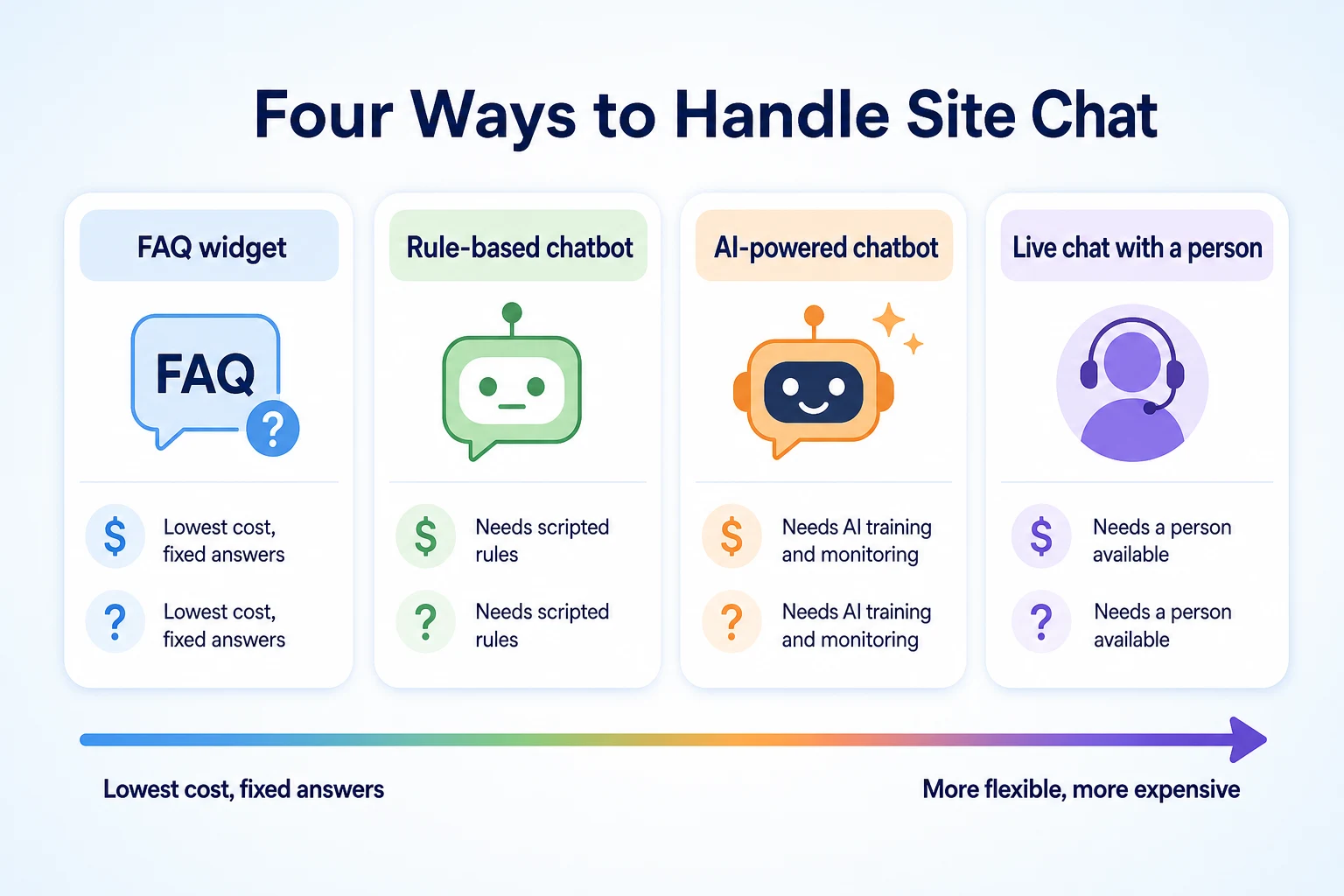
"Chatbot" covers a wide range of tools, from a simple pop-up that only answers a handful of preset questions to a system trained on a business's own pages that can hold something closer to a real conversation. The pitch rarely says which one is being sold.
Rule-based chatbots vs AI-powered chatbots
A rule-based chatbot follows a fixed script. A visitor clicks a button or types a word, and the bot matches it to a pre-written answer. It can't handle a question phrased differently than expected, and it says so plainly when it doesn't understand.
An AI-powered chatbot works differently. It's built on a language model, often given access to a business's own pages, pricing, or policies, and it generates an answer in its own words rather than pulling from a fixed script. That makes it more flexible, but it also means it can produce an answer that sounds confident and turns out to be wrong, which a rule-based bot generally can't do since it only ever repeats what it was explicitly given.
How a chatbot differs from live chat with a real person
Live chat puts an actual person on the other end, typically during business hours, answering in real time. A chatbot runs around the clock without anyone staffing it, which is both its main advantage and the reason it has real limits. A person can read between the lines of an unusual question. A chatbot answers based on whatever it was trained or scripted to recognize.
Many small business setups use both: a chatbot handles the simple, repeated questions and hands off to a person, by chat, phone or email, when a conversation needs judgment the bot doesn't have.
Where chatbots typically show up on a small business site
Most small business chatbots sit in the bottom corner of every page, or specifically on service and pricing pages where visitors tend to have the most questions before deciding to reach out. Some are built into a booking flow, walking a visitor through choosing a service and a time slot rather than just answering questions.
Type | Setup effort | Typical cost | What it can answer | Who steps in when it can't |
|---|---|---|---|---|
FAQ widget | Low, usually a plugin or embed | Free to low cost | A fixed list of preset questions | Nobody, it just shows a contact link |
Rule-based chatbot | Moderate, requires scripting out conversation paths | Low to moderate monthly fee | Questions that match a scripted path | Falls back to a contact form or phone number |
AI-powered chatbot | Moderate to high, needs training on your content and ongoing review | Moderate monthly fee, often usage-based | A wider range of phrasing and follow-up questions | Hands off to a person, if that's configured |
Live chat with a person | Low to set up, ongoing to staff | Staff time, or a dedicated hire | Anything within that person's knowledge | No fallback needed, a person is already there |
Does a Customer Service AI Chatbot Affect Your Google Rankings?
This is the claim worth addressing directly, because it's often the reason a small business adds a chatbot in the first place.
What Google has actually documented about ranking systems
Google's Search Essentials documentation describes what its ranking systems actually consider: whether a page can be crawled and indexed, whether the content is helpful and reliable, and signals around page experience like loading speed and mobile usability. A chatbot widget isn't mentioned anywhere in that documentation, because it isn't part of how Google's systems evaluate a page. Our guide to how Google decides which sites to rank covers the full list of what Google has actually documented, which is worth reading if a vendor's pitch leans on vague SEO claims.
Why a chatbot isn't a technical SEO fix
A technical SEO fix addresses something Google's crawler can measure directly: a blocked page, a slow load time, a broken mobile layout. A chatbot doesn't touch any of that. It sits on top of a page after it's already loaded, which means it has no effect on whether that page can be crawled, indexed, or rendered properly in the first place.
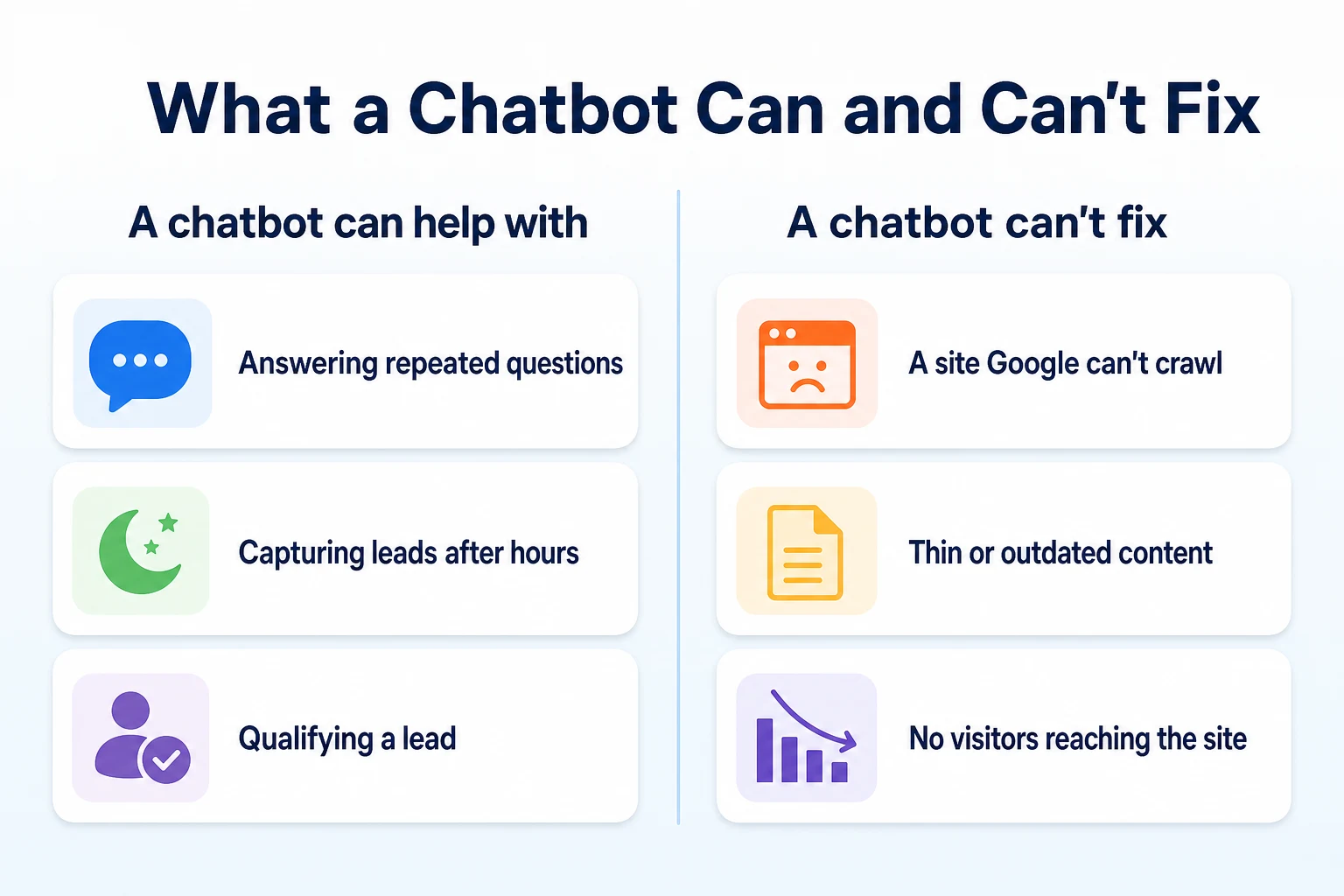
If a site has a real crawlability problem, adding a chatbot won't change it. The fix for that lives in robots.txt, the sitemap, or server response codes, not in a chat widget.
The difference between a ranking factor and a user experience feature
A chatbot is a user experience feature. It can make a visitor's time on the site more useful, which matters for the visitor and for the business, but that's a separate question from whether Google's ranking systems treat it as a signal. Conflating the two is how a vague sales pitch turns "this might help visitors" into "this will help your SEO," without anything in Google's documentation to back up the second half of that sentence.
The Indirect Ways a Chatbot Can Touch Engagement Signals
None of this means a chatbot has zero connection to anything Google might plausibly notice. It means the connection is indirect, and worth describing carefully rather than overstating.
Time on site, pages per visit and bounce rate
A visitor who gets a quick answer from a chatbot might stay on the site longer, visit another page afterward, or avoid leaving immediately after landing. Those are real, measurable changes in how a visitor behaves on a page.
What counts as a documented ranking signal versus a plausible side effect
Google has not documented time on site, pages per visit, or bounce rate as direct inputs into its ranking systems. That's an important distinction from the Core Web Vitals and page experience signals it has documented. A chatbot might plausibly change how a visitor behaves on a page. It hasn't been shown to change how Google ranks that page as a result.
Why a short-term bump in engagement isn't the same as a ranking change
Even where engagement metrics do shift after adding a chatbot, that shift reflects visitor behavior, not a documented signal feeding into search rankings. A business can reasonably value a longer, more productive visit for its own sake, as something that helps a visitor decide to call or book, without assuming it also moves the needle on where the page shows up in search results.
What a Chatbot Can Realistically Do for Conversions
Set rankings aside, and a chatbot still has a real job it can do well: turning a visitor who has a question into someone who takes the next step.
Answering the same five questions instantly, any time
Most small businesses field the same handful of questions over and over: what are your hours, do you serve this area, what does this cost, do you offer a specific service. A chatbot that answers these instantly, at 11pm on a Saturday as easily as at 2pm on a Tuesday, removes a small but real piece of friction between a visitor and a decision to contact the business.
Capturing a lead after hours instead of losing it
A visitor who lands on a site outside business hours, finds no way to ask a quick question, and leaves without contacting the business is a lead that's gone for good in most cases. A chatbot that collects a name, a number and a brief description of what's needed, even without answering the question fully, gives the business something to follow up on the next morning instead of nothing at all.
Qualifying a visitor before a person picks up the phone
A chatbot can ask a few basic questions before handing a conversation to a person: what service is needed, roughly where the visitor is located, what timeframe they're working with. That short exchange means the person who eventually picks up the phone or replies to the message already has useful context, instead of starting the conversation from zero.
Question type | Chatbot fit | Why |
|---|---|---|
"What are your hours?" | Good fit | Fixed, factual answer that doesn't change often |
"Do you service my area?" | Good fit | Simple lookup against a known list of locations |
"Roughly what does this cost?" | Reasonable fit | Works if pricing is simple, weaker if it genuinely depends on specifics |
"My situation is unusual, what do you recommend?" | Poor fit | Needs judgment a script or model can't reliably apply |
A complaint about a past job | Poor fit | Needs a person who can take ownership and respond with care |
What a Customer Service AI Chatbot Can't Do
A chatbot is a tool for the traffic a site already has. It has nothing to offer the traffic a site doesn't have, and it's worth being clear about that before expecting too much from it.
It can't fix a website that isn't getting found in the first place
A chatbot only talks to someone who has already landed on a page. If a site isn't showing up in search results, isn't being crawled properly, or has thin content that doesn't answer what people are searching for, a chatbot does nothing about any of that. It's sitting in the corner of a page nobody reaches.
If traffic itself is the problem, that's a different kind of work entirely, closer to what's covered in our guide on what to fix first on a website that gets no traffic. A business trying to solve a visibility problem with a chat widget is solving the wrong problem.
It can't replace judgment on a complex or sensitive question
A customer asking about a refund after a bad experience, a complicated quote that depends on details a script can't anticipate, or a safety concern that needs an actual decision isn't well served by a bot, however well it's trained. These moments need a person who can weigh context, show some empathy, and take responsibility for what gets said.
A chatbot that tries to handle these anyway, rather than handing off quickly, can make a bad situation worse. A generic or oddly cheerful response to a genuine complaint reads as dismissive, even when nobody intended it that way.
The risk of an inaccurate or out-of-date answer
An AI-powered chatbot generates its answers rather than reciting a fixed script, which means it can produce something that sounds confident and is simply wrong. A price that changed last month, a service the business no longer offers, or a policy that's been updated can all sit in a chatbot's training and quietly give customers bad information until someone notices.
This is the trade-off that comes with flexibility. A rule-based bot that only repeats pre-written answers can't improvise an incorrect one, but it also can't handle anything outside its script. An AI-powered bot can handle more, at the cost of needing someone to check, periodically, that what it's saying still matches reality.
What to Check Before You Choose a Chatbot Platform
Most of the real differences between chatbot platforms show up in questions a sales page rarely answers directly. These are worth asking before signing up for anything, not after.
Whether it can be trained on your own pages and policies
A chatbot trained specifically on your site's pages, pricing and policies gives better answers than one running on generic knowledge about your industry in general. Ask how training actually works: does it crawl your site automatically, do you upload documents, and how do you update it when something changes.
A platform that makes updates slow or technical will fall behind the moment your pricing or hours change, which is exactly the situation that leads to the inaccurate answers described above.
How and when it hands off to a real person
Ask what happens when the bot doesn't know an answer, or when a conversation turns into something it shouldn't be handling alone. A good setup recognizes its own limits and either routes the conversation to a person, a phone number, or a contact form, clearly and quickly.
A bot that keeps guessing rather than handing off, or that buries the option to reach a person several clicks deep, leaves a frustrated visitor with nowhere useful to go.
Where conversation transcripts go and who can see them
Chat transcripts often include a name, a phone number, and sometimes details a customer wouldn't expect to be stored anywhere. Ask where that data lives, who at the company can access it, and whether it's shared with or used by the chatbot vendor for anything beyond running the conversation itself.
A vendor who can't answer this clearly, or whose terms are vague about it, is worth a second look before any customer data starts flowing through their system.
A Worked Example: Trialing a Chatbot on a Local Service Business Site
Imagine a small HVAC company adds an AI-powered chatbot to its site for a one-month trial, mainly to see if it's worth a longer contract. This example is illustrative.
Metric | Before the chatbot | After one month with it |
|---|---|---|
After-hours contact form submissions | 3 per month | 11 per month, mostly captured by the chatbot overnight |
Average time to first response | Next business day | Instant for common questions, next business day for anything handed off |
Organic search traffic | No change observed | No change observed |
Google ranking for main service pages | Unchanged | Unchanged |
These figures are illustrative.
The business sees more after-hours leads captured and faster responses to simple questions. It sees no change in organic traffic or rankings, because neither was ever something a chatbot was positioned to move. That's the honest, unremarkable outcome a trial like this should expect to find.
A 30-Day Plan to Trial a Chatbot Before Committing
Most chatbot platforms are billed monthly, which makes a short trial a reasonable way to find out whether one is worth keeping before committing to a longer plan.
Week | Focus | Tasks |
|---|---|---|
1 | Set up and write accurate answers | List the five to ten questions customers ask most often, write correct, current answers for each, and load them into the chatbot before turning it on |
2 | Test it like a customer would | Ask it the same questions a real visitor might, phrased a few different ways, and note any answer that's wrong, vague, or outdated |
3 | Monitor real conversations | Read through actual transcripts from the week, flag any handoff that happened too late or any answer that needed correcting |
4 | Review the results and decide | Compare leads captured and response times against the month before, and decide whether the trial's cost was worth what it actually delivered |
None of this trial is designed to catch a ranking change, because there isn't one to look for. It's designed to answer a narrower, more useful question: did this tool make it easier for a real visitor to become a customer.
Common Mistakes Small Businesses Make With a Chatbot
A few habits turn an otherwise reasonable chatbot into dead weight on a site, and most of them are easy to avoid once you know to look for them.
Treating the chatbot as an SEO fix is the first. A business that adds a chat widget expecting it to move rankings, instead of fixing a blocked page or writing a better service page, has spent money and gotten nothing it actually needed. The chatbot isn't wrong for existing. It's just answering a question nobody asked it.
Feeding it outdated information is the second, and it's the one that causes the most visible damage. A price that changed last season, a service area that's since expanded, or a promotion that ended months ago can sit in a chatbot's answers long after a person would have noticed and corrected it on a normal page.
Offering no real way to reach a person is the third. A chatbot that loops a frustrated visitor through the same three suggestions without ever surfacing a phone number or an email address turns a minor question into a reason to leave the site entirely.
Never reviewing the conversation logs rounds out the list. Most platforms store a transcript of every exchange, and most of those transcripts go unread. A ten-minute read through a week's worth of conversations is usually enough to catch a wrong answer, a confused customer, or a question coming up often enough to deserve its own page.
Adding a chatbot to fix a traffic or ranking problem it has no effect on.
Letting pricing, hours or policy answers go stale after something changes.
Giving a visitor no clear way to reach a person when the bot can't help.
Leaving conversation transcripts unread for weeks or months at a time.
Is a Customer Service AI Chatbot Worth It for Your Business?
There's no single answer here, and a vendor who says otherwise is selling, not advising. The right call depends on a few specifics about your own site and your own customers.
Signs a chatbot is likely worth the investment
A chatbot tends to pay for itself when a site already gets a reasonable amount of traffic, enough that a handful of extra captured leads each month is worth something real. It also helps when customers genuinely ask the same small set of questions over and over, which is easy to check by looking back through old emails or call notes.
It's also worth it when the business can realistically keep the bot's answers current, whether that's a person checking it monthly or a simple process for updating it when pricing or policies change. A chatbot that gets maintained is an asset. One that doesn't is a liability waiting to embarrass the business in front of a customer.
Signs your time is better spent elsewhere first
If a site gets little traffic to begin with, a chatbot has almost nobody to talk to, and the time and money are better spent finding out why visitors aren't arriving in the first place. Our guide to SEO tips that actually help small business sites covers that groundwork, which tends to matter more at this stage than any feature sitting on top of the site.
It's also a sign to wait if nobody at the business has the time to check the bot's answers periodically, or if most customer questions are genuinely too varied or sensitive for a script or a model to handle well. In both cases, a chatbot adds a new thing to manage without solving the problem that's actually holding the business back.
Where RepGet fits
RepGet doesn't build, host or manage chatbots, and nothing in this article changes if a business adds one or not. What RepGet can do is answer the question that matters more for most small sites before a chatbot ever comes up: whether the site itself has the kind of problems a chat widget can't touch.
RepGet's free website audit crawls a site and gives it a 0 to 100 SEO score, flagging technical and content issues worth investigating, including crawlability problems and thin or outdated pages, the exact things a chatbot sitting in the corner of a page has no way to fix. No account or credit card required.
Beyond the audit, RepGet brings keyword research, content planning, article writing, publishing and search performance reporting from Google Search Console into one workflow, which is useful for building out the pages and answers a chatbot would otherwise be guessing at. RepGet doesn't replace a person's judgment about which chatbot platform to choose, doesn't manage customer conversations, and doesn't guarantee a ranking, a Maps position, or a traffic result from any tool added to a site, a chatbot included.
The bottom line
A customer service AI chatbot doesn't move your Google rankings. Google hasn't documented chatbot presence as part of how its ranking systems work, and nothing about a chat widget changes whether a page can be crawled, indexed, or judged as helpful.
What a chatbot can realistically do is answer repeated questions instantly, capture a lead after hours that would otherwise be lost, and give a person useful context before they pick up the phone. Those are real, modest wins worth having if your traffic and your questions actually support them.
It can't fix a site nobody's finding, and it can't replace judgment on a complicated or sensitive question. If the chatbot is being pitched as a shortcut around either of those problems, it's the wrong tool for the job.
Find out what your website needs first
Before adding a chatbot or anything else, see what your site actually needs. Run a free website audit with RepGet to check whether crawlability or content issues are the real priority. No account or credit card required.
FAQ
Does adding a chatbot help my website rank higher on Google?
No. Google hasn't documented chatbot presence as a ranking factor, and a chat widget doesn't change whether your pages are crawled, indexed, or judged as helpful.
What's the difference between a chatbot and live chat?
A chatbot runs automatically, following a script or an AI model, without anyone staffing it. Live chat puts a real person on the other end, usually only during business hours.
Can an AI chatbot give customers wrong information?
Yes. An AI-powered chatbot generates answers rather than reciting a fixed script, so it can sound confident while giving outdated pricing, policies, or details nobody has corrected yet.
How much does a customer service AI chatbot cost for a small business?
Costs vary by platform and features, from a low-cost FAQ widget to a monthly, often usage-based fee for an AI-powered bot trained on your own site. There's no fixed industry price.
Is a chatbot worth it for a small local business website?
It depends on your traffic and how repetitive customer questions actually are. A site with steady visitors and a handful of recurring questions gets more value than one with little traffic to begin with.
Can a chatbot replace a person for customer service entirely?
No. A chatbot handles simple, repeated questions well but struggles with complaints, unusual situations, or anything needing judgment, which still need a person to handle properly.
What should I track to know if my chatbot is actually working?
Track leads captured after hours, response times to common questions, and how often conversations get handed off to a person. Don't expect it to move organic traffic or rankings.