

SEO Tips: The Moves That Actually Help Small Business Sites
Short answer
The SEO tips that actually move a small site forward are a short list: make sure Google can crawl and index your pages, write content that answers one real question in detail, keep your Google Business Profile current, fix titles and meta descriptions, check mobile speed, and link your own pages together. Most other advice floating around is secondary to these, and a few common shortcuts can do more harm than good.
A small business owner has been told for years that they should "do SEO," but nobody has ever given them a clear list of what that means.
A quick search turns up hundreds of tips. Some about meta tags. Some about backlinks. Some about posting on social media every single day.
There's no way to tell which of these actually matter for a site with one person running it, and maybe an hour a week to spend on it.
Most of that advice isn't wrong exactly. It's just not sorted by what actually helps a small site versus what fills up a blog post.
Here are the seo tips that genuinely move a small business site forward, in the order worth doing them, along with the common advice that's safe to skip.
The SEO Tips That Actually Move the Needle
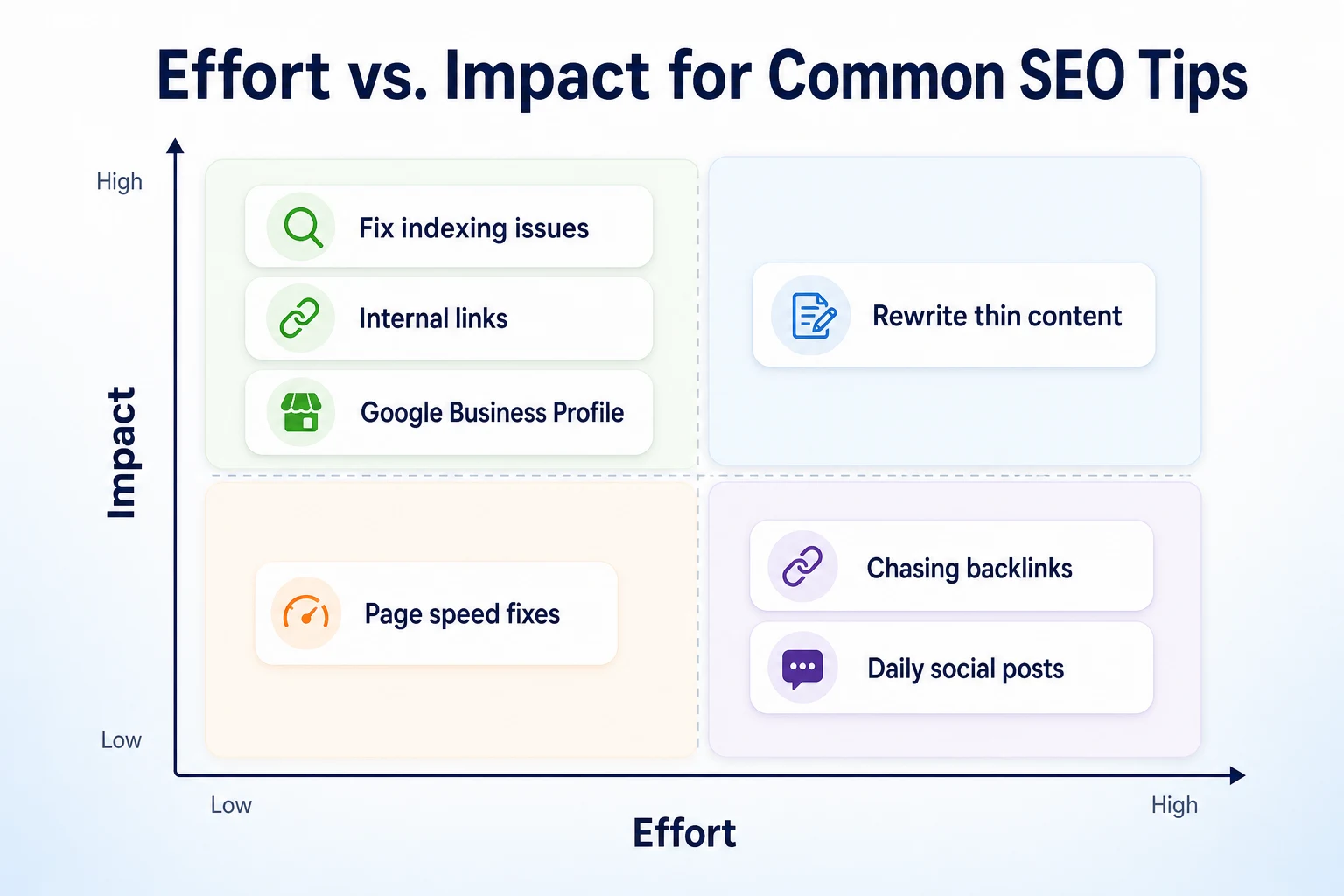
Not every SEO tip deserves the same amount of your time. Some take ten minutes and change a lot. Others take weeks and barely register.
Sorting advice by effort against impact is the fastest way to figure out where to start, especially when you're doing this work yourself alongside everything else running a business involves.
Why most SEO advice overwhelms rather than helps
A lot of SEO content is written for agencies with a full team and a retainer client, not for an owner updating their own site between everything else on their plate. That's part of why the advice feels endless: it's built for a different kind of reader.
Stripped down to what a small, simple site actually needs, the list is much shorter than it looks from the outside.
How to judge effort versus impact on your own site
A useful rule: fix anything stopping Google from reading your site at all first, since nothing else matters until that's sorted. After that, prioritize the things fully within your control, like your own content and your own internal links, before chasing anything that depends on someone else, like a backlink from another site.
Tip | Effort | Impact on a small site | Why it matters |
|---|---|---|---|
Fix indexing and crawl issues | Low | High | A page Google can't read can't rank, regardless of anything else on it |
Internal links between your own pages | Low | Medium to high | Entirely within your control and helps Google understand how your pages relate |
Rewrite thin content with real detail | Medium | High | Generic pages struggle against competitors who cover the topic properly |
Keep your Google Business Profile current | Low | High for local searches | A separate, documented factor in local results, not just a website extra |
Fix page speed on mobile | Medium | Medium | Affects both visitors and a documented set of ranking signals |
Chase backlinks directly | High | Low to medium | Depends on other sites, not you, and risky if done by buying or exchanging links |
Make Sure Google Can Actually Find and Read Your Site
Before any content tip or design tweak can help, Google has to be able to reach your pages in the first place. This is the step people skip because it feels too technical to check, even though it usually takes minutes.
Check robots.txt isn't blocking important pages
Your site's robots.txt file tells crawlers which parts of your site they're allowed to visit. It's a small file, but one wrong line can accidentally block an entire section, including pages you actually want found.
RepGet's free Robots.txt Checker gives a plain verdict on what's blocked and what isn't, for search bots and AI bots together, without needing to read the raw file yourself.
Confirm your key pages are actually indexed
Being crawled and being indexed aren't the same thing. A page can be fetched by Google and still not stored in its index, which means it won't show up in results at all, no matter how well it's written.
Our guide to how to get your website indexed by Google walks through checking this for individual pages, including what to do when one that should be indexed isn't.
Submit an XML sitemap if you haven't already
A sitemap is a simple file listing your site's pages, and submitting one helps Google find new or updated content faster than waiting for it to be discovered through links alone. Most website platforms generate one automatically, but it's easy to assume it exists without ever confirming it.
RepGet's free Sitemap Checker & Finder finds and validates a site's sitemap, which is worth running even on a site you've had for years and never revisited this part of.
Write Pages That Answer One Real Question in Detail
Once Google can reach your pages, the next question is whether they're actually worth showing. This comes down to content, and it's where a lot of small sites quietly fall short.
Pick one topic per page instead of covering everything
A single page trying to cover every service a business offers tends to do a shallow job of each one. A page built around one specific service, written in enough detail to actually answer what someone would want to know before calling, tends to perform better than a page trying to be everything at once.
Our guide to service page SEO covers how to structure a page like this, including what to include above the fold and what belongs further down.
Add detail only your business would know
Specific detail is what separates a page that reads as genuinely useful from one that could belong to any similar business anywhere. What does the job actually involve. What goes wrong most often. What a customer should expect on the day.
None of that comes from repeating a keyword more times. It comes from writing down what you already know from doing the work.
Match the words customers actually type
The words you'd naturally use to describe your own service aren't always the words a customer types into Google. Checking a keyword tool or two, or simply reading what Google suggests as you start typing a phrase, helps close that gap before you write the page rather than after. Our keyword tool comparison covers the free options worth checking for this.
Get Your Titles and Meta Descriptions Right
A title tag and a meta description are often the only two things a searcher sees before deciding whether to click your result or someone else's. Getting these right is cheap to do and easy to skip.
What a title tag needs to do
A good title tag names the actual service and, for a local business, the actual location, in a way that matches how someone would search for it. It should read like something a person would want to click, not a list of keywords stacked together.
RepGet's free SEO Title Checker scores a title against what tends to earn clicks in search results, which is a quick way to check one before publishing it.
Writing a meta description that earns the click
A meta description doesn't directly affect rankings, but it's often the deciding factor in whether someone clicks your result over a competitor's sitting right next to it. A specific description that names what's on offer tends to outperform a vague one every time.
Element | Weak example | Stronger example |
|---|---|---|
Title tag | Home | Smith Plumbing | Emergency Plumber in Dayton, OH | Smith Plumbing |
Meta description | Welcome to our website. We offer plumbing services. | Same-day plumbing repairs in Dayton. Call now for a free quote on leaks, clogs and water heater issues. |
These figures are illustrative.
RepGet's free Meta Description Generator can produce a handful of options with a reason to click built in, and the free Meta Tag Checker shows every tag Google and social sites read on a given page, so you can confirm what's actually live rather than guessing from the page editor.
Keep Your Google Business Profile Updated
For any business that serves customers locally, a lot of the searches that actually matter happen on Google Maps and in the local results block, not in the regular list of blue links below it. That's a separate system from your website, with its own rules.
What a profile does that a website can't
A Google Business Profile is the listing that shows your hours, phone number, photos and reviews directly in search results, often before anyone clicks through to your site at all. Google Business Profile Help describes local results as shaped by relevance, distance and prominence, and prominence draws heavily on information in the profile itself, including reviews.
A well-built website with a neglected profile is leaving an obvious gap open. The reverse is also true: a strong profile pointing to a thin or outdated site doesn't hold up once someone clicks through either.
What to update and how often
A profile left untouched for a year reads as stale, even if the business behind it is thriving. Hours should be correct, especially around holidays. Photos should reflect the current look of the business, not a single set uploaded when the profile was first created. Responding to new reviews, even briefly, keeps the profile looking active rather than abandoned.
None of this needs to happen daily. A short check every couple of weeks, longer if something changes like new hours or a new service, is usually enough to keep it current. Our guide to local SEO for small businesses covers how a profile and a website work together in more detail, including what citations and reviews add beyond the profile itself.
Check Page Speed and Mobile Experience
A page that's slow to load or awkward to use on a phone costs you twice: once with a visitor who gives up before it finishes loading, and once with a documented set of signals Google uses to judge page experience.
Why speed and mobile layout affect rankings, not just visitors
Google's Core Web Vitals, documented on web.dev, measure how quickly a page's main content appears, how it responds to interaction, and whether elements shift around while loading. Most searches happen on mobile devices, so a layout that only works well on a desktop screen is working against a large share of the people who find you.
None of this means a small site needs to chase a perfect score. It means a page that's noticeably slow or hard to tap through on a phone is worth fixing before moving on to smaller refinements elsewhere.
A five-minute way to test your own site
Open your own site on your phone, over mobile data rather than wifi, and time how long it takes the main content to show up. Watch whether buttons or text jump around as the page finishes loading. Check whether the address bar shows a padlock, confirming the connection is secure.
Signal | What it measures | Simple way to check it |
|---|---|---|
Loading speed | How quickly the main content appears | Open the page on a phone over mobile data and time it yourself |
Visual stability | Whether elements shift position while loading | Watch the page load and note any buttons or text that jump around |
Mobile layout | Whether text and buttons work on a small screen | View the page on an actual phone, not a resized browser window |
HTTPS | Whether the connection is encrypted | Check for a padlock icon next to the address in the browser bar |
These checks are a starting point, not a full technical audit.
Link Your Own Pages Together
Of everything on this list, internal linking is the one with no external dependency at all. No competitor affects it, no algorithm change makes it harder, and it takes minutes once you know where to look.
Why this is the easiest win on the list
A link from one page on your site to another helps Google understand how your pages relate to each other, and it helps a visitor find related information without having to search for it separately. Unlike a backlink from another website, you don't need anyone's permission or cooperation to add one.
It's also one of the few SEO tasks with almost no risk attached. There's no equivalent of a manipulated internal link getting a site penalized the way a bought backlink can.
Where to add links without overthinking it
The most natural place to start is connecting a blog post to the service page it supports. A post about what causes a blocked drain should link to the page where someone can actually book a drain cleaning. A service page, in turn, can link back to a related post that answers a question a customer might still have before calling.
You don't need a complex structure to get value from this. A handful of sensible, relevant links between pages that genuinely relate to each other does more than a large number of links added just to have more of them. Our guide to topical authority SEO covers how a small group of linked pages can cover a subject thoroughly without needing hundreds of articles.
SEO Tips Worth Skipping or Approaching Carefully
Alongside the tips worth doing, a handful of ideas still circulate that either don't help anymore or carry real risk if tried. Knowing which is which saves time and avoids trouble later.
Advice that no longer works
Repeating a keyword as many times as possible on a page was once treated as a shortcut to relevance. It isn't anymore, and a page stuffed with the same phrase over and over tends to read worse to a visitor without helping it rank any better.
Posting on social media every single day, purely for the sake of frequency, is another piece of advice that overstates its own effect. Social activity can help a business get noticed, but it isn't a documented ranking signal for search results the way crawlability, content and links are.
Shortcuts that can get a site penalized
Buying links, joining link exchange schemes, or paying for a burst of visits from a traffic bot all promise a quick boost, and all carry real downside. Google's spam policies specifically warn against manipulated links, and artificial traffic does nothing for genuine visibility while adding noise to your own analytics that makes it harder to tell what's actually working. Our guide to website traffic bots covers why this particular shortcut tends to hurt more than it helps.
Creating a near-identical page for every nearby town, changing only the city name, is another shortcut that backfires. Google's systems tend to treat these as duplicate or low-value content rather than as separate, useful pages, which can drag down a site's standing rather than lifting it.
Myth or shortcut | Why it doesn't help (or backfires) | What to do instead |
|---|---|---|
Keyword stuffing | Reads as repetitive rather than more relevant, and doesn't match how Google's systems judge a page today | Cover the topic fully and use natural variations of the phrase |
Posting on social media daily for SEO | Not a documented search ranking signal, even though it can help with visibility elsewhere | Post when you have something worth sharing, not on a fixed schedule for its own sake |
Buying or exchanging links | Google's spam policies warn against manipulated links directly | Earn mentions through real relationships and newsworthy activity |
Using a traffic bot to boost visits | Adds no genuine visibility and makes your own analytics harder to trust | Focus on content and crawlability that bring real visitors |
A near-duplicate page for every nearby town | Often treated as duplicate or thin content rather than separate useful pages | Build fewer pages, each covering a genuinely distinct area or service in detail |
A Worked Example: Applying These Tips to One Page
Imagine a small HVAC repair business with a single page covering air conditioning repair. The page has sat untouched for two years. This example is illustrative.
Before any changes, the page has a generic title, a one-line meta description, thin content that lists services without detail, no links to or from anything else on the site, and takes several seconds to load on a phone. After working through the tips above, in roughly that order, the same page looks different.
Element | Before | After |
|---|---|---|
Title tag | Services | Air Comfort HVAC | AC Repair in Tucson, AZ | Same-Day Service | Air Comfort HVAC |
Meta description | We fix air conditioners. Call us today. | Fast AC repair in Tucson, including weekend callouts. Free diagnostic with any repair booked this week. |
Content depth | Three short sentences naming the service with no detail | A full page covering common faults, what a callout involves, and typical turnaround time |
Internal links | None, page sits isolated with no links in or out | Linked from a blog post about warning signs, and links back to a maintenance plan page |
Page speed | Several seconds to load on mobile data, with images unresized | Loads quickly after images were compressed and unused scripts removed |
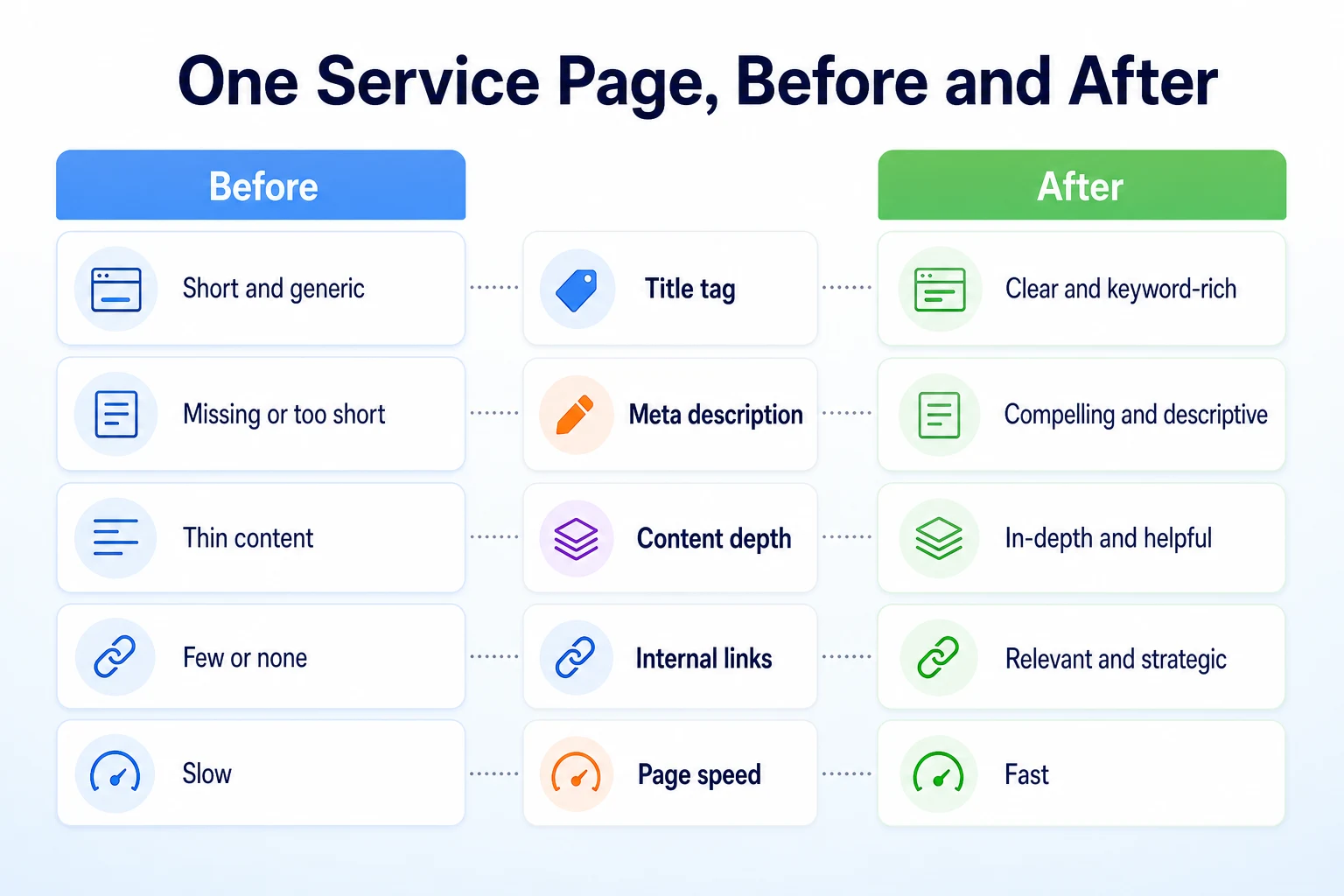
These figures are illustrative.
None of these changes required hiring anyone or rebuilding the site. Each one came from the same list covered above, applied to one page at a time rather than attempted all at once across the whole site.
A 30-Day Plan to Work Through These SEO Tips
Trying to apply every tip in this article in a single weekend usually means doing all of them badly. Spreading the work across a month, in roughly the order it was covered, keeps it realistic for one person to actually finish.
Week | Focus | Tasks |
|---|---|---|
1 | Crawlability and indexing | Check robots.txt, confirm key pages are indexed, and submit or verify an XML sitemap |
2 | Content and on-page basics | Rewrite the thinnest page on the site with real detail, and fix its title tag and meta description |
3 | Local presence and speed | Update your Google Business Profile's hours and photos, and test mobile loading speed on your busiest page |
4 | Internal links and cleanup | Add links between related pages, and check the site isn't relying on any of the shortcuts worth skipping |
A month won't finish everything on a larger site, but it moves every major area forward at least once, rather than leaving three of them untouched while one gets all the attention. Our SEO audit checklist breaks this kind of work into a longer worksheet if a single month isn't enough to cover everything worth checking.
Where RepGet fits
Everything in this article is a task you can do yourself, without special tools, though a few of the checks go faster with one. RepGet's free website audit crawls a site and gives it a 0 to 100 SEO score, flagging technical and content issues worth investigating, including several covered here: whether pages are reachable and indexed, whether content looks thin, and basic page experience problems. It's a reasonable way to see where a site stands across most of this article's checks at once, rather than working through each one by hand. No account or credit card required.
Once you know which pages need work, RepGet's free Keyword Density Checker shows what a page actually talks about, which is a quick way to confirm a rewritten page genuinely covers its topic rather than repeating a phrase without substance behind it.
RepGet also brings keyword research, content planning and article writing into one workflow, and articles it writes can stay as drafts for a business to review before anything goes live. That still leaves the judgment calls in this article, like which service deserves its own page and what detail only your business can add, with the person running it.
RepGet doesn't replace a Google Business Profile, Search Console, or your own judgment, and it can't guarantee a ranking or a traffic result from any of these tips, however carefully they're followed.
The bottom line
The SEO tips that actually help a small business site fit on one short list: make sure Google can crawl and index your pages, write content that answers one real question in detail, get your titles and meta descriptions right, keep your Google Business Profile current, check mobile speed, and link your own pages together.
Most other advice floating around is secondary to these six things, and some of it, like keyword stuffing or buying links, does more harm than good.
None of this needs to happen in a weekend. A month spent working through the list in order, starting with whatever is stopping Google from reading your site at all, covers more ground than trying to tackle everything at once.
Find out what your website needs first
Before deciding which of these tips to start with, see what your site actually needs. Run a free website audit with RepGet to check your site's technical setup alongside its content. No account or credit card required.
FAQ
What are the most important SEO tips for a small business?
Start with whether Google can crawl and index your pages, since nothing else matters until that's fixed. After that, focus on content depth, titles and meta descriptions, your Google Business Profile, mobile speed, and internal links.
How long does it take to see results from SEO changes?
There's no fixed timeline, and Google doesn't publish one. Content and trust signals tend to build gradually, so most changes need a few months before you can fairly judge whether they made a difference.
Do I need to hire someone to do SEO for my small business?
Not necessarily. The tips in this article, fixing crawlability, improving content, updating titles, and keeping a Google Business Profile current, are all things a business owner can do without specialist training.
Is keyword stuffing still bad for SEO?
Yes. Repeating a phrase repeatedly doesn't make a page more relevant anymore, and it tends to read worse to visitors. Covering a topic fully with natural wording works better than forcing a phrase in repeatedly.
How often should I update my website for SEO?
There's no fixed schedule. Revisiting your most important pages every few months to add detail or fix outdated information matters more than making small changes daily just to stay active.
Does posting on social media help my SEO?
Social media activity isn't a documented search ranking signal, though it can help a business get noticed in other ways. It shouldn't replace time spent on crawlability, content and your Google Business Profile.
Can I do SEO myself without any technical skills?
Yes, for most of what's covered here. Checking robots.txt, writing better content, updating a Google Business Profile, and adding internal links don't require coding, just a careful look at your own site.