

SEO Checker: How to Find Quick Wins on Your Website
Short answer
An SEO checker scans your website and returns a score along with a list of technical and content issues. The quickest way to find real quick wins is to run one free scan, sort the results by how much each issue could matter and how easy it is to fix, and work through the easy, high-impact items first instead of trying to fix every flagged issue at once.
A small business owner runs a free SEO checker on their own site.
They expect a simple yes or no. Is the site okay, or is it not?
Instead they get a score out of 100, then a list of thirty or more flagged issues underneath it. Some sound urgent. Some sound like nothing. None of them come in an order that says what to do first.
So the report sits there, half read, because it's easier to close the tab than to figure out which of thirty items actually matters this week.
Here's how to run an SEO checker scan, make sense of what it hands back, and turn it into a short list you can actually work through instead of a wall of jargon.
What an SEO Checker Actually Checks
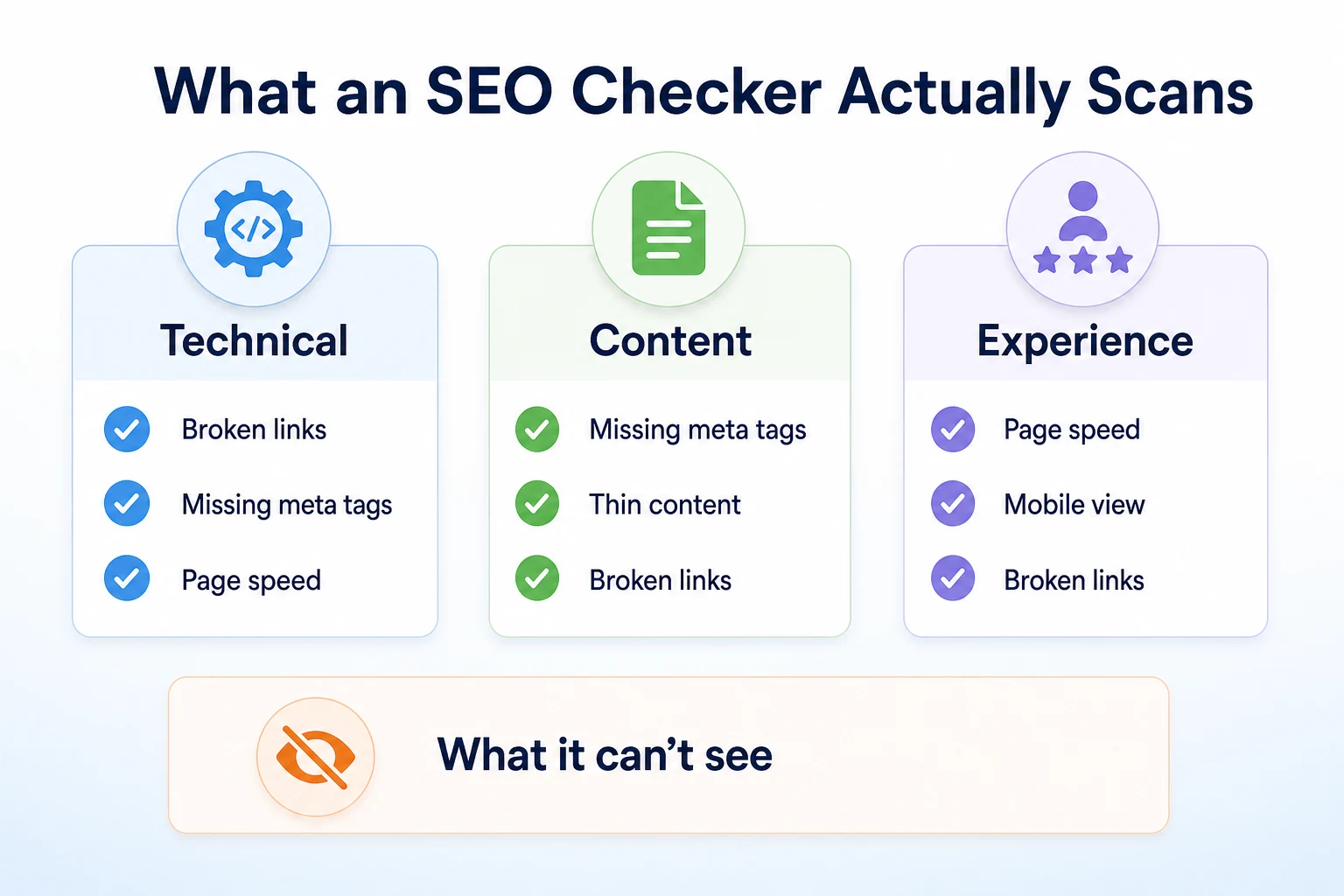
Most free SEO checker tools look at the same three broad areas, even when they use different names for them. Knowing those three areas ahead of time makes the report far less confusing once it arrives.
The technical checks most tools run
Technical checks look at whether a page is built in a way search engines can actually read and crawl. That usually covers things like broken links, missing or duplicate title tags, whether a page loads over a secure connection, and basic page speed.
These checks matter because a page search engines can't properly reach or read won't get a fair shot at ranking, regardless of how good the writing on it is. Google's own documentation on Search Essentials covers the baseline technical requirements a page needs to meet before anything else about it gets judged.
The content checks most tools run
Content checks look at what's actually on the page: whether there's a meta description, whether headings are used sensibly, whether images have alt text, and sometimes whether a page looks thin compared to others ranking for a similar topic.
These checks are more about giving search engines and visitors a clear read on what a page is about. A missing meta description doesn't stop a page from ranking, but it can mean a worse-looking result in search, which affects whether someone actually clicks.
What an SEO checker can't tell you
No free scanner can tell you how your site compares to a specific competitor, how strong your backlink profile really is, or whether a particular page will outrank another one next month. Those things depend on data and context a one-time crawl of your own site doesn't have access to.
A checker also can't judge whether your content is genuinely useful to a real customer. It can flag that a page is short or that a phrase barely appears, but it can't read intent the way a person can. Treat the scan as a first pass, not a verdict on the whole site.
Picking a Free SEO Checker Worth Using
Not every tool that calls itself an SEO checker does the same job, and a few minutes spent picking one saves a lot of wasted reading later.
What to look for before you run a scan
A useful checker actually crawls your site rather than just pulling a handful of signals from a cached snapshot somewhere. It returns its findings in plain language, not just a list of technical codes you have to look up separately. And it should let you run at least one scan without creating an account or entering payment details first, since there's no reason a basic check should require either.
RepGet's free website audit works this way: it crawls the site directly, gives it a 0 to 100 SEO score, and lists the technical and content issues worth investigating, with no account or credit card required.
Signs a report will be more noise than help
A few warning signs are worth watching for. If a tool buries its results behind a paywall after showing only a teaser score, you're not getting the full picture for free, whatever the homepage implies. If every issue is phrased in acronyms with no explanation, you'll spend more time googling the report than acting on it.
And if a tool promises a guaranteed ranking improvement in exchange for fixing its flagged issues, that's worth treating with suspicion. No scanner, including a well-built one, can promise where a page will land in search results.
Running Your First SEO Checker Scan
Running a scan itself is usually the easy part. A little preparation beforehand makes the results easier to act on once they arrive.
Before you start: what to have ready
Know which pages matter most before you scan the whole site. For most small businesses that's the homepage, the main service or product pages, and whichever blog posts bring in the most visitors already.
It also helps to have your site's full URL on hand, including whether it uses https:// and whether it includes www, since a checker scans the exact address you give it rather than guessing at variations.
What happens during the scan
Once you enter a URL, the tool fetches the page the way a search engine's crawler would, reading the HTML, following internal links, and checking the technical and content signals covered above. Larger sites can take longer, since a thorough scan may follow links to other pages rather than stopping at just the one URL entered.
When it finishes, you'll typically see an overall score first, followed by a breakdown of issues grouped by category or severity. RepGet's free website audit follows this pattern, with a 0 to 100 score sitting above the full list of issues it found.
Reading the Score Without Overreacting to It
The number at the top of a report tends to get more attention than anything underneath it, which is understandable, but it's also the least useful part of the whole scan on its own.
What the score is actually measuring
A score out of 100 is a relative signal built from the specific issues a tool found on your site. It isn't a grade handed down by Google, and Google doesn't publish or endorse any single scoring system like this.
Two different checkers can give the same site two different scores, because each tool weighs its own checks differently. That doesn't mean one is wrong. It means the number is only meaningful within that one tool, as a way to track whether your own site is improving over time.
Why the number matters less than the list underneath it
A low score isn't a crisis, and a high score isn't a finish line. A site scoring 55 with three fixable issues and a site scoring 55 with twenty scattered ones are in very different positions, even though the number on top looks identical.
The list of specific issues underneath the score is where the real work starts. Our guide to on-page SEO checker tools goes further into reading that kind of issue list and separating what's worth fixing from what can wait.
Translating the Jargon Into Plain English
A lot of what makes an SEO checker report feel overwhelming isn't the number of issues. It's the vocabulary. Terms like "duplicate title tag" or "thin content" mean something specific, but nobody explains them on the report page itself.
Term | What it means | Why it matters |
|---|---|---|
Missing meta description | The short summary that can appear under your page's title in search results hasn't been written | Without one, search engines often generate their own snippet from the page text, which can read awkwardly |
Duplicate title tag | Two or more pages on the site share the exact same page title | Makes it harder for a search engine, and a visitor scanning results, to tell the pages apart |
Missing alt text | An image has no written description attached to it in the page's code | Alt text helps screen readers describe the image and gives search engines context they can't get from the image file alone |
Thin content | A page has very little actual text, often just a few short sentences | A page that barely says anything gives search engines little to judge it on, and gives a visitor little reason to stay |
Broken link | A link on the page points to a page that no longer exists or returns an error | Sends visitors to a dead end and can waste a search engine's crawling effort on pages that no longer work |
No H1 tag | The page has no main heading marked up as the top-level heading | Headings help both visitors and search engines understand the structure of a page at a glance |
Most of these terms describe something you can check yourself in a few seconds once you know what to look for. RepGet's free Meta Tag Checker lists every tag a page has, including titles and meta descriptions, which is a quick way to see the raw version of what a full scan is flagging.
Sorting Issues Into Quick Wins and Bigger Projects
Once the jargon makes sense, the next problem is volume. A list of thirty issues doesn't need thirty separate plans. It needs sorting.
The two questions worth asking about every issue
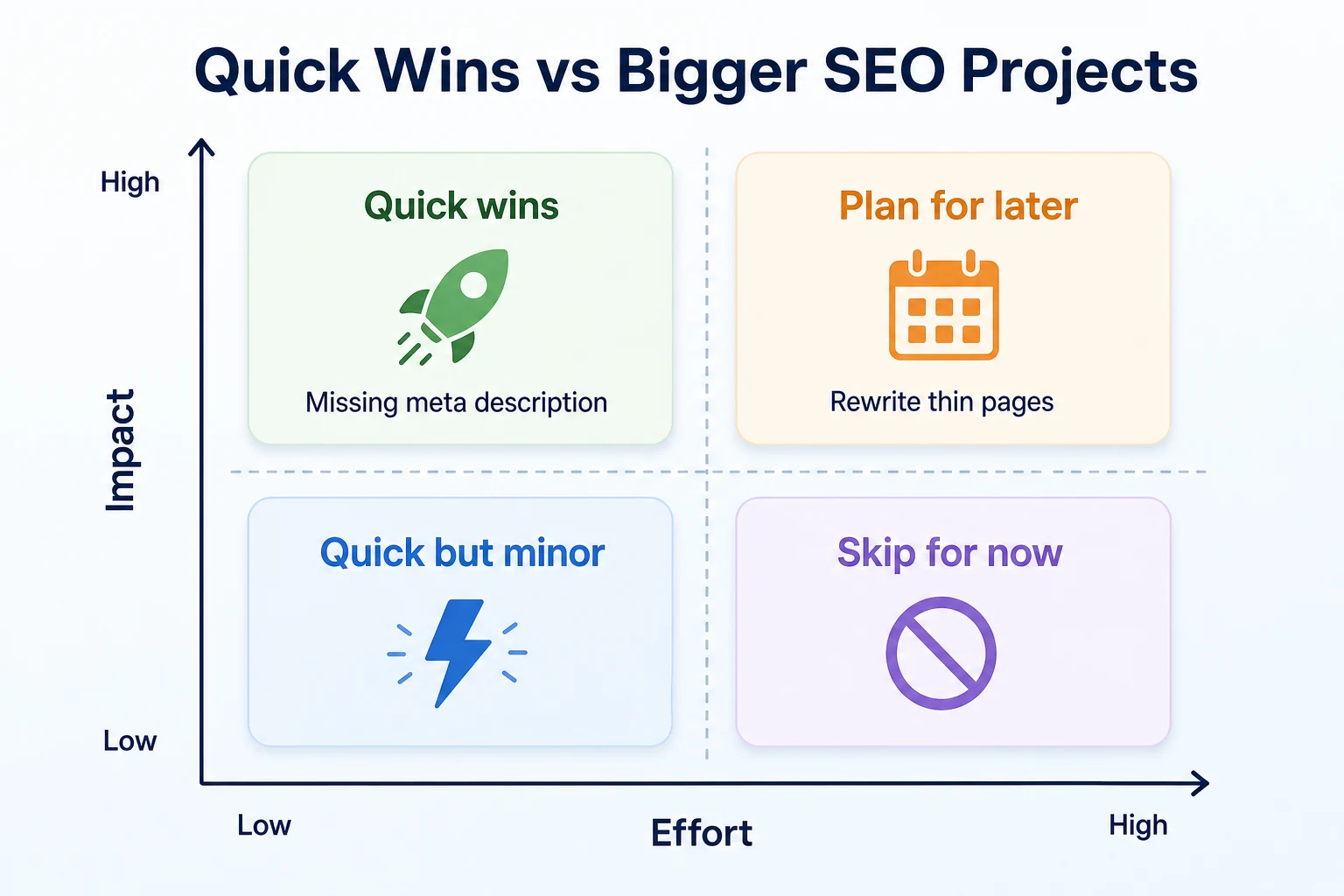
For each flagged issue, ask two things. How much could this actually matter if fixed, and how much work would it take to fix?
An issue that's both high impact and low effort is a quick win: do it this week. An issue that's high impact but takes real work, like rewriting a thin page, belongs on a project list rather than a to-do list for tonight. Low-impact issues, whether easy or hard to fix, can usually wait or get skipped entirely.
Quadrant | Effort | Impact | Example issue |
|---|---|---|---|
Quick wins | Low | High | Missing meta description on a main service page |
Plan for later | High | High | Rewriting a thin service page with little real content |
Quick but minor | Low | Low | Adding alt text to a decorative image buried in a footer |
Skip for now | High | Low | Restructuring heading levels on an old, low-traffic blog post |
Why trying to fix everything at once backfires
It's tempting to open the full issue list and work from top to bottom, treating every flag as equally urgent. That usually means spending an afternoon on minor fixes while a genuinely important one, like a missing title tag on the homepage, sits untouched further down the list simply because it wasn't first.
Sorting first, even roughly, means the time you do spend goes toward the handful of changes most likely to matter. Our SEO audit checklist breaks this kind of sorting into a longer worksheet, useful once a scan turns up more than a handful of items at once.
A Worked Example: Turning a Scan Into a Short To-Do List
Imagine a local bakery runs a free SEO checker scan on its site and gets back twenty flagged issues. This example is illustrative.
Issue | Quick win or bigger project | Reasoning |
|---|---|---|
No meta description on the homepage and two service pages | Quick win | Takes a few minutes per page and directly affects how the pages appear in search results |
Twelve product images with no alt text | Quick win | Repetitive but straightforward, and can be worked through in one sitting |
"Our Story" page is only two sentences long | Bigger project | Needs real writing, not a quick edit, to genuinely cover the topic |
Three broken links to an old supplier page that no longer exists | Quick win | Each link just needs updating or removing, a few minutes of work |
Page loads slowly on mobile due to large uncompressed images | Bigger project | Fixing it properly means resizing images site-wide, not a one-page edit |
Old blog post from three years ago has a thin, outdated section on pricing | Bigger project | Needs a proper content update, not just a quick patch, to stay accurate |
These figures are illustrative.
Out of twenty flagged issues, the bakery ends up with four quick wins it can finish in an afternoon, and three bigger projects it schedules across the following weeks. The rest of the list, mostly minor formatting notes, gets left alone for now. That's a workable plan. Twenty unsorted bullet points never were.
Common Quick Wins Most SEO Checkers Surface
Some issues show up on almost every small business site a checker scans, regardless of industry. Knowing what they usually are ahead of time makes them faster to recognize and fix.
Content quick wins
Missing or duplicate meta descriptions are one of the most common flags, and also one of the fastest to fix, since each one is just a sentence or two written for a single page. RepGet's free Meta Description Generator can produce a handful of options for a page in seconds, which is a reasonable starting point even if you edit the wording afterward.
Outdated information on an older blog post is another frequent flag, especially pricing, phone numbers, or service details that changed after the post was published. Our guide to how to update old blog posts without losing SEO rankings covers how to refresh a page like this without undoing whatever ranking it already has.
Technical quick wins
Missing alt text on images is common and usually fast to fix, a sentence or two describing what's actually in the image, written for a person who can't see it rather than stuffed with keywords. Google's own guidance on image SEO best practices covers what makes alt text genuinely useful.
Broken internal links are another repeat offender, often left behind after a page gets renamed or removed. Each one is a quick edit once found, which is exactly why a checker that lists them by page saves real time over hunting through a site by hand.
Issue | Typical fix | Roughly how long it takes |
|---|---|---|
Missing meta description | Write a one to two sentence summary for the page | 2 to 5 minutes per page |
Missing alt text | Add a short, accurate description to each image | 1 to 2 minutes per image |
Duplicate title tag | Rewrite one of the titles to be specific to that page | 3 to 5 minutes per page |
Broken internal link | Update the link or remove it if the target page is gone | 1 to 3 minutes per link |
A 20-Minute Routine for Rechecking Your Site
Fixing a handful of quick wins feels good, but the job isn't finished until you confirm the fixes actually worked. A short recheck routine closes that loop without turning into another open-ended afternoon.
What to recheck first
Start with whatever you just changed, not the whole site. If you wrote three meta descriptions and fixed two broken links, rerun the scan and look specifically at those items first, rather than reading the entire report again from scratch.
Confirm each fixed issue has actually cleared the list. Occasionally a fix doesn't take, usually because a change was saved on the wrong page or a cache is still showing an older version, and a quick recheck catches that before it sits unnoticed for weeks.
Once the fixed items are confirmed, skim the rest of the list for anything new. A scan run a few weeks after the last one sometimes turns up a fresh broken link or a new page missing a meta description, especially if other changes have been made to the site in the meantime.
How often this actually needs doing
There's no fixed schedule that fits every site, but a reasonable pattern is to recheck right after a round of fixes, then again roughly once a month for an active site that gets new pages or posts added regularly. A site that rarely changes needs less frequent rechecking, maybe once a quarter, since there's less opportunity for new issues to appear.
The twenty minutes this takes is mostly reading, not fixing. A scan runs in the background while you check email, and reading the results against your last list takes the rest of the time. That's a small cost against the alternative, which is a slow pile-up of small issues nobody notices until the next big scan turns up fifty of them at once.
Common Mistakes That Waste a Good Scan
A scan is only as useful as what happens after it runs. A few habits consistently waste the effort of actually having run one.
Trying to fix every flagged issue in one sitting is the most common mistake. It leads to rushed work on low-impact items and exhaustion before the genuinely important ones get touched, which defeats the point of sorting the list in the first place.
Never rechecking after making fixes is a close second. Without confirming a fix landed, it's easy to assume an issue is resolved when it actually isn't, sometimes for months.
Confusing the score with an actual Google ranking causes a different kind of frustration. A site can move from 60 to 85 on a checker's scale and still see no change in search position within the same week, because the score measures how many flagged issues exist, not where a page sits in results.
Running a scan once and never again is its own quiet mistake. A site that looked clean a year ago can quietly accumulate broken links, outdated pricing, or thin pages added in a rush, none of which show up again until someone bothers to check.
Mistake | Why it hurts | What to do instead |
|---|---|---|
Trying to fix every issue at once | Spreads effort thin across low and high impact items equally | Sort by impact and effort first, then work through quick wins before bigger projects |
Never rechecking after fixes | A fix that didn't actually take can sit unnoticed for months | Rerun the scan shortly after making changes and confirm each item cleared |
Treating the score as a ranking guarantee | The score measures flagged issues, not where a page sits in search results | Use the score to track your own site's progress over time, not as a prediction |
Scanning once and never again | New pages and old content quietly build up fresh issues over time | Recheck on a regular schedule, monthly for an active site, quarterly for a quiet one |
Where RepGet fits
Everything covered in this article is work you can do with a free checker and a bit of patience: running a scan, sorting the list, fixing the easy items, and rechecking afterward. RepGet's free website audit handles the scanning part of that, crawling a site and returning a 0 to 100 score with the technical and content issues worth investigating, laid out in plain language rather than raw codes. No account or credit card required.
For a closer look at a specific page, RepGet's free Meta Tag Checker shows every title, description, and tag Google and social sites read, which is useful once a full scan has pointed you toward a handful of pages worth checking in more detail.
RepGet also brings content planning and article writing into the same workflow, so a fix identified in a scan, like a thin page that needs rewriting, doesn't have to turn into a separate project tracked somewhere else. Articles it writes can stay as drafts for you to review before anything goes live.
RepGet doesn't replace Google Search Console, and it can't tell you how your site compares to a specific competitor or promise a ranking, a Maps position, or a traffic result from fixing any list of issues. The sorting and judgment covered in this article, deciding which fix matters most to your business right now, still comes down to you.
The bottom line
An SEO checker is a useful first pass, not a verdict. It scans your site, hands back a score, and lists issues worth looking at, but the real value only shows up once that list gets sorted into what's quick to fix and what actually matters.
A long report doesn't mean a broken site, and a short one doesn't mean a finished one. Most small business sites carry a mix of quick wins and a few bigger projects, and working through them in that order gets more done than reading the list top to bottom.
No checker, however thorough, can tell you where a page will land in search results once the fixes are made. What it can do is point out where to look next, which is usually the part that matters most when a site hasn't been checked in a while.
Find out what your website needs first
Before guessing which issue to tackle first, see the full list for yourself. Run a free website audit with RepGet to get a score and a plain-language list of what's worth fixing. No account or credit card required.
FAQ
Is there a truly free SEO checker I can use?
Yes. Several tools, including RepGet's free website audit, crawl a site and return a score with flagged issues at no cost and without requiring an account or payment details first.
What does an SEO checker's score out of 100 actually mean?
It's a relative measure built from the specific issues that one tool found on your site, not a grade from Google. Different checkers weigh issues differently, so scores vary between tools even for the same site.
How often should I rerun an SEO checker on my website?
Right after making fixes, then roughly monthly for a site that changes often, or quarterly for one that rarely does. This catches both unfixed issues and new ones before they pile up.
Can an SEO checker guarantee my site will rank higher on Google?
No. A checker can only flag technical and content issues worth investigating. No tool, including RepGet, can promise a ranking, a Maps position, or a traffic result from fixing them.
What's the difference between an SEO checker and a full SEO audit?
A checker usually runs an automated crawl and returns a score with flagged issues quickly. A full audit often adds manual review, competitor comparison, and judgment calls a one-time scan can't make on its own.
Why do different SEO checkers give my site different scores?
Each tool weighs its own checks differently and has no shared standard to follow. A score is most useful for tracking your own site's progress over time, not for comparing against another tool's number.
Which SEO issues should I fix first?
Sort flagged issues by how much they could matter and how easy they are to fix. Items that are both high impact and low effort, like a missing meta description, are worth doing before bigger projects like rewriting thin pages.
Do I need technical knowledge to use an SEO checker?
Not for running one. A good checker explains issues in plain language. Fixing some items, like page speed caused by large images, may need more technical help than writing a meta description does.