

On-Page SEO Checker: Find and Fix the Issues That Matter
Short answer
An on-page SEO checker scans a single page's HTML, title tag, meta description, headings, alt text, and keyword use, and flags anything off from common best practices. Not every flag needs action: a missing title or broken heading usually does, while keyword density scores and word count minimums often don't. Read the report with that distinction in mind.
Someone runs their homepage through a free on-page SEO checker and gets back a list of twenty-two flagged issues, most of them in red.
They fix a few. The score barely moves.
They're left staring at the other eighteen, wondering which of them actually matter, and whether any of this will change where the page shows up in Google.
That reaction is common, and it's a fair one. An on page seo checker is useful, but it's built to flag anything that doesn't match a common pattern, not to tell you what's actually worth your time. Some of those twenty-two flags point to a real problem. Others are noise that a checker raises on almost every page it scans, including pages that rank perfectly well.
Here's how to run an on-page SEO checker properly, read what it gives you back, and know which flagged issues to fix first and which ones to leave alone.
What an On-Page SEO Checker Actually Looks At
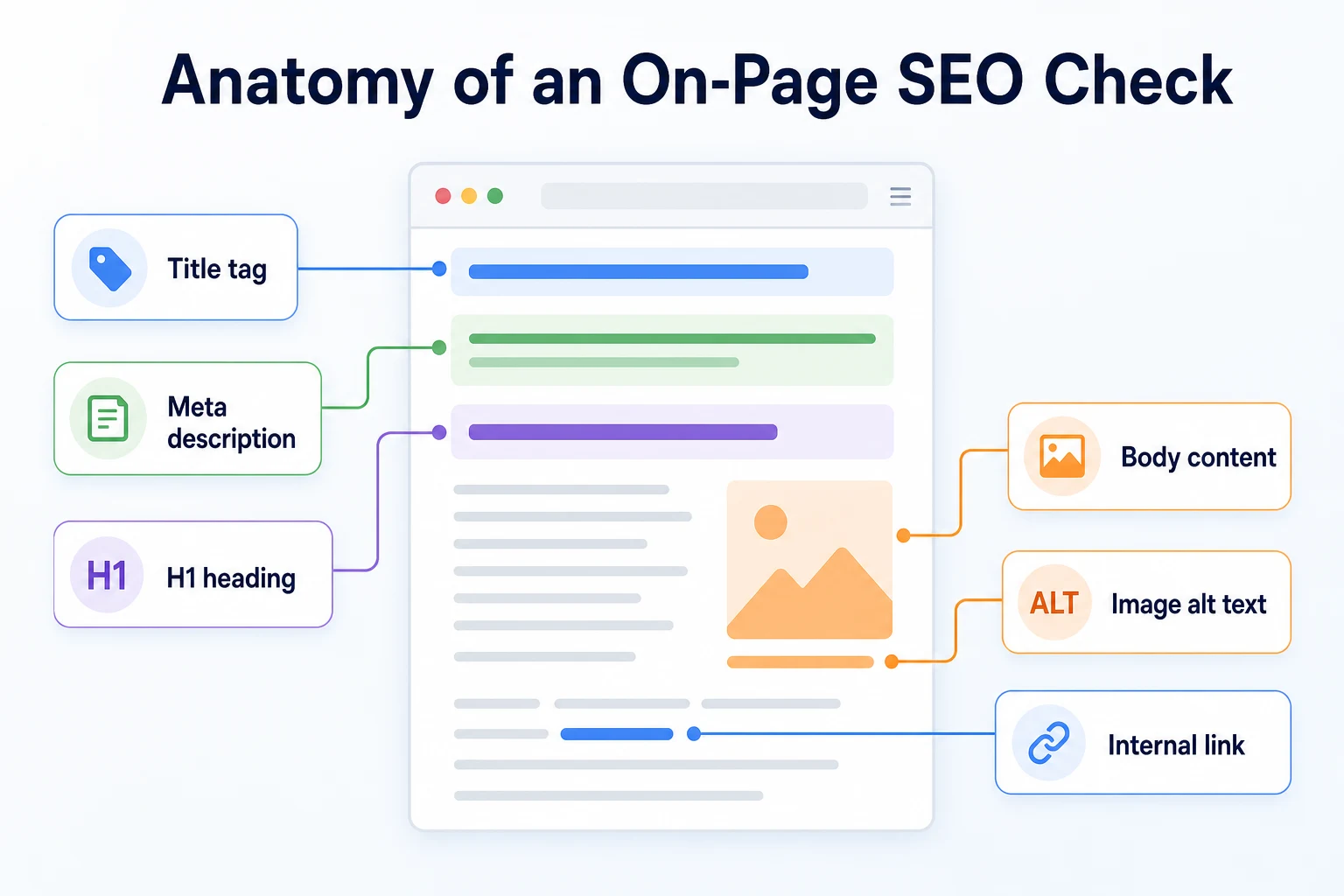
An on-page SEO checker reads the HTML of a single page and compares specific elements against common best practices. It isn't looking at your whole site, your backlinks, or how fast your server responds. It's looking at what's written into that one page.
The elements most checkers inspect
Most tools, free or paid, check a similar handful of things: the title tag, the meta description, the heading structure (H1, H2, H3 and so on), image alt text, internal and outbound links, how often a target keyword appears, the URL itself, and roughly how much text is on the page.
Our own Meta Tag Checker looks specifically at the tags Google and social platforms read, and our Keyword Density Checker looks at what a page actually talks about based on word frequency. Both are examples of the narrower, single-purpose tools that make up a full on-page check.
What a checker can't see or judge
A checker can tell you a title tag exists and how many characters it runs. It can't tell you whether that title is the one a customer would actually click on. It can count how many times a keyword appears, but it can't tell you whether the page actually answers the question behind that keyword.
That judgment call stays with you. The tool surfaces what's there; deciding whether it's good is still a human job.
Element checked | What it tells you |
|---|---|
Title tag | Whether one exists, its length, and whether it includes a relevant keyword |
Meta description | Whether one exists and whether its length fits typical search result space |
Heading structure | Whether there's one H1, and whether H2s and H3s follow a logical order |
Image alt text | Whether meaningful images have a text description attached |
Internal and outbound links | Whether the page links to other relevant pages and whether those links work |
Keyword usage | How often a target phrase appears in the text, title and headings |
URL structure | Whether the URL is readable and reasonably short |
Content length | A rough word count, often compared against similar pages or a fixed minimum |
How an On-Page SEO Checker Reads a Page
Knowing how the tool actually works makes it easier to trust some flags and discount others.
Checking one URL versus crawling a whole site
An on-page checker typically works on one URL at a time. You give it an address, it requests that page, and it reads the HTML that comes back. This is different from a full site crawl, which follows links across many pages to build a picture of the whole site.
Because it only sees that one page, an on-page checker has no idea whether the same title tag is duplicated somewhere else on your site, or whether this page is even linked to from anywhere else. Those are site-wide issues that need a broader crawl to catch.
Why the score is a guideline, not a grade
Google's own guidance on title links and snippets describes general practices, not a rigid formula with a pass or fail cutoff. An on-page checker's score is built from rules loosely based on that kind of guidance, plus some conventions the tool's developers added themselves.
A score of 100 doesn't mean a page will rank well, and a score of 60 doesn't mean it won't. The number is a rough summary of how closely a page follows common patterns, useful for spotting gaps quickly, not a verdict on how Google will actually treat the page.
Running Your First On-Page SEO Check
With that context in mind, the actual process of running a check is straightforward.
Start with a page that should already be working
It's tempting to start with the page that's struggling the most. A better first run is a page you'd expect to be in decent shape already, like your homepage or your best-performing service page. This gives you a baseline for what a normal, healthy report looks like on your site before you start comparing it against pages you know need work.
Run that page through a free on-page SEO checker, like RepGet's free website audit or a focused tool like the Meta Tag Checker, and read the full report before touching anything.
Separate hard errors from suggestions before fixing anything
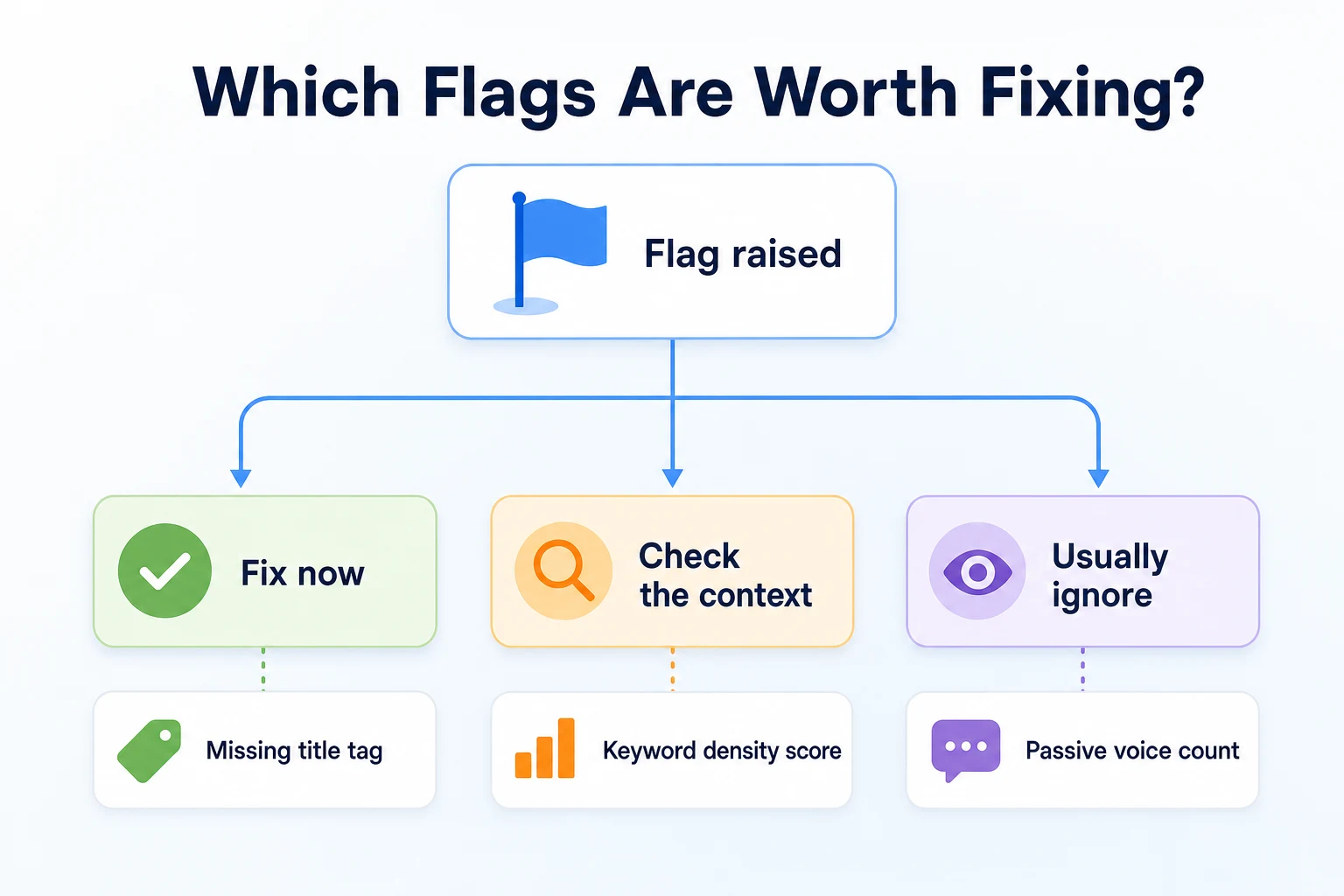
Most reports mix two different kinds of flags: hard errors, like a missing title tag, and softer suggestions, like a keyword appearing slightly less often than the tool expected. Before fixing a single thing, go through the list once and sort it into those two piles.
The hard errors are almost always worth acting on. The suggestions need a second look, which the next two sections walk through.
On-Page Issues That Are Almost Always Worth Fixing
A short list of flags tends to point to a genuine problem no matter what kind of page you're looking at.
Title tag and meta description problems
A missing title tag, a duplicate title used on two different pages, or a title so long it gets cut off in search results are all worth fixing. The same goes for a missing meta description. These are the words a searcher sees before they ever click, and getting them wrong, or leaving them blank, costs you a chance to describe the page clearly.
Heading structure problems
A page with no H1, or with two or more H1 tags, usually points to a template issue or a copy-paste mistake rather than a deliberate choice. Headings help both readers and search engines understand how a page is organized, and a broken structure makes that harder for both.
Missing alt text and broken links
An image that conveys real information, a product photo, a diagram, a screenshot, needs alt text describing what it shows. A decorative background image doesn't need the same treatment, but a checker often can't tell the difference and will flag both the same way, which is worth keeping in mind.
A broken internal link is worth fixing every time it's found. It sends a visitor, and potentially a crawler, to a dead end on your own site. Our guide to service page SEO covers how internal links between related pages are supposed to work when they're set up well.
Flag | Why it matters | Quick fix |
|---|---|---|
Missing title tag | Search results often fall back to an automatically generated title, which rarely describes the page as well as you would | Write a specific, descriptive title and add it to the page's head section |
Duplicate title tag | Makes it harder for a search engine, and a searcher, to tell two different pages apart | Give each page its own distinct title |
Missing meta description | Leaves the search result snippet to be generated automatically, which may not represent the page well | Write a short, specific description of what the page offers |
Missing or multiple H1 tags | Breaks the expected structure that helps readers and search engines follow the page | Use exactly one H1 that states what the page is about |
Missing alt text on meaningful images | Leaves a real image without any text description for anyone who can't see it | Add a short, accurate description of what the image shows |
Broken internal link | Sends visitors and crawlers to a dead page | Update the link or remove it if the destination no longer exists |
On-Page Issues That Depend on the Page
A second group of flags isn't automatically wrong. Whether to act on them depends on what the page is for, who reads it, and what it's trying to do.
Keyword density scores
Many checkers report a percentage for how often your target phrase appears relative to the rest of the text, then flag the page if that percentage sits outside some range the tool considers normal. There's no official target percentage published by Google or any search engine, and a page written naturally around a topic will land wherever it lands.
Our Keyword Density Checker shows this count without pretending there's a single correct number to hit. If a page reads naturally and clearly covers the topic, a keyword density flag usually isn't worth chasing on its own.
Word count minimums
A checker that flags a page for being "too short" is often comparing it against a fixed number, like 300 or 600 words, regardless of what the page is actually for. A short FAQ answer, a simple contact page, or a focused how-to with five steps can all do their job in far fewer words than a long buying guide.
The question worth asking isn't whether a page hits a word count. It's whether it answers what someone came to find, completely enough that they don't need to look elsewhere.
Readability and 'passive voice' scores
Some tools score sentence length, paragraph length, or how often a sentence uses passive voice, then flag anything outside a preset range. These scores can be a useful nudge toward clearer writing, but they're not a measure search engines use to evaluate a page, and a few longer sentences or a passive construction here and there rarely changes whether a page is useful.
Treat this category as a suggestion worth a quick read-through, not a rule to satisfy line by line.
On-Page Flags You Can Usually Ignore
A third category shows up constantly across almost any page a checker scans, including pages that already rank well. These flags are rarely worth any real time.
Exact keyword repetition counts, like a warning that your phrase appears "only twice" or "should appear at least four times," fall into this group. Writing naturally around a topic will use the phrase as often as it makes sense to, not as often as a rule demands.
Strict character limit warnings on titles and descriptions are another common one. Search result snippets get truncated based on pixel width, not a fixed character count, so a title flagged at "62 characters, too long" may still display just fine, and one flagged as "fine" at 58 characters might still get cut off depending on the words used.
Generic structured data warnings are a third. Many checkers flag a page for missing a schema type that simply doesn't apply to it, like recommending review markup on a page with no reviews, or recipe markup on a page that isn't a recipe.
Flag | Why it's usually noise |
|---|---|
Keyword appears "too few" or "too many" times | There's no documented correct frequency; natural writing produces whatever count it produces |
Title or description "too long" by character count | Search results truncate based on pixel width, not a fixed character limit |
Missing schema for an irrelevant content type | The warning applies a generic template regardless of whether that type of content exists on the page |
Low "readability" or passive voice score | A style preference, not a factor search engines are documented to use |
Word count below an arbitrary minimum | Some pages do their job properly in far fewer words than the tool expects |
A Worked Example: Triaging a Service Page's Report
Imagine a plumbing company runs its drain cleaning service page through an on-page checker. This example is illustrative.
The report comes back with nine flags. Sorting them the way this article has laid out looks like this.
Flag raised | Real issue or noise | What to do |
|---|---|---|
No meta description found | Real issue | Write one describing the service and the area covered |
Two H1 tags detected | Real issue | Keep one H1 stating the service, change the second to an H2 |
Keyword density 0.8 percent, recommended 1 to 2 percent | Noise | Leave as is if the page reads naturally and covers the topic clearly |
3 images missing alt text | Real issue | Add alt text describing what each photo shows |
Word count 410, recommended 600+ | Noise | Check whether the page actually answers common questions first; add length only if something's missing |
Title tag 68 characters, flagged as too long | Check the context | Preview it in a search result snippet before shortening it |
1 broken internal link to an old blog post | Real issue | Fix the link or remove it |
No FAQ schema detected | Noise | Only relevant if the page actually has an FAQ section |
Passive voice used in 4 sentences | Noise | Reread those sentences; rewrite only if they're genuinely unclear |
Of the nine flags, three are clear fixes, four are safe to leave alone, and two need a quick look before deciding. That's a much shorter real to-do list than the report first suggests, which is the point of triaging before reacting. Our guide to service page SEO covers what a drain cleaning page like this one needs beyond the checker's flags, including how it should answer the questions a customer actually has.
What an On-Page Checker Won't Catch
Even a clean on-page report doesn't mean the page has no problems. An on-page checker only looks at what's written into that one page's HTML. Several things that determine whether a page gets found at all sit outside that scope entirely.
Crawlability and indexing issues
A page can have a perfect title, a tidy heading structure, and well-written alt text, and still never appear in search results if it's blocked by a robots directive, missing from the sitemap, or simply never indexed. None of that shows up in an on-page report, because the checker is reading the page's content, not whether a search engine has been able to reach or index it in the first place. Our SEO audit checklist covers the indexing and crawling checks that sit alongside on-page work, not instead of it.
Site speed and off-page signals
How fast a page loads, how it performs on a phone, and whether other sites link to it are all separate from anything an on-page checker inspects. A page can score well on every on-page element and still load slowly enough to frustrate a visitor, or have no outside signals pointing to it at all. These need their own checks, run alongside the on-page work rather than assumed to be covered by it.
A 20-Minute On-Page SEO Check You Can Run This Week
None of this needs a block of your calendar. A single page takes about twenty minutes to check properly, once you know what to look for.
Minutes | Step | What you're doing |
|---|---|---|
0 to 3 | Pick the page | Choose one page, ideally one that matters for business, like a service page or a top landing page |
3 to 7 | Run the check | Run the page through a free on-page SEO checker, such as RepGet's free website audit, and read the full report once before touching anything |
7 to 11 | Sort the flags | Split the list into hard errors, context-dependent suggestions, and flags you already know are noise |
11 to 16 | Fix the hard errors | Correct any missing or duplicate title tags, missing meta descriptions, heading problems, missing alt text, or broken links |
16 to 20 | Note what needs a second look | Write down the context-dependent flags you're deferring, and which page you'll check next |
Do this once a week for a handful of pages rather than trying to clear an entire site in one sitting. A steady pace catches real issues early, without burning an afternoon on flags that were never going to move anything.
Common Mistakes When Using an On-Page SEO Checker
Most of the frustration with these tools comes back to a small set of habits, not the tool itself.
Chasing a perfect score is the most common one. A score of 100 isn't a documented requirement anywhere, and time spent closing the gap between 85 and 100 is often time taken away from writing content that actually answers a reader's question.
Fixing every flag without checking whether it applies to the page is a close second. A recipe schema warning on a page with no recipe, or a word count warning on a page that's already complete, doesn't need action just because it's listed in red.
Running a check once and never again lets real problems drift back in. A title tag can get overwritten during a redesign, a link can break months later when another page gets deleted, and a checker only catches these if it's run again.
Letting small technical nitpicks distract from the bigger question is the quietest mistake. A page can tick every box on an on-page report and still fail to answer what the visitor actually came looking for, and no on-page flag will ever say that directly.
Mistake | Why it hurts | What to do instead |
|---|---|---|
Chasing a perfect score | Spends time on flags with no documented effect on rankings | Fix hard errors, use judgment on the rest, then move on |
Fixing flags that don't apply to the page | Adds effort with no real benefit, sometimes adding irrelevant content just to satisfy a rule | Check whether a flag matches what the page is actually for before acting |
Checking a page only once | Real problems like broken links or overwritten tags go unnoticed for months | Recheck key pages on a regular schedule |
Ignoring whether the content actually helps the reader | A technically clean page can still fail to answer the question it was written for | Read the page as a visitor would, separate from the checker's report |
Where RepGet fits
RepGet's free website audit checks the on-page elements covered in this article across a whole site rather than one page at a time: titles, meta descriptions, headings, alt text and keyword use, alongside technical issues like crawlability. It gives a 0 to 100 SEO score and a list of what's worth investigating, which is a reasonable way to triage a larger site in one pass. No account or credit card required.
The individual free SEO tools are useful for spot-checking one thing at a time, like confirming a title and meta description read well with the Meta Tag Checker, or seeing how often a phrase appears with the Keyword Density Checker, without running a full audit each time.
What none of this does is decide, for your specific business and your specific page, which flags actually matter. That judgment, the kind walked through in this article, stays with you. RepGet also doesn't guarantee a ranking or a traffic result from fixing any flag, because no honest tool can make that promise.
The bottom line
An on-page SEO checker is a useful first pass over a page, not a verdict on it. It's built to flag anything that doesn't match a common pattern, and a chunk of what it flags is routine noise that shows up on pages that already rank perfectly well.
The skill worth building isn't clearing every red flag. It's telling a hard error, like a missing title tag or a broken link, apart from a judgment call, like a keyword density score or a word count minimum that doesn't fit what the page is actually for.
Get that distinction right, and a twenty-minute check becomes genuinely useful instead of another list of unread warnings.
Find out what your website needs first
Before chasing every flag on a single-page report, see what your whole site needs across every page at once. Run a free website audit with RepGet to check your site's technical setup alongside its content. No account or credit card required.
FAQ
What is a good on-page SEO score?
There's no official score published by Google or any search engine, so treat a checker's number as a rough guideline, not a pass or fail grade. A page in the 70s or 80s with no hard errors is often in fine shape.
Are free on-page SEO checkers accurate?
They're accurate at reading what's actually in a page's HTML, like whether a title tag exists. They're less reliable at judging what matters, since many flags are based on general conventions rather than documented rules.
How often should I run an on-page SEO check?
Checking your main pages every few weeks, or after any redesign or content update, catches problems like overwritten titles or broken links before they sit unnoticed for months.
Does keyword density actually affect rankings?
There's no documented target percentage search engines use, so a keyword density flag isn't a reliable sign of a ranking problem. Writing naturally and covering the topic clearly matters more than hitting a specific count.
What's the difference between on-page and technical SEO?
On-page SEO covers what's written into a page, like titles and headings. Technical SEO covers whether a page can be crawled, indexed and loaded quickly, which an on-page checker generally doesn't inspect.
Can an SEO checker tell me why my page isn't ranking?
Not fully. It can point to on-page issues like a missing meta description, but ranking also depends on crawlability, competition and off-page factors that sit outside what an on-page checker inspects.
Do I need to fix every issue an SEO checker finds?
No. Hard errors like a missing title tag or broken link are worth fixing. Softer suggestions, like a word count minimum or a passive voice count, depend on what the page is actually for.
What's the best free on-page SEO checker for a small business?
Look for one that checks a page's title, meta description, headings and links in one report, like RepGet's free website audit, rather than juggling several separate single-purpose tools.