

Keyword Tool: Comparing the Free Options for Small Business Owners
Short answer
No single free keyword tool gives a small business everything it needs. Google Keyword Planner shows volume ranges and ideas, Google Search Console shows what already brings traffic, Google Trends shows timing, and Bing Webmaster Tools offers a second data source. Combining two or three of these, rather than picking one, gives a more reliable picture than any single free tool alone.
A small business owner types "keyword tool" into Google, hoping for one clear answer.
Instead they find a dozen free options, each one promising to show what customers are searching for.
They open three of them, type in the same phrase, and get three different numbers back.
One says the term gets 1,000 searches a month. Another says 10. A third doesn't give a number at all, just a bar chart that goes up and down with no scale attached.
None of the tools are lying. They're measuring different things, in different ways, and none of them were built with a one-person business in mind.
Here's how the main free keyword tool options actually differ, what each one is good for, and how to pick one or two without needing an SEO background to make sense of the numbers.
What a Small Business Actually Needs From a Keyword Tool
Every keyword tool, free or paid, is trying to answer some combination of three questions: how often is this searched, how hard is it to rank for, and what other phrases are people using instead.
Understanding what each of those answers actually means matters more than which tool you pick.
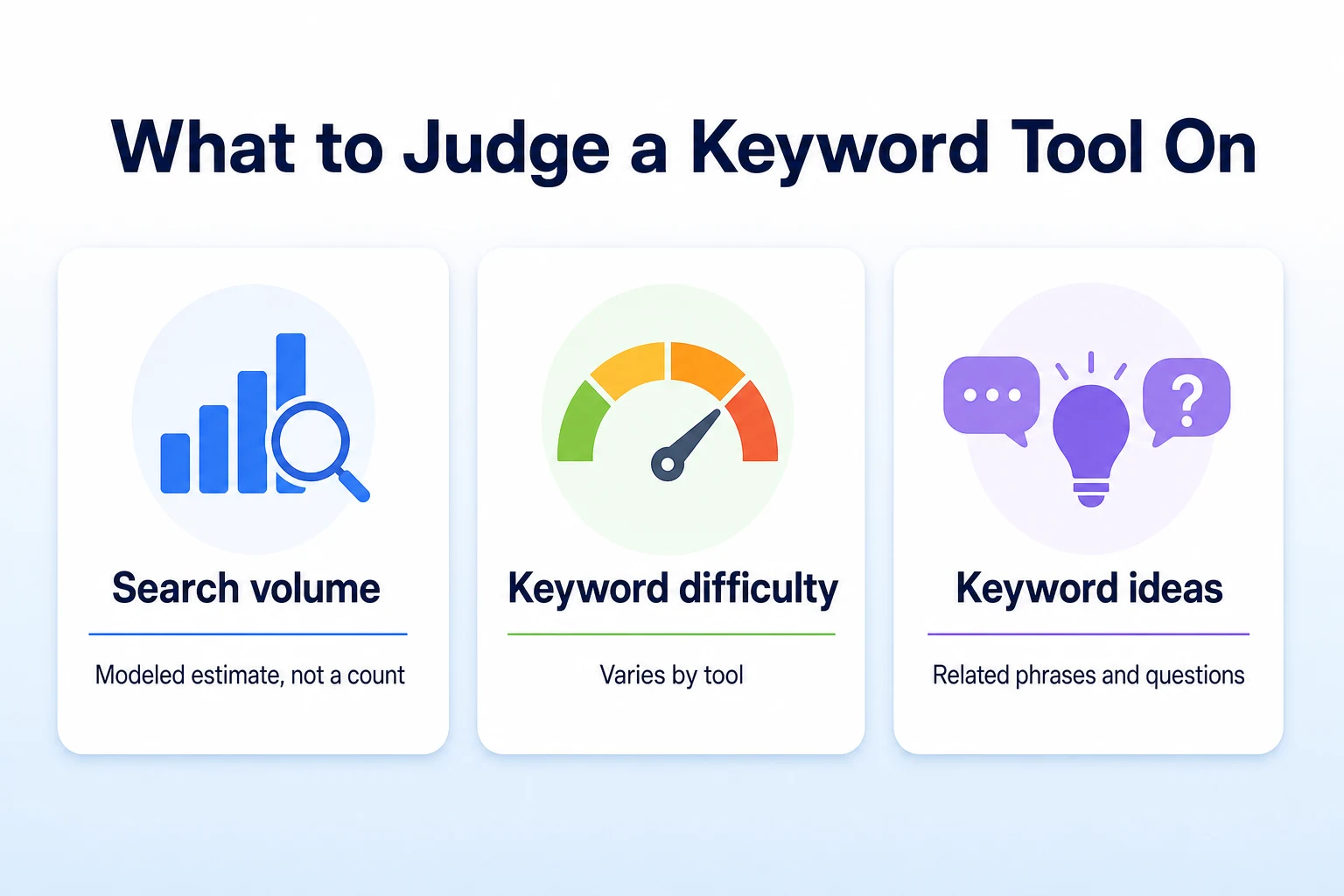
Search volume is a modeled estimate, not a headcount
No tool, including Google's own, counts every search as it happens and hands you a live total. Search volume figures are modeled estimates, built from samples of real search activity and smoothed out over time.
That doesn't make them useless. It does mean a number like "210 searches a month" should be read as a rough signal of scale, not a precise count. Two tools can show different numbers for the same phrase and both still be reasonable estimates, just built from different data and different time windows.
Difficulty scores aren't consistent between tools
A "difficulty" or "competition" score tries to estimate how hard it would be to rank for a given phrase. There's no single agreed method for calculating this, so a score of 40 in one tool and a score of 40 in another can mean genuinely different things, since each tool weighs its own inputs differently.
This matters most when comparing tools rather than comparing phrases within the same tool. A difficulty score is more useful for ranking your own list of keyword ideas against each other than for deciding whether a specific number is objectively high or low.
What "easy to use" means without an SEO background
For a small business owner without SEO training, easy to use means a tool that gives a plain number or a clear comparison without requiring you to interpret jargon first. It also means not needing a paid account just to see basic results.
A tool that's technically more powerful but buries its best data behind confusing filters and unfamiliar terms isn't actually easier to use, even if it's more capable in theory. The rest of this article judges each option against that standard, not just against how much data it holds.
Google Keyword Planner: The Free Standard, With a Catch
Google Keyword Planner is the tool most people mean when they say "free keyword tool." It lives inside Google Ads, and it's the source a lot of other tools quietly build their own estimates from.
Setting up access without running ads
You don't need to run any ads to use Keyword Planner. Creating a free Google Ads account gives you access to the tool itself, and you can skip past the prompts to launch a campaign.
Once inside, you can search for a phrase directly, or paste in a list of several phrases at once, and get a report back for all of them together.
Why volume numbers show as ranges
If your Google Ads account has little or no active ad spend, Keyword Planner tends to show search volume as a broad range, something like "1K to 10K," rather than a specific number. Accounts with active campaigns and spend typically see narrower, more specific figures.
This isn't a bug or a trick to push you toward ads. It's simply how the tool has been set up, and it's worth knowing before you open it so a vague range doesn't feel like a dead end.
When Keyword Planner is the right starting point
Keyword Planner earns its reputation as a starting point because it's genuinely good at one thing: turning a single idea into a long list of related phrases, each with at least a rough sense of scale. That's useful early on, when you're trying to figure out which of several ways to describe your service is worth building a page around.
It's less useful as the only tool you ever check, since a range like "1K to 10K" doesn't tell you much once you're trying to decide between two similarly sized options. Our guide to Google Keyword Planner walks through the account setup and the report screens in more detail, including how to read a list once it's in front of you.
Google Trends: Good for Timing, Not for Volume
Google Trends is free, requires no account at all, and is often the first tool someone finds when searching for a keyword tool. It's also the one most often misread.
What "relative interest" means
Trends doesn't show a search volume number. It shows interest over time on a scale from 0 to 100, where the numbers represent relative popularity within the time period and region you've selected, not an actual count of searches.
A score of 100 just marks the point of highest relative interest in your chosen range. It says nothing about whether that peak represents 50 searches or 50,000, which is the most common misunderstanding people bring to this tool.
Using it to spot seasonal demand
Where Trends is genuinely useful is in showing shape over time rather than scale. A landscaping business can see that interest in "gutter cleaning" rises sharply every autumn, well before the calls start coming in, which is useful for timing a seasonal page update or a push on existing content.
It's also useful for comparing two phrases against each other, since the relative scale stays consistent between them even without a hard number attached. If one phrase consistently sits above another on the same chart, that's a reasonable signal of which one gets searched more, even without knowing the exact totals behind either line.
Google Search Console: The Keyword Data You Already Own
Every other tool in this article estimates what people might search for. Search Console shows what people have actually typed before landing on your site, which makes it a different kind of resource entirely.
Where to find the Performance report
Inside Search Console, the Performance report lists the actual search queries that showed your pages in results, along with impressions, clicks, and average position for each one. This requires your site to already be verified in Search Console, and it only shows queries connected to pages Google has indexed.
It's worth sorting this report by impressions first, since a query getting plenty of impressions but few clicks is often a page that's already being found, just not convincing enough people to click through once they see it.
Why your own data beats a forecast
Every number in this report reflects something that actually happened on your own site, not a model built from sampled data across the wider web. That makes it more trustworthy for your specific business than any estimate from Keyword Planner or Trends, even though it only covers phrases you're already getting some visibility for.
The limitation is just as real as the advantage. A query with zero impressions here isn't necessarily a dead end, it might just mean you don't have a page that targets it yet. Our guide to Google Search Console impressions but no clicks covers how to read this report when the numbers don't match what you'd expect.
Bing Webmaster Tools Keyword Research: A Second Free Opinion
Bing Webmaster Tools is free to sign up for, and most people skip past it entirely because they assume Google is where all their customers search. That's often true, but not always, and the tool itself only takes a few minutes to set up.
Once you've verified your site, Bing's Keyword Research tool lets you type in a phrase and get a search volume figure, along with a list of related terms, built from Bing's own search data rather than Google's. It also lets you filter by country, which matters if your business serves a specific area.
The numbers won't match what you see in Keyword Planner, and that's expected, since the two represent different, smaller slices of overall search activity. What's useful here isn't picking one as more correct than the other. It's checking whether a phrase that looks promising in one tool also shows some activity in the other, which is a reasonable sanity check before building a whole page around a single estimate.
For a lot of small businesses, Bing sends a smaller share of traffic than Google, so this tool won't replace the others covered here. It's worth a look anyway, especially for phrases where Keyword Planner only gives you a broad range and you want a second, independently sourced number to compare it against.
Manual Free Methods: Autocomplete, Related Searches, and People Also Ask
Some of the most useful keyword research doesn't come from a dedicated tool at all. It comes from paying attention to what Google's own results page already shows you, for free, with no account needed.
Autocomplete for real phrasing
Start typing a phrase into Google's search bar and watch what it suggests before you finish. Those suggestions are built from real queries other people have typed, which makes them a useful window into the exact wording customers actually use, rather than the wording a business owner might assume they use.
A plumber might type
A plumber might type "why is my water heater" and watch autocomplete fill in endings like "leaking" or "making noise," which are close to the exact words a customer would type before calling for help. Typing the same phrase with a letter or two added, or trying it with "near me" attached, often surfaces a different set of suggestions worth noting down.
Related searches and People Also Ask for related topics
Scroll to the bottom of a Google results page and you'll often find a short list of related searches, phrases Google considers connected to what you just searched. A People Also Ask box partway down the results does something similar, expanding into a short list of related questions as you click each one open.
Neither gives you a volume number. Both give you real phrasing, pulled from actual search behavior, which is often more useful for planning an FAQ section or a blog post than a number with no context attached. A roofing company checking related searches for "roof replacement cost" might find questions about financing or insurance claims sitting right alongside it, which points to content worth writing that a volume figure alone would never suggest.
Free Keyword Tools Compared Side by Side
Laid out together, the tools covered so far fall into different roles rather than competing for the same job.
Tool | Ease of use | Data quality | Cost | Best for |
|---|---|---|---|---|
Google Keyword Planner | Moderate, needs a free Ads account | Good for ideas, volume often shown as a range | Free | Turning one phrase into a long list of related ideas |
Google Trends | High, no account needed | Relative interest only, no volume figures | Free | Spotting seasonal patterns and comparing two phrases |
Google Search Console | Moderate, needs a verified site | Real first-party data, limited to existing visibility | Free | Seeing what already brings traffic to your own site |
Bing Webmaster Tools | Moderate, needs a free account | Independent volume figures from a smaller data pool | Free | A second opinion on a phrase's scale |
Manual search methods | High, no account needed | No volume data, strong on real phrasing | Free | Finding the exact words customers use |
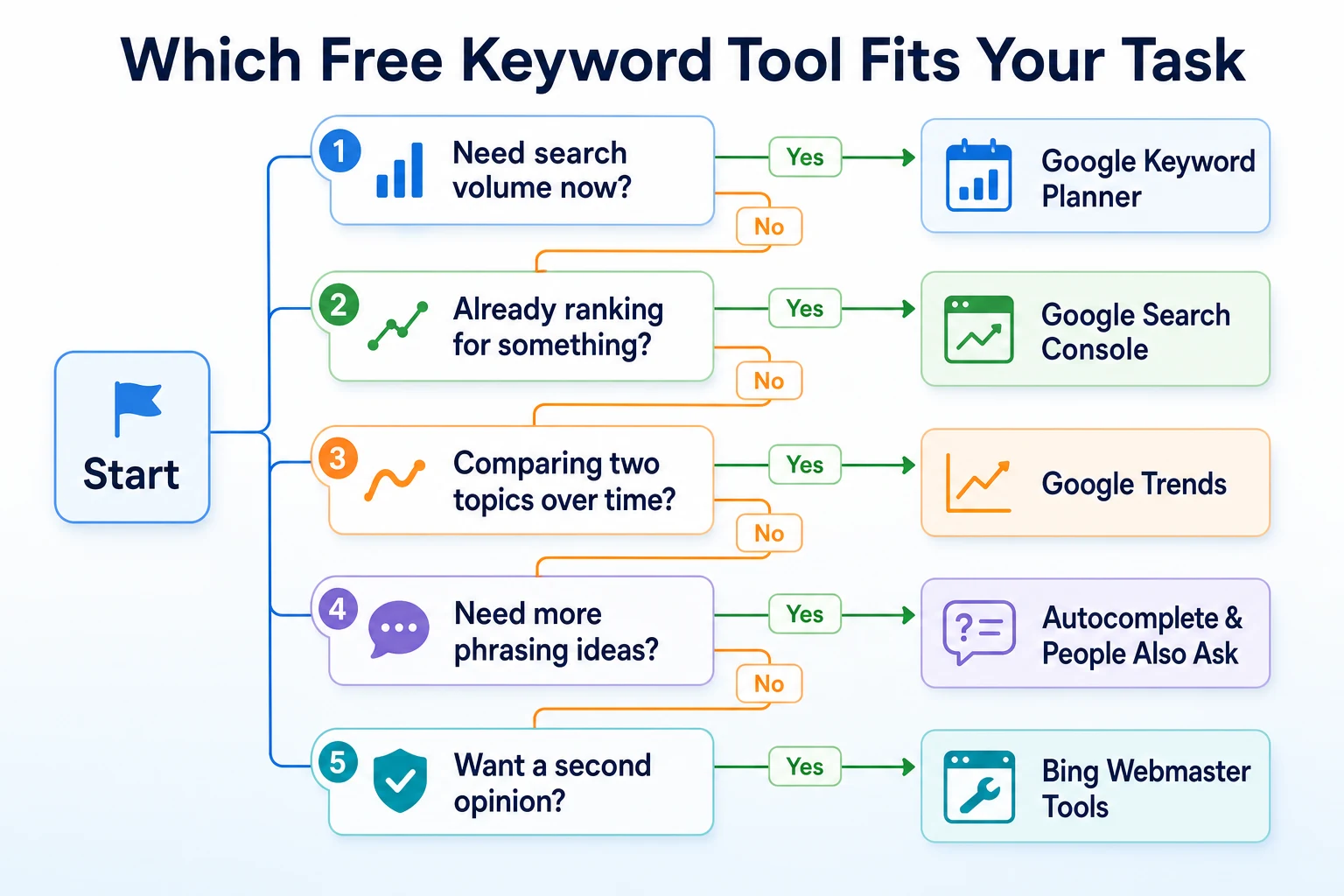
A Worked Example: Choosing Keywords for a Local Service Business
Imagine a carpet cleaning business wants to add a new service page but isn't sure which phrase to build it around. This example is illustrative.
Stage | Tool used | What was found |
|---|---|---|
1 | Google Search Console | The existing pages were already getting impressions for "pet stain carpet cleaning," a phrase with no dedicated page |
2 | Google Keyword Planner | The phrase and a few close variants showed a volume range in the low thousands, with related ideas like "carpet cleaning for pet odor" |
3 | Google Trends | Interest in the phrase stayed fairly level year round, rather than spiking seasonally |
4 | Autocomplete and People Also Ask | Real questions surfaced about whether the treatment was safe for pets, and how long it took to dry |
5 | Final shortlist | One main phrase for the page title, with the safety and drying-time questions built into the page as answered sections |
No single tool here did all the work. Search Console pointed at a real gap, Keyword Planner gave it some rough scale, and the manual checks filled in the actual questions worth answering on the page itself. Our guide to low-competition keywords covers how to judge whether a phrase like this is realistic to compete for once you've found it.
A Weekly Keyword Research Routine That Takes 20 Minutes
Keyword research doesn't need to be a once-a-year project. A short weekly check, using tools already covered, keeps a small business's content plan grounded in what's actually happening rather than guesswork.
Minutes | Step | What you're doing |
|---|---|---|
0 to 5 | Scan Search Console's Performance report | Sort by impressions and note any query getting attention without a dedicated page |
5 to 10 | Run one phrase through Keyword Planner | Check the rough volume range and skim the related ideas it returns |
10 to 14 | Check Google Trends for timing | See whether interest in that phrase is flat, rising, or seasonal |
14 to 18 | Type the phrase into Google and read autocomplete and People Also Ask | Note the exact wording and any related question worth answering |
18 to 20 | Add findings to a running list | Note the phrase, its rough scale, and which page it belongs on |
Twenty minutes a week adds up to a running list of real, grounded ideas over a few months, without ever needing a full afternoon set aside for it.
Common Mistakes When Using Free Keyword Tools
A few habits show up again and again once a small business owner starts checking keyword numbers, and most of them come from treating a tool's output as more certain than it actually is.
Relying on a single tool and taking its number as final is the most common one. A volume range from Keyword Planner or a relative score from Trends is a starting point, not a verdict, and checking it against even one other source often changes the picture.
Chasing the highest volume phrase without reading what it actually means is another. A broad phrase with a big number often attracts searchers who aren't close to hiring anyone, while a narrower, lower-volume phrase can bring in people who are ready to call. Volume alone doesn't tell you which is which.
Treating a difficulty score as a fixed ceiling stops a lot of small sites from trying at all. These scores are rough estimates built differently by each tool, and a newer or smaller site can still earn visibility for a phrase a score marks as difficult, especially with a genuinely useful page behind it.
Ignoring Search Console because it only shows what you already rank for is a missed opportunity. Those existing queries are often the easiest wins on the list, since you're already getting some visibility, just not enough to convert it into clicks.
Mistake | Why it hurts | What to do instead |
|---|---|---|
Trusting one tool's number as final | Every tool models volume differently, so a single figure can mislead | Check a phrase against at least one other free source before deciding |
Picking the highest volume phrase by default | High volume doesn't mean the searcher is ready to buy or call | Weigh volume against how specific and commercial the phrase sounds |
Treating difficulty scores as a hard limit | Scores vary between tools and don't account for a strong, specific page | Use difficulty to compare your own list, not as a yes or no gate |
Ignoring Search Console's existing queries | These often represent the fastest wins, since you already have some visibility | Check the Performance report before adding brand new phrases to a plan |
Where RepGet fits
Everything covered in this article is a manual check: opening a tool, typing a phrase, reading a number, and deciding what it means. RepGet brings keyword research into the same workflow as the content that comes after it, so a phrase you find doesn't sit in a separate spreadsheet from the article written around it.
RepGet's keyword research connects to content planning and article writing in one place, and articles it writes can stay as drafts for you to review before they're published, rather than going live automatically. That still leaves the judgment calls in this article to you: which phrase actually fits a customer's intent, and which page it belongs on.
Before deciding where a new page should sit, RepGet's free website audit crawls your site and gives it a 0 to 100 SEO score, flagging technical and content issues worth investigating, including gaps where a page for a promising phrase doesn't exist yet. No account or credit card required.
Once a page is written, RepGet's free Keyword Density Checker shows what a page actually talks about, which is a quick way to confirm a new page genuinely covers the phrase it was built for rather than mentioning it once and moving on.
RepGet doesn't replace Google Search Console, Keyword Planner, or your own judgment about which phrases fit your business, and it can't guarantee a ranking or a traffic result for any keyword, however promising the numbers look.
The bottom line
No single free keyword tool gives a small business the whole picture. Keyword Planner is strong on ideas and weak on precise volume without ad spend. Trends is strong on timing and says nothing about scale. Search Console is the only one showing what's actually happening on your own site, but only for phrases you already have some visibility for.
Used together, even just two or three of them, these free tools cover enough ground for a small business to plan content with reasonable confidence, without needing an SEO background or a paid subscription to get started.
The habit that matters more than any single tool is checking a number against a second source before building a whole page around it, and starting with the data you already own in Search Console before chasing new ideas elsewhere.
Find out what your website needs first
Before picking a keyword to build a new page around, see what your site already has and what's missing. Run a free website audit with RepGet to check your site's technical setup alongside its content. No account or credit card required.
FAQ
What is the best free keyword research tool for a small business?
No single tool covers everything. Google Search Console shows what already brings traffic to your site, Keyword Planner gives rough volume and related ideas, and combining both covers more ground than either alone.
Is Google Keyword Planner good enough without running ads?
Yes, you can use it for free with no ad spend, but volume often shows as a broad range like "1K to 10K" rather than a specific number. It's still useful for generating related keyword ideas.
How accurate is keyword search volume data?
Every tool's volume figure is a modeled estimate built from sampled data, not an exact count. Treat the numbers as a rough sense of scale and expect different tools to show different figures for the same phrase.
Can I do keyword research without any paid SEO tools?
Yes. Google Keyword Planner, Google Trends, Google Search Console, Bing Webmaster Tools, and manual checks like autocomplete and related searches are all free and cover ideas, timing, and real customer phrasing.
What's the difference between search volume and keyword difficulty?
Search volume estimates how often a phrase is searched. Keyword difficulty estimates how hard it would be to rank for it. The two are unrelated, a low-volume phrase can still be difficult, and a high-volume one can be easier than expected.
Does Google Trends show exact search numbers?
No. Trends shows relative interest on a 0 to 100 scale within your chosen time period and region, not an actual count of searches, so it's best used for comparing timing or two phrases against each other.
Is Bing Webmaster Tools worth using for keyword research?
It's worth a quick look even if most customers search on Google, since it offers an independent volume figure from Bing's own data, which is useful as a second opinion before building a page around one number.