

Claude YouTube Integration: What It Does for Creators
Short answer
Claude does not have a built-in YouTube integration from Google or Anthropic. vidIQ built a connector that lets Claude read YouTube keyword, trend, competitor, performance, transcript and comment data once you link a vidIQ account. Setup takes a few minutes inside Claude's connector settings, but it needs a paid vidIQ plan. It cannot post videos, reply to comments or replace YouTube Studio or Search Console.
A channel owner reads that "Claude now has YouTube integration" and pictures something built by Google, a new AI panel inside YouTube Studio, maybe even a Search feature.
That's not what happened.
What launched is a connector that vidIQ built for Claude, Anthropic's AI assistant. vidIQ plugged its own YouTube data into Claude's chat window. Google and YouTube had nothing to do with it, and Anthropic didn't build any YouTube-specific feature either.
That distinction matters, because it sets the boundaries of what this thing can and can't do. Here's what the Claude YouTube integration actually is, how to set it up, what it costs, and where creators and small businesses can realistically use it.
What vidIQ's Claude Connector Actually Is
vidIQ is a YouTube analytics and keyword research tool that's existed for years, independent of Google. It crawls YouTube, builds its own index of videos, channels, tags and search terms, and sells access to that data through its own dashboard and browser extension.
The Claude connector is a new way to reach that same data. Instead of opening vidIQ's dashboard, a user can ask Claude a question in plain language, and Claude pulls the relevant numbers from vidIQ's index to answer it.
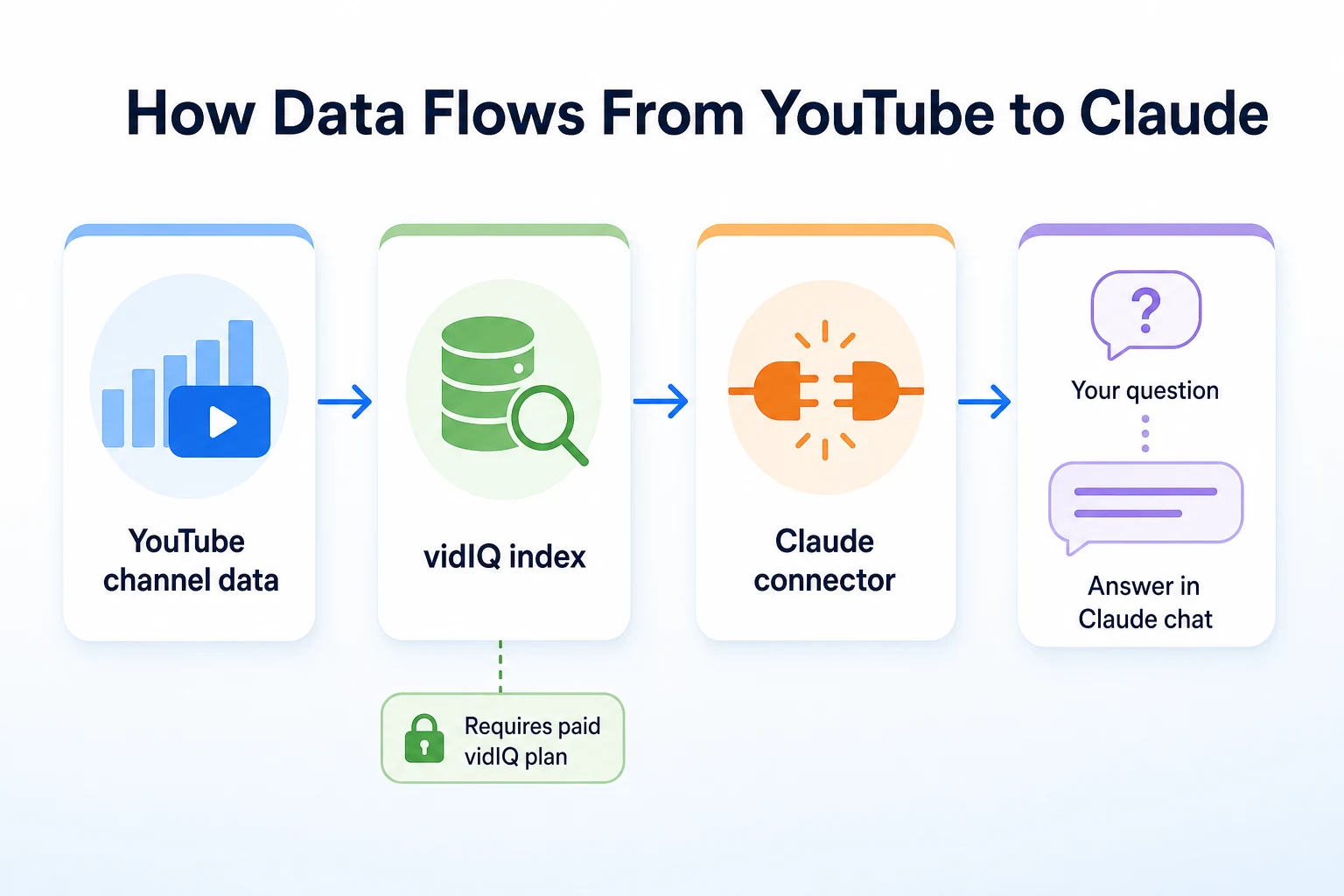
vidIQ's role versus Google's or Anthropic's
Nothing here touches YouTube's own systems directly. Claude isn't reading YouTube Studio, and it isn't talking to Google at all. It's talking to vidIQ, and vidIQ is talking to the YouTube data it already collects for its own product. If a number looks off, the first place to check is whether vidIQ's own dashboard shows the same figure, since that's the actual source behind the answer.
How Claude's connectors work in general
Anthropic built a general framework that lets outside companies connect their own data or tools to Claude, so a user can ask questions that pull in information Claude wouldn't otherwise have. vidIQ is one of a growing list of companies that built a connector on top of that framework. The mechanism is the same one other tools use: an account gets linked, Claude is granted permission to query that account's data, and the connector decides what Claude is allowed to see and do.
When It Launched and Why Now
vidIQ announced its Claude connector as part of a broader push to make its YouTube data available directly inside AI assistants, rather than only through its own dashboard and browser extension.
vidIQ's rollout
The YouTube connector sits alongside connectors vidIQ built for Instagram and TikTok, part of the same effort to let a creator or marketer ask one assistant about performance across more than one video platform, instead of switching between separate dashboards for each one.
Part of a wider connector trend
This fits a pattern showing up across a lot of tools right now, not just vidIQ. Rather than building a browser plugin or a separate app, more companies are plugging their existing data straight into an AI assistant's chat window, betting that users increasingly want to ask a question and get an answer rather than open a dashboard and hunt for one. For a small business already deciding how to be found through AI assistants in general, it's a useful reminder that the tools feeding those assistants matter as much as the assistants themselves.
What You Can Actually Ask Claude to Do
Once the connector is linked, the practical value comes down to four things vidIQ's index already tracks: keywords and trends, competitor channels, video performance, and the text sitting inside transcripts and comments.
Keyword and trend research
vidIQ has long tracked search volume and competition scores for YouTube keywords, similar to the kind of data covered in our guide to keyword tools for small business owners. Through Claude, that research can be asked for conversationally: a creator can describe a video idea and ask which related terms get searched often but have thin competition, instead of typing individual terms into a search box one at a time.
Competitor analysis
vidIQ already tracks competitor channels: their upload frequency, which videos are gaining views fastest, and how their titles and tags are structured. Claude can summarize that across several channels at once, which is slower to do by hand inside a dashboard tab by tab.
Video performance, transcripts and comments
For a channel's own videos, the connector exposes view counts, watch time trends and other performance metrics vidIQ already tracks, plus the text content of video transcripts and viewer comments. That last part matters: it means Claude can be asked to read through comments on a batch of older videos and summarize what viewers keep asking, something no dashboard view does on its own.
Capability | Data it draws on | Example question |
|---|---|---|
Keyword and trend research | vidIQ's search volume and competition scores | "What related keywords to 'home espresso setup' have decent search volume but low competition?" |
Competitor analysis | vidIQ's tracked data on competitor channels | "Compare upload frequency and recent view trends across these three competitor channels." |
Video performance | View counts and watch time metrics for a linked channel | "Which of my last 10 videos had the strongest watch time relative to views?" |
Transcripts and comments | Text content pulled from a channel's videos and comment sections | "What questions do viewers keep asking in the comments on my last five tutorials?" |
How to Set Up the Connector
The setup itself is short. Most of the work is making sure the right accounts exist before you start.
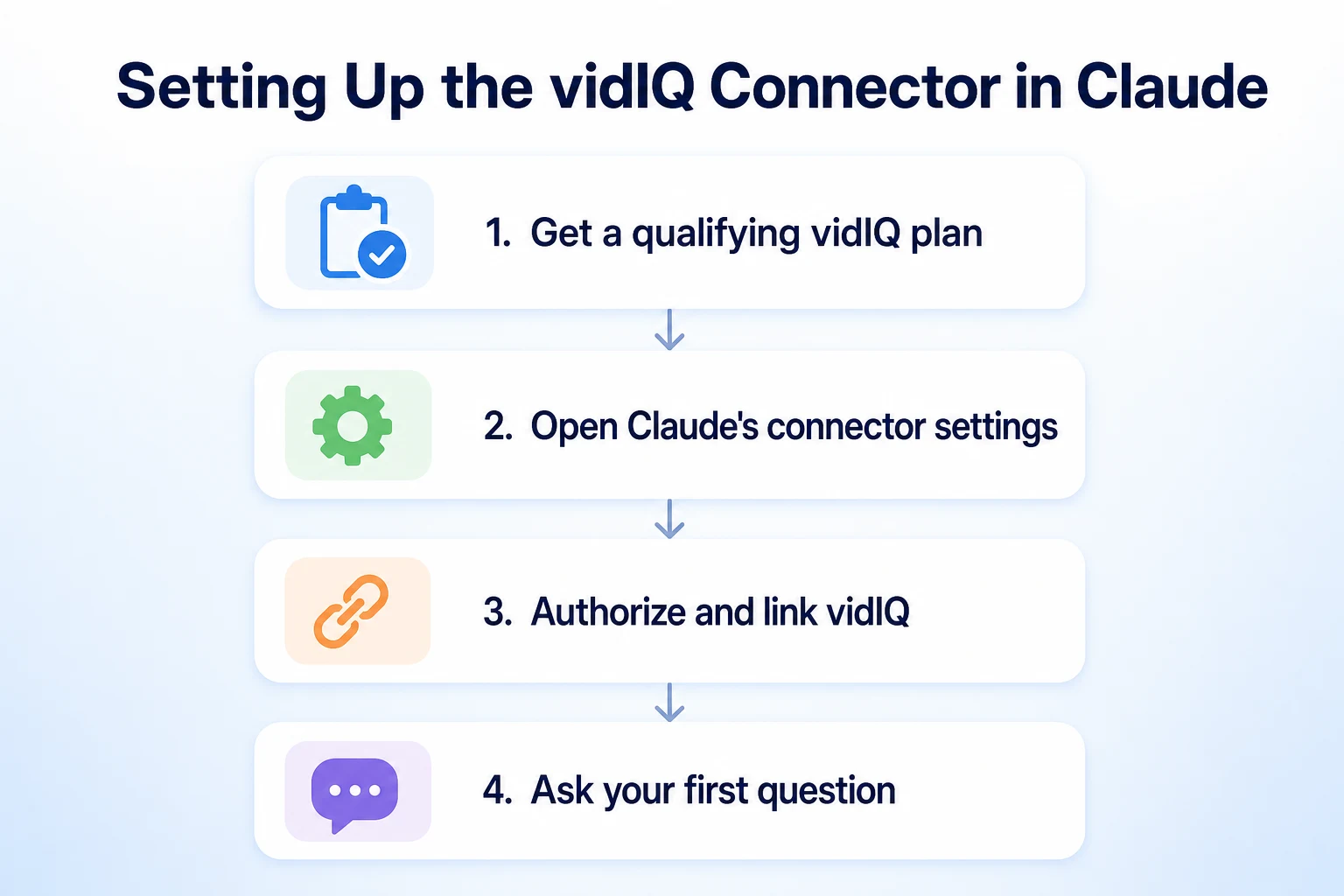
What you need before you start
Two accounts need to already exist: a vidIQ account on a plan that includes connector access, and a Claude account on a plan that supports connectors at all. Neither provider includes this for free, so it's worth checking current plan details on vidIQ's own site and Anthropic's own site before assuming a lower tier qualifies.
Connecting and authorizing vidIQ in Claude
Inside Claude, connector settings live in the account or settings menu, usually under a section for connected apps or integrations. From there, vidIQ appears as an option to add. Selecting it prompts a login to the vidIQ account and a permission screen asking what Claude is allowed to access. Once authorized, the YouTube channel linked to that vidIQ account becomes available to ask about directly in chat, with no further setup needed for a first question.
Two Prompts Worth Trying First
A connector is only as useful as the questions you ask it. Two prompts cover most of what a creator wants out of this on day one.
Prompt 1: spotting a content gap
Try something like: "Using my vidIQ data, find three keyword topics related to [your niche] that get searched often but have low competition, and suggest a video title for each." Claude pulls from vidIQ's keyword and competition scores to return a short list, each with a rough sense of how crowded that topic already is on YouTube. It won't tell you a video will rank, but it narrows a wide niche down to a handful of ideas worth checking further in vidIQ's own dashboard before committing to a script.
Prompt 2: reviewing a video's performance
Try: "Look at my video [title or link] and tell me how its watch time compares to my channel average, and summarize what viewers are saying in the comments." This pulls two different data types at once, the performance metrics vidIQ tracks and the text sitting in the comment section, and asks Claude to connect them. A video with weak watch time and comments asking the same unanswered question is a different problem than a video with strong watch time and comments asking for a follow-up. The prompt surfaces which situation you're actually in, rather than leaving you to read both separately.
What It Costs to Use
The connector itself doesn't carry its own separate price tag. What it actually costs is the sum of two subscriptions you may or may not already have.
Where the cost actually sits
vidIQ gates connector access behind a paid plan, so a free vidIQ account won't expose the feature even if Claude shows it as an option. Claude's side has its own requirement too: connectors are only available on plans that support them, so a free or basic Claude account may not let you add vidIQ at all, regardless of what plan you're on with vidIQ. Both companies change their plan tiers and pricing from time to time, so the only reliable way to know what qualifies right now is to check vidIQ's own pricing page and Anthropic's own plan details directly, rather than go by a figure that might be out of date by the time you read it.
Requirement | Why it's needed |
|---|---|
A vidIQ plan that includes connector access | The connector reads from vidIQ's index, so a free account with no connector permission has nothing to expose |
A Claude plan that supports connectors | Connector settings aren't available on every Claude tier, independent of what vidIQ plan you hold |
An active YouTube channel linked inside vidIQ | Claude only sees the channel data vidIQ already has access to, so the channel has to be connected on vidIQ's side first |
What the Connector Doesn't Do
It's worth being specific about the edges of this, since the gap between what a connector reads and what it can change is easy to misjudge.
No posting or publishing actions
Claude can't upload a video, edit a title or description, schedule a post, or reply to a comment through this connector. Everything it does is read and summarize. Any change still has to happen by hand, in YouTube Studio or in vidIQ's own dashboard, after Claude has helped you work out what that change should be.
Data freshness and accuracy limits
Claude's answers are only as current as vidIQ's own index, which updates on its own schedule and isn't a live mirror of YouTube Analytics at every moment. For a number that needs to be exact, like a figure going into a report or a decision with real budget behind it, it's worth cross-checking against YouTube Studio or Search Console directly rather than treating Claude's summary as the final word. The connector is a faster way to ask a question of data that already exists elsewhere, not a replacement for the systems that generate that data in the first place.
Three Practical Ways a Business Could Use It
Beyond the two prompts above, a few recurring patterns show where this connector saves real time for a small business or a channel run by a handful of people, rather than a large content team with its own analyst.
Planning a content calendar
A business that posts video content on a schedule can ask Claude to cross-reference trending search terms against what it's already covered, then sketch a rough month of topics before anyone opens a planning document. Our guide to building an SEO content calendar covers the same planning logic for blog content, and the same habit of working from real search demand rather than guesswork applies just as well to video topics.
Auditing competitor channels
Before a content push into a new topic, it's useful to know who else is already covering it well. Asking Claude to summarize upload patterns and recent view trends across a handful of competitor channels turns an afternoon of tab-switching into a single question, with the vidIQ data doing the underlying work.
Scanning comments and transcripts for recurring questions
A channel with a backlog of older videos often has useful information buried in the comments: the same question asked a dozen different ways across a dozen different uploads. Asking Claude to read through that and group the recurring questions turns scattered feedback into a short list of topics worth a dedicated video, or a line worth adding to an FAQ page.
Use case | Example prompt | What you do next |
|---|---|---|
Planning a content calendar | "What are five trending topics in [niche] I haven't covered yet, ranked by search volume?" | Pick two or three to script and schedule for the coming weeks |
Auditing competitor channels | "Summarize upload frequency and recent view growth for these four competitor channels." | Note which topics or formats are gaining traction before planning your own |
Scanning comments for recurring questions | "What questions come up most often in the comments across my last 20 videos?" | Turn the most common one into a dedicated video or a page on your site |
Instagram and TikTok Work the Same Way
vidIQ didn't build the YouTube connector in isolation. It sits alongside connectors for Instagram and TikTok, built on the same framework and carrying the same ground rules: a paid vidIQ plan, a Claude plan that supports connectors, and read-only access to whatever vidIQ already tracks on that platform.
For a business posting the same video across YouTube Shorts, Instagram Reels and TikTok, that means one Claude conversation can in principle be asked about performance or trends across all three, rather than three separate dashboard logins. The same limitation applies everywhere, though. Claude isn't posting to Instagram or TikTok any more than it's posting to YouTube. It's reading vidIQ's index and summarizing it back.
What This Says About Being Found Through AI Assistants
Step back from vidIQ specifically and the pattern is worth noticing on its own. A business's visibility used to come down almost entirely to how Google and YouTube's own algorithms treated its pages and videos. Increasingly, a second question sits alongside that one: what does an AI assistant see when someone asks it about a topic a business covers.
That second question doesn't have one clean answer yet, and nobody, including Anthropic, publishes a guarantee about what gets pulled into an answer or when. What's documented is simpler: connectors like vidIQ's give an assistant access to data it wouldn't otherwise have, which changes what it can summarize, but not whether a specific business gets mentioned in a specific answer. Our guide to getting mentioned in ChatGPT covers the same distinction for a different assistant: being readable and well-documented is something a business can actually work on, being mentioned in any specific reply isn't something anyone can promise.
If AI-driven traffic matters to a business already, it's also worth knowing whether any of it is showing up yet. Our guide to tracking ChatGPT traffic covers how to look for that in analytics, which is a more useful starting point than guessing based on a new connector launch.
Where RepGet fits
RepGet doesn't connect to Claude, vidIQ, or YouTube, and it doesn't pull transcript or comment data from video platforms. Nothing about this connector runs through RepGet, and nothing here changes what RepGet actually does.
What RepGet does cover is the website a business sends people back to, whether that traffic comes from a YouTube description link, a comment, or an AI assistant's answer. Its free website audit crawls a site and gives it a 0 to 100 SEO score, flagging technical and content issues worth fixing before worrying about which AI connector to try next. No account or credit card required.
RepGet doesn't guarantee a ranking, a video's view count, or a mention in any AI assistant's answer, on YouTube or anywhere else. Connecting a tool like vidIQ to Claude is a research shortcut, not a result, and the same honesty applies to anything RepGet can offer too.
The bottom line
The Claude YouTube integration making the rounds isn't a Google feature, an Anthropic feature, or a sign that Claude suddenly understands YouTube on its own. It's a connector vidIQ built, using Anthropic's own connector framework, to let its existing keyword, competitor, performance, transcript and comment data be asked about in plain language instead of clicked through in a dashboard.
That's genuinely useful if a business or creator already pays for vidIQ and wants a faster way to ask it questions. It's not a reason to sign up for either product if you don't already use vidIQ, and it's not a tool that posts, publishes, or replaces the judgment calls a person still has to make about what to film, write, or ship next.
Find out what your website needs first
Run a free website audit with RepGet to see what your own site needs before adding a new AI connector to the mix. No account or credit card required.
FAQ
Is Claude's YouTube integration built by Google or YouTube?
No. It's a connector vidIQ built using Anthropic's connector framework. Google and YouTube had no part in building it, and it doesn't touch YouTube Studio or Search Console directly.
Do I need a paid vidIQ plan to connect Claude to YouTube?
Yes. vidIQ gates connector access behind a paid plan, and Claude separately requires a plan that supports connectors. Check current pricing on each provider's own site before assuming a lower tier qualifies.
Can Claude upload videos or reply to YouTube comments?
No. The connector is read-only. Claude can summarize vidIQ's data, but any upload, edit, or reply still has to happen by hand in YouTube Studio or vidIQ's dashboard.
What is a Claude connector?
A connector is Anthropic's framework letting outside companies link their own data or tools into Claude's chat. vidIQ built one of many connectors using that same general mechanism.
Does the vidIQ Claude connector also work with Instagram or TikTok?
Yes. vidIQ offers separate connectors for Instagram and TikTok built the same way, with the same paid-plan requirements and the same read-only limits as the YouTube connector.
How up to date is the YouTube data Claude sees through vidIQ?
Only as current as vidIQ's own index, which updates on its own schedule rather than mirroring YouTube Analytics live. Cross-check anything that needs to be exact against YouTube Studio directly.
Will connecting Claude to vidIQ improve my YouTube rankings?
Nobody can promise that. The connector speeds up research and summarizing, but it doesn't change how YouTube ranks videos, and neither vidIQ nor Anthropic documents any ranking guarantee.