

Track ChatGPT Traffic: How to Measure Leads From AI Search
Short answer
You can track ChatGPT traffic in Google Analytics by filtering referral traffic from chatgpt.com and other AI sources, then connecting it to a channel group and your actual conversion events. Add UTM parameters to any links you control, check Search Console for the impressions-but-no-clicks pattern, and review the data monthly. None of this captures every mention, but it gives you a usable, repeatable signal instead of a guess.
A visitor fills out your contact form and writes "found you through ChatGPT" in the message box.
You open Google Analytics to see where that session came from. It says Direct.
No referrer, no campaign, no way to find that visitor again or prove to anyone that the ChatGPT mention actually did anything.
This is the normal state of things, not a setup mistake. Most guides about ChatGPT and AI search stop at how to get mentioned, and leave out what happens after someone clicks.
Here's how to track ChatGPT traffic in the tools you already have, what you can realistically measure, and what stays invisible no matter how carefully you set things up.
Why ChatGPT Traffic Often Doesn't Look Like ChatGPT Traffic
Before building any tracking, it helps to understand why this data goes missing in the first place.
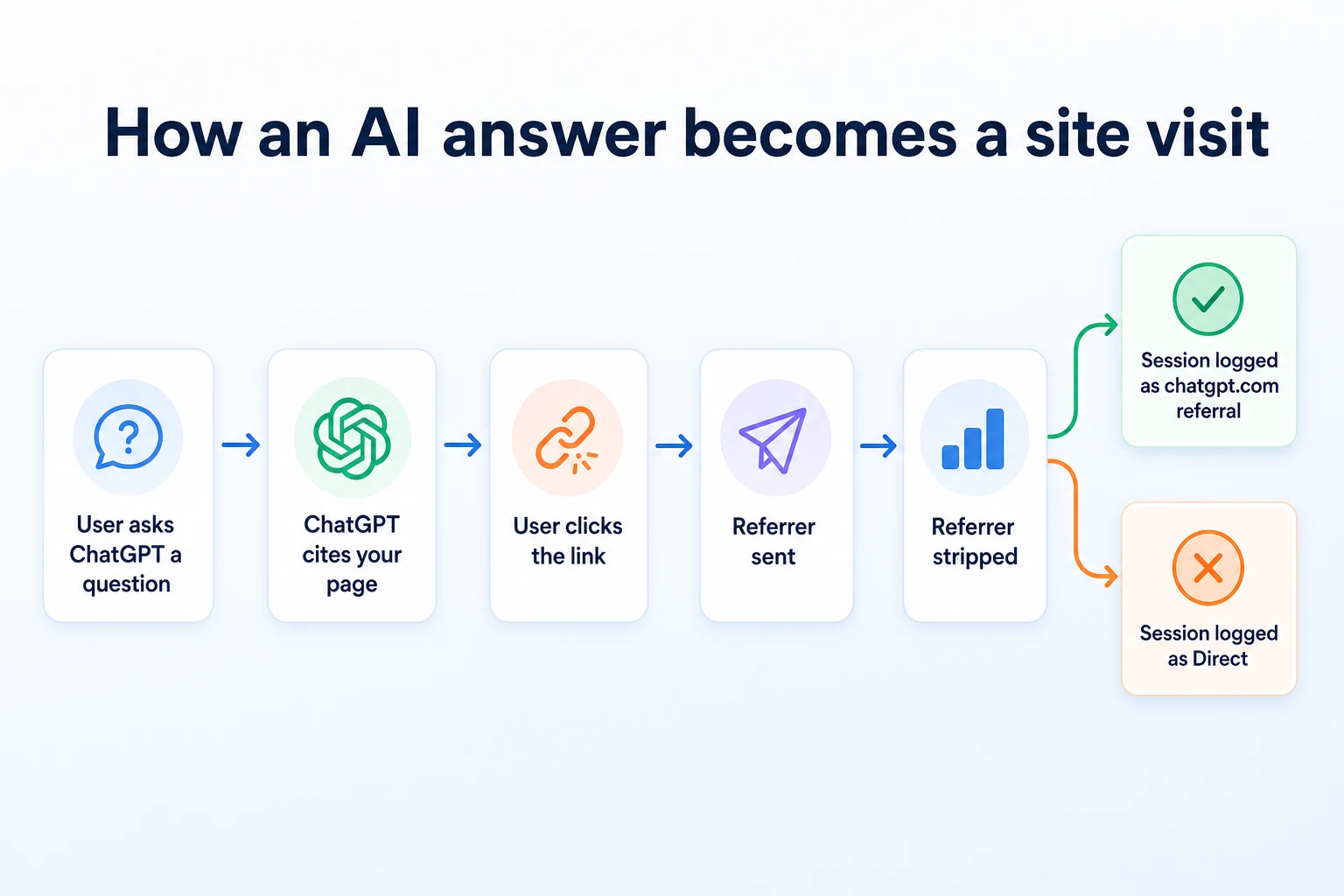
Why links from a ChatGPT answer often look like Direct traffic
When someone clicks a link inside a browser, the browser can send a referrer header telling the destination site where the click came from.
Whether that header gets sent, and how much of it survives, depends on the referrer policy set by the site sending the click, the browser, and whether the click happened inside a native app rather than a standard browser tab.
A link opened from inside a mobile app's built-in browser view often behaves differently from the same link opened in Chrome or Safari. Some app environments drop referrer information entirely, or pass through a generic value that doesn't identify the originating page.
Google Analytics 4 has to put every session somewhere. When a session arrives with no referrer and no campaign parameters, it typically lands in the Direct channel, alongside people who typed your URL in by hand or clicked a bookmark.
That's the core problem. Direct becomes a catch-all for "we don't actually know," and a genuine AI-driven visit can sit in there indistinguishable from someone who already knew your business.
What data actually survives the click
Not every click loses its trail. When a referrer header is sent and GA4 can read it, the session is attributed to whatever domain sent it, which is often enough to work with.
The practical goal isn't to recover every lost session. It's to stop assuming every unlabeled session is either AI traffic or not AI traffic, and instead build a setup that captures what's actually detectable, consistently, over time.
Where Clicks From ChatGPT and Other AI Assistants Actually Come From
When referrer data does survive, it usually points to a recognizable domain. Knowing which domains to look for is the first practical step.
The referrer domains worth watching for
Each AI assistant that can cite and link to outside pages tends to route outbound clicks through its own domain, at least some of the time.
Referrer domain or pattern | Assistant it belongs to | What the session typically looks like |
|---|---|---|
chatgpt.com | ChatGPT | Referral session if the header survives, otherwise Direct |
perplexity.ai | Perplexity | Referral session, generally more consistent than app based clicks |
bing.com | Copilot, Bing AI answers | Often grouped with ordinary Bing search referral traffic |
google.com | Google AI Overviews | Grouped with regular Google organic search, not separated out |
These patterns are illustrative and can change as assistants update how they handle outbound links.
Worth noting: AI Overviews and Copilot answers tend to blend into existing search referral traffic rather than arriving with a clearly separate domain, which is part of why Search Console, covered later in this guide, matters alongside Analytics.
Why a blocked crawler means there's nothing to measure
None of this referrer data matters if the AI crawler behind an assistant can't reach your site in the first place.
ChatGPT and other assistants rely on their own crawlers to find and index pages before they can ever cite them in an answer. OpenAI documents the user agents it uses for this in its crawler documentation.
If your robots.txt file blocks these crawlers, there's no answer to be cited, no link to click, and no traffic to measure at all. RepGet's free AI Crawler Checker tests whether GPTBot, ClaudeBot, and PerplexityBot can actually access your site.
Our guide on how AI assistants decide which businesses to recommend covers what happens before the click, which is worth checking first if your traffic from these sources is zero rather than just hard to label.
Build a Custom Channel Group in GA4 for AI Traffic
Once you know which referrer domains to expect, the next step is making sure GA4 actually groups them somewhere you can find again.
Creating the custom channel definition
GA4 lets you build custom channel groups under Admin, in the Data Display section, where you define rules that assign a session to a channel name based on its source, medium, or referrer.
Create a new channel group, add a rule, and set the condition to match a session referrer against the domains covered above. Name the resulting channel something clear, like "AI Assistants," so it doesn't get confused with ordinary organic or referral traffic in your reports.
Apply this channel group to your main exploration reports and your standard traffic acquisition report, so it shows up in the views you actually check.
Which referrer rules to add, and why they'll need updating
Referrer domain pattern | Matching condition | Channel name |
|---|---|---|
Contains chatgpt.com | Session source contains | AI Assistants |
Contains perplexity.ai | Session source contains | AI Assistants |
Contains copilot.microsoft.com | Session source contains | AI Assistants |
These rules are illustrative. Build your own list based on the assistants relevant to your business.
This list isn't fixed. New assistants launch, existing ones change how they format outbound links, and a rule set built today can go stale within a year. Treat the channel group as something to revisit, not a one-time setup.
Tag the Links You Control With UTM Parameters
Referrer data tells you what already arrives labeled. UTM parameters let you label links yourself, but only the ones you actually control.
What can be tagged and what can't
You cannot add a UTM parameter to a link that ChatGPT generates on its own when it cites your page. That link is built by the assistant, not by you, and there's no way to insert tracking parameters into it.
What you can tag is any link you distribute directly that might get picked up, pasted, or cited elsewhere. That includes links inside an llms.txt file, links in a press release or partner page, or links in a document you know gets shared and summarized by AI tools.
RepGet's free llms.txt Generator can help build that file from your live site, which is one of the few places where a tagged link has a real chance of surviving into an AI-driven click.
A simple UTM naming convention for AI sources
Keep the naming consistent so these links group cleanly in reports later, rather than scattering across a dozen inconsistent labels.
Link type | utm_source | utm_medium | utm_campaign |
|---|---|---|---|
Link inside llms.txt | llms-txt | ai-referral | ai-visibility |
Link in a shared one-pager or PDF | shared-doc | ai-referral | ai-visibility |
Link in a partner or directory listing | partner-listing | ai-referral | ai-visibility |
These values are illustrative. Adjust the naming to match your existing campaign conventions.
Even with tagging in place, expect this to cover a small slice of total AI-driven clicks. Most links an assistant generates in its own answer stay outside your control entirely.
Check Search Console for the Signals It Does Show
Analytics tells you about clicks that already happened. Search Console tells you something different: what your pages looked like to Google before anyone clicked at all.
That's useful for AI Overviews specifically, since Google doesn't give AI Overviews a separate line item inside your traffic reports.
What the performance report actually separates out
The Search results performance report in Search Console breaks data down by query, page, country, device, and search appearance, and lets you filter by search type.
Google's own help documentation on the Search results report explains what each of these filters covers and how the data is grouped.
Clicks and impressions connected to AI Overviews are folded into your existing Web search data rather than shown as their own category. There's no toggle that isolates "AI Overview traffic" from a regular blue link result.
What you can do instead is watch the shape of the data for a specific query or page. A page that used to get a steady number of clicks for a question style query, and still gets similar impressions but noticeably fewer clicks, is worth a closer look.
What it doesn't show you
Search Console only reports on Google. It has nothing to say about ChatGPT, Perplexity, or Copilot, since none of those run through Google's search results.
It also can't tell you whether a click didn't happen because an AI Overview answered the question directly on the results page, or for some unrelated reason. It shows you a pattern, not a cause.
Our guide on Google Search Console impressions but no clicks walks through how to read that specific pattern in more detail, including the other explanations worth ruling out before blaming an AI Overview.
Connect AI Referral Sessions to Real Conversions
A channel group full of sessions is only half the job. The real question is whether any of those sessions turned into something that matters to the business.
Picking conversion events that match the business
GA4 only reports on conversions you've actually marked as conversion events. If nothing is set up, every AI-driven session shows traffic and nothing else.
What counts as a conversion is different for different businesses, and it's worth being specific rather than using a generic "form submit" event for everything.
Business type | Conversion event to track | Where it usually happens |
|---|---|---|
Service business | Contact form submission, phone click | Contact page, header click-to-call |
Local shop | Directions click, phone click, booking request | Location page, Google Business Profile link |
Ecommerce store | Add to cart, completed purchase | Product page, checkout flow |
These examples are illustrative. The right conversion events depend on what actually generates revenue for a given business.
Filtering conversions by the AI channel
Once a conversion event exists and the custom channel group from earlier is in place, GA4 lets you add a filter by session default channel group to any report that shows conversions.
Apply that filter with the AI Assistants channel selected, and the report narrows down to conversions that happened within sessions GA4 attributed to one of those referrer domains.
This number will almost always be small, and it should be read as a floor, not a ceiling. It counts the sessions that kept their referrer intact. It says nothing about the ones that arrived as Direct and converted anyway.
A Worked Example: Tracing One Enquiry Back to ChatGPT
Imagine a small plumbing company that added a page answering a common question about tankless water heater costs. This example is illustrative.
A visitor asks ChatGPT a question about tankless water heater installation costs in their city. ChatGPT cites the plumbing company's page and includes a link in its answer.
The visitor clicks the link from the ChatGPT web app in a desktop browser. The referrer header survives the click, and GA4 logs a new session with a source of chatgpt.com.
Because the custom channel group built earlier includes a rule matching chatgpt.com, that session is grouped under "AI Assistants" in the acquisition report rather than falling into an unlabeled referral bucket.
The visitor reads the page, then fills out the contact form, which has been set up as a conversion event. The form includes a free text field, and the visitor happens to write "saw your page on ChatGPT" in the message.
The business owner checks GA4 at the end of the month, filters conversions by the AI Assistants channel, and sees one conversion recorded against a chatgpt.com session that same week. Cross checking the date against the contact form submissions confirms it's the same enquiry.
That's a full trace: assistant, click, session, channel, conversion, matched against an actual message. It took a channel group, a conversion event, and a bit of manual cross checking to confirm it, and it only worked because the referrer happened to survive the click. A different browser or app context could easily have sent that same visitor into Direct with no way to connect the dots.
A Monthly Check You Can Actually Keep Up
None of this is worth building if nobody looks at it again. A short recurring check is more useful than an elaborate dashboard that gets opened once and forgotten.
Task | Time needed | What it tells you |
|---|---|---|
Review the AI Assistants channel group in GA4 | 10 minutes | Whether session volume from known AI referrers is rising, falling, or flat |
Check Search Console query and page trends | 10 minutes | Whether impressions are holding while clicks drift down on question style queries |
Scan recent enquiry notes for mentions of AI tools | 5 minutes | Confirmed cases that analytics alone wouldn't have caught |
Log any new referrer domains showing up in reports | 5 minutes | Whether the channel group's rule set still matches how people are actually arriving |
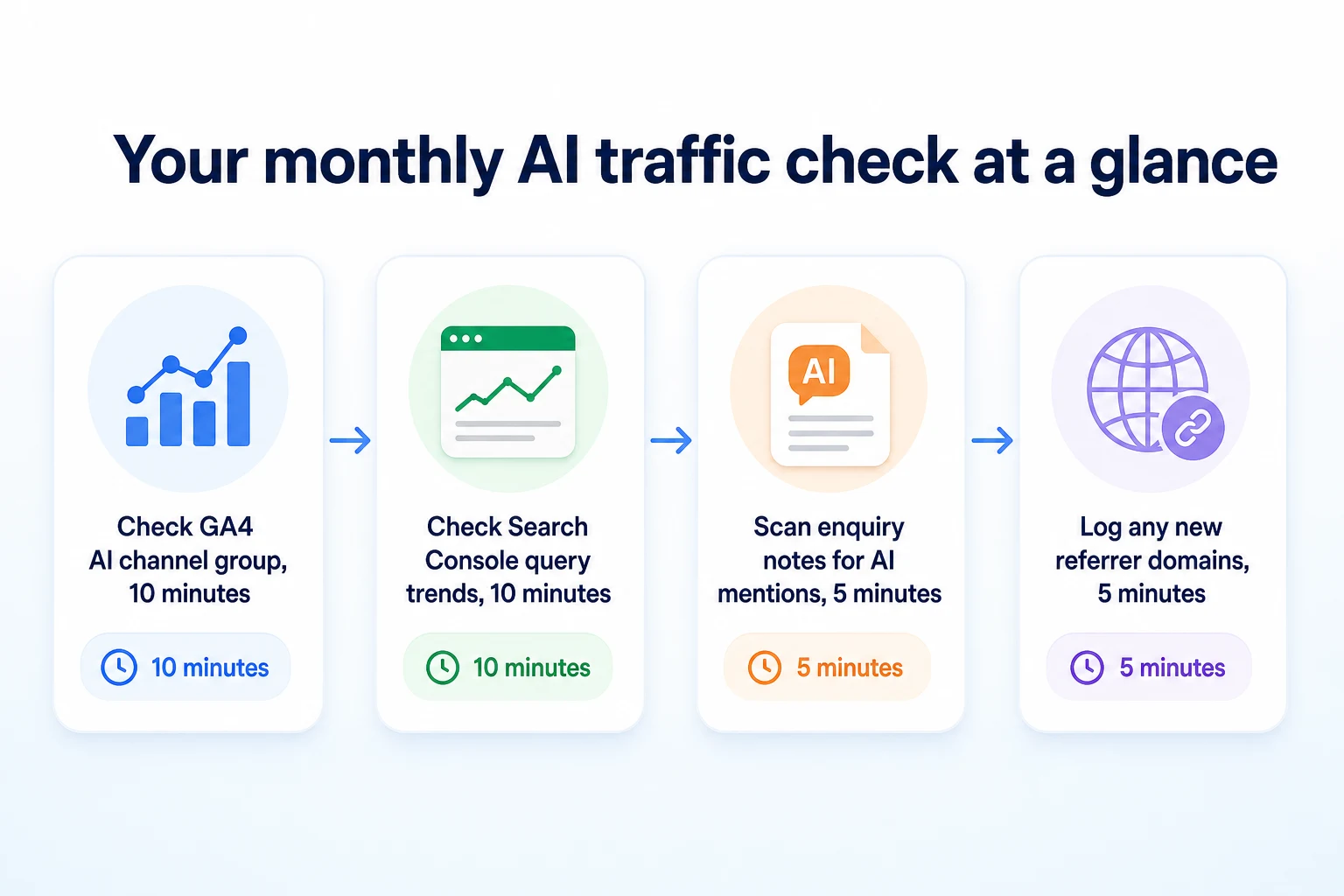
This routine is a suggested pace, not a fixed rule. A business getting very little of this traffic might do it quarterly instead.
The point of keeping it short is that a 30 minute check actually happens every month. An elaborate quarterly audit tends to get pushed back until it's forgotten entirely.
What You Still Can't Measure, and Why That's Not a Failure
Everything so far has been about catching what's detectable. It's worth being honest about what stays outside that, because it's a real part of the picture, not a gap in your setup.
Mentions that never produce a click
A business can be named in a ChatGPT answer, described accurately, and never see a single session for it. The person reading the answer might already have enough information to decide, call the business from memory, search for it by name later, or simply not click anything at all.
None of that shows up as a failure in your tracking. It shows up as nothing, because nothing measurable happened on your website. The mention still did something, a reader formed an impression of the business, but it left no trail for GA4 or Search Console to pick up.
This is different from a blocked crawler or a broken referrer. It's a structural limit of how these assistants work: an answer can satisfy someone on its own, with your website playing a part that never gets recorded anywhere.
Why no tool, including RepGet, can show you this directly
There's no dashboard, from RepGet or anyone else, that shows how often a business gets mentioned inside an AI assistant's answers without a click. None of these assistants publish that data, and nobody outside them has access to it.
What's actually measurable is downstream of a click: a session, a referrer, a conversion. The mention itself happens somewhere you can't see, in a conversation you're not part of.
Our guide on how to get mentioned in ChatGPT covers what influences whether a business gets named at all. Getting mentioned and measuring the result of being mentioned are two different problems, and this article is only about the second one.
Common Mistakes When Measuring AI Search Traffic
Most of the trouble here comes from treating a partial, noisy signal as if it were a complete one.
Assuming every Direct session is AI traffic. Direct has always included people who typed your URL in, used a bookmark, or clicked a link in an app that stripped the referrer for reasons unrelated to AI. Labeling all of it as AI-driven overstates what you actually know.
Setting up the channel group once and never revisiting it. New assistants launch, existing ones change how they format outbound links, and a rule set built this year can miss traffic from a tool that didn't exist when you built it.
Tagging links that get stripped anyway. A UTM parameter only survives if the link travels through channels you control. Tagging a link hoping an assistant will preserve it when it generates its own citation doesn't work, since that link is built by the assistant, not pasted from yours.
Reading one thin month as a trend. AI-driven sessions are often a small number to begin with. A jump from two sessions to five can look dramatic and mean almost nothing, especially before a full quarter of data exists to compare against.
Ignoring Search Console because it doesn't name ChatGPT. It's true Search Console only reports on Google, but the impressions-and-clicks pattern it shows for Google's own AI Overviews is still a real signal, and skipping it means missing half of what's actually checkable.
Treating a missing conversion as proof AI traffic doesn't work. A small number of tracked conversions from an AI channel doesn't mean the mentions aren't doing anything. It may just mean most of that activity never survives as a traceable session, which is the limit covered in the previous section.
Where RepGet Fits
RepGet doesn't track analytics, and it doesn't sit between your website and Google Analytics or GA4's channel groups. The tracking setup covered in this article still has to happen inside those tools directly.
What RepGet does bring together is website auditing, keyword research, content planning, article writing, publishing, and search performance reporting pulled from Google Search Console, in one workflow. That reporting draws on the same Search Console data covered earlier, which is one half of what's checkable for AI-driven visibility, specifically the Google AI Overviews side of it.
Before any of this tracking matters, a page has to be reachable by the crawlers these assistants depend on, and readable once they get there. RepGet's free website audit crawls a site, gives it a 0 to 100 SEO score, and lists technical and content issues worth investigating, which can catch problems that would keep a page from ever getting cited in the first place. No account or credit card required.
RepGet's free LLM HTML Visibility Checker shows how much of a page's text an AI crawler can actually read, which is a different question from whether a human visitor converts once they arrive, but it's the step that has to come before any of the measurement in this article means anything.
RepGet doesn't guarantee a mention in ChatGPT, a click from one, or a conversion from that click. Nothing can promise any of those three things, and this article's whole point is that the gap between a mention and a measured result is real and doesn't close just because a tool is involved.
The Bottom Line
Measuring traffic from ChatGPT and AI search isn't really about building a perfect tracking system. It's about not letting an entire category of visits disappear into Direct without a second look.
A custom channel group in GA4 catches the sessions that keep their referrer. UTM tags catch the small number of links you actually control. Search Console shows the impressions-and-clicks pattern for Google's own AI Overviews, even without naming them directly. None of this recovers everything, and a mention that never produces a click will stay invisible no matter how the tracking is built.
What's left is a usable, repeatable signal instead of a guess: a number you can watch move over time, a handful of confirmed conversions you can point to, and a clear sense of what's still outside your view. That's a better position than assuming either that AI mentions do nothing, or that they explain every unlabeled session in your reports.
Find out what your website needs first
Before building tracking around AI traffic, it's worth checking whether your site can actually be crawled and cited in the first place. Run a free website audit with RepGet to see what's worth fixing. No account or credit card required.
FAQ
Does ChatGPT send referral traffic to Google Analytics?
Sometimes. If the referrer header survives the click, GA4 logs the session with a source of chatgpt.com. Many clicks lose that header along the way and land in Direct instead.
Why does ChatGPT traffic show up as Direct in GA4?
Whether a referrer header survives depends on the browser, app environment, and referrer policy involved in the click. When it doesn't survive, GA4 has no source to attribute and files the session under Direct.
Can I use UTM parameters to track clicks from ChatGPT?
Only for links you distribute yourself, such as one in an llms.txt file or a shared document. You can't add a UTM parameter to a link ChatGPT generates on its own when citing your page.
How do I see AI Overviews traffic in Search Console?
Search Console doesn't separate AI Overviews into their own category. Clicks and impressions tied to them are folded into regular Web search data, so watch for steady impressions with falling clicks on a given query.
What referrer domain does ChatGPT use for outbound links?
Clicks that keep their referrer typically show chatgpt.com as the source in GA4. This pattern can change as OpenAI updates how outbound links in its answers behave.
Can I track a lead that came from ChatGPT without a UTM tag?
Sometimes, by matching a session with a chatgpt.com referrer against a conversion event in GA4, then cross checking the timing against enquiry notes, especially if a visitor mentions ChatGPT directly in a message.
Is it possible to measure AI search traffic accurately?
Not completely. You can measure the sessions that keep their referrer and the conversions tied to them, but mentions that never produce a click stay invisible to any analytics setup.
How do I know if a form submission came from an AI assistant?
Check whether the session's source matches a known AI referrer domain in your channel group, and look for any free text mention of an assistant's name in the form itself, since not every submission includes one.