

AI Hashtag Generator: Do They Help Your Posts Get Found?
Short answer
AI hashtag generators can speed up brainstorming by suggesting tags from a caption, keyword or photo, but they don't know your audience, your niche, or which tags already work on your account. They're a reasonable starting point, not a guarantee of reach. A short manual check, the platform's own search, a few niche accounts, and your own post history, usually finds better tags just as fast.
A small business owner pastes her Instagram caption into a free AI hashtag generator.
It spits out thirty tags in under a second.
She copies them, pastes them under her post, and hits publish.
She has no real way to know if any of those thirty tags will reach the people who'd actually buy from her shop, or if she just added clutter to a caption that was fine on its own.
That's the real question behind an AI hashtag generator: does the list it gives you actually help a post get found, or does it just feel like you did something useful? Here's how these tools actually work, what they're good at, where they fall short, and a manual method that takes about 20 minutes and usually does better.
How AI Hashtag Generators Actually Work
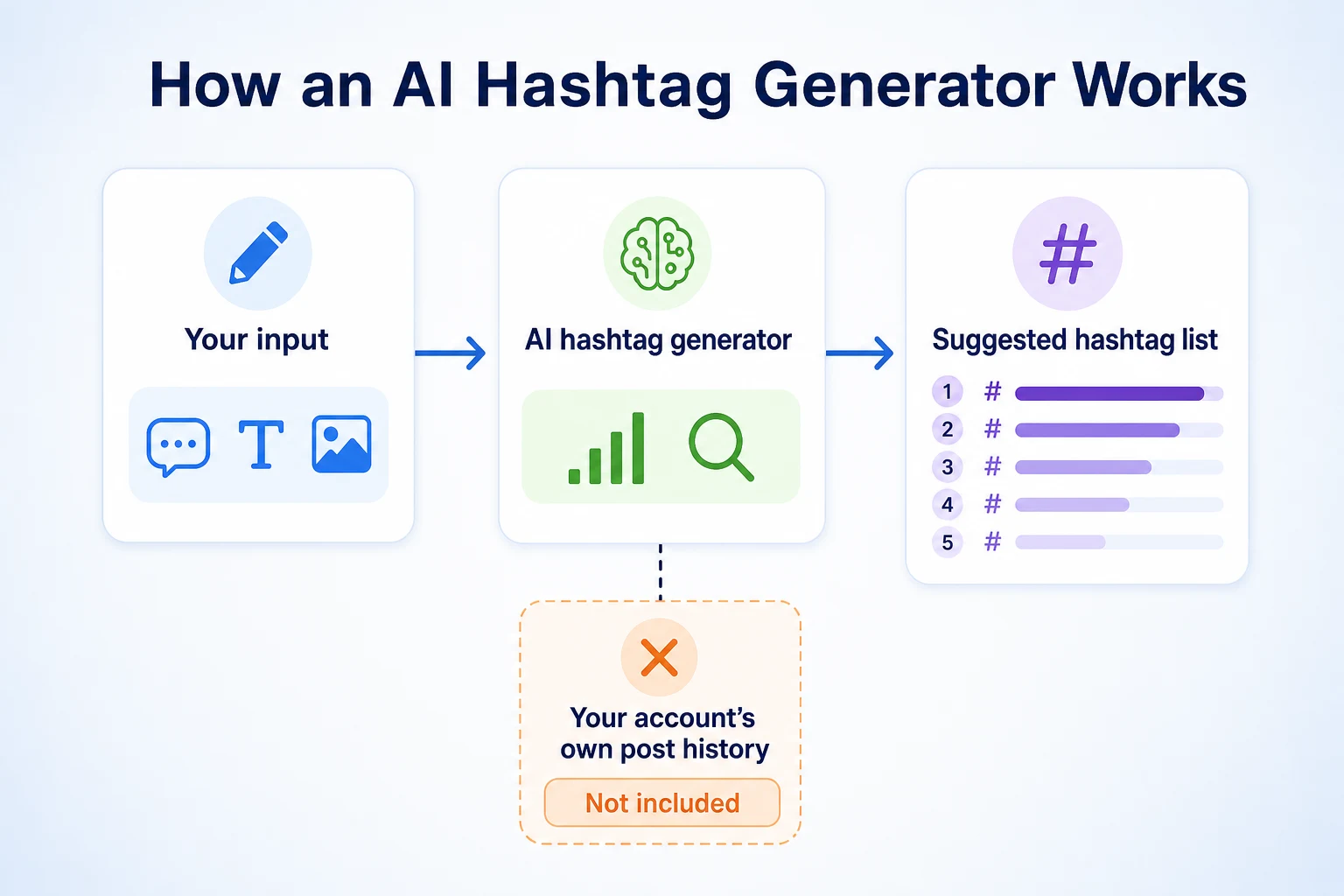
Most AI hashtag generators follow the same basic pattern, whether they're a standalone website, a browser extension, or a feature bolted onto a bigger social media tool.
What you feed the tool
You give it something to work from: a caption you've already written, a single keyword describing your post, or sometimes a photo it can analyze. The tool reads that input and tries to figure out what your post is about.
How it ranks its suggestions
From there, it matches your topic against patterns in public hashtag data, things like how often a tag gets used, how large its following is, and which tags tend to appear together on similar posts. It then returns a ranked list, often split into categories like broad, medium and niche tags based on estimated popularity. None of this is a secret process. It's closer to a search tool that compares your input against publicly visible tag usage, then hands back whatever matches best.
What it can't see: your own account
Here's the part that matters most and gets overlooked the most. A generic AI hashtag generator has no access to your account's own post history. It doesn't know which of your past posts got more reach, more saves, or more comments. It's working entirely from public patterns, not from what's actually worked for you. That's a meaningful gap, because the tags that work well for a stranger's bakery in another city aren't automatically the ones that work for yours.
Hashtags vs SEO Keywords: Why They're Not the Same Thing
It's easy to treat hashtag research like keyword research, especially if you already spend time thinking about SEO. They're not the same job, even though they can look similar on the surface.
What a hashtag does on a platform
A hashtag is a platform's internal label. It groups your post with other posts tagged the same way, so someone browsing or following that tag might see it. It works inside one platform's own system, and it only matters to people already on that platform, searching or scrolling in a way that surfaces tagged content.
What a keyword does for Google
A keyword is a phrase someone types into a search engine, expecting a ranked list of relevant pages back. Google's documentation describes matching a page's content to a search query based on relevance, not based on a label the page owner chose to attach. You don't tag a web page with a keyword the way you tag a post with a hashtag. You write content that happens to use the words people search for. Our guide to how Google decides which sites to rank covers that process in more detail.
Where the two genuinely overlap
The overlap is smaller than it looks. Both reward being specific rather than vague, and both punish stuffing a post or page with terms that don't actually describe it. But a hashtag generator optimizing for platform tag popularity isn't doing keyword research for your website, and a keyword tool isn't going to tell you which hashtags to use on Instagram. Treating one as a substitute for the other usually produces a worse version of both.
What AI Hashtag Generators Are Actually Good At
None of this means these tools are useless. They're genuinely useful for a few specific things, worth naming plainly rather than dismissing outright.
Speeding up the first draft
Staring at an empty hashtag field after writing a caption is its own small kind of friction. An AI hashtag generator removes that blank-page problem fast. It gives you a starting list in seconds, which is a real time saver, even if that list needs editing before you use it.
Surfacing variations you'd miss on your own
A generator will often suggest tag variations a person wouldn't think of unprompted, plural versus singular versions, regional spellings, or niche terms specific to an industry you're not deeply embedded in day to day. For a business owner who isn't a heavy social media user themselves, that's a reasonable way to widen a short list into something more complete.
Where AI Hashtag Generators Fall Short
The limits matter just as much as the benefits, and they're the reason a generated list shouldn't be the last step in your process.
They don't know your audience
A generic tool has no sense of who actually follows you, what they care about, or where they're located. It suggests tags based on broad popularity, not on the specific group of people most likely to buy from your business. A tag that's popular nationally might attract an audience that has nothing to do with your local customer base.
They can suggest overused or restricted tags
Some hashtags become so broadly used that a post tagged with them disappears into a flood of unrelated content within minutes. Others get flagged by a platform at various points for being associated with spam or policy violations, and using them can limit a post's reach rather than help it. A generator trained on general popularity data isn't necessarily checking for either problem at the moment you use it.
They don't learn from your own results
This is the gap worth repeating. A standalone AI hashtag generator doesn't see your account's insights. It can't tell you that a particular niche tag brought in more saves last month, because it was never connected to your account in the first place. Whatever it recommends is a guess based on public patterns, not a lesson learned from your own posting history.
What an AI hashtag generator typically knows | What it typically doesn't know |
|---|---|
Public hashtag popularity and usage volume | Who actually follows your account |
Keywords pulled from your caption or input | Your local area or service region |
General category or topic matching | Which of your own past posts performed well |
Common tag variations and related terms | Whether a tag is currently restricted or flagged |
For a broader look at where automated tools genuinely help on social platforms and where they still need a person checking the output, our piece on AI bots on social media covers similar ground.
How Hashtags Affect Reach on Each Platform
Hashtags don't work the same way everywhere. Each platform describes its own role for them, and none of the major platforms treats a hashtag as a guaranteed way to reach more people.
Instagram and TikTok
Instagram's own help documentation describes hashtags as a way to categorize a post so people interested in that topic can find it, through hashtag pages and search, rather than as a direct input into how often a post appears in someone's main feed. TikTok's documentation describes a similar role: hashtags help categorize a video for discovery, particularly in search and on topic pages, while the For You feed itself relies on broader signals like watch time and what someone tends to engage with. On both platforms, a hashtag is a label that helps the right audience find a post that's already being shown to some people. It isn't described as a lever that forces a post in front of more people on its own.
LinkedIn and X
LinkedIn's help documentation treats hashtags as a way for members to follow a topic, so posts tagged with that hashtag can reach people who've chosen to follow it, separate from their existing network. X's help center describes hashtags in a similar way, as a way to group posts around a topic or event, which matters most when that topic is already getting attention. On both platforms, a hashtag works best when it connects a post to a conversation people are actively following, not as a generic label added out of habit.
Platform | What its documentation says hashtags do | Practical takeaway for a small business post |
|---|---|---|
Categorize posts so people interested in that topic can find them via hashtag pages and search | Use tags that genuinely describe your post, not just popular ones | |
TikTok | Help categorize videos for discovery through search and topic pages | Pair hashtags with a caption that makes the topic clear too |
Let members follow a topic and see more posts tagged with it | A few specific, professional tags beat a long generic list | |
X | Group posts around a topic or event, often tied to active conversations | Tags work best when tied to something currently being discussed |
Our piece on LinkedIn post analytics 2026 goes further into what LinkedIn actually measures and surfaces to a poster, which is useful context if you're trying to judge whether a hashtag choice made any real difference there.
AI-Generated Hashtags vs a Manual Method: A Worked Example
This example is illustrative, not a record of a real business's results.
Imagine a small bakery in a mid-sized city posting a photo of a new sourdough loaf. Running the caption through a free AI hashtag generator produces a list built mostly from broad, high-volume tags: popular food and bakery terms that get used by accounts all over the world. Spending about 20 minutes checking the platform's own search and a handful of local bakery accounts produces a different kind of list: a mix of a couple of broad terms, some tags specific to the type of bread, and tags tied to the actual city and neighborhood.
Hashtag set | Example tags | What they have in common |
|---|---|---|
AI-generated list | #bakery #freshbread #foodie #instafood #smallbusiness | Broad, high-volume, used by bakeries everywhere, not specific to this one |
Manually built list | #sourdoughbread #[cityname]bakery #[neighborhood]eats #artisanloaf #smallbusiness | Mixes one or two broad tags with specific, local and niche ones |
These figures are illustrative.
Both lists share at least one broad tag, which isn't a problem. The difference is in the rest of the list. The manual set includes tags tied to location and to the specific product, which are exactly the kind of searches a nearby customer is more likely to use than a generic food term that pulls in accounts from everywhere.
A Simple Manual Method That Takes About 20 Minutes
None of the steps below require a paid tool. They just take a bit of deliberate time, which is the part a generator skips entirely.
Step 1: Search the platform itself
Type a relevant word or phrase into the platform's own search bar and look at what hashtags it suggests or auto-completes. This reflects what's actually being searched and tagged on that platform right now, rather than a generic popularity score pulled from somewhere else.
Step 2: Check a few niche accounts
Look at three to five accounts similar to yours, ideally in your city or your specific niche, and note which hashtags they use regularly. This surfaces tags that are relevant to your actual market, not just popular in general.
Step 3: Mix broad and specific tags
Combine a couple of broad tags with several specific ones, including at least one tied to your location if your business serves a local area. A broad tag gets you into a larger pool. A specific one gets you in front of people more likely to actually care.
Step 4: Review your own post history
Look back at a handful of your own recent posts and their results, saves, comments, shares, whatever the platform shows you. Note any hashtags that showed up on your better-performing posts, and keep using them rather than starting from zero every time.
Step | What to do | Time |
|---|---|---|
1 | Search the platform itself for suggested tags | 5 minutes |
2 | Check three to five niche or local accounts | 5 minutes |
3 | Mix broad and specific tags into one list | 5 minutes |
4 | Review your own past posts for what's worked | 5 minutes |
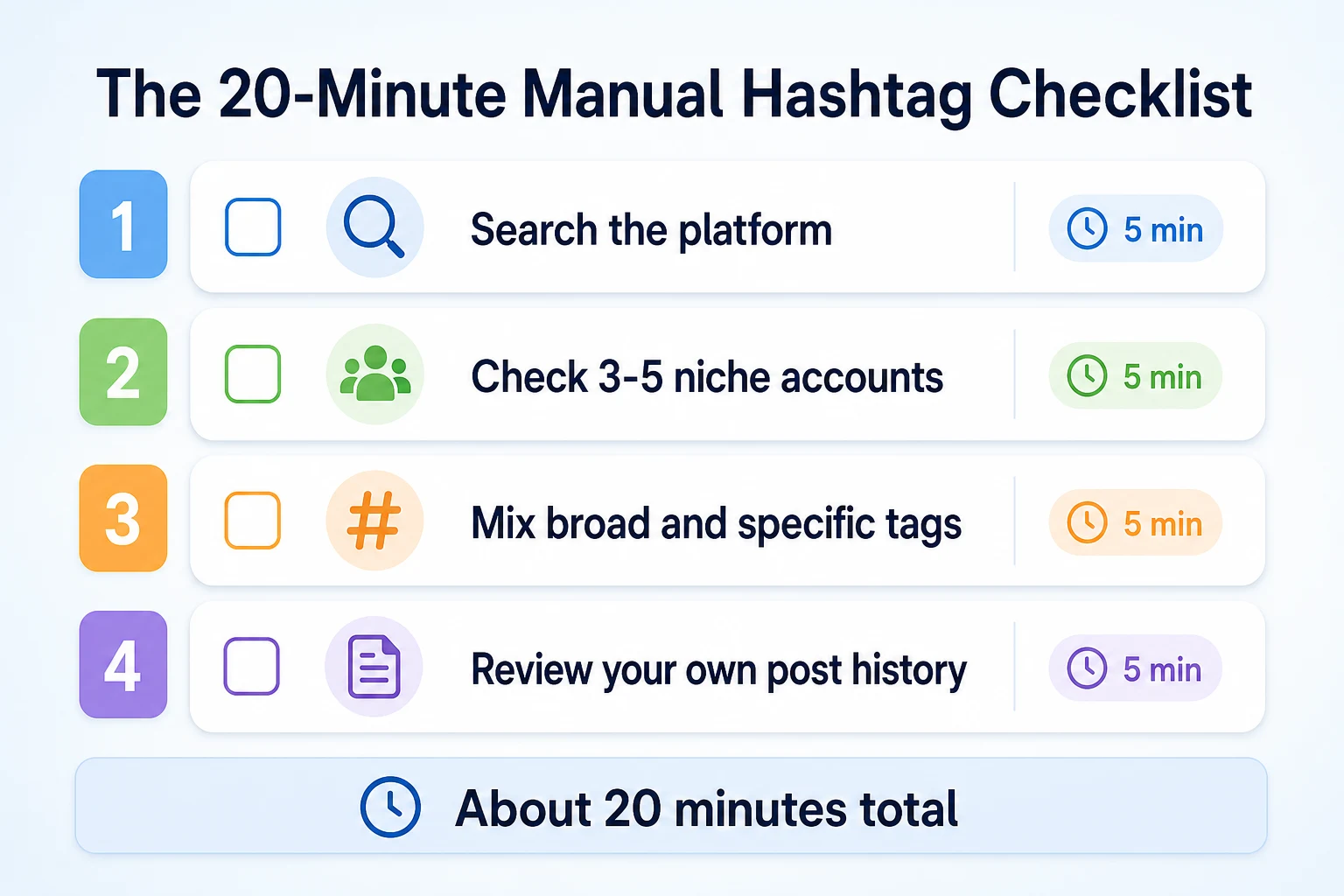
About 20 minutes total, and you end up with a list tied to your actual audience instead of a generic one pulled from public popularity data.
Common Mistakes With Hashtags
Most hashtag problems come from a handful of habits, not from picking the wrong tool.
Mistake | Why it backfires | Better move |
|---|---|---|
Copying a competitor's exact hashtag list | You compete for the same attention without offering anything that separates you from them | Use their list as a starting point, then swap in tags specific to your own location or specialty |
Using the same 30 tags on every post | A set of tags that isn't matched to the actual post looks generic and may not describe the content accurately | Keep a small core set and vary a few tags based on what each post is actually about |
Chasing only the highest-volume tags | Your post gets buried quickly among a huge volume of unrelated content tagged the same way | Mix in smaller, more specific tags where your post has a real chance of being seen |
Ignoring a platform's own hashtag guidance | Each platform's help documentation describes hashtags differently, so a strategy built for one may not transfer to another | Check what the platform you're posting on actually says hashtags do before assuming it works like another one |
Never checking which tags already worked | You keep guessing instead of building on what your own account's history already shows | Glance back at your better-performing posts every so often and note which tags they used |
When an AI Hashtag Generator Is Still Worth Using
None of this means you should swear off these tools entirely. There are a couple of situations where reaching for one still makes sense.
A brand new account with no history yet
If you just opened a business account and haven't posted enough to have any real history to review, step four of the manual method doesn't give you anything to work with yet. In that gap, an AI hashtag generator is a reasonable way to get a starting list, paired with the platform search and niche account checks from steps one and two. Once you've posted for a few weeks and have some results to look back on, your own data becomes the better guide.
A faster first draft, not a final list
Even for an established account, there's nothing wrong with running a caption through a generator to get ideas flowing, as long as the list that comes out is treated as a draft rather than something to paste in as is. Check it against what you already know about your audience, drop anything too broad or oddly specific, and add in the local or niche tags the tool couldn't have known about. Used that way, the tool saves you the blank-page moment without replacing the judgment that actually makes the list useful.
A 30-Day Plan to Test and Improve Your Hashtag Strategy
The only way to know whether a hashtag set is actually helping is to compare it against something, over enough time to see a real pattern rather than one lucky post.
Week | Task | Why it matters |
|---|---|---|
1 | Run your next few posts through an AI hashtag generator and use its suggestions with little editing | Gives you a baseline of how a generic, tool-built list performs on your own account |
2 | Build your hashtag sets manually using the platform search, niche accounts and your own history | Produces a comparison set built specifically for your audience rather than general popularity |
3 | Keep using the manual method, but try adjusting the mix of broad versus specific tags on each post | Shows whether leaning more local and specific changes reach, saves or comments |
4 | Check the platform's own insights for both weeks of posts and compare reach, saves and profile visits | Gives you an actual answer, from your own numbers, about which approach is worth sticking with |
This isn't a complicated test. It just takes a month of being consistent about which method you're using each week, so the comparison means something. If you're already thinking about planning posts further ahead so this kind of test doesn't get lost in the daily scramble, our piece on socialpost AI and similar tools covers how a content plan and a scheduling tool fit together, which is useful groundwork for running a test like this properly.
Where RepGet fits
RepGet doesn't generate hashtags, and it doesn't manage, schedule or post to any social media account. If you're looking for a tool that writes your Instagram tags or plans your TikTok calendar, that's not what RepGet does.
What RepGet works on sits one step past the social post itself. A hashtag, however well chosen, is meant to bring someone from a feed or a search page to your business, usually by way of a click to your website or a profile link. If that website is slow, hard to navigate, or unclear about what you actually offer, the work that went into picking good hashtags doesn't pay off once someone actually lands there. RepGet's website auditing, keyword research, content planning, article writing and publishing work on that side of the equation, making sure the site someone reaches after a social click actually holds up.
If you want to check what shape your website is in before you put more effort into social reach, RepGet's free website audit crawls the site and gives it a 0 to 100 SEO score, with technical and content issues worth fixing listed out. No account or credit card required. RepGet's free SEO tools cover related checks, like whether your page titles and descriptions give someone a reason to click through once they've found you.
RepGet doesn't track hashtag performance, doesn't suggest tags for any platform, and doesn't guarantee that better hashtags, or a better website, will translate into more followers, more clicks or more sales. What it can do is make sure the destination behind your social presence is ready for whoever a hashtag happens to bring in.
The bottom line
An AI hashtag generator isn't a trick and it isn't useless either. It's a tool that turns a caption into a list of tags based on public popularity patterns, which is a reasonable starting point, especially for a new account with no post history to learn from yet. What it can't do is know your specific audience, your local area, or which of your own posts have actually performed well, because none of that data ever reaches it.
A manual check, the platform's own search, a quick look at a few niche accounts, a mix of broad and specific tags, and a glance at your own past results, takes about the same 20 minutes either way and usually produces a list that's more specific to your actual business. Whichever method you use, the hashtags are only ever going to bring someone as far as your website's front door. What happens after that click is a separate job, and it's worth checking on regularly too.
Find out what your website needs first
Run a free website audit with RepGet to see what your site needs before you spend more time chasing reach on social media. No account or credit card required.
FAQ
Do hashtags still work in 2026?
Yes, but platforms describe them as a way to categorize content for discovery, not as a guaranteed reach booster. They still help the right audience find a post that's already being shown to some people.
Are AI hashtag generators actually free?
Many offer a free tier that gives a basic list of suggestions, with paid plans for extra features like bulk generation or saved lists. Check the specific tool's pricing before assuming full access is free.
How many hashtags should I use on Instagram?
Instagram's own documentation doesn't set a fixed ideal number. A smaller set of relevant, specific tags tends to describe a post more accurately than a long generic list padded out to a maximum.
Can using the wrong hashtags hurt my reach?
Overused or flagged tags can bury your post among unrelated content or limit its visibility. Tags that don't actually match your post's content can also make it harder for the right audience to find you.
What's the difference between a hashtag and an SEO keyword?
A hashtag is a platform's internal label grouping posts by topic. An SEO keyword is a phrase someone types into a search engine, matched to a page's content for relevance rather than a chosen label.
Do hashtags help posts get found on LinkedIn?
LinkedIn's help documentation describes hashtags as a way for members to follow a topic, so tagged posts can reach people who follow it, separate from your existing network of connections.
How do I find out which hashtags my competitors use?
Look at three to five accounts similar to yours, ideally local or in the same niche, and note the hashtags they use regularly on their posts. This takes about five minutes and reflects real, relevant usage.
Comments
0 shownShare your thoughts about this article.
New to RepGet? Create a free account to join the conversation.
No comments yet. Be the first to leave one.