

Threads Friends Feature: How Meta's Private Groups Test Works
Short answer
On October 29, 2026, Meta began testing Threads Friends, letting selected users share posts with a private group of up to 50 people instead of their full public audience. It's a limited test, not a global rollout, and Meta hasn't said when or if it reaches every account. For creators and small brands, it's a smaller space to build closer community ties before posting publicly.
A boutique owner posts a behind-the-scenes update to Threads.
She notices a new option next to the usual share button: send this to a private group of up to 50 people instead of everyone who follows her.
She taps around for a minute, not sure who would see it, how it differs from a direct message, or whether it's even live for her account.
That new option is part of the Threads Friends feature, a test Meta started rolling out on October 29, 2026. Here's what Meta has said about how it works, who controls a Friends group, and what's still just a test rather than something every Threads account can use.
What Meta Announced on October 29
On October 29, 2026, Meta confirmed it was testing a new way to share posts on Threads with a smaller, private group instead of a full public audience. The feature, referred to as Threads Friends, lets a selected user build a group of up to 50 people and post directly to that group rather than to everyone who follows them.
The announcement in brief
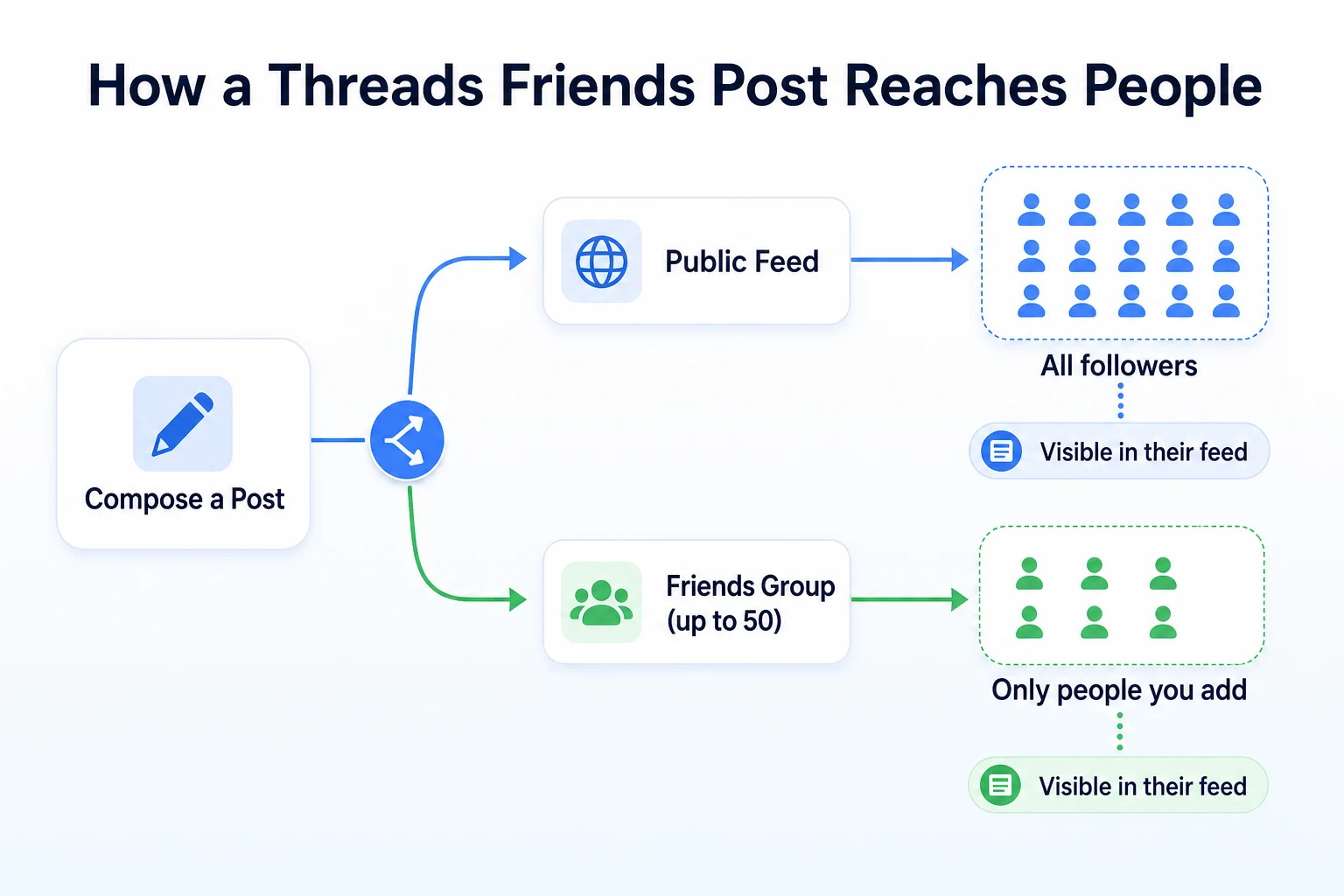
Meta described Threads Friends as a test, not a finished feature available to every account. A post shared to a Friends group appears in the feeds of the people in that group, but it doesn't show up in the person's public profile or in the main Threads feed for anyone outside the group. Meta hasn't published a full technical breakdown of how the feature is built, so most of what's known comes from how the test has been described rather than any underlying detail.
Why Meta is testing smaller private groups now
Meta hasn't given a detailed public explanation for the timing. What's worth noticing is that this fits a pattern across social platforms: adding smaller, more private sharing options tends to keep people posting more often, since a smaller group can feel like a lower-stakes place to share something unfinished or informal. Our piece on LinkedIn creator monetization 2026 covers a related shift, where a platform invests in tools that keep creators posting consistently rather than only occasionally. Threads Friends reads as part of that same broader direction, even though Meta hasn't stated that reasoning directly.
How Threads Friends Works
The basic idea is simple: pick a group of people, and share a post only with them.
Creating a Friends group and adding people
Meta has described the setup as building a group from people a user already follows or is followed by on Threads, then adding them to a named Friends group before posting. The group has to be created before a post can be sent to it, rather than being assembled at the moment of posting. Meta hasn't published whether a person needs to accept being added to a Friends group or whether they're added automatically once chosen.
What a Friends post looks like compared to a public post
A Friends post is described as appearing in the normal Threads feed for the people in the group, formatted the same way a public post would look, with the same reply, like and repost options available to them. The difference is entirely about who sees it. Someone outside the group scrolling through Threads won't see the post at all, and it won't appear on the author's public profile.
Who can reply, like or repost a Friends post
Meta has described replies and likes on a Friends post as working normally within the group, meaning anyone in the group can respond as they would to any other post. Meta hasn't published clear detail on whether a Friends post can be reposted outside the group, which matters, since a repost could, in theory, carry it to a wider audience than the original 50 people. Until Meta clarifies that point, it's worth assuming a Friends post could potentially travel further than the group itself if reposting isn't restricted.
Privacy Settings and Who Controls the Group
The privacy model behind Threads Friends is built around a fixed group size and a single person controlling who's in it.
The 50-person limit and what happens at the cap
Meta has confirmed a maximum of 50 people per Friends group. Meta hasn't published what happens if someone tries to add a 51st person, whether the option is simply disabled or whether an existing member needs to be removed first. A group that size sits well below a typical public following for most active Threads accounts, which is part of what makes it function more like a close circle than a broadcast audience.
Whether members can see the full group list
Meta hasn't published a clear statement on whether a member added to someone's Friends group can see who else is in it. That's a meaningful gap, since it affects whether a Friends group feels like a visible, shared space or a more anonymous one where each member only knows they're included, not who else is.
Editing or removing people from a Friends group
The group's creator is described as able to manage membership after it's set up, adding or removing people over time rather than locking the group permanently at creation. Meta hasn't detailed whether a removed person is notified, or whether they can still see posts shared to the group before they were removed.
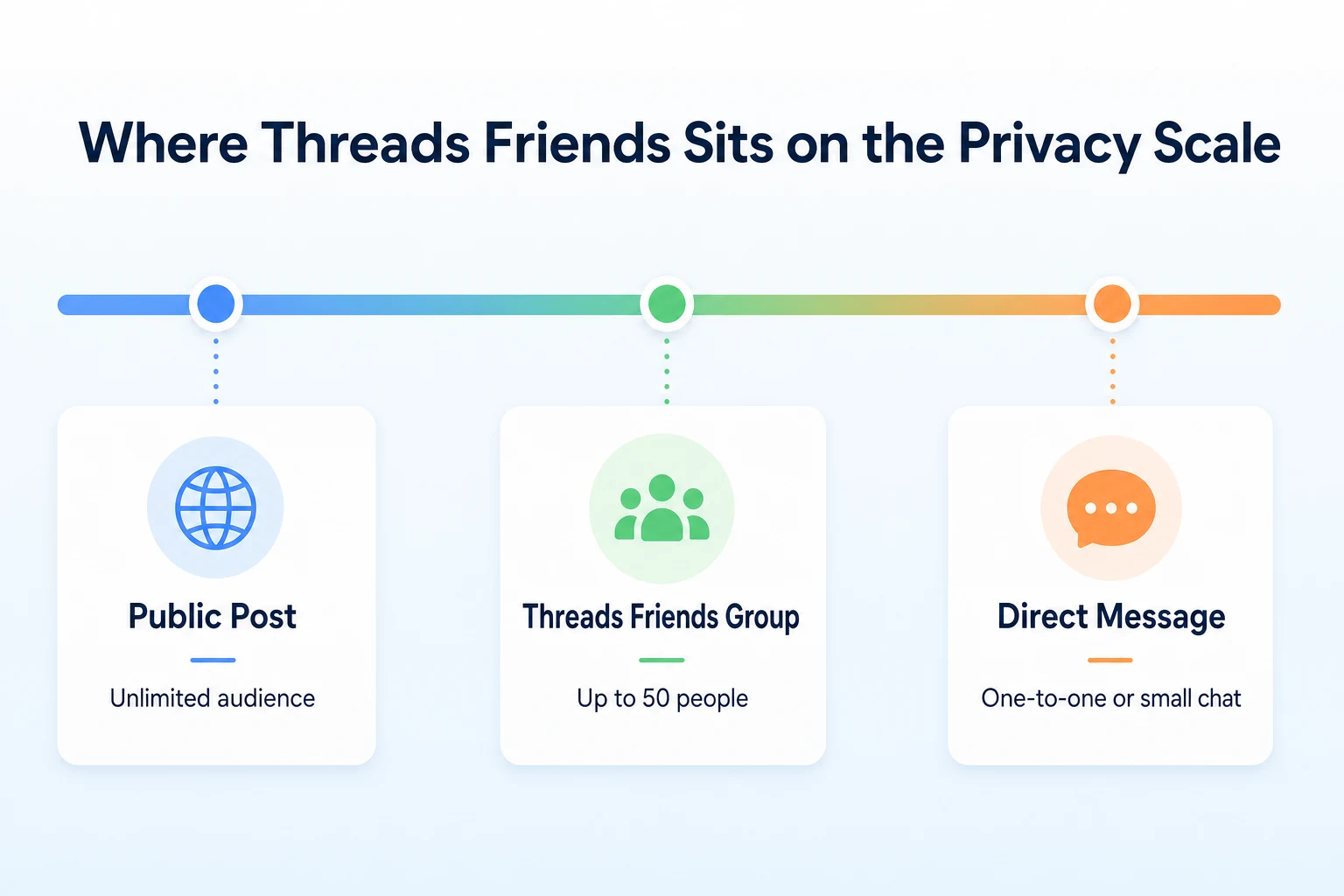
Option | Audience size | Visible to others outside it | Who controls membership |
|---|---|---|---|
Public Threads post | Unlimited | Yes, anyone on Threads | No membership; open to all |
Threads Friends group | Up to 50 people | No, only group members | The group's creator |
Threads direct message | One person or a small chat | No, only participants | Shared among participants |
Testing vs Global Rollout: What's Confirmed and What Isn't
It's worth being precise about what Meta has actually confirmed here, since a feature in testing is a different thing from a feature every account can use today.
Which accounts have access right now
Meta's October 29 announcement described Threads Friends as a test reaching a limited set of users, without naming specific criteria for who was chosen. Meta hasn't published whether access is tied to account type, posting activity, follower count or region. If the option hasn't appeared in your account yet, that doesn't necessarily mean anything is wrong with it.
What Meta hasn't said about a wider rollout
Meta hasn't given a timeline for expanding Threads Friends beyond the initial test group, and hasn't confirmed whether it will reach every account at all. Features tested this way sometimes expand gradually, sometimes change significantly before a wider release, and sometimes don't move past testing. None of those outcomes has been ruled in or out yet.
Question | What's confirmed | What's still unclear |
|---|---|---|
When did the test start? | October 29, 2026 | Full timeline for any wider release |
Who has access? | A limited, selected group of users | The exact criteria used to choose them |
Will it reach every account? | Not addressed directly | Whether a global rollout is planned at all |
Can posts be reposted outside the group? | Not addressed directly | Whether a Friends post can spread beyond its original 50 people |
Threads Friends vs Other Private Sharing Options
Threads Friends isn't the first private sharing option on a Meta app, and it isn't the only way to reach a smaller audience on Threads either. It's worth placing it next to the two tools it most resembles.
Friends groups vs Instagram's Close Friends
Instagram's Close Friends list works on a similar idea: pick a smaller group, and share something only they can see. The two differ in format and scope. Close Friends is built mainly around Stories, content that disappears after a set time, while Threads Friends is built around regular posts that stay in a group member's feed the way any other post would. Meta hasn't described Threads Friends as having any disappearing-content behavior, so a Friends post looks more permanent than a typical Close Friends Story. The two also run on separate apps with separate group lists, so a Close Friends list built on Instagram doesn't carry over to a Threads Friends group.
Friends groups vs Threads direct messages
A direct message on Threads is a conversation: one person or a small chat, with replies happening inside that thread. A Friends group post is closer to a scaled-down version of a public post, formatted the same way and open to replies, likes and reposts from everyone in the group at once, rather than a back-and-forth chat. The practical difference is tone. A direct message reads as a conversation aimed at specific people. A Friends post reads as a post aimed at a defined audience, which suits a quick update or an early look at something more than it suits an actual discussion.
Option | Group size limit | Feed-style posting | Typical use |
|---|---|---|---|
Threads Friends | Up to 50 people | Yes, appears as a normal post to the group | Sharing an update with a small, chosen audience |
Instagram Close Friends | No published hard limit | Mostly Stories, not standard feed posts | Short-lived, informal updates to a trusted list |
Threads direct messages | One person or a small chat | No, a conversation thread | Back-and-forth messages with specific people |
Potential Benefits for Creators
For someone building an audience on Threads, a Friends group adds an option that sits between posting publicly and messaging someone directly.
Testing content before a public post
A creator unsure about a new format, a joke that might not land, or an opinion that could draw unwanted attention could share it to a Friends group first. The group's reactions and replies give a sense of how it lands before it goes out to a full public following. This isn't something Meta has described as an intended use. It's a reasonable reading of what a smaller, lower-stakes audience naturally lends itself to.
Rewarding your most engaged followers
A Friends group of up to 50 people is small enough to feel selective. A creator could use it to give a handful of their most engaged followers something the rest of their audience doesn't see: an early update, a behind-the-scenes note, or a heads-up about something coming later. Whether that actually strengthens loyalty over time isn't something Meta or anyone else has measured publicly, so it's worth treating as a reasonable idea to test rather than a guaranteed benefit.
Potential Benefits for Brands and Small Communities
The same mechanics that suit an individual creator can suit a small business, though the reasons for using them look a little different.
Early access and insider updates for loyal customers
A business could build a Friends group out of repeat customers, local regulars, or people who've asked to be kept in the loop, and use it to share things like an early look at a new product, a heads-up about a sale before it's public, or a quick note about a schedule change. The appeal is the same as any small loyalty list: a sense that this particular group gets something first. Whether 50 people is enough to matter depends entirely on the size of the business and how engaged that group already is.
Running a small community without extra tools
Some small businesses already try to maintain a tighter circle of engaged followers through a separate group chat, an email list, or a private social group elsewhere. A Threads Friends group offers a way to do something similar without adding another tool to the mix, since it works inside an app the business may already be posting to. It won't replace a dedicated community platform for a business that needs more structure than a single feed can offer, and Meta hasn't described Threads Friends as built for that kind of ongoing community management in the first place. For a business already relying on a broader content plan across channels, our piece on socialpost AI and similar tools is a useful read alongside this, since it looks at a related question: whether a tool speeds up execution of a plan, or ends up standing in for a plan that still needs to be made.
Authentic Engagement in Smaller Groups
A post sent to 50 people doesn't behave the same way as a post sent to a few thousand, even when the words are identical.
Why smaller groups can change how people respond
People tend to act differently when they know exactly who else might see something. A public post invites a wide range of replies, some from people the author has never interacted with before. A Friends group is smaller and more familiar, which often makes replies feel more like a conversation between people who already know each other than comments left for a stranger to read. Meta hasn't published anything suggesting this is measured or intended, but it's a reasonable expectation based on how private groups tend to work on other platforms too. A quieter, more specific reply in a group of 50 can sometimes tell a business more about what's actually working than a larger number of generic reactions on a public post.
The risk of relying on private posts for growth
It's worth being clear about what a Friends group can't do. A post limited to 50 people isn't going to introduce a business to new customers, since nobody outside the group sees it at all. There's no discovery angle here, no chance of a stranger finding the post through search or a public feed. A business that starts treating Friends posts as a substitute for public content risks quietly shrinking its own reach without noticing, since the group only ever talks to people who are already connected to the business in some way. Used alongside regular public posting, a Friends group is a reasonable extra option. Used instead of it, it's a step backward for anyone trying to grow an audience rather than just hold on to one.
A Worked Example: Using Threads Friends for a Product Launch
This example is illustrative, not a record of how any real business used the feature.
Imagine a small candle maker who gets early access to Threads Friends and decides to test it around the launch of a new scent, using a group made up of past customers who've bought more than once.
Day | Action in the Friends group | What happened |
|---|---|---|
Day 1 | Shared a photo of the new scent with a short note asking what people thought of the name | Several replies came back quickly, more specific and detailed than typical public comments |
Day 3 | Posted a shortlist of two label designs and asked the group to pick one | One design was a clear favorite, with a few comments on packaging too |
Day 5 | Shared the final label and a release date, still only to the group | A couple of members asked if they could pre-order before the public launch |
Day 7 | Posted the launch publicly to the full Threads following | Public engagement was steady but less detailed than the group's earlier replies |
Day 10 | Checked which scent sold fastest among customers who'd been in the Friends group versus those who hadn't | No way to measure this directly, since Threads doesn't tie group membership to sales data |
These figures are illustrative.
The pattern worth noticing is Day 10. A Friends group can shape a product or build excitement before launch, but it doesn't come with a way to measure whether that translated into actual sales. Any read on whether the group was worth the effort has to come from somewhere else, like a business's own order data or a direct conversation with customers, not from anything Threads reports back.
A 30-Day Plan to Test Threads Friends for Your Business
A month is enough time to find out whether a Friends group is worth keeping in a regular routine, without committing to it long term before knowing that.
Week 1: Set up and invite a small group
Build a Friends group from a short list of genuinely engaged followers, people who already comment, reply or buy regularly, rather than the largest group available. Post something low-stakes first, like a simple update, just to see how the group behaves before using it for anything that matters.
Weeks 2 to 3: Post and compare engagement
Share a mix of updates to the Friends group over these two weeks, and keep posting publicly as normal alongside it. Note how replies in the group compare to replies on public posts covering similar topics, and whether anyone in the group asks questions or shares things they wouldn't say publicly. A content calendar makes this easier to track consistently, since it's simpler to compare results when posts are planned ahead of time rather than decided in the moment. Our guide to building an SEO content calendar covers a similar planning habit for a blog, and the same discipline applies to tracking a smaller test like this one.
Week 4: Decide whether to keep using it
Look back at four weeks of group activity and decide, honestly, whether it added something that public posting alone didn't. If the group produced sharper feedback, more direct questions, or a sense of closer connection with repeat customers, it's worth keeping as a regular part of a posting routine. If it mostly sat quiet or duplicated what public posts already did, it's fine to let it go and revisit the idea later once Meta has said more about where the feature is headed.
Common Mistakes to Avoid With Threads Friends
A new sharing option tends to get misused in predictable ways before people settle into what it's actually good for.
Mistake | Why it backfires | Better move |
|---|---|---|
Treating a Friends group as a mini public audience | A post to 50 people won't reach anyone new, so using it for anything meant to grow a following wastes the point of it | Save Friends posts for updates aimed specifically at people already connected to the business |
Filling the group with everyone available instead of the most engaged followers | A group padded out to hit 50 members often behaves like a smaller public post rather than a close circle | Choose people based on how often they already reply, comment or buy, not just who's easiest to add |
Posting to the group and forgetting to post publicly | Public reach quietly shrinks if private posts start replacing public ones rather than sitting alongside them | Keep a normal public posting schedule and treat Friends posts as an addition, not a substitute |
Assuming replies outside the group never see the content | Meta hasn't confirmed whether a Friends post can be reposted beyond the original group | Write Friends posts as if they could travel further, just in case |
Expecting the feature to measure its own results | Threads doesn't tie group membership to sales or conversions on its own | Track any outcome, like orders or sign-ups, through the business's own records instead |
Where RepGet fits
RepGet has no connection to Threads, Meta, or the Friends feature covered here. It doesn't post to Threads, manage a Friends group, or track replies, likes or group membership.
What RepGet works on sits one step further along, once a business starts testing new ways to engage an audience on social media. A Friends group might sharpen feedback from loyal customers or build a closer sense of community, but none of that shows up anywhere outside Threads itself. The business's own website is usually where that attention eventually needs to go, whether that's a page announcing a product that got shaped by early feedback, or a blog post expanding on an idea that first came up in a smaller, private conversation. RepGet's website auditing, keyword research, content planning, article writing and publishing work on exactly that layer, helping a business turn something that resonated with a small group into content that also works for search.
If a business wants to check whether its website is ready to capture and convert the attention a social experiment like this might bring, RepGet's free website audit crawls the site and gives it a 0 to 100 SEO score, flagging technical and content issues worth fixing first. No account or credit card required. RepGet's free SEO tools cover related checks, like whether a page's title and description give a visitor a reason to click through once something on social media sends them looking.
RepGet doesn't manage a Threads account, doesn't build Friends groups, and doesn't guarantee that engagement on social media will translate into rankings, traffic or sales. What it can do is make sure the website behind that engagement is technically sound and clearly described, whatever platform brings people to it.
The bottom line
Meta's October 29 test of Threads Friends adds a real, documented option for sharing a post with a group of up to 50 people instead of a full public audience. It's built on a straightforward idea: smaller, more private groups tend to invite more open replies, and that can be useful for a creator testing an idea or a business staying close to its most engaged customers.
What's still missing is just as important. Meta hasn't said who gets access beyond the initial test, whether the feature reaches every account, or what happens when a Friends post gets reposted outside the group. Until more of that is confirmed, the sensible approach is the one that applies to most new features: try it on a small scale with people who already engage, watch what it actually adds, and keep posting publicly as normal rather than letting a private test quietly replace the reach a business already has.
Find out what your website needs first
Run a free website audit with RepGet to see what your site needs before a smaller, more engaged social audience starts looking for more from your business. No account or credit card required.
FAQ
What is the Threads Friends feature?
Threads Friends is a test Meta started on October 29, 2026 that lets a selected user build a group of up to 50 people and share posts only with that group instead of their full public audience.
When did Meta launch Threads Friends?
Meta confirmed it was testing Threads Friends on October 29, 2026. It's described as a limited test, not a feature available to every Threads account yet.
How many people can be in a Threads Friends group?
Meta has confirmed a maximum of 50 people per Friends group. Meta hasn't published what happens if someone tries to add a 51st person to an existing group.
Is Threads Friends available to everyone yet?
No. Meta described it as reaching a limited, selected group of users at launch, without naming the exact criteria used to choose them or a timeline for wider access.
How is Threads Friends different from a direct message?
A Friends post appears as a regular post in each group member's feed, open to replies, likes and reposts from everyone at once, while a direct message is a private conversation between specific people.
Can I remove someone from my Threads Friends group?
Meta has described the group's creator as able to manage membership over time, including removing people. Meta hasn't said whether a removed person is notified or can still see earlier posts.
Will Threads Friends roll out to all Threads users?
Meta hasn't confirmed whether Threads Friends will ever reach every account. It remains a test, and Meta hasn't published a timeline for expanding it beyond the initial group.
Can small businesses use Threads Friends for marketing?
A business with access could use a Friends group to share early updates or insider news with loyal customers, but it won't reach new people, since posts stay limited to the chosen group of up to 50.