

Repurpose Blog Content for Social Media: Turn 1 Post Into 15
Short answer
Pull the strongest points, examples and steps out of one blog post, then rewrite each one for the platform it's going on: a hook and caption for Instagram, a short script for TikTok, a professional take for LinkedIn. AI can draft the first version of each post, but you still need to edit so posts don't read like the same text repeated fifteen times.
A landscaping company publishes a 1,500 word blog post on fall lawn care, shares one Instagram caption about it, then moves on to the next job, while the other six platforms the business has a profile on never hear about it at all.
That post took real work. Research, writing, a couple of photos from an actual job site.
One caption uses maybe two sentences of it. The rest, the steps, the examples, the common mistakes section, sits unused on the blog and nowhere else.
Here's how to repurpose blog content for social media so one article becomes fifteen platform ready posts instead of one, using AI to draft the first version of each and your own edit pass to keep them from sounding identical.
What It Means to Repurpose a Blog Post (Not Just Copy It)
Repurposing gets confused with copying a lot, and the two produce very different results.
Repurposing vs. copying and pasting
Copying and pasting takes the same paragraph, maybe trimmed a little, and drops it into every platform's caption box. It's fast, and it's also why so many business accounts post the exact same wording on Instagram, Facebook and LinkedIn within the same hour. Repurposing starts from the same source material but rebuilds each post around what that platform actually rewards: a hook in the first line, a different length, a different tone. The idea survives across platforms. The sentence doesn't.
Why each platform rewards a different shape of content
An Instagram caption and a LinkedIn post aren't competing for the same reader in the same mood. Someone scrolling Instagram is moving fast and deciding in a second whether to stop. Someone on LinkedIn has more patience for a full paragraph if it opens with a real point. A TikTok viewer needs the hook spoken out loud in the first few seconds, not buried in a caption underneath. None of that is a reason to avoid social media, it's just a reason one caption can't do five platforms' jobs at once.
Why One Blog Post Has Enough Material for 15 Posts
A blog post worth repurposing usually has more raw material in it than it looks like at first read, because a good post isn't one idea, it's several, stacked under one headline.
The parts of a blog post worth pulling out
Most useful blog posts contain a handful of reusable pieces even if they were never written with social media in mind. There's usually an opening hook, the line that made someone keep reading past the first sentence. There's a central claim or a statistic, something worth stating on its own. There are steps or a checklist, which split naturally into a numbered list. There are examples, which make a strong visual or a short story. There's a common mistakes section, which almost always makes a good standalone post, since people like reading about what not to do. And there's a conclusion, which often reads like a post in itself with barely any editing.
Matching a content piece to a platform
Once a post is broken into those pieces, the platform question gets easier, because each piece tends to suit a different format better than the others.
Blog post element | Social post type | Best platform |
|---|---|---|
Opening hook or question | Short caption or spoken hook | Instagram, TikTok, Threads |
Central claim or statistic | Single-statement post | LinkedIn, Threads |
Numbered steps or checklist | Carousel or list post | Instagram, Pinterest |
A worked example | Short story or before/after post | Facebook, Instagram |
Common mistakes section | Numbered mistakes post | LinkedIn, TikTok, YouTube Shorts |
Conclusion or main takeaway | Summary caption | Facebook, Threads |
The Repurposing Workflow: From One Article to 15 Posts
A repeatable process matters more here than any single clever prompt, because the goal is doing this every time a post goes live, not just once.
Step 1: Pull out the content pieces
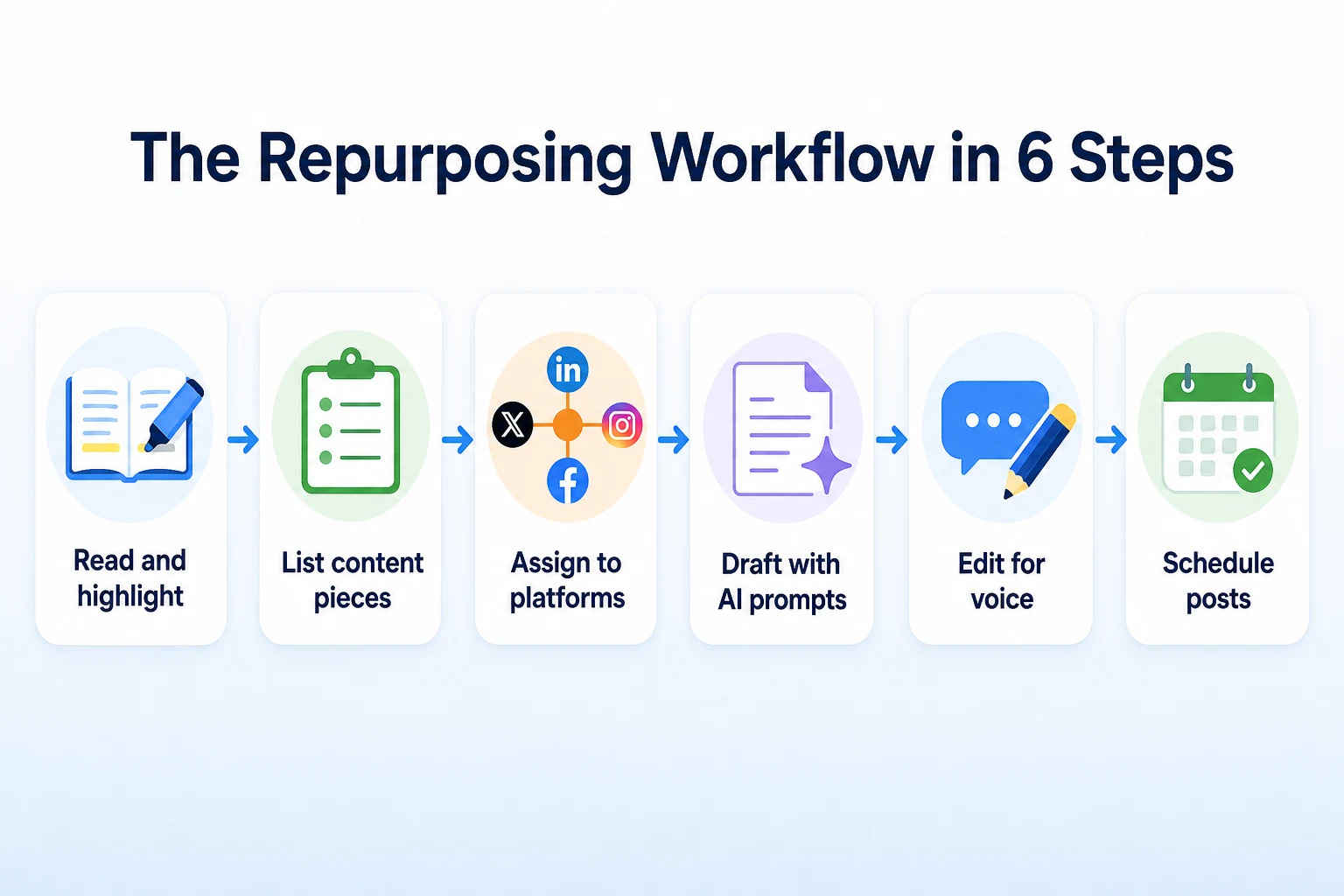
Read the finished blog post once with a notepad open, not a prompt box. Mark the hook, the strongest claim, the steps, one or two examples, the mistakes section if there is one, and the conclusion. This step takes longer by hand than by AI prompt, which is why the next section gives a few prompts that do most of this pulling automatically.
Step 2: Assign each piece to a platform
Using the table above as a starting point, assign each piece to one or two platforms. A business posting to all seven platforms covered in this guide, Instagram, Facebook, LinkedIn, Threads, TikTok, Pinterest and YouTube Shorts, doesn't need a unique piece for every single post. The same steps section can become an Instagram carousel and a Pinterest pin without much extra work, since both formats reward a numbered list.
Step 3: Draft, edit and schedule
Draft each post with an AI prompt specific to that platform, which the following sections cover one at a time. Then edit every draft for voice, specific details and anything that reads generic. Add a visual where the platform needs one, then schedule. The draft is the fast part. The edit is the part that keeps fifteen posts from reading like one post copied fifteen times, which the later section on originality covers in more detail.
AI Prompts to Pull Content Pieces Out of a Blog Post
Before writing a single platform-specific caption, it helps to have the raw pieces pulled out and sitting in one document. These prompts do that extraction step, with the blog post pasted in as context.
Prompts for finding hooks and quotable lines
A prompt like "read this blog post and pull out the five sentences most likely to work as a standalone hook or quote on social media" gives a usable starting list in one pass. A second prompt, "rewrite each of those five sentences as a question instead of a statement," often produces a stronger hook than the original line, since a question tends to stop a scroll better than a flat statement does.
Prompts for turning steps into a carousel outline
If the post contains a numbered process or a checklist, a prompt like "turn the steps in this blog post into a 6-slide carousel outline, one idea per slide, each slide under 15 words" gives a structure ready for Instagram or Pinterest without any further summarizing. Asking for a second version with "rewrite the same 6 slides but cut each line to under 8 words" is worth doing too, since the first draft from an AI tool often runs longer than what actually fits cleanly on a slide.
Instagram, Facebook and Threads: Formats and Prompts
These three platforms all run on a caption, which makes it tempting to write one caption and post it three times. The problem is each one reads that caption in a different mood, and the format that works best on one often falls flat on another.
Instagram: carousel captions and reel hooks
An Instagram caption works best when the first line can stand alone, since that's the only part visible before someone taps "more." A prompt like "write an Instagram caption for a carousel post about [blog post topic], opening with a one-line hook, then three short lines expanding on it, ending with a simple question to invite comments" gives a structure that matches how the app actually displays text. For a reel built around the same topic, the caption matters less than the spoken hook, which the TikTok section below covers in more detail since the two formats work almost identically.
Facebook: the longer, community-style version
Facebook audiences tend to read longer posts than Instagram ones, especially in local business groups and community pages where a post reads more like a short update than an ad. A prompt like "write a Facebook post based on this blog post's conclusion, written as a friendly update from a business owner, 4 to 6 sentences, no hashtags" produces something closer to what actually performs there. Dropping the hashtags isn't a style choice, it's a practical one: Facebook's own discovery doesn't lean on hashtags the way Instagram's search does, so a post crowded with them just looks cluttered.
Threads: the short, conversational take
Threads rewards a shorter, more opinionated post than either of the other two, closer to a single thought than a full caption. A prompt like "take the central claim from this blog post and rewrite it as a short, conversational Threads post under 280 characters, written like a text to a friend, not a brand" tends to produce something that fits the platform's tone better than a polished marketing line would. Our guide to social media SEO covers how each platform's own search tool reads captions differently, which is worth checking once the posts are written, since a caption built only to sound conversational can end up saying very little a search tool can actually match against.
Platform | Best format | Caption length | Tone |
|---|---|---|---|
Carousel or reel with a one-line hook | Short, front-loaded | Visual, direct | |
Single image or link post | 4 to 6 sentences | Friendly, community-style | |
Threads | Single short post | Under 280 characters | Conversational, opinionated |
LinkedIn: Turning a Blog Post Into a Professional Take
LinkedIn readers aren't scrolling past a brand update the same way they'd scroll past one on Instagram. They're more likely to actually read a few sentences if the first line earns it, which changes what a good prompt asks for.
Writing the LinkedIn version of the same idea
A prompt like "rewrite this blog post's central claim as a LinkedIn post, opening with a specific observation from running the business, written in full sentences, no more than two hashtags at the end" tends to avoid the generic, hashtag-heavy post that reads like it could belong to any business in any industry. LinkedIn's help documentation treats hashtags as a much smaller part of how a post gets found than the words in the post itself, so a draft that leans on hashtags instead of a real sentence is working against how the platform actually reads it. Our breakdown of LinkedIn post analytics 2026 covers how saves, sends and reach get measured there, which is worth reading before deciding whether a post actually landed.
When a document or carousel post works better
If the blog post's steps or checklist section is substantial, a LinkedIn document post, a short slide-style PDF, often outperforms a single caption for that specific content. A prompt like "turn the numbered steps in this blog post into an 8-slide LinkedIn document outline, one step per slide, with a title slide stating the topic as a question" gives a usable outline without starting from a blank slide deck.
TikTok and YouTube Shorts: Scripts, Hooks and On-Screen Text
Both platforms live or die on the first few seconds, which means the hook isn't a line in a caption here. It's the first thing spoken out loud.
Writing a hook that survives the first three seconds
A prompt like "write five spoken hooks under 10 words each for a short video about [blog post topic], each one a question or a surprising claim, written to be said out loud in the first three seconds" gives several options to test rather than committing to one on the first try. The strongest hooks usually name the problem directly instead of teasing it, since a viewer deciding whether to keep watching has no patience for a slow buildup.
Turning one blog section into a 30-second script
A prompt like "turn this blog post's common mistakes section into a 30-second spoken script for a short video, one mistake per 5 to 7 seconds, written in plain spoken sentences, with matching on-screen text for each line" produces a script and its on-screen text together, which saves a separate pass later. The spoken line and the on-screen text don't need to match word for word, but they should carry the same point, since a viewer watching with the sound off still needs to follow along from the text alone.
Pinterest: Turning One Post Into Multiple Pins
Pinterest gets treated as an afterthought by a lot of small businesses, mostly because it doesn't fit the same caption-and-comment pattern as the other platforms covered so far. That's also what makes it one of the easier platforms to get several posts out of a single blog article.
Why one blog post can support several pins
A pin is really just a linked image with a title and a description, which means a blog post with several distinct sections can support a separate pin for each one, all pointing back to the same article. The fall lawn care post from earlier could produce one pin built around the steps section, a second built around the common mistakes section, and a third built around a single before-and-after photo, if one exists. None of that duplicates the others, because each pin's image and title describe a different part of the same post.
Writing a pin title and description that gets found
Pinterest functions a lot like a visual search engine, which means a pin's title and description carry more weight than a clever turn of phrase would. A prompt like "write a Pinterest pin title under 100 characters and a description under 500 characters for a pin linking to this blog post, using the exact phrases someone would search for this topic, not a vague tagline" tends to produce something closer to what actually gets found. A title like "Fall Lawn Care Checklist: 7 Steps Before Winter" gives Pinterest's search tool real words to match against a query, where a title like "Our Favorite Season" gives it almost nothing.
A Worked Example: One Blog Post, 15 Social Posts
This example is illustrative, not a record of a real business's posts.
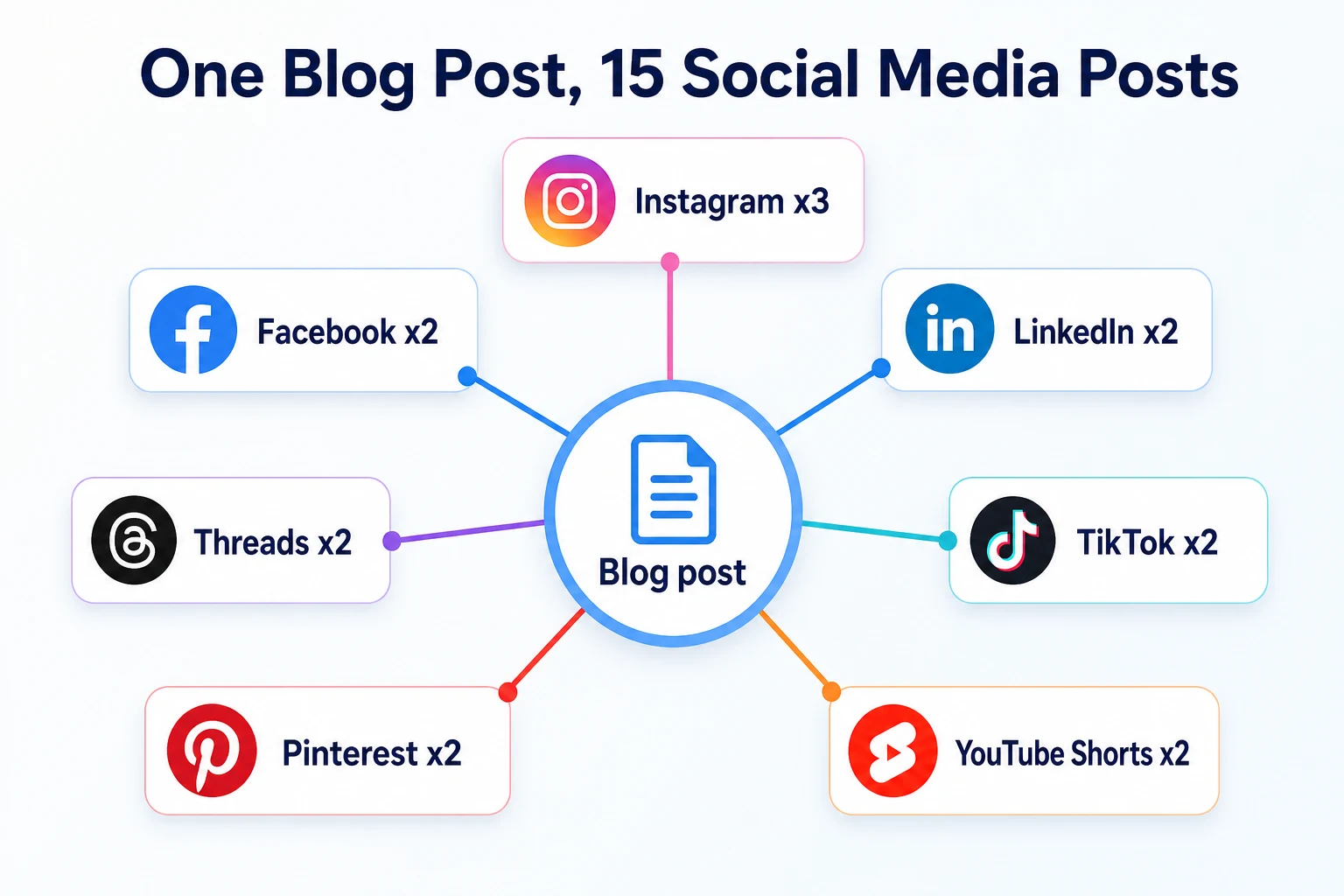
Picking up the landscaping company's fall lawn care post from the opening, here's how the full article could be split into fifteen posts across seven platforms, using the workflow and prompts covered above.
Platform | Post type | Example hook or caption opening line |
|---|---|---|
Carousel: 6 step checklist | "Your lawn needs these 6 things before the first frost." | |
Reel: common mistakes | "Stop mowing this short in October." | |
Single photo: before and after | "This lawn looked like straw three weeks ago." | |
Community update post | "We've had a few neighbors ask when to put down fall fertilizer, so here's our answer." | |
Link post with summary | "Full fall lawn care checklist is up on the blog if you want the whole list." | |
Professional observation post | "Most of our fall callbacks come from one mistake homeowners make in September." | |
Document post: step outline | "8 slides on what your lawn actually needs before winter." | |
Threads | Short opinion post | "Everyone overwaters their lawn in fall. Here's why that's backwards." |
Threads | Quick tip post | "One thing most lawn care blogs get wrong about fall mowing height." |
TikTok | 30 second mistakes video | Spoken: "These three fall lawn mistakes cost you money next spring." |
TikTok | Quick how-to video | Spoken: "Here's exactly when to put down fall fertilizer." |
Checklist pin | "Fall Lawn Care Checklist: 7 Steps Before Winter" | |
Mistakes pin | "5 Fall Lawn Mistakes That Ruin Spring Grass" | |
YouTube Shorts | Steps walkthrough | Spoken: "Do these 4 things to your lawn before the ground freezes." |
YouTube Shorts | Mistakes walkthrough | Spoken: "If your lawn looked patchy this spring, this is probably why." |
These figures are illustrative.
Fifteen posts, seven platforms, and every single one traces back to a section that already existed in the original 1,500 word article. Nothing here required new research or a second round of photos, just a different shape for material that was already written.
Keeping 15 Posts Original Instead of Repetitive
Fifteen posts drafted from one source will start to blur into each other if nobody steps in, and that's the part of this process an AI prompt can't fix on its own.
Why AI drafts start to sound the same
Ask an AI tool to write fifteen posts from the same blog article and it tends to lean on the same handful of phrases across most of them, especially the opening line and the closing question. That's not a flaw unique to any one tool, it's a natural result of drafting from a single source document over and over in the same session. The pattern shows up as repeated sentence structures, the same adjective describing the business in post after post, or a closing call to action that reads nearly word for word across three different platforms.
A quick edit pass that fixes it
Before scheduling anything, read all fifteen drafts back to back in one sitting, not spread across separate editing sessions. Reading them together makes repeated phrasing obvious in a way it isn't when each draft is reviewed on its own. Replace any repeated opening line with something specific to that platform's audience, swap out a generic adjective for a real detail from the business (a job site, a customer's actual question, a specific product), and vary the closing line so a question doesn't appear at the end of every single post. Running a finished batch through a tool like RepGet's AI content detector guide is also worth reading if the goal is making sure the writing still reads like it came from a person, not a template repeated fifteen times.
Mistake | Why it backfires | Better move |
|---|---|---|
Using the same opening line across multiple platforms | Readers who follow a business on two platforms notice the repetition fast, and it reads as low effort | Write a separate hook for each platform, even when the underlying idea is identical |
Letting AI pick the closing call to action every time | A question like "what do you think?" at the end of all fifteen posts starts to feel like a template | Vary the closing line, and skip a call to action entirely on posts where it doesn't fit |
Drafting all fifteen posts in one AI session with no breaks | The model tends to reuse phrasing it generated a few prompts earlier in the same conversation | Draft in smaller batches, or start a fresh session partway through, to reduce repeated wording |
Skipping the edit pass because the drafts read fine individually | Repetition is only obvious when posts are read together, not one at a time | Read all fifteen drafts back to back before scheduling any of them |
A Weekly Plan: Repurposing One Post in Under Two Hours
The workflow covered so far works, but it only sticks if it fits into a normal week rather than becoming a separate project every time a post goes live. Here's roughly how the full process breaks down in practice, once the prompts and the platform assignments are already familiar.
Minutes 0 to 15: read the finished blog post once and mark the hook, the strongest claim, the steps, one or two examples, the mistakes section, and the conclusion.
Minutes 15 to 30: run the extraction prompts from earlier in this guide to turn those marked sections into a rough document of reusable lines, carousel outlines and quotable statements.
Minutes 30 to 70: draft each platform's posts one at a time using the prompts covered for Instagram, Facebook, Threads, LinkedIn, TikTok, YouTube Shorts and Pinterest, working through the list in one sitting rather than returning to it across several days.
Minutes 70 to 95: read all fifteen drafts back to back, fix any repeated opening lines or closing questions, and swap in specific details from the business where a line still reads generic.
Minutes 95 to 110: add or request visuals, a photo from the original post, a screenshot of the steps, a simple on-screen text overlay, for the posts that need one.
Minutes 110 to 120: schedule the posts across the week, spacing them out instead of publishing all fifteen the same day.
None of these numbers are a rule, and a first attempt will likely run longer while the prompts and the edit habits are still new. The point of laying it out this way isn't to hit two hours exactly. It's to show that fifteen posts is a repeatable weekly task, not a one-time campaign that only happens when there's time to spare.
Where RepGet fits
RepGet doesn't schedule posts to Instagram, TikTok or any other platform, and it doesn't edit a draft for your business's voice. Those steps still belong to whoever runs the accounts, the same as the rest of this guide describes.
Where it can help is at both ends of the workflow. RepGet brings article writing into the same workflow as website auditing, keyword research, content planning, publishing and search performance reporting, so the source blog post this whole process starts from can come out of the same place the rest of your SEO work happens, and it can stay as a draft for you to review before it goes live. From there, RepGet's free AI Social Media Post Generator turns one page into a handful of posts to edit and share, which covers the drafting step for a few platforms without starting from a blank prompt each time. It's a starting point, not a finished, scheduled post, and the edit pass covered earlier in this guide still matters just as much on anything it drafts.
It's also worth checking that the blog post itself is set up well before building fifteen posts around it. RepGet's free website audit crawls the site and gives it a 0 to 100 SEO score, with the technical and content issues worth fixing listed out. No account or credit card required. RepGet doesn't guarantee that any post, on any platform, will get seen, saved or shared, and nothing here replaces your own read-through before anything goes out under the business's name.
The bottom line
A single blog post rarely gets the mileage it deserves when it's reduced to one caption and forgotten. Pulled apart into its hooks, steps, examples and mistakes, that same article holds enough material for fifteen posts across seven platforms, each one shaped for how that platform actually gets read.
AI speeds up the part that used to take the longest, drafting a first version for each platform instead of starting from a blank box every time. It doesn't replace the read-through that catches repeated phrasing, generic lines and a closing question that shows up fifteen times in a row. Do that edit pass, and one well-built blog post can carry a business through a full week of social content instead of a single post that gets used once and forgotten.
Find out what your website needs first
Run a free website audit with RepGet to check whether the blog posts you're about to repurpose are actually set up well in the first place. No account or credit card required.
FAQ
How many social media posts can you get from one blog post?
A detailed blog post usually holds enough material, hooks, steps, examples, mistakes and a conclusion, to produce around fifteen platform-specific posts, though a shorter post may yield fewer.
What AI tools can repurpose a blog post into social media content?
General AI writing tools can draft captions, scripts and pin descriptions from a pasted blog post using platform-specific prompts. RepGet's free AI Social Media Post Generator turns one page into a few posts to edit and share.
How do you stop AI-generated social posts from sounding the same?
Draft in smaller batches instead of one long AI session, then read every post back to back before scheduling, since repeated phrasing is usually only obvious when posts sit side by side.
What's the best way to turn a blog post into a LinkedIn post?
Open with a specific observation from running the business, write in full sentences instead of short caption lines, and keep hashtags to two or fewer, since LinkedIn's search reads post text over tags.
Can one blog post be turned into a TikTok script?
Yes. Pull one section, often the steps or common mistakes part, and turn it into a short spoken script with a hook in the first three seconds and matching on-screen text for sound-off viewers.
How long does it take to repurpose a blog post into social content?
With a workflow and a set of ready prompts, pulling content pieces and drafting fifteen posts typically takes under two hours, with most of that time spent editing rather than drafting.
Do you need different captions for Instagram, Facebook and Threads?
Yes. Instagram favors a short, front-loaded caption, Facebook reads better as a longer community-style update, and Threads works best as a short, conversational line, so one caption rarely suits all three.
Can Pinterest pins come from a blog post that isn't a recipe or DIY post?
Yes. Any blog post with distinct sections, a checklist, a mistakes list, or a single strong photo, can support a separate pin for each, as long as the title and description use real search terms.
Comments
0 shownShare your thoughts about this article.
New to RepGet? Create a free account to join the conversation.
No comments yet. Be the first to leave one.