

Social Media Content Calendar: A 30-Day Plan You Can Reuse
Short answer
A social media content calendar is a day-by-day plan of what to post, where, and why. This article gives a reusable 30-day calendar with platform, format, hook, and call to action for each day, mixing educational, behind-the-scenes, customer story, and promotional posts, plus how to adapt it by industry, generate ideas with AI, schedule efficiently, and measure what's working.
A boutique owner opens her scheduling app on Sunday night with nothing queued for the week.
She ends up reposting the same product photo from last month, with a caption that just says "check it out!"
It's not that she has nothing to say. She just doesn't have a plan that tells her what to post, where, and why, before the blank box is staring back at her at 9pm.
A social media content calendar fixes exactly that problem. It turns "what do I post today" into "check the calendar," because the decision already got made last week, not tonight.
Here's a 30-day social media content calendar built to be filled in and used this week, not just read and forgotten.
What a Social Media Content Calendar Actually Does
A content calendar is a planned mix of content types and platforms laid out over time. It's not just a list of dates with "post something" written next to each one.
A calendar vs. a posting schedule
A posting schedule answers one question: when. Monday, Wednesday, Friday, 9am. A content calendar answers two more questions underneath that: what, and why that particular post belongs on that particular day. Without those two answers, a schedule just tells you when to feel stuck, since the time slot arrives but the idea doesn't.
The six content types this calendar rotates through
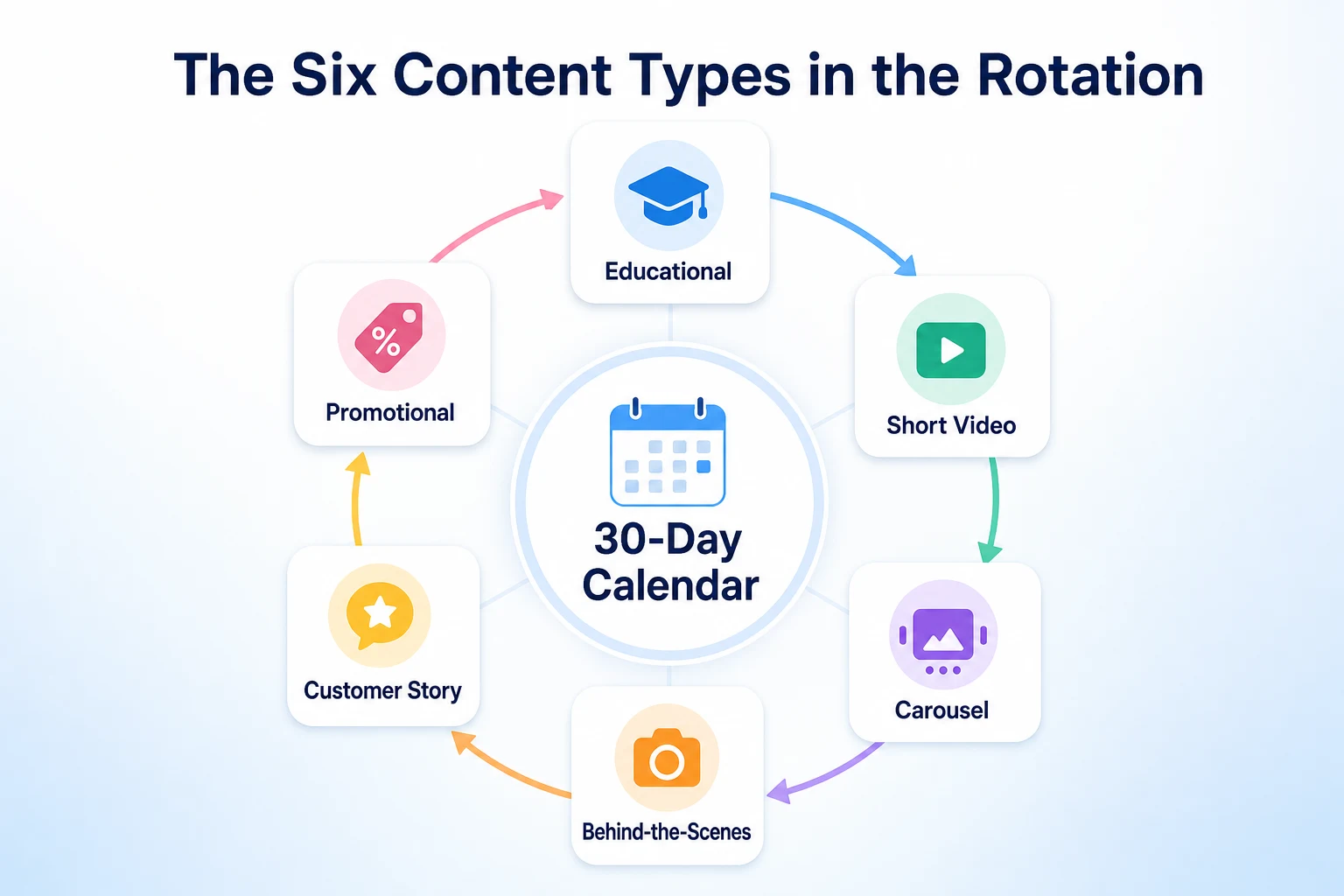
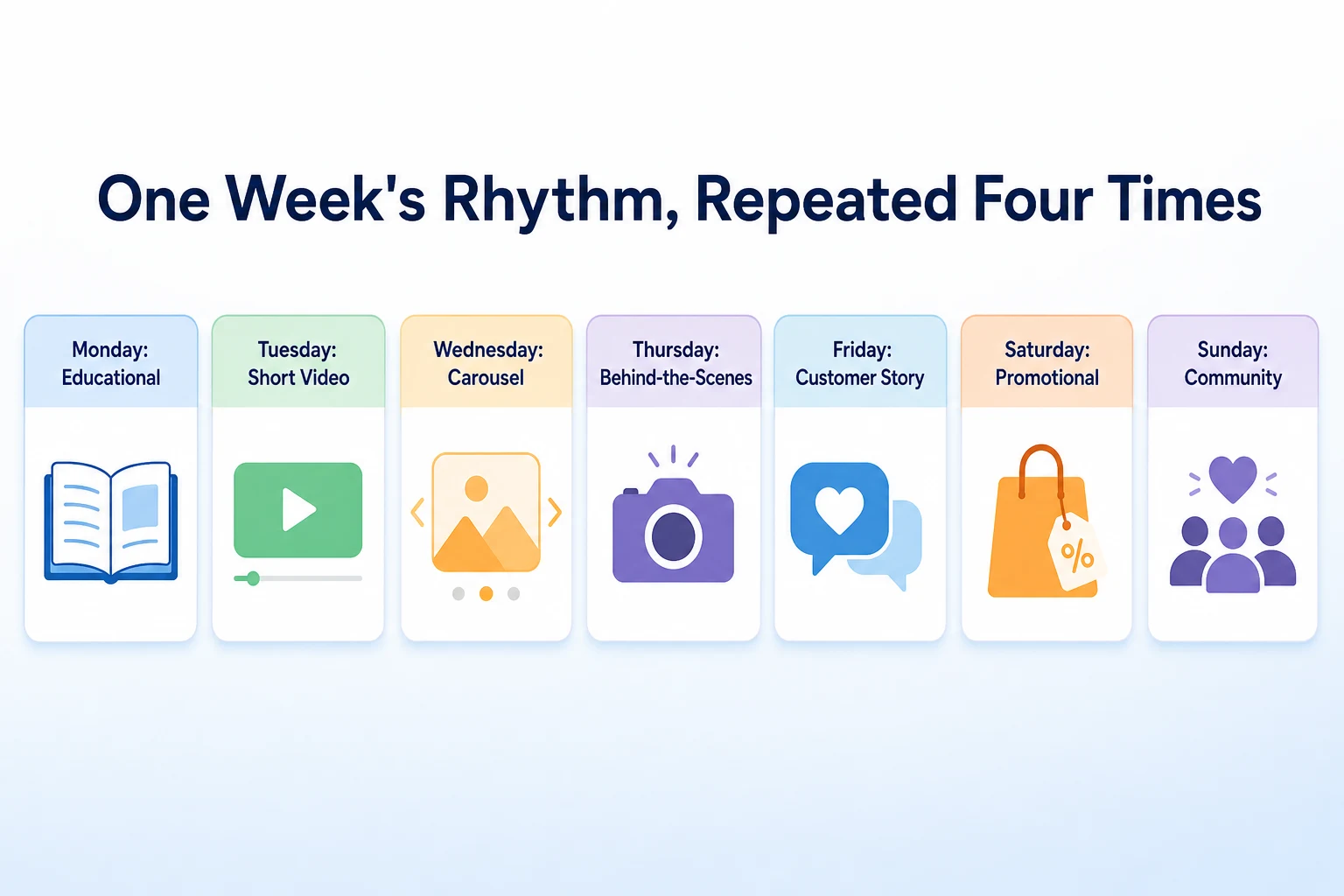
This calendar rotates through six content types across the week, with a seventh, lighter day set aside for engagement rather than a fresh post. Educational posts teach something useful, a tip, a mistake to avoid, a how-to. Short videos are quick, usually under a minute, built around a hook in the first few seconds. Carousels break one idea into a few slides a viewer swipes through. Behind-the-scenes posts show the work before the finished product, a process, a workspace, a decision being made. Customer stories feature a real result, a review or a before-and-after. Promotional posts are the direct ask: a sale, a new product, a booking link. A community day, usually a lighter lift, is for replying to comments, resharing something a customer posted, or asking a simple question instead of publishing something new. Rotating through all of these keeps a month of posts from feeling like the same ad repeated thirty times.
Before You Fill In a Single Day
The calendar below works for most small businesses, but it only works once two decisions are made first.
Choosing two or three platforms, not seven
Trying to run a content calendar across every platform at once usually means every platform gets a thin, inconsistent version of it. Pick the two or three platforms where your actual customers already spend time, and where you can realistically keep showing up. A service business whose customers are other businesses probably gets more out of LinkedIn and Instagram than TikTok. A retail shop with a young customer base might get more out of Instagram and TikTok than LinkedIn. Nobody can tell you the exact right combination without knowing your customers, but starting with two or three and doing them properly beats spreading the same effort across seven.
Matching frequency to what you can actually sustain
The calendar below assumes close to daily posting, split across platforms. That's a target, not a requirement. A business with one person running social media on top of everything else is better off posting four times a week consistently than seven times for two weeks and then going quiet for a month. Pick a frequency you can sustain past the first thirty days, then adjust the calendar to fit it by skipping the lightest days first, usually the community day, before cutting into educational or promotional posts.
Platform | Realistic weekly frequency | Content types that tend to work best |
|---|---|---|
3 to 5 posts, plus Stories | Carousels, short video, behind-the-scenes | |
2 to 4 posts | Customer stories, community updates, promotional posts | |
TikTok | 2 to 4 videos | Short video, behind-the-scenes |
1 to 3 posts | Educational posts, customer stories framed as results | |
2 to 3 pins | Carousels turned into pins, educational graphics |
The Full 30-Day Social Media Content Calendar
This is the calendar itself. Copy it into a spreadsheet, swap in your own product names and details where the hook uses brackets, and start posting from day one.
Day | Content Type | Platform | Format | Sample Hook | Call to Action |
|---|---|---|---|---|---|
1 | Educational | Carousel | "The one thing most customers don't know about [your product or service]." | "Save this for later." | |
2 | Short Video | TikTok | Under 30 seconds | "Here's what actually happens when you [book, order, hire] us." | "Link in bio to get started." |
3 | Carousel | 5 slides | "5 things to check before you [common customer decision]." | "Which one surprised you? Comment below." | |
4 | Behind-the-Scenes | Instagram Stories | Photo sequence | "This is what [a typical workday, a project, an order] actually looks like." | "Ask us anything in the replies." |
5 | Customer Story | Photo with caption | "[Customer name] came to us with [a problem]. Here's what changed." | "Read the full story on our website." | |
6 | Promotional | Single image | "This week only: [offer or product]." | "Shop now, link in bio." | |
7 | Community | Reply and reshare | Reshare a customer's tagged post with a thank you. | "Tag someone who needs this." | |
8 | Educational | Text post | "A mistake we see [customers, clients] make with [common task]." | "What would you add? Comment below." | |
9 | Short Video | Instagram Reels | Under 30 seconds | "3 signs it's time to [replace, upgrade, book] your [product or service]." | "Save this for when you need it." |
10 | Carousel | 6 slides | "Your checklist before [a seasonal task or decision]." | "Pin this for later." | |
11 | Behind-the-Scenes | Short video | "Meet [staff member's name], who handles [a specific task] here." | "Say hi in the comments." | |
12 | Customer Story | Before and after | "[Customer name] wasn't sure [product or service] would work. Then this happened." | "Ready for your own? Book a call." | |
13 | Promotional | Link post | "We just added [new product, service or slot]. Here's what it covers." | "Message us to grab one." | |
14 | Community | Poll or question sticker | "Which of these do you want to see more of?" | "Vote in Stories." | |
15 | Educational | Carousel | "How to [common task related to your business] without [common mistake]." | "Share this with someone who needs it." | |
16 | Short Video | TikTok | Under 30 seconds | "Answering the question we get asked most: [common FAQ]." | "Drop your question below." |
17 | Carousel | 5 slides | "[Number] options for [a decision customers face], compared." | "Which one fits you? Tell us below." | |
18 | Behind-the-Scenes | Instagram Stories | Photo sequence | "Here's what goes into [making, preparing, building] [product or service]." | "Swipe to see the whole process." |
19 | Customer Story | Written review screenshot | "We don't get tired of reading reviews like this one." | "Leave us a review if we've helped you too." | |
20 | Promotional | Single image or Reel | "Spots for [a service slot] are filling up for [upcoming period]." | "Book now, link in bio." | |
21 | Community | Threads | Short text post | A short, honest opinion related to your industry. | "What's your take?" |
22 | Educational | Text post | "What changed in [your industry] this year, and what it means for you." | "Let us know if you've noticed this too." | |
23 | Short Video | Instagram Reels | Under 45 seconds | "Watch us [complete a task] start to finish." | "Follow for more behind the process." |
24 | Carousel | 6 slides | "6 things to ask before you hire or choose [a service in your industry]." | "Save this before your next decision." | |
25 | Behind-the-Scenes | Short video | "A day in the life at [business name]." | "Tell us what you'd want to see next." | |
26 | Customer Story | Photo with caption | "[Customer name]'s story is exactly why we do this." | "Share your own story in the comments." | |
27 | Promotional | Link post | "Last chance for [offer or seasonal product]." | "Order before it's gone." | |
28 | Community | Reply and reshare | Answer the most common question from this month's comments. | "Keep the questions coming." | |
29 | Educational | Carousel | "What we wish every new customer knew about [your industry]." | "Send this to someone just starting out." | |
30 | Short Video | TikTok | Under 30 seconds | "A recap of what we got up to this month." | "Which post was your favorite? Tell us below." |
These figures are illustrative. Swap the bracketed details for your own products, staff and offers before posting.
A Worked Example: Filling In One Week for a Real Business
This example is illustrative, not a record of a real business's posts.
Imagine a small bakery called Maple and Rye filling in the first seven days of the calendar above with its own specifics instead of leaving the brackets in place.
Day | Generic entry | Filled-in example |
|---|---|---|
1 | "The one thing most customers don't know about [your product or service]." | "Most people don't know our sourdough starter is nine years old. Here's why that matters for flavor." |
2 | "Here's what actually happens when you [book, order, hire] us." | "Here's what actually happens when you place a custom cake order with us, from the first call to pickup." |
3 | "5 things to check before you [common customer decision]." | "5 things to check before you order a wedding cake, including two questions most couples forget to ask." |
4 | "This is what [a typical workday] actually looks like." | "This is what 5am in our kitchen actually looks like, before the shop opens at 7." |
5 | "[Customer name] came to us with [a problem]. Here's what changed." | "Maria came to us needing a gluten-free cake with 48 hours' notice. Here's what we made." |
6 | "This week only: [offer or product]." | "This week only: buy a dozen cinnamon rolls, get a fourth box half off." |
7 | Reshare a customer's tagged post with a thank you. | Reshared a customer's photo of her birthday order, tagged with "thank you for trusting us with the big day." |
Nothing about the structure changed between the two columns. The content type, the platform and the format stayed exactly the same. What changed was specificity: a real product, a real staff detail, a real customer name standing in for a placeholder. That's usually the only gap between a calendar that feels generic and one that sounds like it came from an actual business.
Adapting the Calendar by Industry
The 30-day calendar above is a starting point, not a fixed formula. Different kinds of small businesses get more out of some content types than others, and the mix is worth adjusting before you commit to a month of it.
Service businesses
A plumber, a cleaning company, a personal trainer, anyone selling time and expertise rather than a physical product, tends to get the most out of educational posts and customer stories. People hiring a service want proof the business knows what it's doing and proof other people were happy with the result. Behind-the-scenes content works well here too, since showing the actual work in progress builds trust in a way a stock photo never does. Promotional posts still matter, but they can sit further back in the mix, maybe one in ten days instead of one in five.
Retail and ecommerce
A shop selling physical products can lean harder into carousels and short video, since both formats are built for showing a product from a few angles or in actual use. Promotional posts also carry more weight here than they do for a service business, because the path from seeing a post to buying is shorter. Customer stories work best as photos of the product in a real customer's hands or home rather than a written testimonial alone.
Restaurants and local shops
Behind-the-scenes content tends to outperform almost everything else for a restaurant or a local shop, since people are curious about the kitchen, the staff and the process in a way they rarely are for a service business. Short video suits this well too, a quick clip of a dish being plated or a shelf being restocked. Educational posts are a smaller fit here, though a simple tip, how to store something, how to reheat it, still has a place.
B2B and professional services
A business selling to other businesses, an accountant, a consultant, a software company, usually gets more from LinkedIn than from Instagram or TikTok, and the mix should shift accordingly. Educational posts carry more weight here, since the audience is often researching a decision rather than browsing for entertainment. Customer stories work better framed as results and numbers than as a photo, and promotional posts should stay rare, since a hard sell reads worse to a professional audience than it does to a retail shopper.
Industry | Lean into | Dial back |
|---|---|---|
Service businesses | Educational, customer stories, behind-the-scenes | Promotional |
Retail and ecommerce | Carousels, short video, promotional | Long educational text posts |
Restaurants and local shops | Behind-the-scenes, short video | Educational |
B2B and professional services | Educational, customer stories as results | Promotional, short video |
Our guide to social media SEO covers how to write the bios and captions that sit around these posts so each platform's own search tool can actually find them, which matters whichever mix you land on.
Generating 30 Days of Post Ideas with AI
Filling in thirty days of brackets by hand takes a while, even with the structure above already done for you. AI can draft a first pass fast, as long as you treat the output as a draft and not a finished post.
Prompts that draft a week of ideas at once
Working a week at a time usually produces better results than asking for all thirty days in one prompt, since a shorter request gives the tool less room to repeat itself. A prompt like "write seven social media post ideas for a [type of business], one educational, two short video, one carousel, one behind-the-scenes, one customer story, one promotional, each with a one-line hook" gives a structure close to the calendar above, filled in with ideas specific to the business instead of a placeholder. Asking a second prompt, "now write three alternate hooks for each of those seven posts," gives options to choose from instead of committing to the first line drafted.
Why the edit pass still matters
AI tends to default to the same handful of sentence patterns across a batch of posts, especially hooks that all start with a question or all end on an exclamation point. Read a week's worth of drafted posts back to back before scheduling any of them, and swap out anything that reads too similar to the post two days before it. The example earlier in this guide, Maple and Rye's bakery posts, shows the gap a quick edit pass closes: a generic draft turns into something that sounds like it came from a real kitchen once a staff member's name or an actual product replaces the placeholder. Our guide to Socialpost AI and similar tools covers what these tools are actually good at and where a real plan still has to come from you. RepGet's free AI Social Media Post Generator turns one page from your website into a handful of draft posts to edit, which is a fast way to fill a slow day in the calendar without starting from a blank prompt.
Setting Up Your Calendar in Under an Hour
A calendar sitting in a document nobody opens doesn't help on a Sunday night. Getting it into a tool you'll actually check takes less time than it sounds like.
Picking a tool that matches how you actually work
A spreadsheet works fine for a one-person business that posts manually each day, since it costs nothing and takes minutes to set up. A scheduling tool that queues posts in advance suits a business posting across three or more platforms, since it removes the daily task of remembering to actually publish. Neither choice is wrong. The only real mistake is picking a tool with more features than you'll use, then abandoning it because it feels like overhead instead of help.
Loading the first week before moving on
Don't try to load all thirty days before posting anything. Load the first week, using the calendar's day-by-day entries as a starting structure, fill in your own product names and staff details the way the bakery example did, and get those seven posts scheduled or ready to publish. Loading one week at a time keeps the setup task short enough to actually finish in a sitting, and it leaves room to adjust the next week based on what the first one taught you.
Batching So 30 Days Doesn't Mean 30 Separate Sessions
Treating each day's post as its own task, start to finish, is the fastest way to abandon a content calendar by day ten. Batching the creation work into fewer, longer sessions keeps the month manageable.
Batching a month of content in one or two sittings
Set aside one longer block, two or three hours, or split it across two shorter sessions, to shoot the photos and short videos the month's posts will need. A bakery might photograph a week's worth of products in one morning instead of pulling out a camera daily. A service business might film three or four short videos back to back on a single job site visit instead of filming once per week. Writing the captions can happen in the same sitting or a separate one, but batching the raw material, the photos and video, is usually what saves the most time, since setup and lighting take longer than the shot itself.
Leaving room for real-time posts
Batching works best when it doesn't fill every single slot. Leave a couple of days a week open, usually the community day and one other, for something timely: a reply to a comment that's gotten attention, a quick photo from something that happened that day, a reaction to news relevant to your industry. A calendar planned entirely in advance can start to feel stiff if nothing on it ever responds to what's actually happening. Our guide to repurposing blog content for social media covers a related way to fill those open slots without starting from scratch, by pulling a fresh angle out of something you've already published.
Common Mistakes That Derail a Content Calendar
Most content calendars don't fail because the ideas were bad. They fail for one of a handful of predictable reasons, all of which are easy to avoid once you know to look for them.
Mistake | Why it backfires | Better move |
|---|---|---|
Filling every day with a promotional post | Followers stop engaging once every post asks for something, and the feed starts to feel like an ad instead of an account worth following | Keep promotional posts to roughly one in five, using the rotation in the calendar above as a guide |
Leaving the bracketed placeholders in the hook | A post that still reads "[your product or service]" looks unfinished and tells followers nothing specific | Fill in real details before scheduling, the way the bakery example earlier in this guide does |
Trying to post on every platform from day one | Spreading a thin effort across five or six platforms usually means none of them get done well or consistently | Start with two or three platforms, as covered earlier in this guide, and add more only once those are running smoothly |
Scheduling a month, then never checking back in | A calendar set and forgotten can't adjust to what's actually landing with your audience | Check in weekly, even briefly, and use the review step covered below to adjust the next batch |
Copying the calendar's hooks word for word | Hooks written to be generic examples sound generic when posted exactly as written, since no business detail backs them up | Treat every hook in the table as a starting structure to rewrite with your own specifics |
Abandoning the plan after one slow week | A single week of low engagement doesn't mean the calendar failed, it's often just one slow week | Give a new rotation at least a full month before deciding whether to change the mix |
Measuring What's Actually Working
A calendar is worth running for a month mainly so you have something to measure. Without that, there's no way to tell whether next month's calendar should look the same or different.
Metrics worth checking by content type
Different content types are worth judging by different numbers, rather than treating every post as a competition for the same single metric. Educational posts are worth checking for saves and shares, since those suggest someone found the information useful enough to keep or pass on. Short video is worth checking for watch time and completion rate, how much of the clip people actually watched before scrolling past. Carousels are worth checking for how far people swiped, if the platform shows that. Customer stories and behind-the-scenes posts tend to show up in comments more than any other type, so that's where to look. Promotional posts are the one category worth judging by clicks and, where you can track it, actual sales or bookings that followed.
Using a month of data to plan the next one
At the end of thirty days, look back at which content type got the strongest response on each platform, not which single post did best. One unusually good post can be an outlier. A pattern across four or five posts of the same type is more useful information. If customer stories consistently outperform everything else, shift next month's mix to include more of them. If a particular platform never gets much engagement regardless of what's posted there, that's worth questioning too, since it might mean the audience simply isn't there yet. Our breakdown of LinkedIn post analytics 2026 covers how saves, sends and reach get measured on that platform specifically, which is worth reading before deciding a LinkedIn post underperformed when it may just be measured differently than an Instagram one.
Where RepGet fits
RepGet doesn't post to Instagram, Facebook, TikTok or any other platform, and it doesn't manage a content calendar for you. Filling in the brackets, batching the photos, scheduling the posts, all of that still sits with whoever runs your accounts, the same as everything covered in this guide.
Where it can help is at the edges of the work. If the calendar's educational posts or customer stories need a starting draft, RepGet's free AI Social Media Post Generator, linked earlier in this guide, turns a page from your website into a handful of posts to edit rather than starting from a blank prompt each time. And since several days in the calendar point back to your own website, a booking link, a product page, a blog post worth repurposing, it's worth checking that the site itself is in reasonable shape before a month of posts starts sending people there. RepGet's free website audit crawls the site and gives it a 0 to 100 SEO score, with the technical and content issues worth fixing listed out. No account or credit card required. RepGet doesn't guarantee that any post, on any platform, will get seen, saved or clicked, and nothing here replaces your own read-through before a post goes out under the business's name.
The bottom line
A content calendar works because it removes the daily blank-page problem, not because any single post on it goes viral. Thirty days of planned posts means the decision about what to say today already got made last week, with the right amount of variety built in so followers see something different each time they check in.
The calendar in this guide is a starting structure, not a fixed script. Fill in the brackets with your own products, staff and offers, adjust the mix for your industry, and give a full month's worth of posting a chance to show a pattern before changing anything. The posts that work best will usually be the ones that sound like they came from your business specifically, not the ones that followed the template most precisely.
Find out what your website needs first
Run a free website audit with RepGet to check whether the site your posts link back to is ready for the traffic a month of consistent posting sends its way. No account or credit card required.
FAQ
How many times a week should a small business post on social media?
There's no fixed number. Four consistent posts a week sustained over months usually does more for a small business than seven posts a week that stop after two weeks.
What should be in a social media content calendar?
A real calendar lists the date, platform, content type, format, a sample hook and a call to action for each post, not just a list of dates marked "post something."
Can I reuse the same 30-day content calendar every month?
Yes, with new specifics each time. The structure and rotation can repeat, but swap in different products, customer stories and offers so followers don't see the same posts twice.
What's the best ratio of promotional to non-promotional posts?
Roughly one promotional post for every four or five non-promotional ones tends to work well, though the right mix depends on your industry and how your audience responds.
How do I come up with 30 days of social media post ideas?
Start from a rotation of content types, educational, video, carousel, behind-the-scenes, customer story and promotional, then fill each slot with a real detail from your business, using AI prompts to draft a first pass.
What's the difference between a content calendar and a posting schedule?
A posting schedule only sets the time to post. A content calendar also decides what to post and why, so the time slot arrives with an idea already attached to it.
Which social media metrics actually matter for a small business?
It depends on the post type: saves and shares for educational content, watch time for video, comments for stories, and clicks or bookings for promotional posts.
Do I need a different content calendar for each platform?
Not a fully separate one, but the mix of content types should shift by platform, leaning into video on TikTok and educational posts on LinkedIn, for example.
Comments
0 shownShare your thoughts about this article.
New to RepGet? Create a free account to join the conversation.
No comments yet. Be the first to leave one.