

Social Media Automation for Small Business: The Complete Guide

Short answer
Social media automation for small business means letting tools handle scheduling, first-draft captions, repurposing and basic reporting, while you keep control of ideas, final edits and real conversations with customers. Scheduling and drafting are safe to automate. Direct replies and anything that imitates genuine engagement are not. A realistic setup takes a few hours to build, then a short weekly review to keep it honest.
A salon owner is supposed to post three times a week on Instagram, reply to every comment, and keep TikTok going too.
Most weeks she's lucky to get one post out before closing up at 6pm.
She's heard that automation could fix this, but she's also seen accounts that clearly run on autopilot: generic replies, captions that sound like nobody, posts that go out at odd hours with no one watching.
The real question isn't whether to automate. It's which parts of the work can run on their own and which parts still need her. Here's how social media automation for small business actually breaks down, task by task, so you can build a workflow that saves hours without turning your accounts into something nobody wants to follow.
What Social Media Automation Actually Means for a Small Business
Social media automation isn't one setting you switch on. It's a range of tools doing different jobs, from a calendar that fires off a post at a set time to an AI model drafting a caption from a short prompt.
The spectrum from manual to automated
At one end sits fully manual posting: you write the caption, pick the photo, open the app, hit publish, every single time. At the other end sits a workflow where AI suggests ideas, drafts captions, repurposes a blog post into three platform versions, and a scheduling tool publishes everything at the planned time. Most small businesses land somewhere in the middle, automating the repetitive steps and keeping a human hand on anything that represents the business directly to a customer. That middle ground is usually the sustainable one.
What automation doesn't mean
None of the major platforms document a way to run an account that looks authentic while being entirely hands off. Meta's Business Help Center, TikTok's Creator Portal and LinkedIn's Help Center all frame good performance around content that's actually relevant to the people seeing it, not around volume or automation alone. Automation can remove the busywork of scheduling, drafting and reporting. It can't remove the judgment calls about what's worth saying or how to respond to a real customer, and treating it as if it can is usually where accounts start to feel hollow.
Which Tasks You Can Safely Automate, and Which Still Need a Person
Breaking the work into specific tasks makes the automate-or-not decision much easier than treating
Breaking the work into specific tasks makes the automate-or-not decision much easier than treating every post the same way. Some tasks are mechanical. Others depend on reading a specific person or a specific moment, and that's where a tool runs out of judgment.
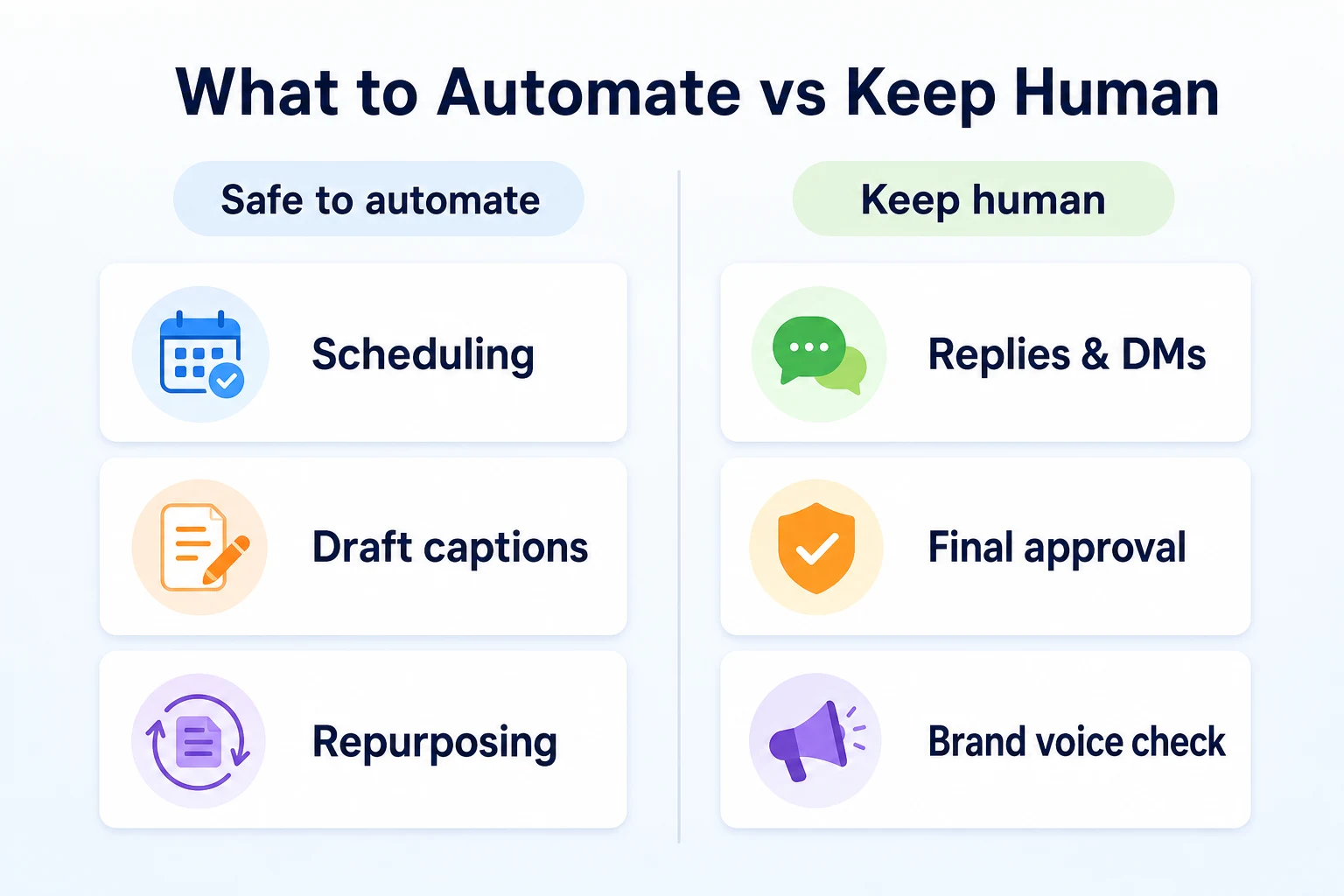
Tasks that are safe to automate
Scheduling a post for a set time, drafting a first version of a caption, turning one article into a few platform-specific posts, and pulling engagement numbers into one dashboard are all mechanical steps. None of them change meaning depending on whether a person or a tool carries them out, as long as a person still reviews the result before it goes live.
Tasks that still need a human decision
Replying to a comment or a direct message, approving a caption before it publishes, and deciding how to respond to a complaint in public all depend on reading tone, context and risk in a way a tool can't reliably do on its own. Choosing which photo actually represents the business is a brand decision too, not a scheduling one.
Task | Automate or keep human | Why |
|---|---|---|
Scheduling a post for a set time | Automate | Timing doesn't change what the post says |
Drafting a first caption | Automate, then edit | Speeds past the blank page, but still needs a human pass before it posts |
Repurposing a blog post into platform posts | Automate | Mechanical reformatting of existing material |
Pulling metrics into one report | Automate | Gathering numbers doesn't require judgment |
Replying to comments and DMs | Keep human | Needs to read tone and intent from a real person |
Approving a post before it publishes | Keep human | Final check for accuracy and whether it sounds like the business |
Handling a complaint in public | Keep human | Highest risk task on the list, and the one most likely to be screenshotted |
Choosing the photo that represents the business | Keep human | A brand decision, not a scheduling one |
AI Content Ideation: Generating a Month of Topics Without Starting From Zero
Staring at a blank content calendar is where most posting schedules die before they start. AI tools are reasonably good at breaking that stall, as long as you feed them something specific to work from.
Where idea generation works well
Pointing an AI tool at an existing website, a list of products, or a set of past posts and asking for a month of topic ideas usually produces a workable starting list. It's faster than staring at an empty document, and it tends to surface angles you'd forget under time pressure, a seasonal tie-in, a common customer question, a behind-the-scenes angle you haven't used in a while. Our social media content calendar guide has a full 30-day structure you can drop AI-generated topics into, so the ideas land in a rotation instead of a loose pile.
Where it still needs your specific detail
A generated list of topics tends to read generically until a real product, a real staff member, or an actual customer story fills in the blanks.
A generated list of topics tends to read generically until a real product, a real staff member, or an actual customer story fills in the blanks. Treat an AI-generated idea list as a table of contents, not a finished calendar. The work of making each idea sound like your business still belongs to you, and it usually takes less time than generating the ideas did in the first place.
Captions and Visuals: Drafting Fast, Then Editing Before Anything Posts
Once you have a topic, the next bottleneck is usually the caption and the image. AI tools can draft both quickly. Neither draft should go out as written.
Prompting for a draft, not a finished post
A caption prompt works best when it's specific: the platform, the tone, the point you want to make, and one detail that makes it yours, a product name, a price, a staff member's name. A vague prompt like
A vague prompt like "write an Instagram caption for a bakery" tends to produce something generic enough to fit any bakery, which means it doesn't sound like yours. Naming the platform, the tone you want, and one real detail, a product name, a price, a staff member, turns a generic draft into something worth editing rather than rewriting from scratch.
AI visuals: templates versus image generators
Two different tools get lumped together under "AI visuals," and they do different jobs. A template tool takes a photo you already have and drops it into a consistent layout, a frame, a font, a logo placement, so a batch of posts looks like they came from the same business. An image generator creates a picture from a text description, with no real photo involved at all. Templates tend to serve a small business better for everyday posts, since the product or the person in the photo is real. A generated image can work for an abstract idea, a seasonal background, an illustration, but using one to represent an actual product or a real customer result risks looking misleading, and it's worth a second look before it goes out under the business's name.
Repurposing One Piece of Content Into Many
Writing one piece of content well and then reshaping it for a few platforms usually takes less time than writing something new for each one. A single blog post, for example, can become a short caption with a key takeaway for Instagram, a longer text post for LinkedIn that leads with the same point framed as a lesson, and a handful of short video talking points for TikTok or Reels.
Imagine a landscaping business that publishes a blog post about when to aerate a lawn. The Instagram version becomes a carousel with the three signs it's time to aerate, pulled straight from the post's headers. The LinkedIn version becomes a short text post about a common customer mistake, written for other small business owners rather than homeowners. The TikTok version becomes a thirty-second script demonstrating the test described in the post. Same source material, three different shapes, none of them starting from a blank page. Our guide to repurposing blog content for social media goes through this process in more depth, including how to pull several posts out of a single article without repeating the same sentence across all of them.
Scheduling, Publishing and the Platform Limits Worth Knowing
Scheduling tools feel like magic until a post fails to go out and nobody notices for three days. Understanding how these tools actually connect to each platform explains most of the odd behavior that shows up occasionally.
How scheduling tools actually publish
A scheduling tool doesn't log into an account like a person would. It connects through each platform's official API, a set of documented rules for how outside software is allowed to read and post content on that platform. That connection usually requires the account to be set up in a specific way, a business or creator account rather than a personal profile in most cases, and it often needs to be reauthorized periodically as platforms update their requirements. When a scheduled post doesn't appear, it's frequently because that connection lapsed quietly in the background, not because the content itself was rejected.
What platforms document about API and posting access
Meta's developer documentation for Instagram and Facebook describes posting access through its Graph API, available to business accounts connected through a Facebook Page, with app review required for some permissions. TikTok's documentation for its Content Posting API similarly requires a business account and approval before a third-party tool can publish on an account's behalf. LinkedIn's developer documentation ties posting access to its Marketing or Community Management APIs, which require an approved application and a Company Page rather than a personal profile in most cases. None of this is a reason to avoid scheduling tools. It's a reason to expect an occasional reauthorization step, and to check a connected account's status now and then rather than assuming it will run forever untouched.
Platform | Account type typically required | What's documented about posting access |
|---|---|---|
Instagram / Facebook | Business account linked to a Facebook Page | Meta's Graph API documentation requires app review for some posting permissions |
TikTok | TikTok business account | TikTok's Content Posting API documentation requires approval before a third-party tool can publish |
Company Page, not a personal profile | LinkedIn's developer documentation ties posting to an approved application | |
Business account | Pinterest's developer documentation requires an approved app to publish pins on a business's behalf |
Multi-Platform Workflows: One Process Across Several Platforms
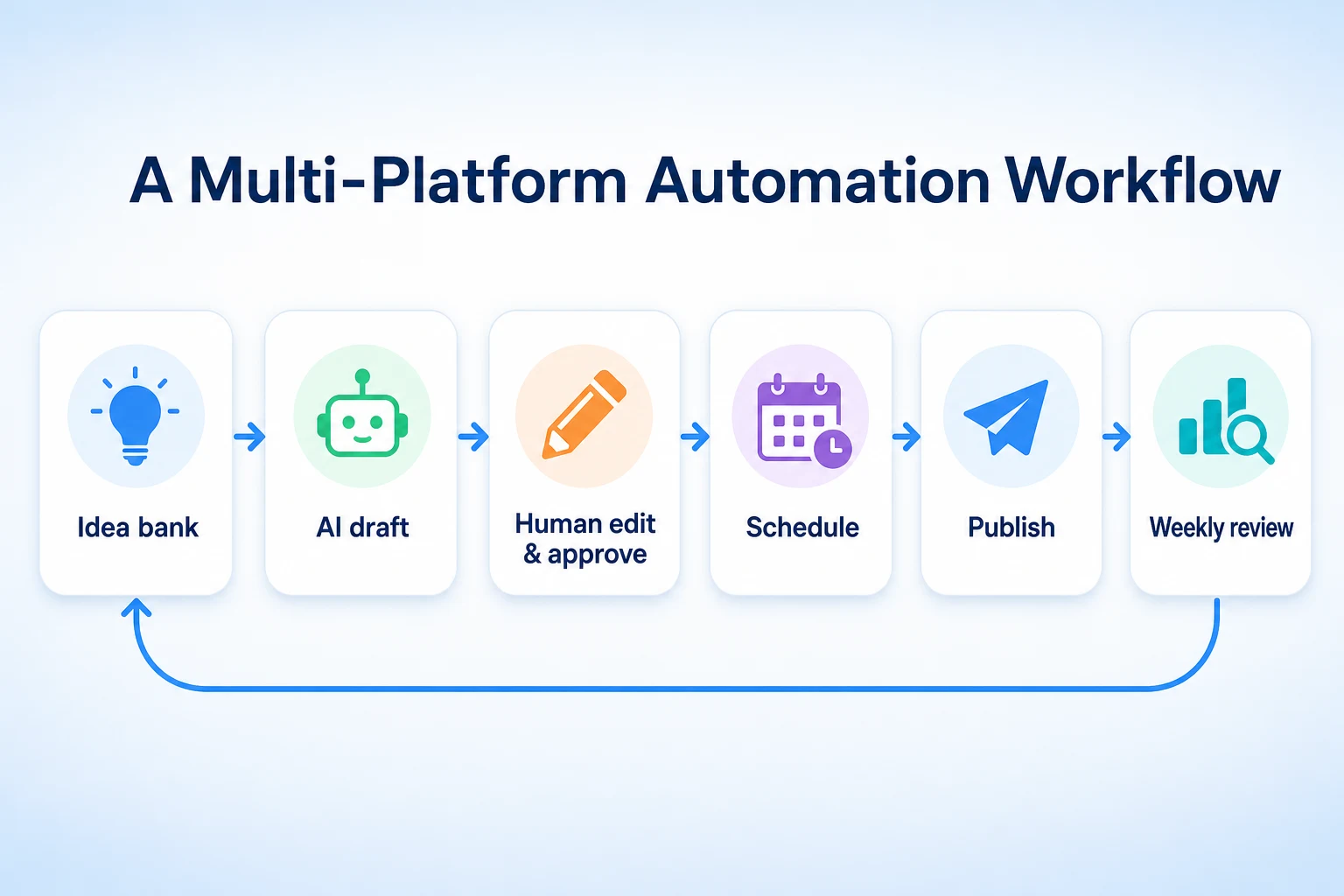
Running a separate planning process for each platform is one of the fastest ways to burn out a one-person marketing effort. A single workflow that branches out near the end tends to hold up better.
A single source of truth
Start every piece of content from one place, a document, a content calendar, a folder of approved photos, rather than drafting each platform's version independently. Deciding the core message once, what this post is actually about, and writing that down before touching any platform-specific format keeps every version grounded in the same idea instead of drifting into unrelated posts that happen to go out the same week.
Adjusting format and tone per platform
Once the core message exists, adjusting it for each platform is a smaller task than creating it fresh each time. A LinkedIn version usually needs more context and a more measured tone. A TikTok version needs a hook in the first few seconds and almost no setup. An Instagram caption sits somewhere between the two, short but a little more personal than LinkedIn's. Keeping the adjustments to format and tone, rather than changing the underlying point being made, is what lets one piece of planning turn into several posts without feeling like a different business wrote each one.
Performance Analysis: What Automated Reporting Can and Can't Tell You
Most scheduling tools now bundle in some kind of reporting dashboard, pulling likes, comments, shares and follower counts from several platforms into one screen. That part is genuinely useful, and it's one of the easier tasks to hand over entirely.
A dashboard can tell you that Tuesday's carousel got more saves than Thursday's video, or that engagement on Facebook has been flat for a month while Instagram has climbed. It can't tell you why. A post might have done well because the hook was strong, because it happened to post right after a local news story made the topic relevant, or because a single well-followed customer shared it. An automated report shows the pattern. Working out the cause still takes a person who knows the business and remembers what else was happening that week.
That's also where a report earns its keep over time rather than in any single week. One strong post doesn't prove much on its own. A pattern across a month, say customer story posts consistently outperforming promotional ones across two or three platforms, is worth acting on. Our breakdown of LinkedIn post analytics 2026 goes into how saves, sends and reach get measured on that platform specifically, which matters before comparing a LinkedIn number directly against an Instagram one, since the two platforms don't measure the same things the same way.
Authentic Engagement, Copyright and Brand Consistency
A few parts of social media automation cause more harm than the time they save. These are worth understanding clearly before any tool touches them.
Why automated replies tend to backfire
A comment or a direct message is usually a real person asking a real question, and an automated reply that misses the point, or answers a different question than the one asked, reads as worse than no reply at all. It's also the kind of mistake that gets screenshotted. A chatbot that handles a simple, repeated question, store hours, an address, can be useful as a first line, as long as it clearly hands off to a person the moment a question gets specific. Anything that imitates a founder or a staff member personally responding, without a person actually behind it, risks damaging the trust that made someone comment in the first place.
Copyright: what to check before posting an AI image
An AI-generated image carries questions that a photo taken on your own phone doesn't. Where the training data for an image tool came from, and what rights a business actually has to use the output commercially, is something each tool's own terms of service addresses differently, and it's worth reading those terms rather than assuming an image is automatically free to use however you like. A generated image representing something that isn't real, a product that doesn't exist, a result that didn't happen, also risks misleading a customer, which is a separate problem from copyright and arguably a bigger one for a small business that depends on trust. Using a template tool on a real photo, covered earlier in this guide, avoids both problems at once.
Keeping one voice across several tools
Once scheduling, drafting and reporting run through different tools, it's easy for the actual voice of the business to drift, one tool's caption style leaning more casual, another's more formal, with nobody comparing them side by side. A short written brand voice note, three or four sentences on tone, a few words the business never uses, one example caption that sounds right, gives every tool and every person touching the accounts the same reference point. It takes an hour to write once and saves a lot of small inconsistencies later. Our guide to AI bots on social media covers this in more depth, including where an automated presence helps a brand and where it quietly undermines it.
Manual vs. Automated: A Worked Comparison for One Week
Numbers make the trade-off easier to see than a general description does. This comparison is illustrative, not a record of a real business's week.
A worked example: one week, two ways
Picture a small landscaping business running the same week of social media twice, once fully manual and once with the automation covered in this guide applied to the repeatable parts.
Task | Manual workflow | Automated workflow | Time estimate |
|---|---|---|---|
Coming up with the week's topics | Stares at a blank calendar each Sunday | AI draft list generated from the website, edited for the week | 45 minutes manual, 15 minutes automated |
Writing captions | Writes each caption from scratch | AI drafts, owner edits for voice and detail | 60 minutes manual, 25 minutes automated |
Scheduling posts across platforms | Logs into each app at the planned time | Scheduled once through a connected tool | 30 minutes manual, 10 minutes automated |
Replying to comments | Owner replies personally | Owner replies personally | 20 minutes either way |
Pulling the week's numbers together | Checks each platform's app separately | One dashboard shows all platforms | 20 minutes manual, 5 minutes automated |
These figures are illustrative.
The automated week doesn't skip any step that needs a person. It just removes the slow, repeatable parts, drafting from nothing and checking four separate apps, while leaving replies and final edits exactly where they were. That's roughly the shape automation takes for most small businesses once it's set up properly.
A 30-Day Checklist to Set Up Social Media Automation
Reading about automation and actually having a working setup are two different things. This checklist turns the ideas in this guide into four weeks of concrete tasks, in the order that makes sense to do them.
Week 1: audit what you're actually doing now
Before adding any tool, spend a week writing down what actually happens today: which platforms get posted to, how often, who writes the captions, who picks the photos, and roughly how long each task takes. Most small businesses find this part surprising, since the real pattern rarely matches what they assumed. This audit also surfaces the task that's eating the most time, which is usually the one worth automating first.
Week 2: pick tools and build templates
Choose one scheduling tool that connects to the platforms you actually use, rather than the one with the longest feature list. Write the short brand voice note described earlier in this guide, three or four sentences on tone plus one example caption. Build two or three visual templates for the platforms where a consistent look matters most, so photos go into a frame rather than getting posted raw each time.
Week 3: automate the repeatable parts
Connect the scheduling tool to each account, following whatever business account setup that platform requires. Run one week's worth of topics through an AI ideation prompt, draft the captions, apply the templates, and schedule the batch in one sitting instead of posting day by day. Leave replies, DMs and final approval exactly where they were, with a person checking every draft before it goes live.
Week 4: review and adjust
Pull the week's numbers into one report and compare them against the audit from week one, specifically on time spent rather than just engagement. Note which parts of the new workflow actually saved time and which ones took longer than expected to set up or still needed heavy editing. Adjust the templates and prompts based on that, then repeat the cycle the following month with a smaller setup burden each time.
Week | Focus | Key tasks |
|---|---|---|
Week 1 | Audit current workflow | Log platforms, frequency, time spent per task |
Week 2 | Pick tools and build templates | Choose a scheduling tool, write a brand voice note, build two or three visual templates |
Week 3 | Automate the repeatable parts | Connect accounts, draft and schedule a full week's posts in one sitting |
Week 4 | Review and adjust | Compare time saved against the week 1 audit, adjust templates and prompts |
Where RepGet fits
RepGet doesn't schedule posts to Instagram, TikTok, LinkedIn or any other platform, and it doesn't reply to comments or manage a posting calendar for you. The work covered in this guide, choosing a scheduling tool, connecting accounts, writing the brand voice note, still sits with you.
Where it can help is at the content end of that workflow. RepGet's free AI Social Media Post Generator turns one page from your website into a handful of draft posts to edit and share, which is a quick way to fill the week 3 batch described above without starting from a blank prompt. RepGet also brings website auditing, keyword research, content planning, article writing and publishing into one workflow, and since a lot of social posts end up pointing back to the website, it's worth checking that the site itself holds up before sending a month of automated traffic its way. RepGet's free website audit crawls the site and gives it a 0 to 100 SEO score, with the technical and content issues worth fixing listed out. No account or credit card required. RepGet doesn't guarantee that any post, on any platform, will get seen, saved or clicked, and nothing here replaces the judgment calls covered throughout this guide.
The bottom line
Social media automation for a small business works best as a set of specific tools applied to specific tasks, not a single switch that runs the account on its own. Scheduling, first-draft captions, repurposing and reporting are mechanical enough to hand over, as long as a person checks the result before it goes live. Replies, approvals and anything that imitates a real conversation need to stay with a person, since that's exactly the part customers notice when it's missing.
Start small: automate one repeatable task, run it for a month, and only add the next one once the first is genuinely saving time rather than creating a new kind of busywork. A workflow that saves two hours a week and still sounds like your business beats one that saves five hours and quietly stops sounding like anyone at all.
Find out what your website needs first
Run a free website audit with RepGet to check whether the site your automated posts link back to is ready for the traffic they send. No account or credit card required.
FAQ
What parts of social media marketing can I automate as a small business?
Scheduling, first-draft captions, repurposing a blog post into platform posts, and pulling metrics into one report are all safe to automate, as long as a person still checks the result before it posts.
Is it safe to automate replies and comments on social media?
Not reliably. Automated replies often miss the point of a real question, and the mistake tends to get noticed and screenshotted, so replies and DMs are better left to a person.
Can AI actually write good social media captions?
It can write a usable first draft fast, especially with a specific prompt naming the platform, tone and a real detail. It rarely sounds like your business without a human edit pass first.
Do social media scheduling tools post directly to Instagram and TikTok?
Yes, through each platform's official API, which usually requires a business account and periodic reauthorization. A lapsed connection, not rejected content, is the usual reason a scheduled post doesn't go out.
Can I use AI-generated images for my business's social posts?
It depends on the use. A generated image works for an abstract or seasonal graphic, but using one to represent a real product or result risks misleading customers and raises copyright questions worth checking first.
How much time does social media automation realistically save?
It varies by business, but the time saved usually comes from cutting drafting and scheduling busywork, not from skipping replies or approval, which still take roughly the same time either way.
What's the difference between automating social media and outsourcing it?
Automation hands repeatable tasks to tools while you keep control of ideas and approval. Outsourcing hands the whole job, including judgment calls, to another person or agency.
Comments
0 shownShare your thoughts about this article.
New to RepGet? Create a free account to join the conversation.
No comments yet. Be the first to leave one.