

LinkedIn Growth Strategy for Founders: From Visibility to Leads
Short answer
A LinkedIn growth strategy for founders combines a profile optimized around who you help, three or four content pillars, founder stories and educational posts with strong hooks, and intentional commenting. Convert that visibility into leads with soft calls to action pointing to your website, not direct pitches. It takes weeks of consistent posting, not one viral post, and nobody can guarantee follower counts or lead volume.
A SaaS founder posts on LinkedIn every few weeks, gets a handful of likes from the same ten people, and can't tell if any of it is reaching someone who might actually buy.
He's seen other founders in his space with thousands of followers and comment sections full of strangers asking questions.
He doesn't want to become an influencer. He wants the right person, a potential customer, a partner, an investor, to land on his profile and come away thinking this person knows what they're talking about.
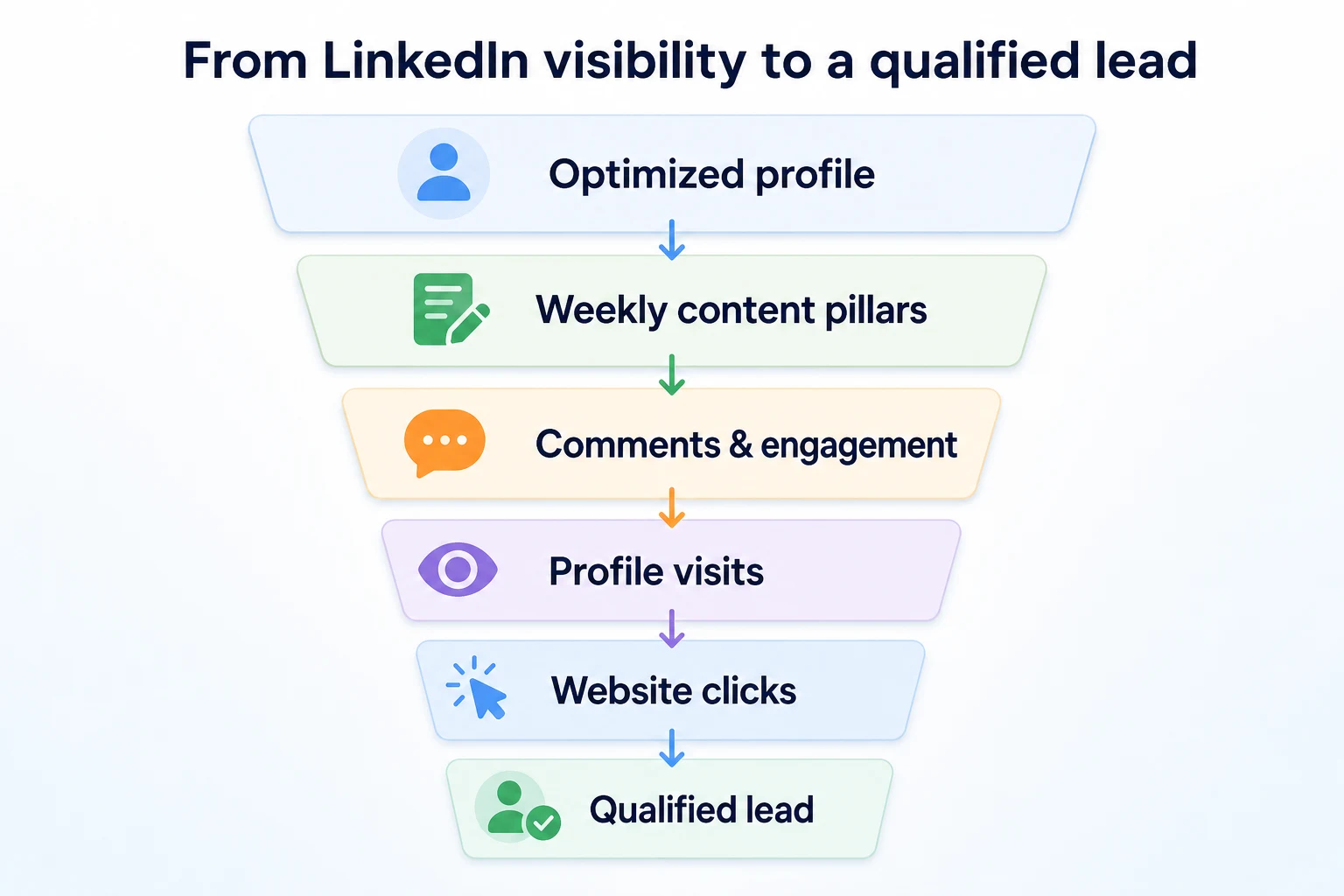
That's a different goal than growing a number, and it changes what a LinkedIn growth strategy for founders should actually look like. Here's how to build a profile, a content system and a posting rhythm that turns quiet visibility into people who actually click through to your website.
What a LinkedIn Growth Strategy Actually Means for a Founder
Most LinkedIn advice is written for people trying to build a personal media brand. A founder has a narrower, more useful goal: get in front of the specific people who could become customers, partners or hires, and give them a reason to trust you before they ever talk to you.
Why generic 'post more' advice doesn't work for founders
Posting daily with no plan tends to produce the same handful of generic tips everyone else is already posting. It also burns out a founder who already has a company to run. The volume isn't the problem. The lack of a system behind it is.
A founder doesn't need to out-post anyone. They need three or four things to say that actually connect to the business, and a repeatable way to say them.
What growth should actually mean here
Follower count is the easiest number to watch and usually the least useful one. A profile with two thousand followers in exactly the wrong industry is worth less than one with three hundred in the right one. The numbers that actually matter for a founder are profile visits from people who fit the business, clicks through to the website, and conversations that start because someone read a post first. LinkedIn's own Help Center describes its feed as ranking posts based on relevance to the people seeing them, not on raw volume, which is part of why a smaller, specific audience tends to serve a founder better than a large, scattered one.
Personal Profile vs Company Page: Where to Actually Post
This decision trips up a lot of founders early on, usually because a company page feels more official. For most of the work in this guide, it's the wrong default.
Why LinkedIn's feed tends to favor personal profiles
People connect with people, not logos. A post from a founder's personal profile tends to reach further into the feed than the same post from a company page, partly because connections and followers on a personal profile are often more engaged to begin with. It also reads as a real opinion from a real person, which is exactly what builds the trust a founder is after.
What the company page still does well
A company page isn't wasted effort. It's where a prospect checks after meeting a founder, to confirm the business is real, see who else works there, and read official updates like product launches or hires. It's a credibility check, not a growth engine.
Aspect | Personal profile | Company page |
|---|---|---|
Typical reach | Higher, especially for posts with a personal angle | Lower, often limited to existing followers |
Tone | Personal, opinionated, story-driven | Formal, informational, brand-level |
Posting frequency | A few times a week, sustainably | Less often, mainly for announcements |
Best suited for | Building trust, stories, educational posts, networking | Product news, hiring posts, proof the company exists |
Optimizing Your Profile Before You Post Anything
A great post sends a stranger to a profile that hasn't been touched in two years. That's a wasted click. Before posting regularly, the profile itself needs to do its job.
A headline that says who you help, not your job title
"Founder & CEO" tells a visitor nothing about whether you're relevant to them. A headline built around who you help and what problem you solve does far more work. Something like "Helping ecommerce brands cut returns with better sizing data" tells a visitor in one line whether to keep reading.
An About section structured like a case for working with you
The About section is read by people who are already curious, so it can go further than the headline. A structure that tends to work: the problem you noticed, what you built or do about it, and who it's for. It doesn't need to sell. It needs to make the case clearly enough that the right person recognizes themselves in it.
Using the Featured section as proof
The Featured section sits right under the About text and is one of the most skipped parts of a profile. Pinning a strong past post, a product page, or a short case study here gives a visitor something concrete to look at instead of taking your word for it.
Choosing Your Content Pillars
Staring at a blank post box is where most founders quietly give up on LinkedIn. Content pillars fix that by giving every post a home before it's written.
Four pillars that work for most founders
Four recurring themes are usually enough: a founder story pillar, an educational pillar, a behind-the-business pillar, and an industry commentary pillar. Rotating between them means never starting from nothing, and it keeps the feed from turning into one repeated kind of post.
Pillar | Purpose | Example topics |
|---|---|---|
Founder story | Builds trust through a real decision or mistake | Why we changed pricing; a hire that didn't work out |
Educational | Shows expertise without pitching | A framework for evaluating vendors; a checklist readers can reuse |
Behind the business | Humanizes the company | A customer conversation that changed the roadmap; a small team win |
Industry commentary | Positions you in the wider conversation | A reaction to a platform change; a trend you're watching |
Rotating pillars without repeating yourself
A simple weekly rotation, one pillar per post across three or four posts a week, keeps the feed varied without any real planning overhead. Our social media content calendar guide has a full structure for mapping pillars onto specific days, which is worth borrowing directly rather than building from scratch.
Founder Storytelling: What to Share and What to Leave Out
A founder's story is the one kind of content nobody else can copy. It's also the pillar most founders get wrong, either oversharing in a way that feels staged or underselling real moments because they seem too ordinary to post.
What's worth sharing
The posts that tend to land are the ones built around a decision, a mistake, or a moment where something changed. A pricing change and why you made it. A customer conversation that reshaped the roadmap. A hire that didn't work out and what you'd do differently. These aren't confessions, they're evidence that you've actually run into the problems your audience is facing, which is exactly what makes a stranger trust your opinion on anything else you post.
What to leave out
Not everything personal belongs on a company-adjacent profile. Internal conflicts that involve a named team member, numbers you haven't cleared with a co-founder or investor, and anything that reads as a complaint about a customer are worth leaving out, regardless of how well they might perform. A good rule: if the post would make a current customer or employee uncomfortable reading it, it's not ready to post, no matter how honest it is.
A worked example: turning one decision into a post
Imagine a founder who raised prices by 20 percent after realizing the lowest tier was attracting customers who needed the most support. The post doesn't open with the price change. It opens with the problem: a support queue that kept growing from customers who were never going to upgrade. It walks through what that revealed about who the product was actually built for, then the decision, then what happened after. The price itself is almost incidental to the post. The reasoning is the part worth reading, and it's the part that makes a reader in a similar spot pay attention to everything else that founder posts next.
Educational Posts That Build Authority Without Selling
An educational post is the easiest pillar to get right and the easiest to ruin by turning it into a disguised pitch halfway through.
Frameworks and checklists beat generic tips
"Three tips for better onboarding" is forgettable because anyone could have written it without ever running a business. A named framework, a repeatable sequence with its own structure, holds attention longer and gets saved more often, because it gives a reader something they can actually apply rather than something they nod along to and scroll past.
Teaching the thing you'd normally charge for
The instinct to hold back the useful part of your expertise, saving it for a paid call or a proposal, usually backfires on LinkedIn. Giving away a genuinely useful piece of thinking, the exact checklist you use to vet a vendor, the three questions you ask before signing a new hire, does more to prove expertise than any amount of vague positioning. The people who read it and do it themselves were rarely going to hire you anyway. The ones who read it and think "I don't have time to do this properly" are the ones who reach out.
Hooks and Post Structure That Get Posts Read
LinkedIn only shows the first two or three lines of a post before a reader has to click "see more." Everything about whether a post gets read comes down to that first line.
Five hook patterns worth testing
A hook doesn't need to be clever. It needs to create a small gap, a question the reader wants answered, or a claim specific enough that it demands a second look.
Pattern | Example opening line | Why it stops the scroll |
|---|---|---|
The contrarian claim | "Most founders are overthinking their LinkedIn strategy." | Challenges an assumption the reader already holds |
The specific number | "We lost our third biggest customer over one email." | A concrete detail reads as more credible than a vague tease |
The direct question | "Why do most SaaS trials never convert?" | Invites the reader to answer in their own head before clicking further |
The mistake admission | "I ignored this metric for a year. That was a mistake." | Honesty about failure reads as rare and worth the extra click |
The short, blunt statement | "Your onboarding email is too long." | Simple enough to register instantly while scrolling on a phone |
The structure that holds attention after the hook
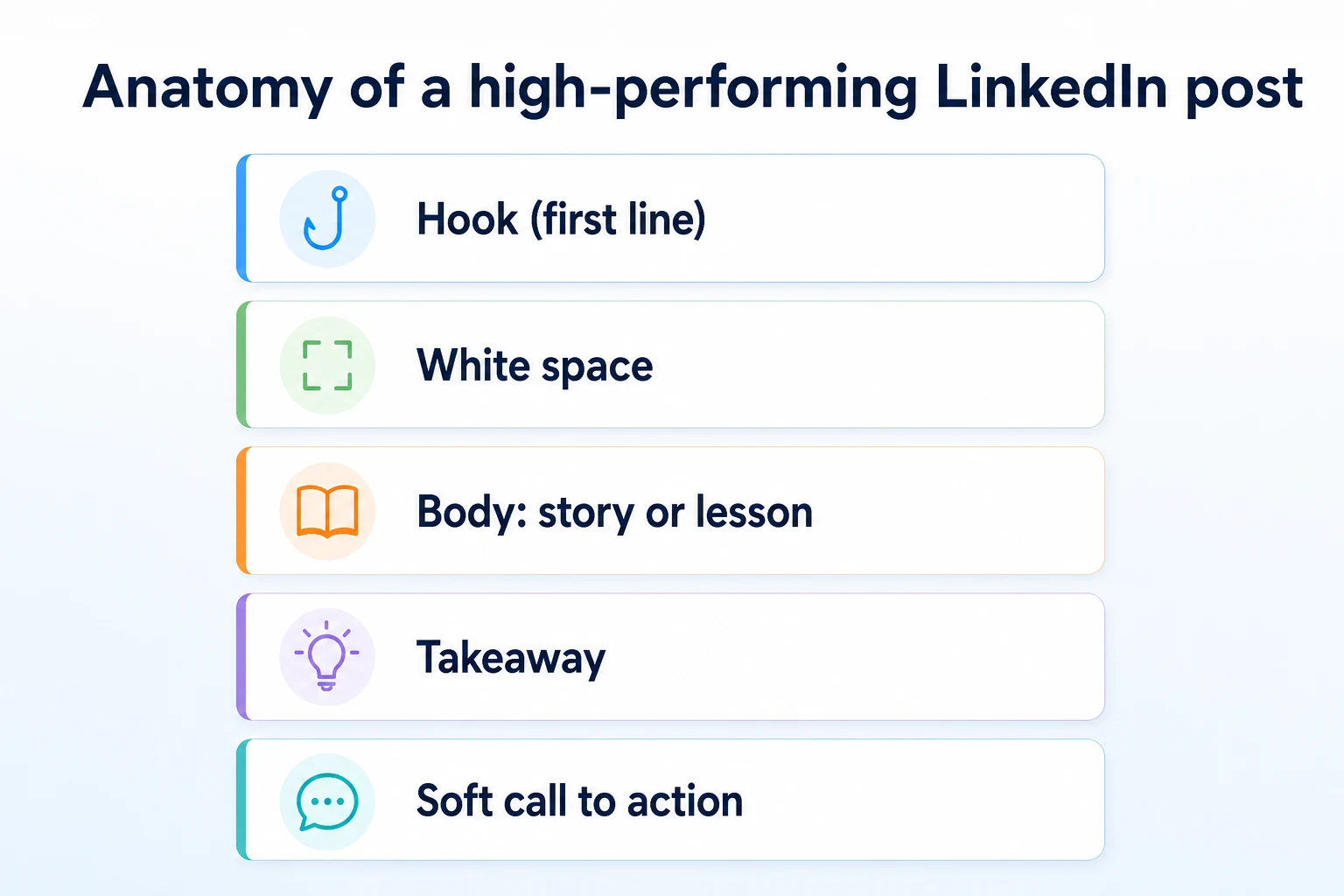
Once the hook earns the click, the rest of the post needs to keep its promise. A reliable shape: the hook, a line of white space, the story or lesson itself told in short lines, a clear takeaway stated plainly, and a soft call to action at the end. Skipping the takeaway is a common mistake. A reader who finishes a story without a stated lesson often leaves without being sure what they were supposed to get from it.
Formatting for a feed read mostly on a phone
Most LinkedIn reading happens on a phone screen, where a dense paragraph looks like a wall of text before anyone reads a word of it. Short lines, generous line breaks, and the occasional one-sentence paragraph make a post feel readable before the reader commits to reading it. A post with real substance can still get skipped if it looks exhausting on a six-inch screen.
Networking and Comments: Growing Reach Without Posting More
A founder who can only manage two posts a week isn't stuck at two posts a week of visibility. Commenting well on other people's posts reaches people who've never seen your profile, often faster than publishing does.
What a meaningful comment looks like versus a generic one
"Great post!" does nothing for anyone. It doesn't add to the conversation, and it doesn't give the original poster's audience a reason to click through to the person who wrote it. A comment that adds a specific detail, disagrees respectfully, or extends the point with an example from your own experience does the opposite. It shows up under someone else's post with your name attached to an actual thought, which is often how a stranger discovers a founder's profile in the first place: not through a post of theirs, but through a comment that said something worth reading.
A useful test before posting a comment: would this sentence make sense pasted under a different post too? If it would, it's generic enough to skip. A comment that only makes sense under this specific post, responding to this specific point, is the one worth the thirty seconds it takes to write.
Who to actually spend time engaging with
Commenting everywhere spreads the same effort too thin to matter anywhere. A shorter, more deliberate list works better: a handful of people whose audience overlaps with your own target customers, a few peers in adjacent industries who might become referral partners, and the specific prospects or past customers you already know by name. Fifteen minutes spent on five thoughtful comments under the right posts usually does more for visibility than the same fifteen minutes spent writing a sixth post nobody asked for. Our breakdown of LinkedIn post analytics 2026 covers how saves, sends and reach actually get measured on the platform, which is worth reading before assuming a quiet comment thread means nobody noticed it.
Turning Visibility Into Website Visits and Qualified Leads
Posts and comments build trust. On their own, they don't send anyone to a website. That handoff needs to be built deliberately, or it never happens at all.
Soft CTAs that don't feel like selling
A hard pitch at the end of an educational post undoes most of the trust the post just built. A softer close works better: naming where the full framework, template or checklist lives, and inviting anyone who wants it to ask in the comments or check the Featured section on the profile. This does two things a direct link in the post itself usually doesn't. It keeps the post itself free of an outbound link, which tends to read as less promotional in the feed, and it turns interest into a visible comment, which is itself a form of engagement that helps the post reach further.
Getting the click from LinkedIn to your website
The actual click usually happens in one of three places: the Featured section discussed earlier in this guide, the single link allowed in a profile's About section, or a reply left under a comment asking for more detail. None of these require an outbound link inside every post. A founder who pins one strong, evergreen piece in Featured and keeps the About section's link current gives every single post, old or new, a consistent path back to the website, rather than hoping each individual post happens to include the right link at the right moment.
What makes a LinkedIn lead actually qualified
A click isn't a lead. A qualified lead from LinkedIn is someone who fits the actual customer profile, arrived because a specific post or comment gave them a reason to look closer, and takes a next step beyond scrolling past, visiting a service page, reading a case study, replying to a message. Tracking which posts actually produce that kind of visit, rather than which ones got the most likes, is what separates a founder who's building a pipeline from one who's just building an audience. LinkedIn itself doesn't publish a lead conversion rate for organic posts, and nobody else can promise one either. What's realistic to expect is a slow, compounding trickle of the right kind of attention, not a predictable number of leads per post.
A 30-Day LinkedIn Publishing Plan for Founders
Everything above is easier to use as a system than as a list of ideas to remember. A month-long plan turns it into a routine.
Week 1: profile and pillars
Rewrite the headline and About section using the structure covered earlier in this guide. Pin one strong piece to the Featured section. Pick the four content pillars and write down two or three topics under each, so week 2 starts with a list rather than a blank page.
Week 2: finding your hooks
Draft the first week's three posts, one per pillar, each starting from one of the five hook patterns covered earlier. Spend fifteen minutes a day leaving thoughtful comments on five posts from the engagement list built earlier, rather than posting yet.
Week 3: posting and commenting rhythm
Publish three to four posts this week, rotating pillars, and keep the daily comment habit running alongside them. This is usually the week a founder notices whether the hook and structure work are actually landing, based on which posts get read past the first line.
Week 4: review and adjust
Look back at which posts got genuine comments versus passive likes, and which pillar performed best. Adjust the next month's topic list based on that rather than the original guesswork from week 1.
Day | Pillar in rotation | Post type | Action |
|---|---|---|---|
Monday | Founder story | A decision or mistake, told with a takeaway | Publish and reply to every comment within the first hour |
Tuesday | No post | Comment day | Five thoughtful comments on the engagement list |
Wednesday | Educational | A named framework or checklist | Publish and mention the full version lives in the Featured section |
Thursday | No post | Comment day | Five thoughtful comments, plus one direct message to a prospect from the list |
Friday | Behind the business | A small team or customer moment | Publish, then review the week's comment replies for leads worth following up |
This weekly pattern is illustrative and can be adjusted to the pillars and days that fit your own week.
Using AI to Plan Content Without Losing Your Founder Voice
Four content pillars and a 30-day plan still mean coming up with a new angle most weeks. This is where AI tools genuinely help, as long as the founder's actual voice goes in by hand before anything publishes.
Where AI speeds up the planning
Turning one pillar into a week's worth of topic ideas, or drafting a first version of a post from a few bullet points, is the kind of mechanical task AI handles quickly. RepGet's free AI Growth Copilot lets you ask a handful of growth questions a day, free and without signup, which is a reasonable way to test an angle or a hook before committing time to drafting it fully. RepGet's free AI Social Media Post Generator can turn one page from your website, a service page, a case study, a blog post, into a handful of draft posts to edit, which solves the blank-page problem on a week when nothing in the news cycle or the business gives you an obvious topic.
What still needs your specific voice
A generated draft reads like it could belong to any founder in the industry until a real decision, a real number, or a real customer detail fills it in. The mistake you actually made, the exact figure in the pricing change, the name of the framework you use, none of that comes from a prompt. Treat an AI draft the same way you'd treat a template: useful for structure and pacing, but not finished until it only sounds like you. A post that could have been written by a competitor with the same prompt isn't doing the job a founder's post is supposed to do.
Where RepGet fits
RepGet doesn't post to LinkedIn, write your founder story for you, or manage your personal brand. The judgment calls covered in this guide, which story to tell, which comment to leave, how to word a soft call to action, stay with you.
Where it helps is on the other side of the click. Once a post sends someone to your website, RepGet brings website auditing, keyword research, content planning, article writing and publishing into one workflow, so the pages a LinkedIn visitor lands on are worth the visit. Articles RepGet writes can stay as drafts for you to review before anything goes live, which matters if a founder post points to a service page or an article that hasn't been checked in a while. RepGet's free website audit crawls the site and gives it a 0 to 100 SEO score, with the technical and content issues worth fixing listed out. No account or credit card required. RepGet doesn't replace Google Business Profile, Search Console or your own judgment, and it doesn't guarantee rankings, traffic or that any LinkedIn post will turn into a lead.
The bottom line
A LinkedIn growth strategy for founders isn't a trick for going viral. It's a profile that says plainly who you help, a handful of content pillars you rotate instead of staring at a blank box, and a habit of commenting with something real instead of posting alone and waiting.
Visibility only becomes a lead when the handoff is built on purpose: a soft call to action, a current Featured section, a website on the other end that's actually ready for the visit. None of this happens from one post. It happens from weeks of the same system run consistently, reviewed honestly, and adjusted based on what the comments and clicks actually show, not on a follower count that was never the real goal.
Find out what your website needs first
Run a free website audit with RepGet to check whether the site your LinkedIn posts point to is ready for the visitors they send. No account or credit card required.
FAQ
How often should a founder post on LinkedIn?
Three to four posts a week, rotating through content pillars, is sustainable for most founders. Consistency over months matters more than hitting a higher number for a few weeks and stopping.
Should I post from my personal profile or my company page?
Post from your personal profile for stories, education and networking, since it tends to reach further. Use the company page for announcements and as a credibility check prospects visit afterward.
What should a founder's LinkedIn headline say?
It should name who you help and the problem you solve, not just your title. A visitor should know in one line whether your profile is relevant to them.
How do I write a LinkedIn post that doesn't sound like selling?
Lead with a real story, mistake or lesson, state the takeaway plainly, then close with a soft invitation rather than a pitch, like naming where a related resource lives in your Featured section.
How long does it take to see results from a LinkedIn growth strategy?
It varies by industry and audience. Expect weeks of consistent posting and commenting before patterns show up, and treat any specific timeline or guaranteed lead number with skepticism.
Can AI tools help me plan LinkedIn content?
Yes, for topic ideas and first drafts. Tools like RepGet's AI Growth Copilot and Social Media Post Generator speed up planning, but your specific details and voice still need a human edit before posting.
What counts as a qualified lead from LinkedIn?
Someone who fits your actual customer profile, arrived because a specific post or comment gave them a reason to look closer, and takes a next step beyond scrolling, like visiting a service page.
How do I get comments and engagement on LinkedIn without a big following?
Leave specific, thoughtful comments on posts from people whose audience overlaps with your target customers. That often brings visibility to your profile faster than posting alone does.
Comments
0 shownShare your thoughts about this article.
New to RepGet? Create a free account to join the conversation.
No comments yet. Be the first to leave one.