

Perplexity Computer Ecommerce: Shopify, Meta Ads and Klaviyo
Short answer
On November 3, 2026, Perplexity announced ecommerce workflows under Perplexity Computer that connect to Shopify, Meta Ads and Klaviyo, so a store owner can ask about sales data, review ad performance and trigger marketing actions in one place. Perplexity hasn't published full details on pricing, availability or exactly which actions are automated, so the real value depends on testing it against your own store's accounts.
A Shopify store owner opens Perplexity one morning and finds a prompt asking if she wants to connect her store, her ad account and her email platform directly to the assistant.
She's used Perplexity before, mostly to ask quick questions and get a summary back.
This feels different. It's asking for access to the accounts her business actually runs on.
She's not sure what happens if she says yes, or what she'd be handing over control of.
That's the real question behind Perplexity Computer ecommerce: what does connecting Shopify, Meta Ads and Klaviyo to Perplexity actually let it do, and what should a store owner check before agreeing to any of it. Here's what Perplexity announced on November 3, how the pieces fit together, and where the limits sit.
What Perplexity Announced on November 3
On November 3, 2026, Perplexity announced a set of ecommerce workflows built on Perplexity Computer, its agentic layer that can act inside connected apps rather than only answer questions in a chat window. The announcement described these workflows as linking a store's Shopify account, its Meta Ads account and its Klaviyo account so a store owner can work with sales data, advertising and marketing automation from one place.
The three platforms it connects to
Perplexity named three specific platforms as part of this release: Shopify for the store itself, Meta Ads for advertising on Facebook and Instagram, and Klaviyo for email and SMS marketing. These are three of the more widely used tools among small and mid-sized online stores, which is likely why Perplexity chose them for this first round of connections rather than a broader or more generic set of integrations.
Why Perplexity is moving into ecommerce
Perplexity has been expanding Perplexity Computer's reach into tasks that go beyond answering a question, and ecommerce is a natural next step for that kind of agentic product. A store owner juggling sales reports in one tab, ad performance in another and email campaigns in a third is exactly the kind of fragmented workflow an assistant that can act across connected apps is built to simplify. Perplexity hasn't published a stated reason for the timing of this particular announcement beyond presenting it as part of its ongoing work on Perplexity Computer.
What Perplexity Computer Actually Is
Before getting into what the ecommerce workflows do, it's worth being clear about what Perplexity Computer is, since it's a different product from the search assistant most people associate with Perplexity's name.
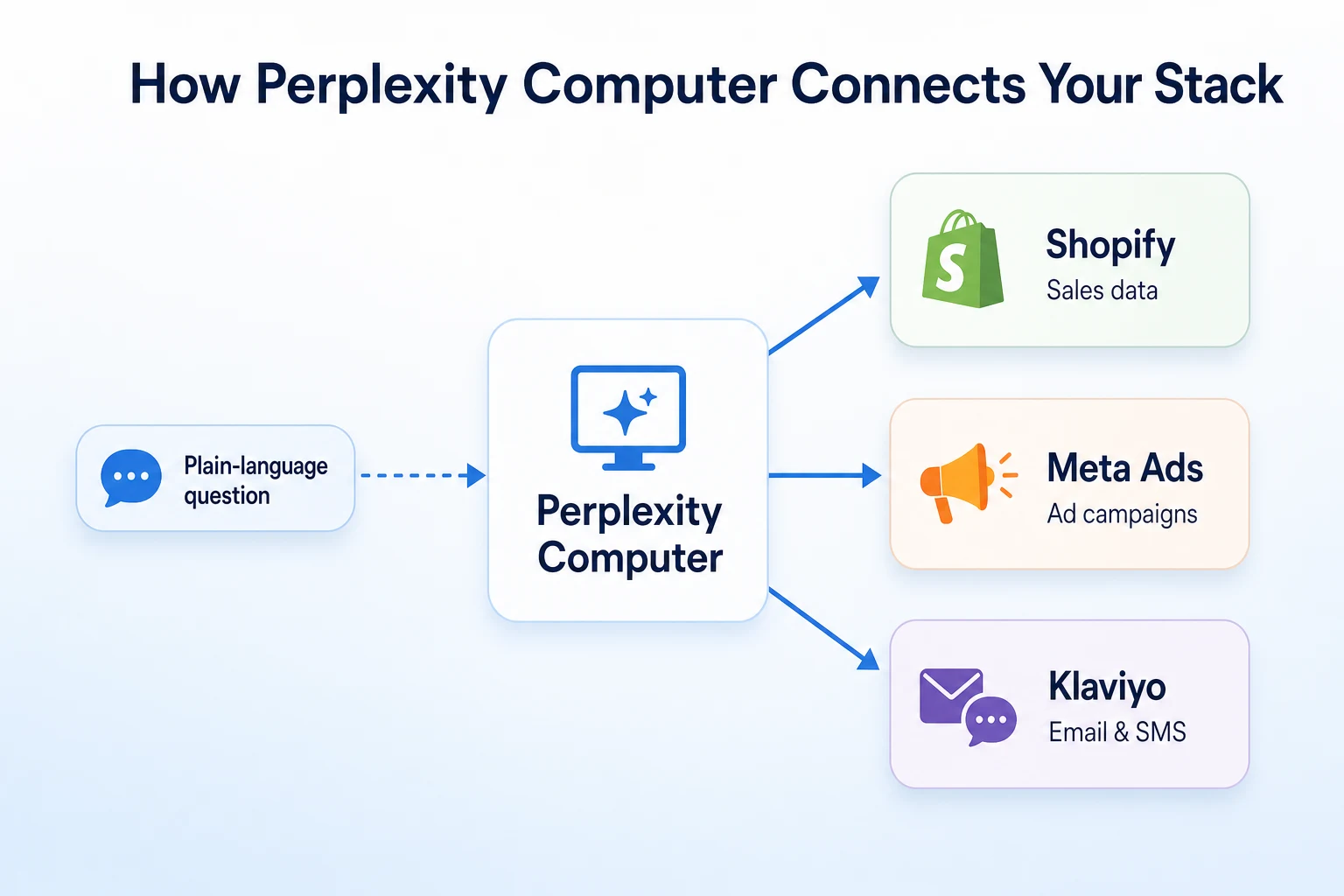
From answering questions to taking action
Perplexity's regular assistant answers a question and cites sources. Perplexity Computer is described as able to go further: carrying out tasks inside apps a user has connected to it, rather than stopping at a summary or an answer. That distinction matters here, because the ecommerce workflows aren't just about asking Perplexity questions about your store. They're about Perplexity being able to look inside connected accounts and, depending on what's set up, act on them.
What 'connected' means in practice
Connecting an account to Perplexity Computer means granting it some level of access to that account's data, and in some cases the ability to make changes within it. Perplexity hasn't published a full technical breakdown of exactly what permissions each connection requests for Shopify, Meta Ads and Klaviyo individually. What's clear from the announcement is that the point of connecting these three platforms is to let a store owner work across them through Perplexity rather than switching between three separate dashboards, which is a meaningfully different arrangement from a one-off question answered in a chat window.
The Shopify Connection: Sales Analysis in Plain Language
Of the three connections, Shopify sits closest to the core of the business: the store itself, its products, its orders and its customers.
Questions you could ask about your store
With Shopify connected, Perplexity's description of the workflow suggests a store owner could ask plain-language questions about sales and get an answer pulled from the store's actual data, rather than building a report inside Shopify's own analytics first. Something like asking which product sold best last week, or whether a particular item is running low on stock, fits the kind of question this connection is built to answer. For a store owner who finds Shopify's native reporting slower to dig through than a direct question, that's a real convenience, assuming the connection is working as described.
What Shopify access probably includes
Perplexity hasn't published the exact scope of data access the Shopify connection requests, so it's worth checking the specific permissions shown at the point of connecting rather than assuming what's included. A sensible approach is to review what access is being granted before approving it, the same way you'd check any third-party app asking to connect to a Shopify store. Our piece on the Shopify AI agent covers a related question worth reading alongside this one: what an AI agent connected to a Shopify store can and can't do for a business's SEO, which is a separate concern from the sales analysis Perplexity Computer is aimed at here.
The Meta Ads Connection: Reviewing and Adjusting Campaigns
The second connection brings advertising into the same workflow, and it's the one that raises the clearest question about how much control a store owner is handing over.
Checking ad performance through Perplexity
With Meta Ads connected, the announcement describes being able to ask about campaign performance directly, things like spend, reach or which ad is outperforming the others, without opening Meta's own ads manager. That's a reasonable, low-risk use of the connection on its own, since checking performance doesn't change anything in the account.
Where a person still needs to approve changes
Perplexity's description of the workflow goes further than reviewing, suggesting the connection can also be used to adjust campaigns, not just report on them. That's where a store owner needs to be more careful. Perplexity hasn't published a full account of which changes happen automatically versus which ones require a person's confirmation first, so the safer assumption is to treat any suggested change to budget, targeting or an ad itself as something to review before it takes effect, not something to leave running unattended. Our guide to Meta AI ads covers the broader question of how much automated decision-making is worth trusting with a real advertising budget, and the same caution applies here regardless of which assistant is making the suggestion.
The Klaviyo Connection: Marketing Automation
The third connection brings email and SMS marketing into the same workflow, which rounds out the set: sales data from Shopify, advertising from Meta Ads, and now the channel most stores use to follow up with customers directly.
What marketing automation through Perplexity could look like
With Klaviyo connected, Perplexity's description of the workflow points to asking about campaign performance, things like open rates or how a recent flow is doing, and triggering actions within Klaviyo without opening it separately. A store owner might ask which email campaign brought in the most orders last month, or ask Perplexity to start a flow tied to a weekend sale. Perplexity hasn't published a full list of which Klaviyo actions are available through this connection versus which ones still require working inside Klaviyo directly, so it's worth testing with something low-stakes before relying on it for a campaign that matters. The broader question of which marketing tasks are worth automating and which ones still need a person checking the output is covered in our piece on AI SEO automation, and the same reasoning carries over here: automating the repetitive part of a task is different from automating the judgment behind it.
Setting Up Perplexity Computer for Your Store
Connecting three separate business accounts to one assistant is not something to click through without reading what's being asked for. Here's the practical sequence.
Connecting each platform
Each connection is handled separately: you authorize Shopify, then Meta Ads, then Klaviyo, each through that platform's own login and permission screen rather than a single combined sign-in. That matters because it means you get three separate chances to see exactly what's being requested, not one blanket approval covering everything at once. Going through them one at a time, rather than all in one sitting, gives you a better chance of actually reading what each screen says before approving it.
Permissions worth checking first
Before connecting anything, it's worth checking a few things on your own site and accounts that have nothing to do with Perplexity directly but affect how well any of this works. Confirm that Perplexity's crawler can actually reach your store's public pages, since an AI assistant pulling in product or store information benefits from being able to read your site the normal way too. RepGet's free AI Crawler Checker tests whether a specific AI crawler can access a page, which is a quick way to rule out a blocked robots.txt file before assuming a connection problem sits somewhere else.
Platform | What you need to connect it | What to check before linking it |
|---|---|---|
Shopify | Store admin login and permission to authorize a connected app | Which data the connection requests, and whether it includes customer details beyond order totals |
Meta Ads | Access to the Meta Ads account tied to your business | Whether the connection can change campaigns directly or only report on them |
Klaviyo | Klaviyo account login and permission to authorize the integration | Which flows or campaigns the connection can trigger, and whether that needs your approval first |
None of this is unusual caution specific to Perplexity. It's the same checklist worth running through before connecting any third-party tool to accounts that handle money, customer data or an advertising budget.
A Worked Example: One Store Across a Week
This example is illustrative, not a record of a real store's results.
Imagine a small home goods shop that connects all three accounts on a Monday morning. The owner spends the first few days mostly asking questions rather than approving any changes, getting a feel for what the answers look like before trusting them with anything that costs money.
Day | Task done through Perplexity Computer | What still needed a human decision |
|---|---|---|
Monday | Asked which products sold best over the past month, pulled from Shopify | Deciding whether to reorder stock based on that answer |
Tuesday | Reviewed Meta Ads spend and reach for the current campaign | Deciding whether the spend level was still worth it for that week |
Wednesday | Asked about a specific ad underperforming compared to the rest | Approving whether to pause that ad or let it keep running |
Thursday | Checked Klaviyo open rates for the last email campaign | Deciding what subject line to try next, based on the owner's own sense of the audience |
Friday | Asked Perplexity to prepare a Klaviyo flow tied to a weekend sale | Reviewing the flow's content and timing before it actually sent to customers |
By the end of the week, the owner had saved time on checking numbers across three dashboards, but every action that touched money or went out to a customer still passed through her own review first. That split, faster checking paired with the same level of approval on anything consequential, is the pattern worth aiming for with a new connection like this.
What's Confirmed vs What's Still Unclear
It helps to separate what Perplexity has actually stated from what a store owner is left to assume, since the two get blurred easily in coverage of a new announcement.
What Perplexity has confirmed
Perplexity confirmed the announcement date of November 3, 2026, the three platforms involved, Shopify, Meta Ads and Klaviyo, and the general categories of work the workflows are built for: sales analysis, advertising and marketing automation. It also described Perplexity Computer as able to take action inside connected apps, not just answer questions about them.
What hasn't been said yet
Perplexity hasn't published full pricing details specific to the ecommerce workflows, a complete breakdown of which actions happen automatically versus which require explicit approval, or a rollout timeline showing when every account gets access. It also hasn't published a detailed account of exactly what data each connection pulls from Shopify, Meta Ads or Klaviyo, beyond the general description of what the workflows are for.
Question | What's confirmed | What's still unclear |
|---|---|---|
When did this launch? | November 3, 2026 | Whether every account has access yet, or whether it's rolling out gradually |
What does it connect to? | Shopify, Meta Ads and Klaviyo | Whether more platforms will be added, and on what timeline |
Does it cost extra? | Not addressed in detail in the announcement | Whether ecommerce workflows require a specific plan or tier |
Can it act automatically? | Perplexity Computer is described as able to take action inside connected apps | Exactly which actions run without approval versus which ones wait for a person to confirm them |
Until Perplexity publishes more detail on these points, the practical move is to treat the workflows as something to test cautiously on your own accounts rather than something with a fully documented set of limits to plan around.
Limitations and Risks to Watch For
Connecting three accounts that touch money, advertising spend and customer communication isn't a decision to make lightly, even when the convenience is real.
Data access and account permissions
Each connection you approve gives Perplexity some level of access to that platform's data, and Perplexity hasn't published a full breakdown of exactly what each connection can see or do inside Shopify, Meta Ads and Klaviyo. That means the permission screen shown at the moment you connect each account is the most reliable source of information you have, more reliable than any general description in the announcement itself. If a connection requests access to customer names, addresses or payment details beyond what's needed to answer sales questions, that's worth noticing before approving it, not after.
Letting an AI assistant take action on ads or emails
The more consequential risk sits with the actions side of these workflows, not the reporting side. Asking a question about last week's sales carries little downside if the answer is slightly off. Letting an assistant adjust an ad's budget or send a marketing email to your full customer list carries a real one. Perplexity hasn't published a complete account of which actions happen automatically and which wait for explicit approval, so the safer default is to treat anything that spends money or reaches a customer as a draft to review, not a task to hand off entirely.
Risk | Why it matters | What to do about it |
|---|---|---|
Broad data access | A connection might request more account data than the task actually needs | Read the specific permission screen for each platform before approving it |
Unreviewed ad changes | A budget or targeting change made without review could run before anyone catches it | Check ad account activity after any session where changes were discussed, not just assumed |
Unreviewed email or SMS sends | A flow triggered without a final check could reach customers with outdated or wrong details | Review the content and timing of any Klaviyo flow before it actually sends |
Unclear data retention | It's not documented how long connected account data is kept or how it's used | Check Perplexity's current privacy and terms pages directly rather than assume |
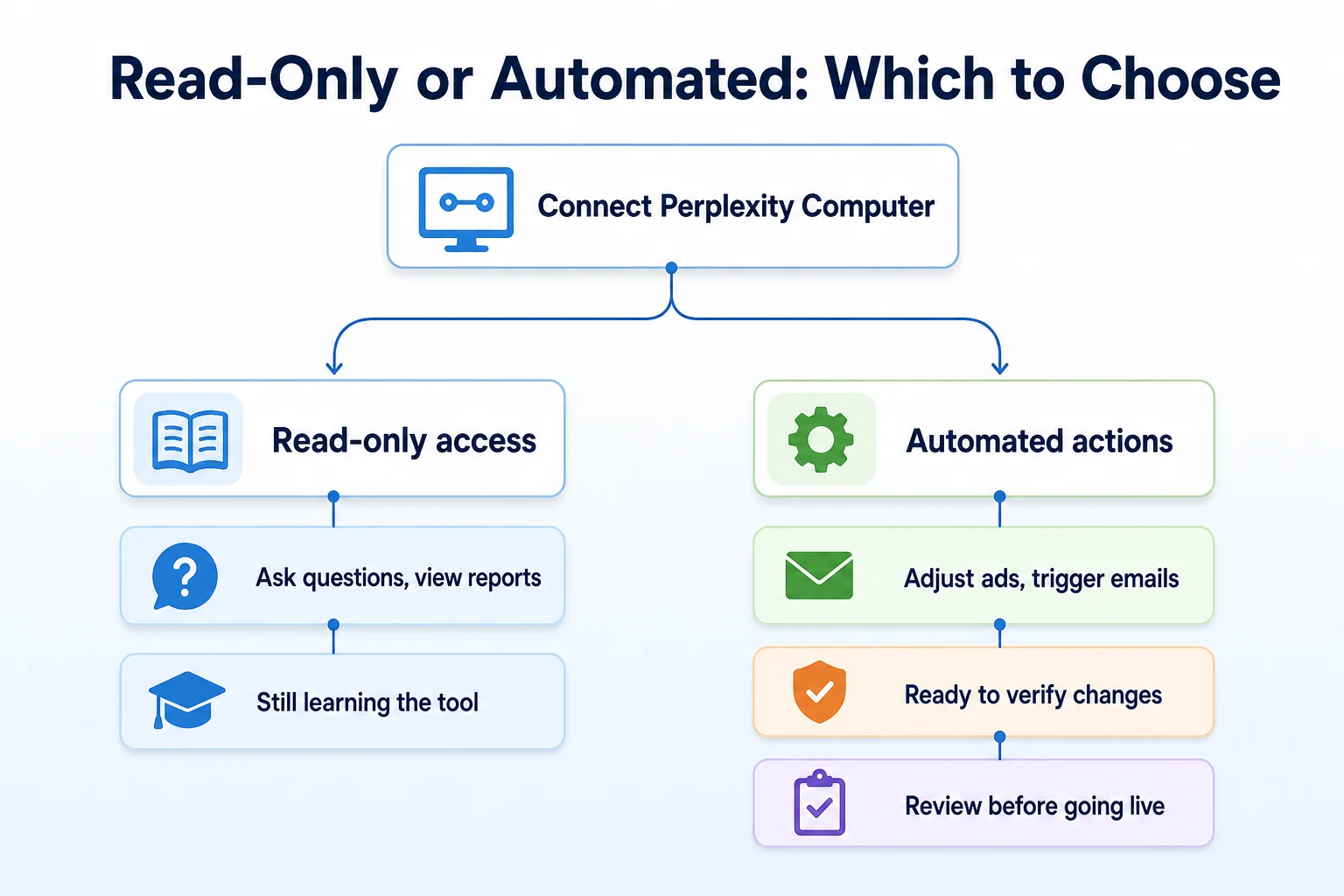
A 30-Minute Checklist Before You Connect Your Accounts
Half an hour is enough to go through the basics before linking anything, and it's time well spent given what's at stake if a connection does more than expected.
Step | Task | Why it matters |
|---|---|---|
1 | Read the permission screen for each platform before approving the connection | It's the clearest source of what access you're actually granting |
2 | Note who on your team has access to approve ad or email actions | Avoids a change going live with nobody responsible for checking it first |
3 | Export a recent sales, ad and email report from each platform directly | Gives you something to compare Perplexity's answers against for accuracy |
4 | Start with questions, not actions, for the first few days | Builds confidence in the reporting side before trusting it with changes |
5 | Set a date to review what's been approved versus what's been automatic | Catches any action that ran without the review you expected |
None of these steps require technical skill. They just require treating the connection the way you'd treat handing a new staff member the keys to your ad account: with a short trial period before full trust.
Where RepGet fits
RepGet has no role in Perplexity Computer or its ecommerce workflows. It doesn't connect to Shopify, Meta Ads or Klaviyo, and nothing about this announcement runs through RepGet.
What RepGet does is work on the website behind the store, the pages and content that sales and ad campaigns ultimately point customers toward. A product highlighted in an ad or an email is only as useful as the page it leads to, and plenty of small store sites have technical or content gaps that quietly undercut the budget spent sending traffic there. RepGet's website auditing, keyword research, content planning and article writing work on that side: making sure the site itself is in reasonable shape before more visitors arrive through any channel.
If you're about to connect Shopify, Meta Ads and Klaviyo to a new assistant and want to know where your site stands first, RepGet's free website audit crawls the site and gives it a 0 to 100 SEO score, flagging technical and content issues worth fixing. No account or credit card required. RepGet's free SEO tools cover related checks, like whether your page titles and meta descriptions give a visitor arriving from an ad or an email a reason to stay.
RepGet doesn't manage ad campaigns or email flows, and it doesn't claim any connection between using Perplexity Computer and a store's search rankings or sales. What it can do is make sure the site a store is driving traffic to is ready for it.
The bottom line
Perplexity's November 3 announcement is a real, dated expansion of Perplexity Computer into ecommerce, connecting Shopify, Meta Ads and Klaviyo so a store owner can check sales, review ads and manage email marketing from one place. The reporting side is low-risk and likely to save time for anyone tired of switching between three dashboards.
The action side deserves more caution. Perplexity hasn't published full detail on pricing, rollout timing, or exactly which changes happen automatically versus which wait for approval. Until that's clearer, the sensible approach is to connect one account at a time, start with questions rather than actions, and keep reviewing anything that touches money or reaches a customer directly.
Find out what your website needs first
Run a free website audit with RepGet to see what your own site needs before sending more traffic there from ads or email campaigns managed through a new assistant. No account or credit card required.
FAQ
What is Perplexity Computer?
It's Perplexity's agentic layer that can take action inside apps a user connects to it, rather than only answering questions, and it's the basis for the new ecommerce workflows announced November 3, 2026.
Does Perplexity work with Shopify stores?
Yes, Perplexity announced a Shopify connection as part of its ecommerce workflows, letting a store owner ask plain-language questions about sales, orders and inventory instead of digging through Shopify's own reports.
Can Perplexity manage my Meta Ads campaigns automatically?
Perplexity describes the Meta Ads connection as able to review performance and adjust campaigns, but it hasn't published which changes happen automatically, so any budget or targeting change is worth reviewing before it takes effect.
Is Perplexity Computer connected to Klaviyo email marketing?
Yes, Klaviyo is one of the three platforms in the announcement, letting a store owner check campaign performance or trigger a flow through Perplexity rather than opening Klaviyo separately.
How do I set up Perplexity Computer for my online store?
You connect Shopify, Meta Ads and Klaviyo separately through each platform's own login and permission screen, reading what access each one requests before approving it rather than accepting a blanket connection.
Is Perplexity Computer free to use for ecommerce?
Perplexity hasn't published detailed pricing specific to the ecommerce workflows, so it's unclear whether these features require a particular plan or tier beyond the general announcement.
What are the risks of connecting my store accounts to an AI assistant?
The main risks are broader data access than expected and unreviewed changes to ads or email sends, since Perplexity hasn't fully documented which actions run automatically versus which need approval.
When did Perplexity launch its ecommerce features?
Perplexity announced the ecommerce workflows under Perplexity Computer on November 3, 2026, connecting Shopify, Meta Ads and Klaviyo for sales analysis, advertising and marketing automation.