

Repurpose Blog Content for Multiple Platforms: One Post, 5 Feeds
Short answer
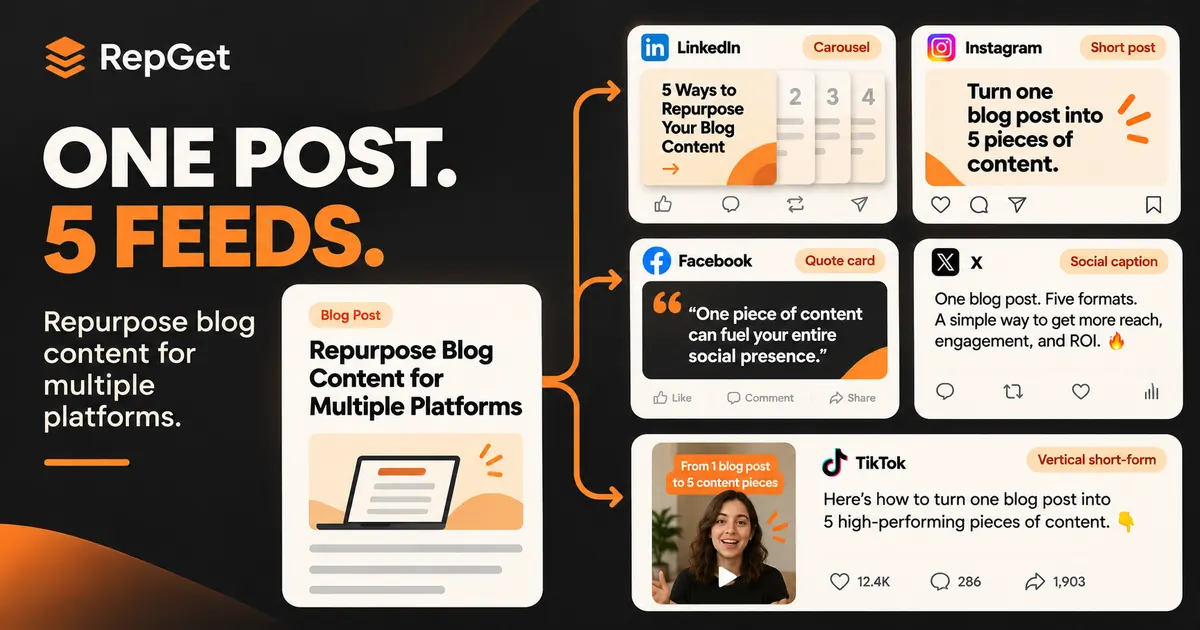
To repurpose blog content for multiple platforms, pull the strongest ideas, stats and lists out of a post, then rewrite each one in the format and length that platform rewards, instead of copying the same text everywhere. LinkedIn, Instagram, Facebook, X and TikTok each favor different formats, so one post can become five genuinely different posts, not five copies of one paragraph.
A business owner finishes a long blog post, feels good about it, and then opens five apps to share the news.
She pastes the same three sentences into LinkedIn, Instagram and X, swaps a hashtag or two, and moves on.
A week later, none of the three posts has more than a handful of likes, and the blog post itself barely got any visits from social media at all.
The problem isn't the writing. It's that each platform expects something different, and one post copied five times usually reads as spam to all five. Here's how to repurpose blog content for multiple platforms properly: pulling out the pieces worth reusing, and rebuilding each one in the shape its platform actually rewards.
Why the Same Post Doesn't Work Copy-Pasted Across Platforms
A blog post is written to be read slowly, with headings to skim and room to make an argument in full. None of the five platforms in this guide work that way, and each one has built its own habits around how people actually use it.
What actually changes between platforms
Length expectations are the most obvious difference. A LinkedIn post that performs well is often a few short paragraphs. A caption on Instagram might be a single hook line followed by a longer block most people never fully read. A post on X rewards brevity to the point of a single sentence. Tone shifts too: LinkedIn tends to reward a more professional framing, Facebook a more conversational one, and TikTok almost requires speaking directly to camera rather than writing at all. Our guide to social media SEO covers how these platform-specific habits affect whether a post gets found at all, which is worth reading alongside this one if visibility across platforms is the bigger goal.
What should stay the same
The idea underneath the post doesn't need to change from platform to platform, and it shouldn't. If the blog post argues that a specific scheduling mistake causes most appointment no-shows, that same claim can anchor a LinkedIn post, an Instagram caption and a TikTok script. What changes is the shape around it: how long it takes to get to the point, what proof gets shown, and what the reader is asked to do next. Keep the core idea fixed. Rebuild everything else.
Finding the Reusable Pieces Inside a Blog Post
Before adapting anything, it helps to break the finished post into smaller pieces rather than treating it as one block of text to summarize.
The six kinds of pieces worth pulling out
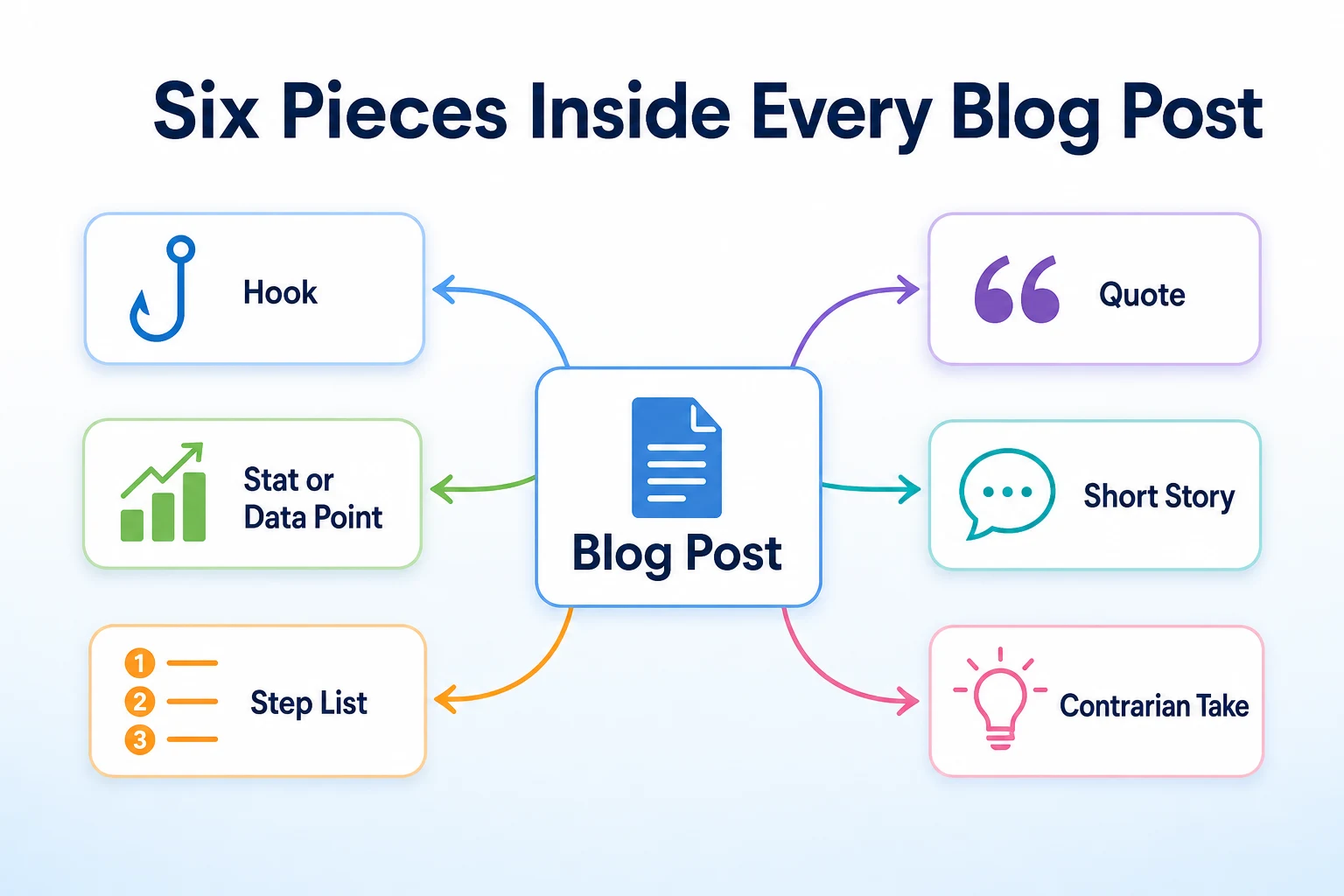
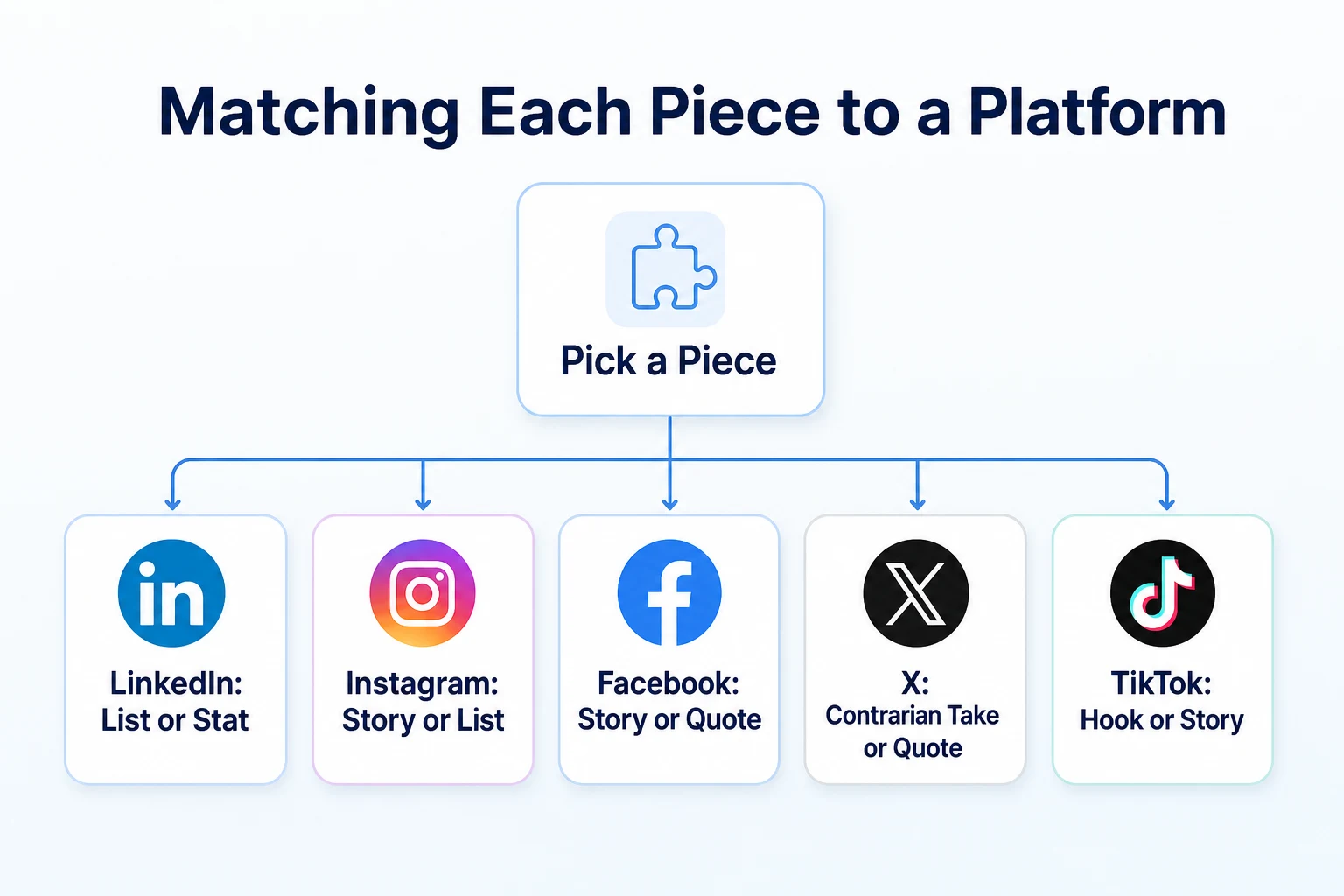
Most blog posts, once you look closely, already contain several separate things a social post could be built from. A hook, the single line that would make someone stop scrolling. A stat or data point, something concrete enough to anchor a post on its own. A step list, the kind of numbered or bulleted sequence that turns naturally into a carousel or a thread. A quote, either from the post itself or from something cited in it. A short story, a specific example or scenario used to illustrate a point. And a contrarian take, a place where the post pushes back on a common assumption. Not every post has all six, but most have at least three or four worth pulling out.
Marking them as you write, not just after
Going back through a finished post to find these pieces works, but it's slower than marking them as you write. A simple habit helps: whenever a sentence in the draft feels quotable, surprising or especially concrete, flag it right there, even with something as plain as putting it in bold for now. By the time the post is finished, there's already a short list of candidates ready to adapt, instead of a blank page and a long post to reread from scratch.
Piece type | What it looks like | Platforms it tends to fit |
|---|---|---|
Hook | The single line most likely to stop someone scrolling | TikTok, Instagram, X |
Stat or data point | A concrete number or finding the post is built around | LinkedIn, X |
Step list | A numbered or bulleted sequence from the post | LinkedIn carousel, Instagram carousel, X thread |
Quote | A quoted line from the post or a source it cites | Instagram, Facebook |
Short story | A specific example or scenario used in the post | Facebook, TikTok |
Contrarian take | A place the post pushes back on a common assumption | X, LinkedIn |
LinkedIn: Turning a Section Into a Professional Post or Carousel
LinkedIn tends to reward a post that reads like a person thinking out loud, not a press release, which means the blog post's argument usually needs a more personal frame before it fits.
Writing the text-post version
Start with the contrarian take or the strongest stat pulled from the post, stated plainly in the first line. Follow it with two or three short paragraphs explaining why it matters, written the way you'd explain it to a colleague rather than how it reads in the blog post itself. End with a single, specific question or a line pointing to the full post, rather than a generic call to
Instagram: Carousels, Captions and a Reel From the Same Post
Instagram gives you three separate formats from one blog post: a carousel, a caption underneath it, and a short Reel. None of them need new research. They just need the pieces you already pulled out, shaped for a feed people swipe through quickly.
Turning a list into carousel slides
A step list from the blog post is the easiest thing to turn into a carousel. Give each step its own slide, with one idea per slide and as few words as the point allows. The first slide carries the hook, stated as plainly as it was in the post, since that's the slide deciding whether anyone swipes to the second one. The last slide is where you point back to the blog post or ask a direct question, rather than trailing off with no close. Keep the design consistent across slides: same font, same color treatment, same layout for the text block. A carousel that looks like six unrelated images rarely gets read past the second slide, no matter how good the content is.
Writing a caption that earns a save
The caption underneath a carousel or a single image does a different job than the slides themselves. Its first line needs to work on its own, since that's the only part visible before someone taps "more," so it's worth using the hook here again, even if it already appeared on the first slide. The rest of the caption can go longer than people expect, as long as it holds together: a short version of the story or example from the blog post, written the way you'd tell it to a friend, works better than a dry summary of the post's structure. Close with a specific, answerable question rather than a vague "thoughts?", since a question tied to the actual topic is what tends to pull a comment out of someone. If the blog post contains a short, specific story rather than a list, that same story often works better as a 30 to 60 second Reel than as a carousel: film it talking directly to camera, keep the on-screen text short enough to read in the time it's shown, and let the caption underneath carry the rest of the detail the video didn't have time for.
Facebook: A Longer, More Conversational Version
Facebook tends to reward a post that reads like something a person actually wrote, rather than something dropped in from a content calendar. That usually means the Facebook version of a blog post ends up longer than the Instagram caption and noticeably more casual than the LinkedIn post, even though it might draw on the same underlying idea.
Framing it as a question or a story
A short story or a specific example from the blog post tends to do well here, written out in full rather than trimmed down the way it might be for Instagram. Opening with a direct question works too, especially one that mirrors something a customer has actually asked or said. If the blog post includes a scenario, a customer who kept missing appointments, a mistake that cost a business time or money, that scenario can carry an entire Facebook post on its own, with the broader point from the blog post arriving near the end rather than the start.
What to leave out
Heavy formatting, a long string of hashtags, and a stack of bullet points all tend to work against a Facebook post rather than for it, since they make a post look more like an ad than something a person wrote. Jargon pulled straight from the blog post is worth cutting too, along with any line that only makes sense if someone has already read the full article. A Facebook post should stand on its own for someone who never clicks through, even though the goal is still to get some of them to click through.
X: A Thread or a Single Sharp Line
X rewards brevity more than any of the other four platforms, which means a blog post usually gets reduced to one of two things here: a short thread that mirrors a list, or a single line that needed the rest of the post to earn it.
Turning a list into a thread
If the blog post has a numbered list, a thread is often the most natural fit. Each post in the thread covers one step, kept short enough to read in a glance, with the first post carrying the hook and making clear what the full thread covers. Resist the urge to pad a short list into a longer thread just to look more substantial. A five-step list that actually needs five posts reads better than the same list stretched into eight.
Finding the one line worth posting alone
Not every blog post needs a thread. Sometimes the strongest piece pulled from the post, the contrarian take or the sharpest stat, is better posted by itself, with nothing added around it. A single line that makes someone stop and think, or disagree, tends to travel further on this platform than a well-organized thread explaining the same idea in more words. If you're not sure which approach fits, it's worth trying the single line first, since it costs less time to test and tells you quickly whether the idea itself has any pull on its own.
TikTok and Short Video: Scripting 30 to 60 Seconds From One Section
TikTok doesn't really work as a summary of a blog post. It works as one narrow idea from that post, said out loud, in under a minute.
Picking the right section to adapt
Trying to cover an entire blog post in one short video usually ends up rushed and flat. A single section, often the short story, the contrarian take, or one step from a list, gives a video enough room to breathe without running past the point where people stop watching. If the blog post covers five causes of a problem, a single video on the most surprising one usually performs better than one video trying to rush through all five.
Writing the hook and the on-screen text
The first two or three seconds decide whether anyone keeps watching, so the hook pulled earlier from the blog post belongs right at the start, said plainly rather than built up to. The rest of the script can follow the shape of that one section: the problem, the specific detail that makes it believable, and a short, direct close. On-screen text should match what's being said closely enough that the video still makes sense with the sound off, since a meaningful share of viewers watch that way. Keep the text short enough to read before the next line of speech starts, rather than trying to caption every word.
Comparing the Five Platforms at a Glance
Once you've adapted a post for each of the five platforms a few times, the differences start to feel automatic. Until then, a quick reference table saves you from guessing each time.
Platform | Best format to pull from a post | Ideal length | Tone to use |
|---|---|---|---|
Text post or carousel from a list | A few short paragraphs, or 6 to 10 carousel slides | Professional, first person, thinking out loud | |
Carousel, caption, or a short Reel from a story | Short on-slide text, caption can run longer | Casual, visual, built to be swiped | |
A story or a direct question | Longer than Instagram, written out in full | Conversational, like a person wrote it | |
X | A short thread from a list, or a single sharp line | One sentence, or a thread of 4 to 8 short posts | Direct, brief, opinionated |
TikTok | One narrow section, scripted and spoken | 30 to 60 seconds | Spoken, direct to camera, no summary |
A Worked Example: One Blog Post, Five Different Posts
It's easier to see all of this working together than to picture it from a list of rules, so imagine a fictional blog post and what five genuinely different versions of it might look like.
The original blog post
Imagine a dental clinic publishes a blog post titled
Imagine a dental clinic publishes a blog post titled "Why Patients Miss Appointments (and How to Fix It)," built around five causes, a short story about a mother who missed a Tuesday slot after a text reminder went to a disconnected number, and one stat about reminder timing cutting no-shows.
What each platform's version looked like
From that one post, five different pieces went out over the following week, each pulling from a different part of the post rather than repeating the same paragraph.
Platform | Format used | Approximate length |
|---|---|---|
Text post built around the reminder-timing stat | 4 short paragraphs | |
Carousel listing the five causes, one per slide | 7 slides plus a long caption | |
The missed-appointment story, told in full | About 200 words | |
X | A single line: the stat, with no thread | One sentence |
TikTok | A 40-second script built around the mother's story | 40 seconds |
This example is illustrative. A real post's best pieces will depend on what the post actually contains.
A 30-Minute Weekly Checklist (and the Mistakes to Avoid)
Repurposing a post doesn't need to take longer than writing the post itself. A fixed routine, run the same way every time a new post goes live, keeps the whole job to about half an hour.
The 30-minute checklist
Step | Time |
|---|---|
Reread the published post and mark the hook, stat, list, quote, story and contrarian take | 5 minutes |
Draft the LinkedIn text post or carousel outline | 5 minutes |
Draft the Instagram carousel slides and caption | 5 minutes |
Draft the Facebook version, told conversationally | 5 minutes |
Draft the X thread or pick the single line to post alone | 5 minutes |
Write the TikTok hook and on-screen text, then schedule everything | 5 minutes |
Our social media content calendar guide covers how to space these five posts out over a week instead of publishing them all the same day, which tends to work better for reach on most platforms.
Common mistakes to avoid
Posting the exact same paragraph on every platform instead of rebuilding it for each one.
Leading with the blog post's title instead of the hook that actually earns attention on that platform.
Stacking a long string of hashtags onto a Facebook or LinkedIn post, where they tend to read as clutter rather than help.
Publishing all five versions at the same moment instead of staggering them across the week.
Forgetting to link back to the original post anywhere, so none of the traffic the pieces generate actually reaches the site.
Our fuller guide to repurposing one blog post into fifteen pieces goes further into stretching a single post across a longer stretch of time, if five platforms in one week isn't enough to use up everything a longer post contains.
Using AI Tools to Draft Faster Without Sounding Generic
Writing five different versions of the same idea, every time a post goes live, is the part of this routine most likely to get skipped under a deadline. AI tools genuinely help here, as long as the help stops at the draft stage.
Where AI speeds up the first draft
Turning a list from a blog post into rough carousel slide text, or a short paragraph into a tighter LinkedIn-length version, is a mechanical rewriting task, and AI tools handle that reasonably well. RepGet's free AI Social Media Post Generator takes one page and turns it into three draft posts to edit and share, which is a reasonable starting point for the LinkedIn, Instagram or Facebook version of a post you've already written, rather than starting from a blank box each time.
Why the specifics still need to be yours
A generated draft tends to flatten the exact detail that made the blog post worth reading in the first place, the specific number, the particular customer situation, the line that only makes sense because you were actually there. That detail is usually what makes a social post feel real rather than templated, and it's worth adding back in by hand before anything gets scheduled. Treat an AI draft as a faster starting point, not a finished post, and rewrite the one line in each version that needs to sound like it came from someone who actually wrote the original.
Where RepGet fits
RepGet doesn't post to your social accounts or run your LinkedIn or Instagram presence for you. What it does is sit earlier in the chain: it brings website auditing, keyword research, content planning, article writing and publishing to your website into one workflow, so there's a steady supply of blog posts worth repurposing in the first place.
Articles RepGet writes can stay as drafts for your team to review before anything goes live, which matters if you want a person checking the detail and the tone before a post becomes the source material for five social versions. Once a post is live, RepGet's free AI Social Media Post Generator can turn it into draft posts to edit, and the free website audit crawls your site and gives it a 0 to 100 SEO score, with the technical and content issues worth fixing listed out. No account or credit card required. RepGet doesn't replace your own judgment about what a post should say on a given platform, and it doesn't guarantee that any repurposed post will get engagement, traffic, or a mention in an AI answer.
The bottom line
Repurposing a blog post for multiple platforms works when each platform gets its own version of the idea, built in the length and tone that platform actually rewards, rather than five copies of the same paragraph. The underlying argument stays fixed. Everything around it, the hook, the length, the format, the close, changes from one platform to the next.
Done with a routine, this doesn't take much longer than writing the original post. Skipped, it's the reason a genuinely good blog post sits unread while five identical, flat posts quietly underperform across every account that shared it.
Find out what your website needs first
Run a free website audit with RepGet to see whether the blog post you're about to repurpose is sitting on a site that's actually ready to turn that attention into a visit. No account or credit card required.
FAQ
How many social media posts can I get from one blog post?
A typical post yields five platform-specific versions, one each for LinkedIn, Instagram, Facebook, X and TikTok, sometimes more if a long post has several lists, stats or stories worth pulling out separately.
Do I need to post the exact same content on every platform?
No, and you shouldn't. Each platform rewards a different length and tone, so copying one post everywhere usually reads as spam rather than content built for that audience.
What's the best way to turn a blog post into a LinkedIn post?
Pull the strongest stat or contrarian take from the post, state it plainly in the first line, then explain it in a few short paragraphs written the way you'd explain it to a colleague.
Can I use AI to repurpose my blog posts for social media?
Yes, for a first draft of each platform's version. The specific detail that makes a post worth reading, like a real number or a particular customer story, still needs your own edit before it's posted.
How long should a repurposed social media post be?
It depends on the platform: a few short paragraphs for LinkedIn, a single sentence for X, 30 to 60 seconds for TikTok, and a longer, conversational post for Facebook.
How often should I repurpose old blog content instead of writing new posts?
Repurposing a post works best right after it's published, while it's still relevant, though a post that still holds up months later can be repurposed again with a fresh angle pulled from it.
Does repurposing blog content help my SEO?
It doesn't change how Google ranks the blog post itself, but social posts that link back to it can bring visitors who wouldn't have found it through search alone.
What's the difference between repurposing and just cross-posting the same text?
Cross-posting copies the same paragraph everywhere. Repurposing rebuilds the same underlying idea in the length, format and tone that each specific platform actually rewards.
Comments
1 shownShare your thoughts about this article.
New to RepGet? Create a free account to join the conversation.
One of the biggest mistakes businesses make is creating content for just one platform and letting its potential go to waste. A single well-written article can become five different opportunities to reach new audiences. The key is not copying the same content everywhere, but adapting it to each platform. This is exactly the philosophy we're building into RepGet: create smarter, distribute better, and get more value from every piece of content. Dumitru Culiuc Founder of RepGet