

AI Search Visibility Audit: Check ChatGPT, Gemini, Perplexity
Short answer
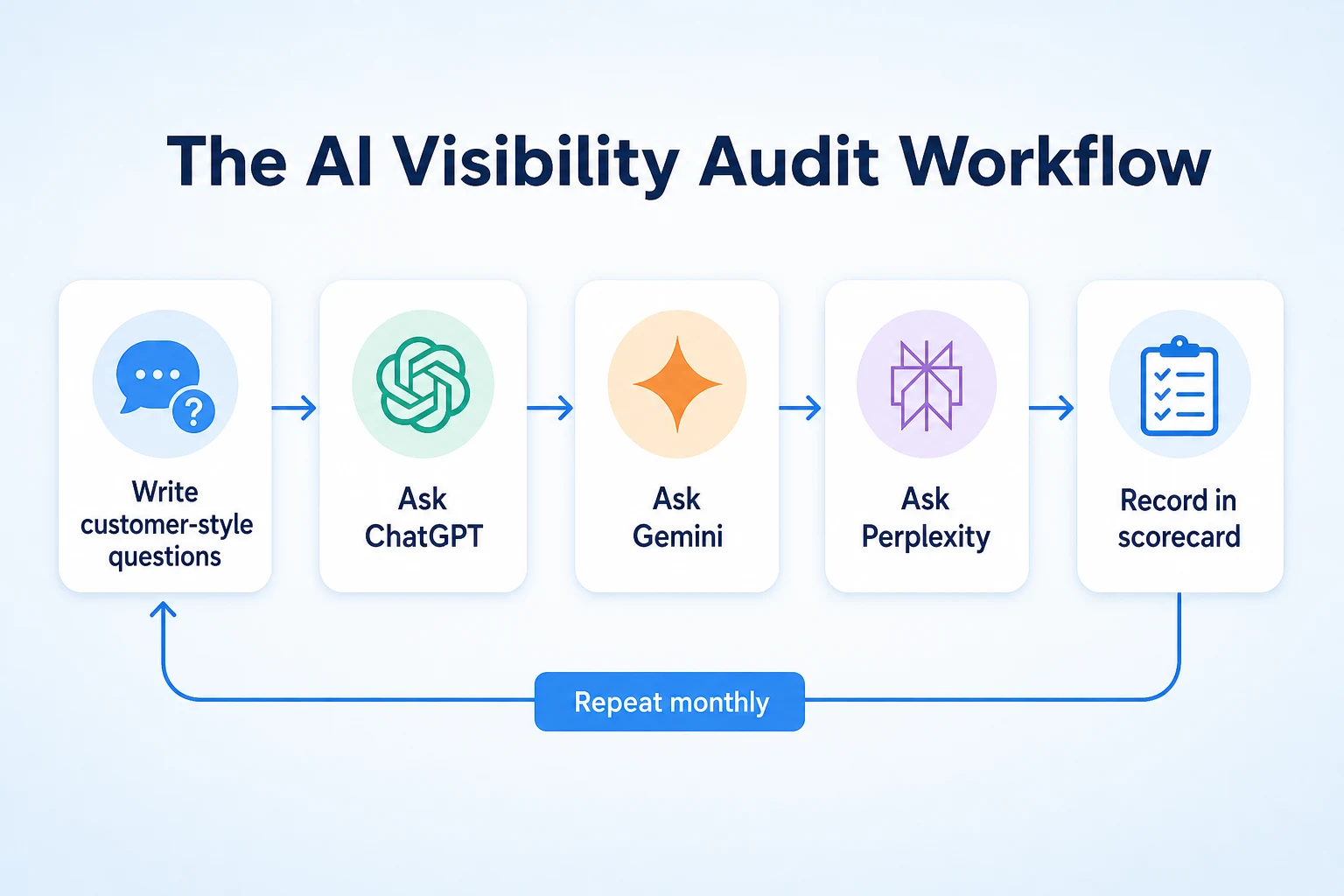
An AI search visibility audit means asking ChatGPT, Gemini and Perplexity the same customer-style questions about your business, then recording whether you're named, how accurately, and whether a link appears. Repeat the questions over a few weeks to see a pattern rather than a single result, and confirm each assistant's crawler can actually reach your site before drawing any conclusions from what you find.
A bakery owner asks ChatGPT where to get a custom cake in her town, and her shop doesn't come up even though she ranks on Google's first page.
She tries Gemini with the same question and gets a different list of names.
She tries Perplexity and gets a third answer, with a source link to a competitor's menu page she's never heard of.
She doesn't know if this is a technical problem, a content problem, or just how these tools work. That's what an AI search visibility audit is for: a repeatable way to check whether ChatGPT, Gemini and Perplexity mention your business, how accurately, and why. Here's how to run one properly, starting with the checks that come before you ask a single question.
Why an AI Search Visibility Audit Is Different From a Ranking Check
It's tempting to treat an AI assistant the way you'd treat Google's results page: run a search, note the position, check it again next week.
That approach doesn't map onto how these tools actually work, and expecting it to leads to a lot of confused conclusions.
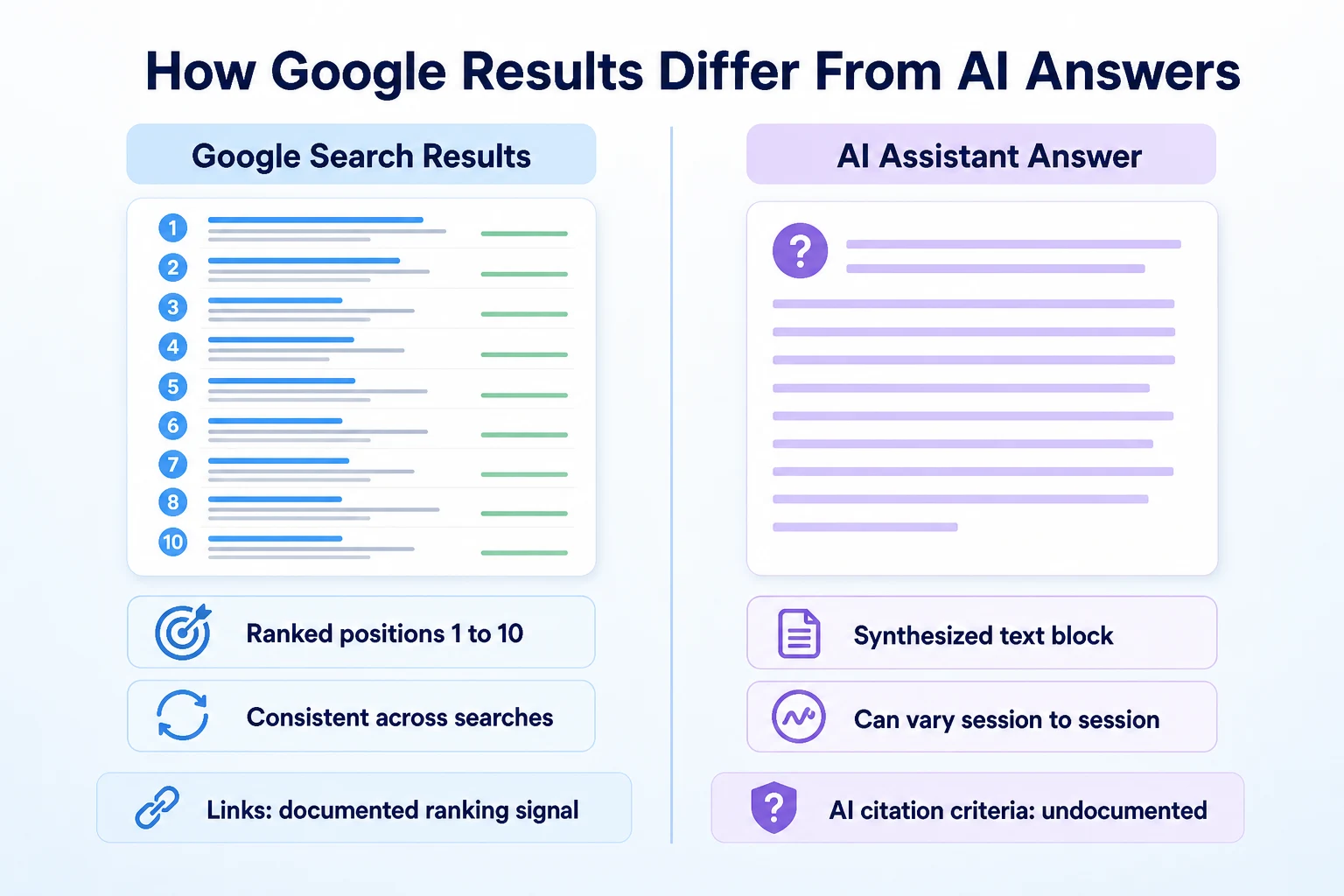
How an AI answer differs from a list of search results
A Google search returns a ranked list. Position one, position two, and so on, built from an index Google has already crawled and organized ahead of time. Ask the same question twice in the same place and you'll generally see the same list, at least until something changes on the web itself.
An AI assistant's answer is generated fresh each time it's asked. There's no fixed position one for your business to hold or lose. The same question, asked an hour apart, can come back with a different set of names, a different order, or a different level of detail, even with nothing on your site having changed at all. That's not a bug you're meant to fix. It's a basic difference in how the two systems produce an answer.
What Google's documentation does and doesn't say about AI citations
Google's Search Central documentation describes links as a signal it uses to discover pages and to understand how pages relate to each other, and that documentation covers ranking in traditional search results specifically. It does not describe a formula for how AI Overviews, or any chatbot, decides which businesses to name in a generated answer. Nobody outside the companies that build these tools has the complete picture of that process.
That gap is exactly why an audit matters more than a guess. Rather than assuming your business should or shouldn't come up, you check directly, repeatedly, and look for a pattern. Our guide to AI search citations vs backlinks goes further into how a citation differs from the ranking signals Google has actually documented, and our guide to how AI assistants decide which businesses to recommend covers what's documented, and what isn't, about that decision itself.
Check Technical Access Before You Ask a Single Question
Before testing any assistant with a single question, it's worth confirming the assistant's crawler can actually reach your site. A business that ranks well on Google can still be invisible to an AI tool if a crawler rule or a technical quirk is quietly blocking it.
Checking robots.txt for the AI crawlers that matter
Your site's robots.txt file can allow or block specific crawlers by name, and it's common for a rule written years ago, aimed at blocking a scraping bot, to accidentally catch an AI crawler too. ChatGPT, Gemini and Perplexity each rely on their own named crawlers to gather information from the open web, and a blanket disallow rule can shut all of them out at once without anyone noticing.
RepGet's free AI Crawler Checker tests whether GPTBot, ClaudeBot, PerplexityBot and similar crawlers can actually access your site, which is a faster way to check than reading the raw file yourself. If a crawler is blocked, that alone can explain a business being absent from an assistant's answer, regardless of how good the content itself is.
Checking whether your page's text is actually readable
A page can be open to every crawler and still give an AI assistant very little to work with, if the actual text that matters sits inside a script, a slider, or an image rather than as plain, readable HTML. A crawler that can technically reach a page isn't guaranteed to get much out of it if the words a customer needs are rendered in a way that's hard to extract.
RepGet's free LLM HTML Visibility Checker shows how much of a page's text is actually readable in this sense, which is worth running on your most important pages, your homepage, your service pages, your hours and location, before assuming the problem is anything more complicated than this.
Build a List of Questions a Real Customer Would Ask
Once access is confirmed, the next step is writing the questions you'll actually test. The mistake here is testing your business name directly, which tells you almost nothing about how you show up when a real customer asks something they'd actually type.
Category and comparison questions
A category question describes what you do without naming you: "who does custom wedding cakes in town" rather than "tell me about [bakery name]." A comparison question goes a step further, asking the assistant to weigh options against each other, which is often where a competitor gets named and you don't.
Local, near-me and specific questions
A local or near-me question adds a location, mirroring how people phrase things on a phone. A specific question asks about one detail a customer actually needs: a price range, an opening time, whether a service is offered at all. These tend to be the questions where a clear, direct answer on your own site pays off the most.
Question type | Sample prompt |
|---|---|
Category | "Who does custom wedding cakes in Springfield?" |
Comparison | "What's the difference between the top bakeries in Springfield for custom cakes?" |
Local | "Is there a bakery near downtown Springfield that does custom cakes?" |
Specific | "How much does a custom wedding cake cost in Springfield?" |
These prompts are illustrative.
Aim for ten to fifteen questions spread across these four types before moving on to testing them against each assistant.
Run the Questions Through ChatGPT
With a question list ready, ChatGPT is a reasonable place to start, since it's the assistant most small business owners already have some familiarity with.
Starting a fresh conversation each time
Ask each question in a new conversation rather than following up in the same thread. A follow-up question inherits context from everything said before it, which can nudge the answer toward or away from your business in a way that has nothing to do with how it would perform for a first-time user. A fresh conversation for each question gives a cleaner read.
What counts as a pass and what doesn't
A pass is your business named accurately, whether or not a link appears alongside it. A partial pass is your business named with an error, a wrong phone number, an outdated service, an old address. A fail is no mention at all, especially when a competitor answering the same kind of question does get named. Record all three outcomes rather than only the clean passes, since the errors and the near-misses are often more useful to know about. Our guide to tracking ChatGPT traffic covers how to catch the sessions that follow when a pass does include a link someone actually clicks.
Run the Questions Through Gemini
Gemini is worth testing separately rather than assuming it will behave like ChatGPT, since the two tools don't necessarily draw from the same sources or produce the same kind of answer.
What Gemini may draw on that ChatGPT doesn't
Gemini is built by Google, and Google's own documentation describes it as able to draw on Google's Search index and real-time information as part of how it answers. That's a different starting point than a model relying only on what it learned during training, and it can mean Gemini picks up a page that was published recently or updated last week, where another assistant might still be working from older information.
Run the same ten to fifteen questions through Gemini that you used for ChatGPT, in fresh conversations each time, and note the same three outcomes: a clean pass, a partial pass with an error, or a fail. Don't assume a pass in one tool predicts a pass in the other. A business can be named clearly in Gemini and skipped entirely in ChatGPT for the same question, and that difference is itself useful information, not a contradiction to explain away.
If Gemini consistently draws on fresher information than another assistant, that's a reasonable hint that keeping your site's details current, hours, prices, service areas, matters more for this tool than for one that answers from a less frequently updated base. It's not proof of anything on its own, but it's worth watching across a few rounds of testing before drawing a conclusion.
Run the Questions Through Perplexity
Perplexity is the easiest of the three to audit in one sense: it shows its sources openly, right next to the answer, rather than leaving you to guess where a claim came from.
Reading Perplexity's visible source list
Perplexity typically numbers its sources and lists them alongside or beneath the generated answer, with each number corresponding to a specific page it drew from. This is the clearest window into an AI assistant's reasoning that any of the three tools gives you. If your business is named, check which source the mention is tied to. If a competitor is named instead, check their source too, since it often reveals exactly what Perplexity found that your own site didn't offer as clearly.
Go through each of your test questions and note not just whether you were mentioned, but which page, if any, was cited as the source. A mention tied to your homepage tells you something different than a mention tied to a three-year-old blog post or a review site you don't control.
What to do if the source is wrong or out of date
Sometimes the source Perplexity cites for your business is accurate but stale: an old menu, a closed location, a price that changed last year. That's a fixable problem, and it usually means updating the page in question so the next crawl picks up the correction, since these tools don't notify you when they've cited something outdated.
Other times the cited source isn't even your own site. A business directory or a review aggregator with incomplete or wrong details can end up as the source Perplexity relies on, simply because that page was easier to crawl or seemed more authoritative at the time. In that case, the fix isn't just updating your own site. It's also correcting your listing on whatever third-party page got cited, since that's the page actually feeding the answer.
Score What You Find in a Simple Scorecard
Running the same questions through three assistants produces a lot of individual answers fast, and none of it is useful unless it's written down somewhere you can compare later.
What to track for each assistant
A scorecard doesn't need to be complicated. For each question and each assistant, record whether your business was mentioned at all, whether the mention was accurate, whether a link or source appeared alongside it, and whether a competitor was named in your place. That's enough detail to spot a pattern without turning the audit into a research project.
Question | Assistant | Mentioned (Y/N) | Accurate | Link shown | Competitor named instead |
|---|---|---|---|---|---|
"Who does custom wedding cakes in Springfield?" | ChatGPT | N | n/a | n/a | Yes |
"Who does custom wedding cakes in Springfield?" | Gemini | Y | Yes | Yes | No |
"Who does custom wedding cakes in Springfield?" | Perplexity | Y | Partially (old address) | Yes | No |
These entries are illustrative.
How many questions is enough
Ten to fifteen questions, run across three assistants, gives you thirty to forty-five data points, which is plenty to spot a pattern without the exercise taking all day. Fewer than that and a single odd answer can skew what you think you're seeing. More than that tends to add time without adding much clarity, since the same handful of patterns usually show up well before question thirty.
A Worked Example: Auditing Three Local Businesses
It helps to see how technical access and visibility line up in practice, so imagine three fictional plumbing companies in the same town, each audited the same way.
Business | AI crawler access | ChatGPT | Gemini | Perplexity |
|---|---|---|---|---|
Business A | Blocked (robots.txt disallows GPTBot and PerplexityBot) | Not mentioned | Mentioned, accurate | Not mentioned |
Business B | Open to all crawlers | Mentioned, outdated hours | Mentioned, accurate | Mentioned, accurate |
Business C | Open, but key text loads via script | Not mentioned | Mentioned, vague | Not mentioned |
These three businesses are illustrative.
Business A's robots.txt rule explains most of its gaps directly: two of the three assistants rely on crawlers it's blocking outright, and Gemini's mention likely comes from Google's own index rather than a fresh crawl of the site itself. Business B, with nothing blocking access, shows up everywhere, with the only issue being a page that hasn't been updated since a schedule change. Business C passes the crawler access check on paper but fails in practice, because the text that actually describes its services loads through a script a crawler can't easily extract, which is a different problem than a robots.txt rule and needs a different fix.
None of these three outcomes required guessing. Each one traces back to something checkable: a crawler rule, an outdated page, or text that isn't readable in plain HTML.
Common Mistakes When Running an AI Visibility Audit
Most of the trouble with an AI search visibility audit comes from a handful of habits that make the results look worse, or better, than they actually are.
Asking each question only once and treating that single answer as the final verdict, when the same question asked an hour later can come back differently.
Writing leading questions that name your business or your category too specifically, which tells you little about how a real customer's plain question would perform.
Skipping the robots.txt and readable text checks and jumping straight to asking questions, then spending hours guessing at a content problem that was actually a crawler being blocked.
Treating one fail as proof the business has no AI visibility at all, rather than one data point among thirty or forty.
Confusing a mention with a visit, and assuming a citation with no link is worthless, when it may still have shaped what the person reading it believed.
Testing once, finding a disappointing result, and never testing again, instead of treating the audit as a repeatable monthly habit the way a business might already check its Google ranking.
Fixing the wrong source when a mention is wrong, updating your own site's page while leaving an outdated directory listing exactly as it was, when that listing was the actual source cited.
None of these mistakes require a specialist to avoid. They mostly come down to testing more than once, asking plain questions, and checking access before content.
A 30-Day Plan to Audit and Improve Your AI Search Visibility
Spreading this work across four weeks keeps it manageable and gives you a second round of results to compare against the first, which matters more than any single week's findings on their own.
Week | Focus | Tasks |
|---|---|---|
Week 1 | Confirm technical access | Check robots.txt for AI crawlers, run the LLM HTML Visibility Checker on your key pages, and fix anything blocking or hiding your text |
Week 2 | Write questions and run the first round | Draft ten to fifteen customer-style questions across the four types, run them through ChatGPT, Gemini and Perplexity, and fill in the scorecard |
Week 3 | Fix the content gaps you found | Update outdated details on your own site and on any third-party source that got cited instead, and add plain, direct answers where a question came back empty |
Week 4 | Repeat and compare | Run the same questions again in fresh conversations, update the scorecard, and note which outcomes changed since week two |
A single pass through this plan won't settle the question for good, since these answers can shift from one session to the next even with nothing changed on your end. Running it again next month is what turns one snapshot into a pattern worth trusting.
Where RepGet fits
RepGet doesn't run an AI search visibility audit for you across ChatGPT, Gemini and Perplexity, and it doesn't promise a mention in any of their answers. Nobody honestly can promise that, since none of these companies have published the rules that decide it.
What RepGet does help with is the technical access check that this whole audit depends on. Its free AI Crawler Checker tests whether GPTBot, ClaudeBot, PerplexityBot and similar crawlers can reach your site, and its free LLM HTML Visibility Checker shows how much of a page's text is actually readable to these tools. Both are worth running before week one of the plan above, since a blocked crawler or hidden text explains more absences than anything else covered in this article.
Beyond that, RepGet brings website auditing, keyword research, content planning, article writing, publishing to your website, and search performance reporting from Google Search Console into one workflow. The content work matters here because the businesses that came up clearly in the worked example earlier had plain, specific pages answering exactly the kind of question a customer would type. Articles RepGet writes can stay as drafts for your team to review before anything goes live, so you can check a page actually states its facts plainly before it's published.
RepGet's free website audit crawls your site and gives it a 0 to 100 SEO score, with the technical and content issues worth fixing listed out, which is a reasonable place to start before the four-week plan above. No account or credit card required. RepGet does not replace Google Search Console, a Google Business Profile, or your own judgment, and it doesn't guarantee rankings, Google Maps positions, traffic or mentions in AI answers.
The bottom line
An AI search visibility audit isn't a single check you run once and file away. It's a habit built on the same handful of steps: confirm the crawlers can reach your site, ask the questions a real customer would ask, record what each assistant says, and repeat it next month to see whether the pattern holds.
None of the three assistants in this article work exactly alike, and none of them are obligated to agree with each other or with Google's own ranking of your site. A business can rank well on Google and still go unmentioned in ChatGPT, or show up clearly in Gemini while Perplexity cites a competitor instead. That's not a contradiction to panic over. It's the honest, current state of how these tools generate answers, and the only real response to it is checking directly rather than guessing.
Find out what your website needs first
Run a free website audit with RepGet to see what your site needs fixed before running your first AI search visibility audit. No account or credit card required.
FAQ
How do I know if ChatGPT knows about my business?
Ask it a plain customer-style question about what you do, in a fresh conversation, rather than naming your business directly. Try it a few times across different sessions before drawing a conclusion.
Can I check my business visibility in Gemini for free?
Yes. Gemini is free to use for basic testing, and running the same customer-style questions you used for ChatGPT through Gemini costs nothing beyond the time it takes.
Why does Perplexity show different results than ChatGPT for the same question?
The two tools draw on different sources and generate answers independently, so there's no reason to expect them to agree. Perplexity's visible source list is the easiest way to see exactly what it used.
How often should I run an AI search visibility audit?
Monthly is a reasonable habit, since answers can shift even without changes on your site. A single test tells you less than a pattern across a few rounds over several weeks.
Does blocking AI crawlers in robots.txt affect whether ChatGPT mentions my business?
Yes. If your robots.txt disallows the crawler a given assistant relies on, that crawler generally can't read your pages at all, which can explain an absence regardless of how good your content is.
What does it mean if a competitor shows up in AI answers but I don't?
It usually means their site gave the assistant something clearer or more current to work with, or that their pages are easier for a crawler to read. Check their cited source for a clue.
Is there a free tool to check if AI crawlers can read my website?
Yes. RepGet's free AI Crawler Checker tests whether crawlers like GPTBot and PerplexityBot can access your site, and its LLM HTML Visibility Checker shows how much of your text is actually readable.
Comments
1 shownShare your thoughts about this article.
New to RepGet? Create a free account to join the conversation.
One thing I strongly believe is that the future of online visibility is not just about ranking on Google, but also about being discovered and recommended by AI. Businesses need to understand what ChatGPT, Gemini, and Perplexity actually say about them. At RepGet, we're working to make this new landscape more transparent, measurable, and accessible to businesses of every size. The first step is understanding where you stand, not guessing. Dumitru Culiuc Founder of RepGet