

Multilingual SEO for SaaS: How to Publish in Five Languages Correctly
Short answer
Multilingual SEO for SaaS means giving each language its own URL, using hreflang tags so Google serves the right version to the right searcher, and treating each market's content as something to localize rather than translate word for word. Get the URL structure and hreflang map right before writing a single translated word, since fixing it afterward across five languages is slower than planning it first.
A SaaS founder translates her onboarding page into Spanish, French, German and Portuguese with a page builder's auto-translate plugin.
She publishes all four under the same domain, right next to the English version, and waits for signups from new markets.
Three months later, Search Console shows the English page ranking fine. The other four are barely indexed at all.
Nothing is technically broken. The pages load, the text reads in the right language, and nobody typed anything wrong. The problem is further back, in how the site was structured before a single word got translated.
That's the real work behind multilingual SEO for SaaS: deciding how your URLs are organized, telling search engines which version serves which audience, and making sure each language version is worth indexing on its own. Here's how to do that correctly before you publish in five languages, not after.
Why Multilingual SEO Works Differently for a SaaS Business
A local bakery publishing a Spanish version of its homepage has one page to worry about. A SaaS company has a marketing site, a pricing page, a help center, in-app strings and often a blog, all of which someone eventually asks to translate.
That scale changes the stakes. A mistranslated blog post is embarrassing. A mistranslated pricing page can cost you a sale, or worse, a refund request from someone who thought they were buying something different.
Which pages actually need full translation
Not every page deserves the same effort. Marketing pages, pricing and your core product pages are where a visitor decides whether to sign up, so these need full, reviewed translation in every language you launch.
A help center is a different case. It's often fine to translate the handful of articles your international users actually read first, and leave the long tail in English with a note, rather than translating hundreds of articles nobody in that market will ever open.
Why pricing and feature pages carry the most risk
A pricing page states numbers, currencies, billing terms and feature limits as fact. If a plugin or a rushed translator gets a currency symbol wrong, or drops a word like "annual" from a sentence, a visitor can read a different offer than the one you're actually making.
Feature pages carry a similar risk when a feature isn't actually available in a given region yet. A translated page that promises something your support team in that market can't deliver creates a support problem long before it creates an SEO one.
Choosing a URL Structure: Subdirectories, Subdomains or ccTLDs
Before translating anything, decide where each language version will live. This choice is hard to undo later without redirects, lost links and a period of confused rankings, so it's worth getting right at the start.
Subdirectories: example.com/fr/
A subdirectory keeps every language under one domain, with a folder for each: example.com/fr/, example.com/de/ and so on. All the signals your main domain has built up, backlinks, age, trust, apply to every language version at once, since they all sit on the same domain.
Subdomains: fr.example.com
A subdomain gives each language its own address, like fr.example.com. Google's Search Central documentation has historically treated subdomains as capable of being crawled and ranked somewhat independently from the main domain, which means a new language subdomain can take longer to build its own authority rather than inheriting it outright.
Country-code domains: example.fr
A country-code top-level domain, like example.fr, signals a strong local connection to a specific country, which can help with local trust. It also means maintaining a separate domain entirely: its own hosting, its own backlink profile, its own everything, which is more overhead than most small SaaS teams want to take on for a first launch.
Structure | Example URL | Shares domain authority | Setup complexity | Best for |
|---|---|---|---|---|
Subdirectory | example.com/fr/ | Yes, fully | Low | Most SaaS companies launching several languages at once |
Subdomain | fr.example.com | Partial, builds separately | Medium | Teams running language versions as separate products or teams |
ccTLD | example.fr | No, separate domain | High | A company committing heavily to one specific country |
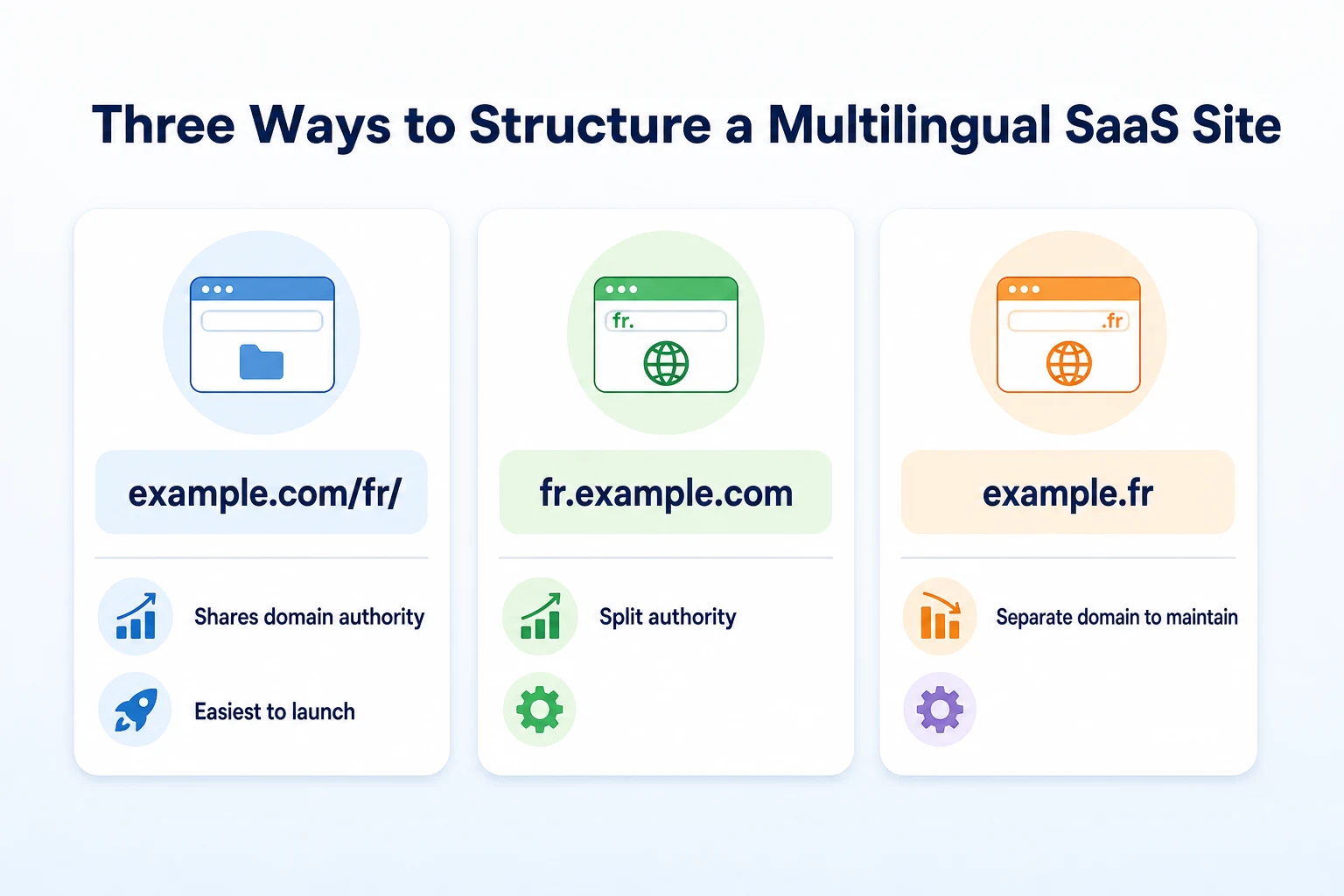
For most small SaaS businesses launching five languages at once, a subdirectory is the simplest path. It keeps one domain's authority working for every language, and it's the structure you'll see most often recommended for exactly this situation.
How hreflang Tags Tell Search Engines Which Page Is for Which Language
Once your URL structure is set, hreflang is the piece that tells Google which version of a page to show a given searcher. Without it, Google has to guess based on the page's content and the searcher's location and language settings, which doesn't always land on the version you'd pick yourself.
Google's Search Central documentation describes hreflang as an annotation that tells search engines about equivalent pages in different languages, so that the right regional or language URL can be served in search results. It's a hint, not a guarantee, but it's the clearest signal you can give.
The three ways to implement hreflang
Hreflang can go in three places: a link tag in each page's HTML head, an entry in your XML sitemap, or an HTTP header for non-HTML files. For a SaaS marketing site, the HTML head or the sitemap are the two realistic options, and the sitemap approach tends to be easier to maintain once you have more than two or three languages, since you're not editing five separate page heads every time something changes. You can check what Google actually sees on a page, including these tags, with our guide to viewing your website as Googlebot.
What x-default handles
Every language version needs a return tag pointing back to every other version, including itself. On top of that, x-default marks the page to show a visitor whose language doesn't match any of your versions, usually your English page. Without it, a visitor searching in a sixth language you haven't translated into gets no clear signal of which version fits them best.
Building an hreflang Map for Five Languages: A Worked Example
It helps to see this laid out for one real page rather than described in the abstract, so imagine a fictional SaaS company's pricing page, published in English, Spanish, French, German and Portuguese.
Mapping one page across five language versions
Language | URL | hreflang value |
|---|---|---|
English | example.com/pricing | en |
Spanish | example.com/es/precios | es |
French | example.com/fr/tarifs | fr |
German | example.com/de/preise | de |
Portuguese | example.com/pt/precos | pt |
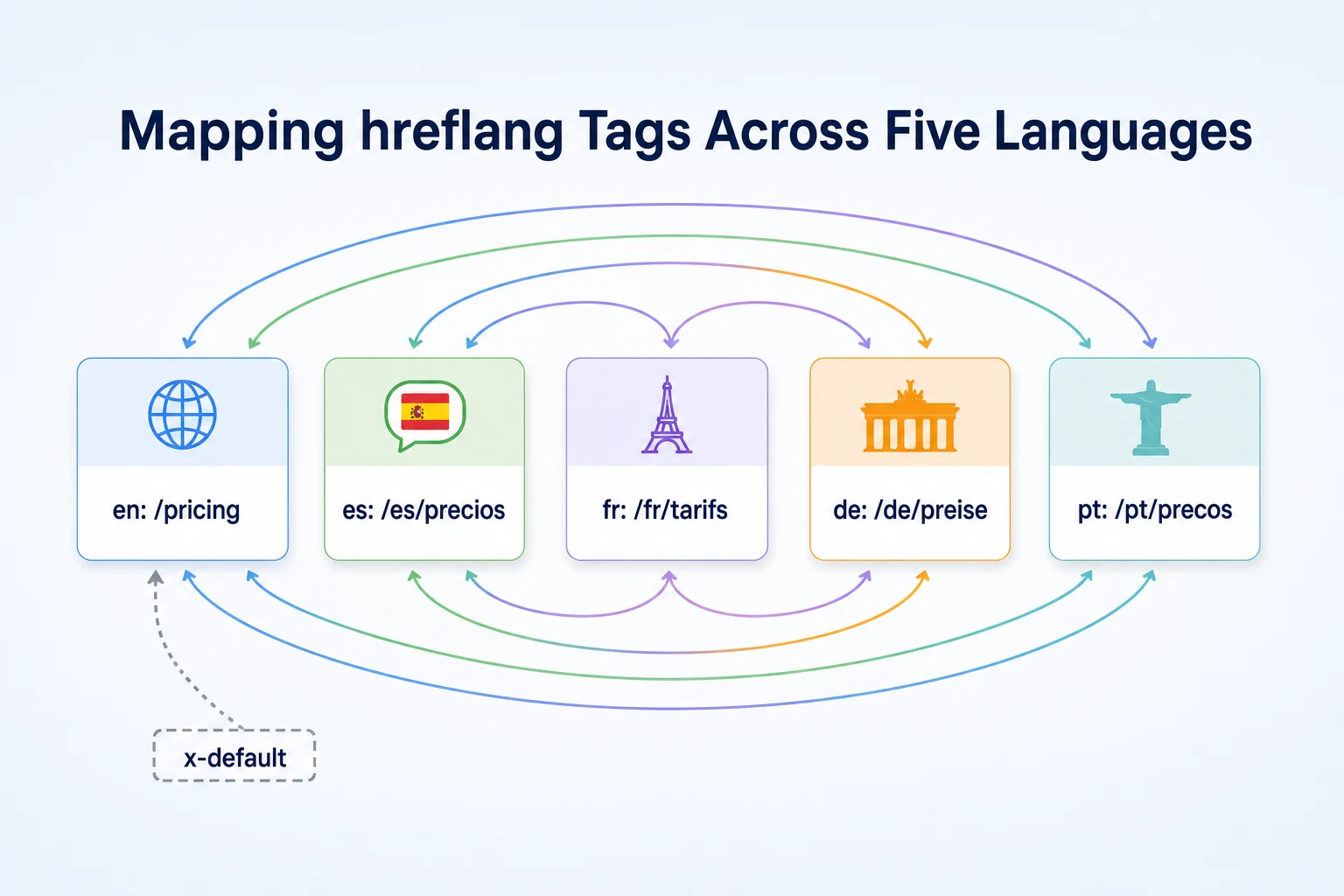
These URLs are illustrative.
Each of these five pages needs a set of five hreflang tags, one pointing to each version including itself, plus an x-default tag pointing to the English page. That's six tags per page, thirty tags total across the set, before you add a sixth language. Our free Sitemap Checker can confirm whether these URLs are actually listed and reachable once you've built the map, which is worth doing before assuming the tags themselves are correct.
What to do when a translation isn't ready yet
It's common for one language to lag behind during a launch, say the German pricing page isn't translated yet while the other four are live. The honest fix is simply not including a German hreflang entry until that page exists. Pointing hreflang at a page that doesn't exist yet, or at an English page pretending to be the German version, creates a broken signal that's harder to untangle later than it would have been to just wait a week.
Translation Is Not Localization: What Each Market Actually Needs
Translating a sentence word for word gets the vocabulary right and still misses most of what a reader in that market actually needs to see.
A pricing page that lists amounts in dollars, mentions a payment method common in the United States, and references a competitor nobody in Germany has heard of, is technically in German without actually being for a German reader.
What localization adds beyond translation
Localization means adjusting currency and formatting, not just the words around them. A price shown as $29 reads oddly to a French visitor if the page never switches to euros, and a date written 03/04/2026 means a different day depending on whether the reader expects month first or day first.
It also means adjusting the examples and references a page makes. A page that mentions local competitors, local integrations, or a support team's working hours should reflect what's actually true for that market, not a direct copy of the English version with different words in the same slots. Support hours matter here too: a page promising live chat during business hours should say which time zone those hours fall in, or it reads as a promise you can't keep.
Where machine translation alone falls short
Machine translation has gotten fast and often reads cleanly at the sentence level, which is exactly why it's easy to publish without a second look. The trouble shows up in places a sentence-by-sentence tool doesn't catch: idioms that don't carry across, product names translated when they shouldn't be, or a feature description that technically reads fine but doesn't match how people in that market actually talk about the problem.
A page that reads as obviously machine-translated, even a competent one, signals low effort to a visitor deciding whether to trust a company with a monthly payment. The fix isn't necessarily hiring a full translation team for every language on day one. It's having someone who speaks the language review the output before it goes live, especially on pricing and feature pages, even if the first draft comes from a translation tool.
Keyword Research for Each Language, Not a Translation of English Terms
It's tempting to take the keyword list that works in English, run it through a translator, and assume the translated terms are what people in that market actually search. They often aren't.
Why a literal translation misses real search terms
Search terms are shaped by how people actually describe a problem, not by the most accurate dictionary translation of an English phrase. A term like
A term like project management software might translate literally into French as something close to logiciel de gestion de projet, but that's not necessarily the phrase a French buyer types into Google. They might search for outil de gestion de projet instead, or describe the problem they're solving rather than the category of product, the same way an English speaker might search for team task tracker instead of project management software.
A translated keyword list catches the vocabulary. It doesn't catch the phrasing a market actually uses, and that gap is often the difference between a page that ranks and one that sits untouched. Running a keyword tool filtered to the target country and language, rather than guessing from a translated list, is the more reliable starting point. Our guide to using Google Keyword Planner for free keyword research covers how to filter results by location and language, which works the same way whether you're researching English or French terms.
Checking intent differs by market, not just vocabulary
Even when the vocabulary lines up, the intent behind a search can differ from one market to another. A term that's clearly commercial in the United States, where a buyer is ready to compare pricing, might be more informational in a market where your product category is newer and people are still learning what the software does before they're ready to buy.
That difference changes what the page ranking for that term should actually say. A page built to close a sale reads as pushy to someone who's still asking what the category even means. It's worth checking the kind of results Google already shows for a term in that market before assuming your English page's approach will translate directly.
Avoiding Duplicate Content and Thin Pages Across Languages
The overlap between an English page and its Spanish version isn't a duplicate content problem. Hreflang tells search engines these are equivalent versions for different audiences, and Google's documentation treats that as expected, not as something to flag.
When two pages in the same language compete with each other
The real risk shows up when two pages in the same language end up competing with each other. A Spanish page aimed at Spain and a separate Spanish page aimed at Mexico, both targeting the same keyword with largely the same content, can cannibalize each other in search results the same way two English pages on the same topic would. The fix isn't necessarily avoiding regional variants altogether. It's making sure each one has a genuine reason to exist, different pricing, different examples, different local references, rather than the same page published twice with a different country code attached. Our guide to finding and fixing keyword cannibalization in Search Console covers how to spot two pages competing for the same query, which applies just as well across two versions of the same language.
Keeping every language version worth indexing
A thin, auto-translated page with no human review is a weaker candidate for indexing than a short page that's accurate and localized, even if the second one covers less ground. If a help center article genuinely isn't worth translating for a small market yet, leaving it in English with a clear note is more honest than publishing a rushed machine translation just to have five versions of everything. A page that exists only to complete a set, rather than to serve a reader, usually isn't worth the index slot it takes up.
Language Switchers and Detection: Let Users Choose, Don't Force a Redirect
Detecting a visitor's browser language or IP address and redirecting them automatically to a matching language version seems helpful. In practice it causes two separate problems, one for visitors and one for crawlers.
Why automatic redirects can hide content from crawlers
A crawler visiting your site from a data center in one country can be redirected the same way a real visitor would be, which means it may never actually reach the other language versions at all if every request gets bounced to whichever version the redirect logic assumes is correct. That can leave some language versions poorly crawled even though the pages themselves are built correctly and linked in your sitemap.
A language switcher that works for both people and bots
A visible language switcher, a simple menu or flag selector in the header, lets a person choose their version directly, and lets a crawler follow a normal link to reach every version too. It's fine to suggest a language based on browser settings, as a banner someone can dismiss, but every version should stay reachable by URL regardless of what the detection logic guesses. That keeps the choice with the visitor instead of a redirect rule deciding for them.
Sitemaps, Canonical Tags and robots.txt for a Multilingual Site
With the switcher and translations in place, three smaller technical pieces are worth checking before launch, since each one is easy to get wrong quietly.
One sitemap or five
Either a single sitemap listing all language versions together, or one sitemap per language, works, as long as every URL and its hreflang entries are included somewhere and nothing is left out. A single combined sitemap is usually simpler to maintain for five languages, since it avoids the risk of one language's sitemap getting forgotten during an update. Our free Sitemap Checker can confirm every language's URLs are actually present and reachable in whichever setup you choose.
Self-referencing canonical tags
Each language version needs a canonical tag pointing to itself, not back to the English page. A German page with a canonical tag pointing to the English version tells search engines the German page isn't the real, intended version of its own content, which can keep it out of search results even if hreflang is set up correctly everywhere else. It's worth checking this on each version individually rather than assuming a template applied it consistently.
While checking canonicals, it's worth confirming robots.txt isn't quietly blocking a language directory either. A rule written to block a staging folder or an old URL pattern can accidentally catch a path like /de/ or /pt/ if it wasn't written carefully, which would stop that entire language from being crawled regardless of how well everything else is set up.
Common Mistakes When Publishing a SaaS Site in Five Languages
Most of what goes wrong with a multilingual launch traces back to a handful of avoidable habits rather than anything genuinely complicated.
Publishing machine-translated pricing or feature pages without a native speaker reviewing them first.
Setting hreflang tags that point one direction only, missing the return tags each version needs back to every other version.
Forcing an automatic redirect based on browser language or IP address, which can hide language versions from crawlers and annoy visitors who wanted a different version.
Using a different URL structure for different languages, some as subdirectories, others as query parameters, which makes the whole site harder to maintain and crawl consistently.
Leaving metadata, alt text and page titles in English while translating only the visible body text, which leaves search engines a mixed signal about what the page is actually for.
Pointing a translated page's canonical tag back to the English original instead of to itself.
Launching a language version with no real content plan behind it, just to say the product is available in five languages, rather than because that market has been researched at all.
None of these require a specialist team to avoid. They mostly come down to checking the setup once, carefully, before publishing five versions of everything at once.
A 30-Day Plan to Launch Five Language Versions Correctly
Spreading this work across four weeks keeps it manageable, and it puts the structural decisions before the translation work, which is the order that actually saves time.
Week | Focus | Tasks |
|---|---|---|
Week 1 | Decide the structure | Choose subdirectories, subdomains or ccTLDs, map out URLs for all five languages, and draft the full hreflang map before translating anything |
Week 2 | Translate and localize core pages | Translate pricing, product and homepage content, have a native speaker review each one, and adjust currency, dates and local references |
Week 3 | Build the technical pieces | Add hreflang tags or sitemap entries, set self-referencing canonicals, add a visible language switcher, and check robots.txt isn't blocking any directory |
Week 4 | Test and submit | Check every hreflang pair resolves correctly, run a free website audit on the main domain, and submit the sitemap in Search Console |
A single pass through this plan won't catch everything, since some issues only show up once Google has actually crawled and indexed the new versions. Checking Search Console again a few weeks after launch, specifically the indexing status for each language's URLs, is worth doing before assuming the setup worked.
Where RepGet fits
RepGet doesn't translate your pages, write your hreflang tags, or decide which URL structure fits your SaaS site. Those are decisions that depend on your product, your team and the markets you're actually entering, and they need a person's judgment rather than an automated guess.
What RepGet does help with is the parts of this work that come after structure and translation are decided. Its free Meta Tag Checker reads every tag Google and social sites read on a given page, including the title and description on a translated version, which is a quick way to confirm a page's metadata actually matches its content rather than sitting untranslated in English. Its free Sitemap Checker, mentioned earlier in this article, confirms every language's URLs are present and reachable in your sitemap, which is worth running on each version separately rather than assuming one check covers all five.
Beyond the free tools, RepGet brings website auditing, keyword research, content planning, article writing, publishing to your website, and search performance reporting from Google Search Console into one workflow. The keyword research side matters here specifically, since the earlier section on researching each language separately, rather than translating an English list, is exactly the kind of work that benefits from a repeatable process per market. Articles RepGet writes can stay as drafts for your team to review before anything goes live, which matters more in a multilingual launch than almost anywhere else, since a pricing or feature claim published incorrectly in a language nobody on your team reads fluently can sit uncorrected for a long time.
RepGet's free website audit crawls your site and gives it a 0 to 100 SEO score, with the technical and content issues worth fixing listed out. Running it on your main domain before translating a single page is a reasonable first step, since several of the issues a multilingual launch can expose, a missing canonical, a blocked directory, a thin page, are issues worth catching on the English version first. No account or credit card required. RepGet does not replace Google Search Console, a native speaker's review of your translations, or your own judgment about which markets are worth entering, and it doesn't guarantee rankings, traffic or mentions in AI answers in any language.
The bottom line
Multilingual SEO for a SaaS company isn't really about the words on the page. It's about the structure underneath them: which URL pattern you chose, whether hreflang correctly tells search engines which version serves which audience, and whether each language version gives a reader something worth reading rather than a rushed copy of the English page.
Get that structure right before translating a single sentence, and the translation work that follows actually counts for something. Skip it, and even a well-translated page can sit poorly indexed for months, the way the founder in this article's opening found out the hard way.
None of this needs to happen perfectly on the first try. It needs to happen in the right order, checked once carefully before launch, rather than fixed piecemeal across five languages after the fact.
Find out what your website needs first
Run a free website audit with RepGet to see what your main domain needs fixed before you structure and launch your translated versions. No account or credit card required.
FAQ
Do I need hreflang tags if I only have a few languages on my site?
Yes, hreflang matters even with just two or three languages. It's the signal that tells search engines which version serves which audience, and without it, Google has to guess based on a visitor's settings and location.
Should I use subdirectories or subdomains for a multilingual SaaS site?
Subdirectories, like example.com/fr/, are the simpler choice for most small SaaS teams, since every language shares the main domain's authority. Subdomains build authority more separately and suit teams running each language as its own product.
Will Google penalize me for having the same content in different languages?
No. Google's documentation treats equivalent pages in different languages, correctly connected with hreflang, as expected, not duplicate content. The real risk is two pages in the same language competing for the same search term.
Can I use Google Translate or a plugin for my SaaS website's translations?
It's a reasonable starting draft, but publish it only after a native speaker reviews it, especially on pricing and feature pages where a small error can misstate what you're actually offering.
What is x-default in hreflang and do I actually need it?
x-default marks which page to show a visitor whose language doesn't match any version you've built, usually your English page. It's worth including once you have more than one language, so an unmatched visitor still lands somewhere sensible.
How do I do keyword research for a language I don't speak?
Use a keyword tool filtered to that country and language rather than translating your English list, since a literal translation often misses how people in that market actually phrase the search.
Should I redirect visitors automatically based on their browser language?
It's better to suggest a language with a dismissible banner and let a visitor choose through a visible switcher. Forced redirects based on browser or IP detection can hide other language versions from crawlers entirely.
How many languages should a small SaaS company launch with first?
There's no fixed number, but launching with one or two markets you've actually researched tends to work better than five thin versions at once, since each one needs real content and ongoing upkeep.
Comments
1 shownShare your thoughts about this article.
New to RepGet? Create a free account to join the conversation.
Multilingual SEO is not simply about translating content. It's about understanding how people search, communicate and make decisions in different markets. At RepGet, we believe international growth should be part of a company's strategy from day one, not an afterthought. The opportunities beyond your primary market can be enormous. Dumitru Culiuc, Founder of RepGet